# Create a campaign

{% hint style="info" %}
If your create campaign is greyed out and your are unable to create campaigns, please [Request for campaign creation rights from agency PICs](/general-users-ui-portal/request-for-campaign-creation-rights-from-agency-pics.md).
{% endhint %}

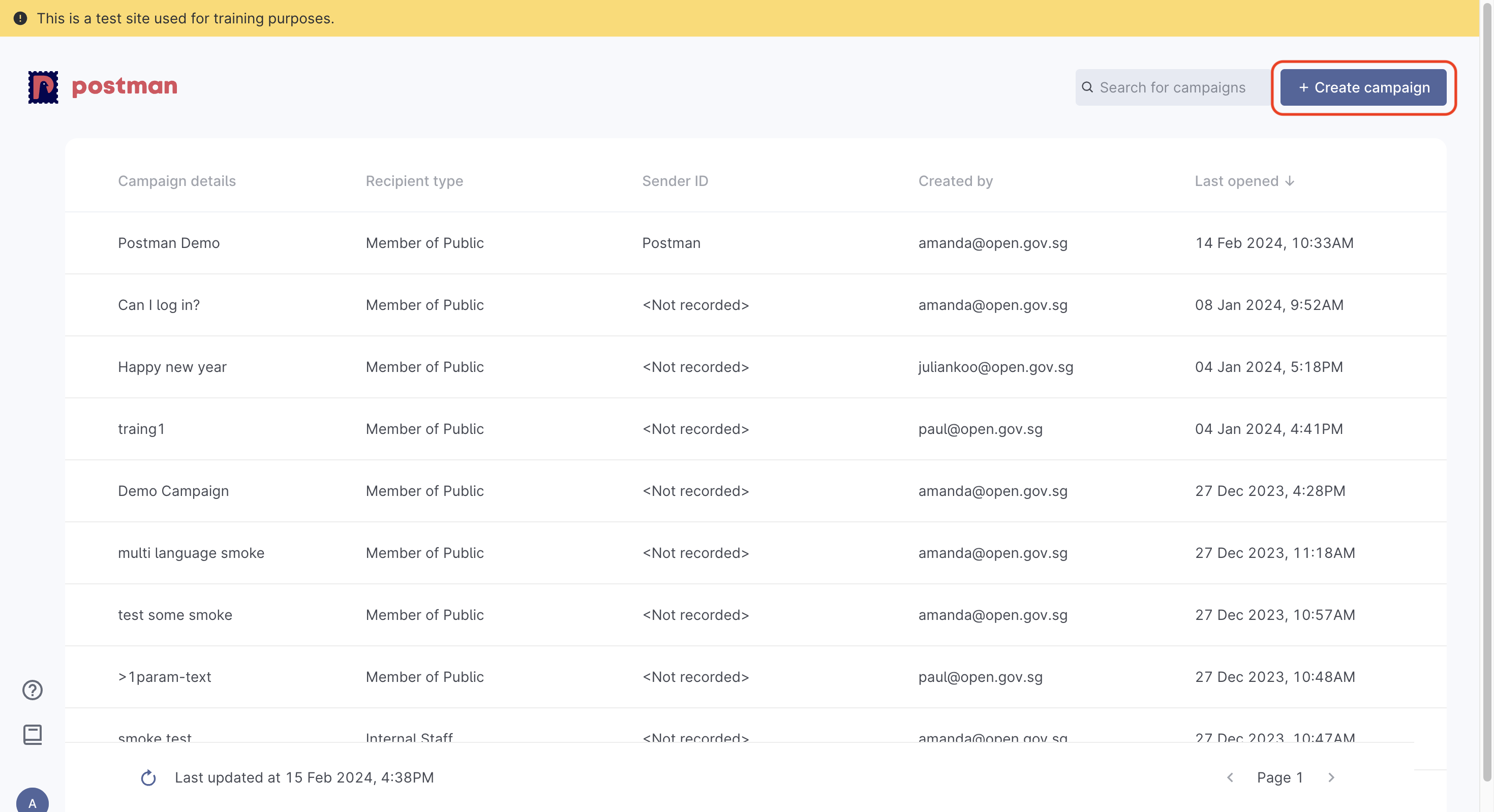
To start creating campaigns, select  `+ Create campaigns` on your home page

<figure><img src="/files/CwAcBNdGoW9wNKwHsMnj" alt=""><figcaption></figcaption></figure>

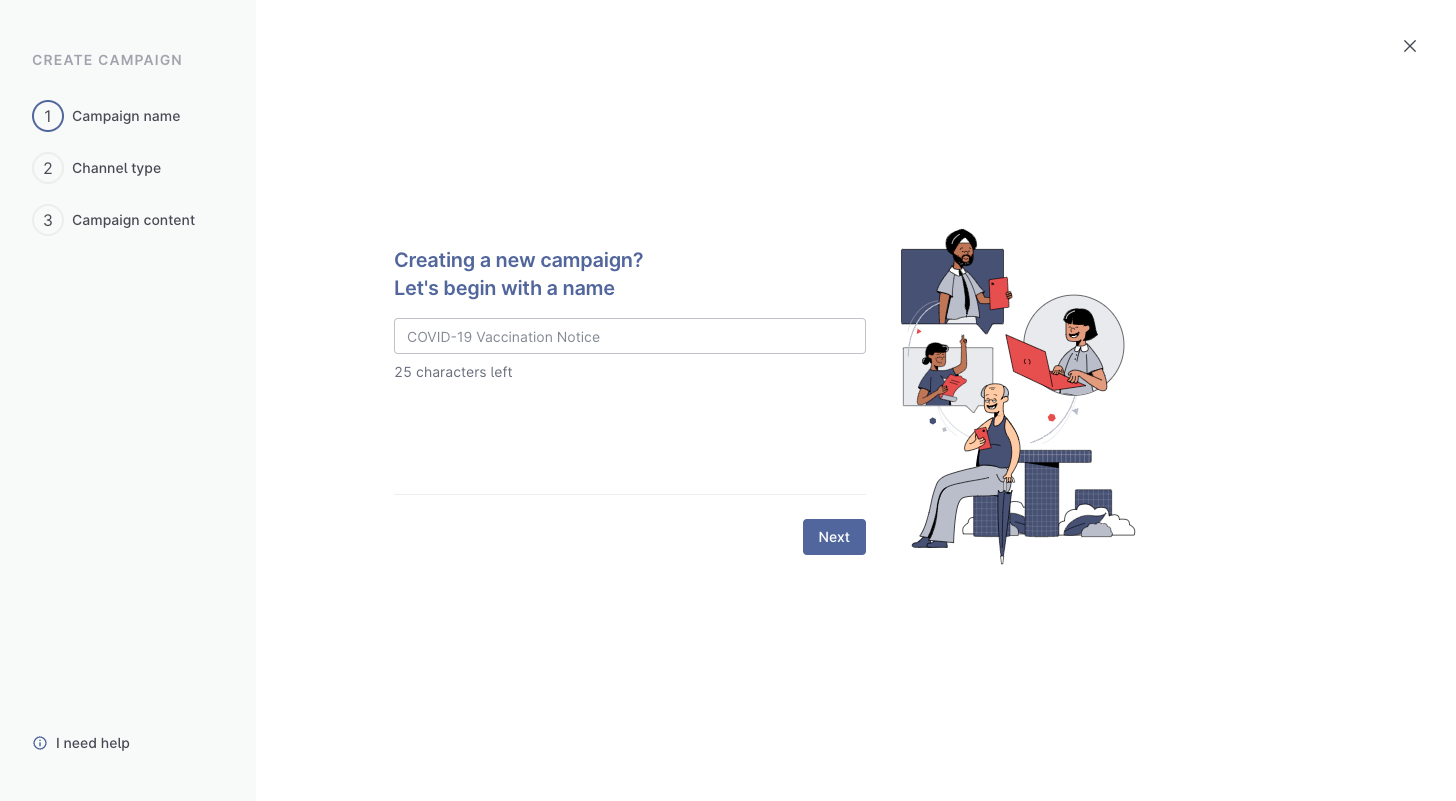
### Step 1. Give your campaign a name

Upon clicking on `+ Create Campaign` you will be taken to the campaign creation page and asked to name your campaign.

<figure><img src="/files/NXWh2yqNZw8Nc2H8rjrD" alt=""><figcaption></figcaption></figure>

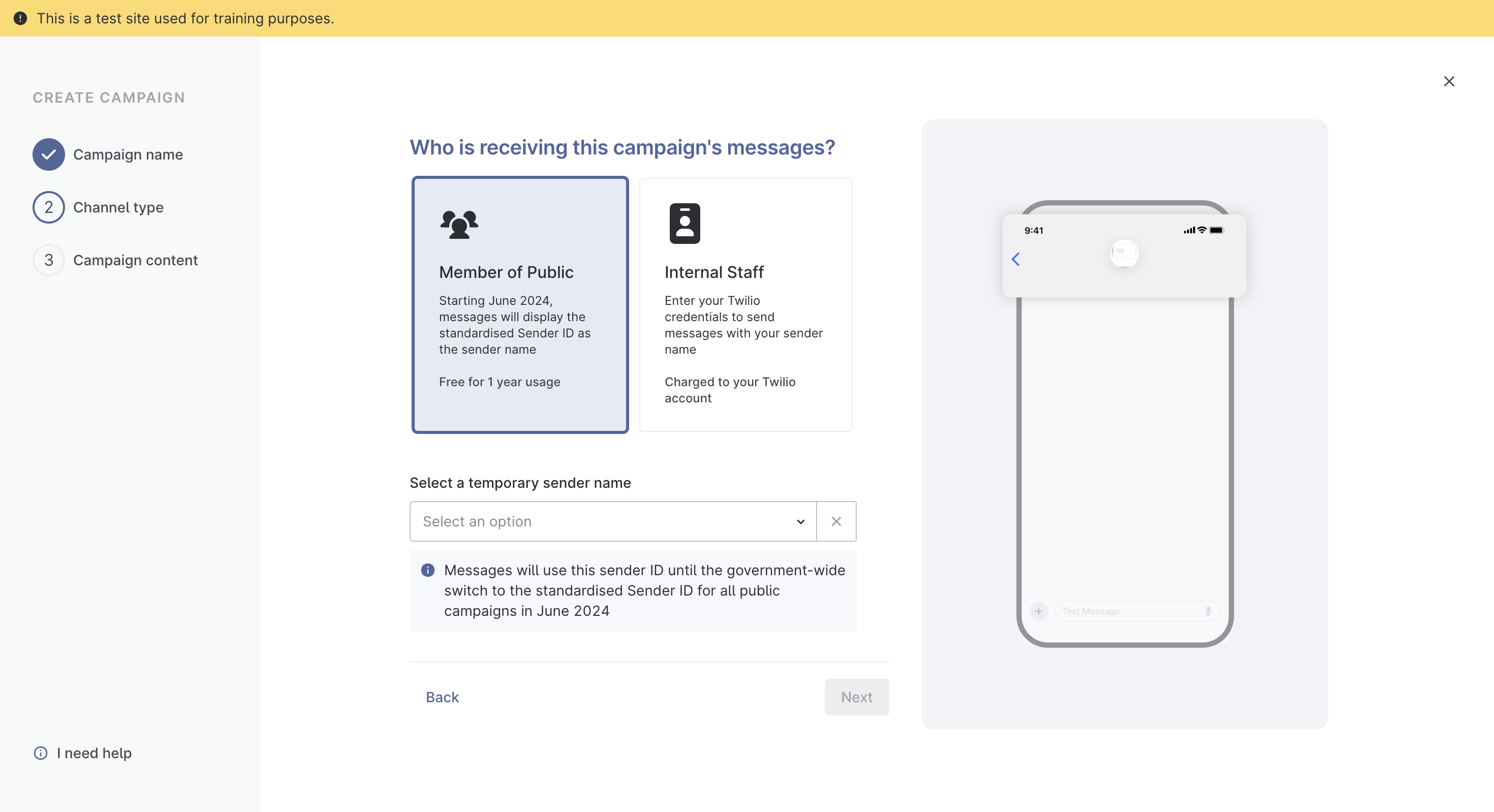
### Step 2. Setup who will be receiving these messages

Postman has 2 types of campaign channels available - **Member of Public** and **Internal Staff**

1. Member of Public: to send out messages to MOPs
2. Internal Staff - to send out with your own sender ID
   * You will need to provide your own Twilio credentials if you choose the `Internal Staff` option

{% hint style="danger" %}
**ALL Singapore government agencies must use Postman to send out SMSes using the “gov.sg” sender ID** while disseminating official communications to the public. Agency CIOs will be notified of any non-compliance.
{% endhint %}

<figure><img src="/files/uDOwYW7HjthF1SfljeOx" alt=""><figcaption></figcaption></figure>

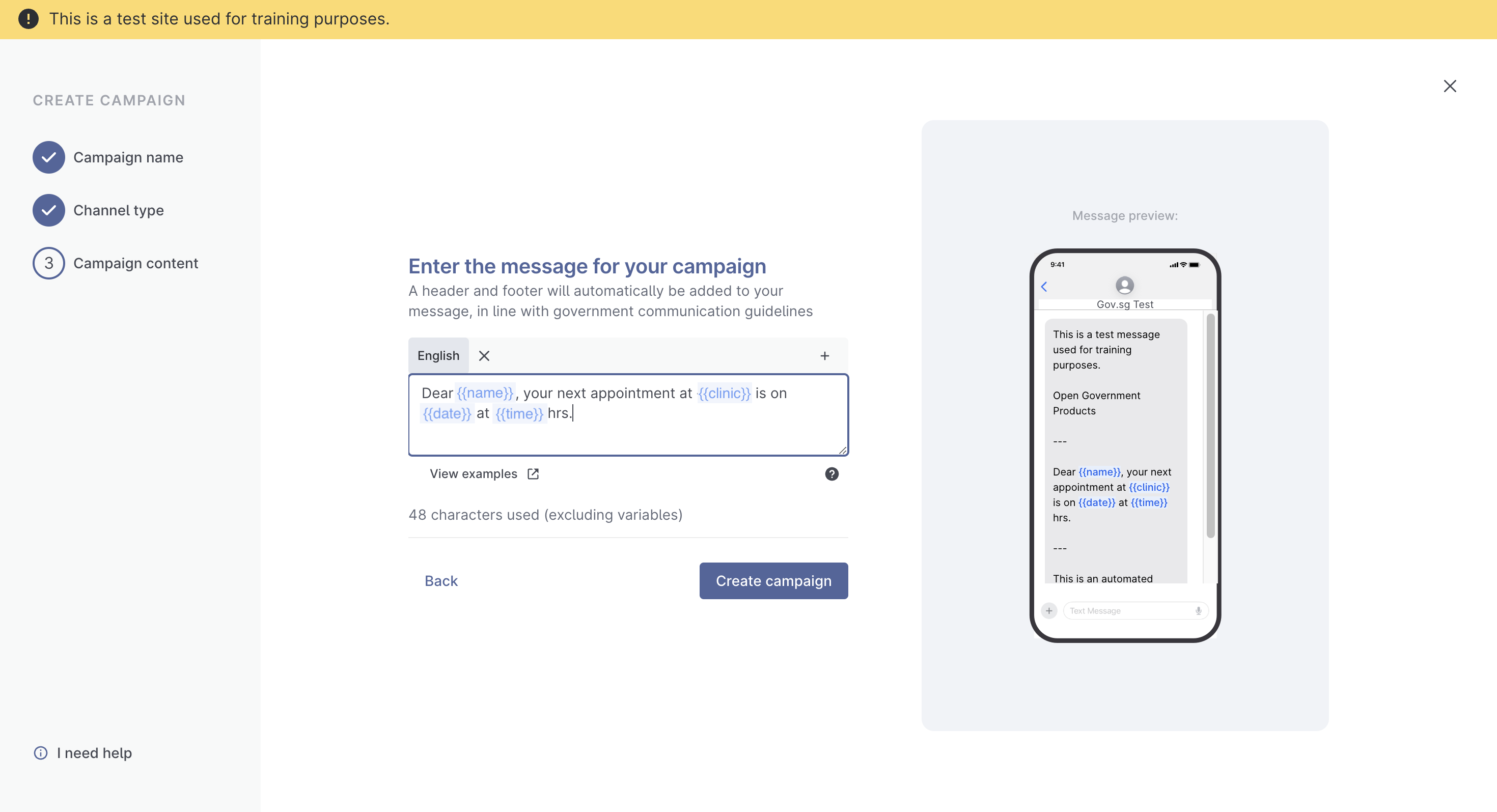
### Step 3. Enter your message content

{% hint style="info" %}
You will not be able to edit your campaign content after creating your campaign.
{% endhint %}

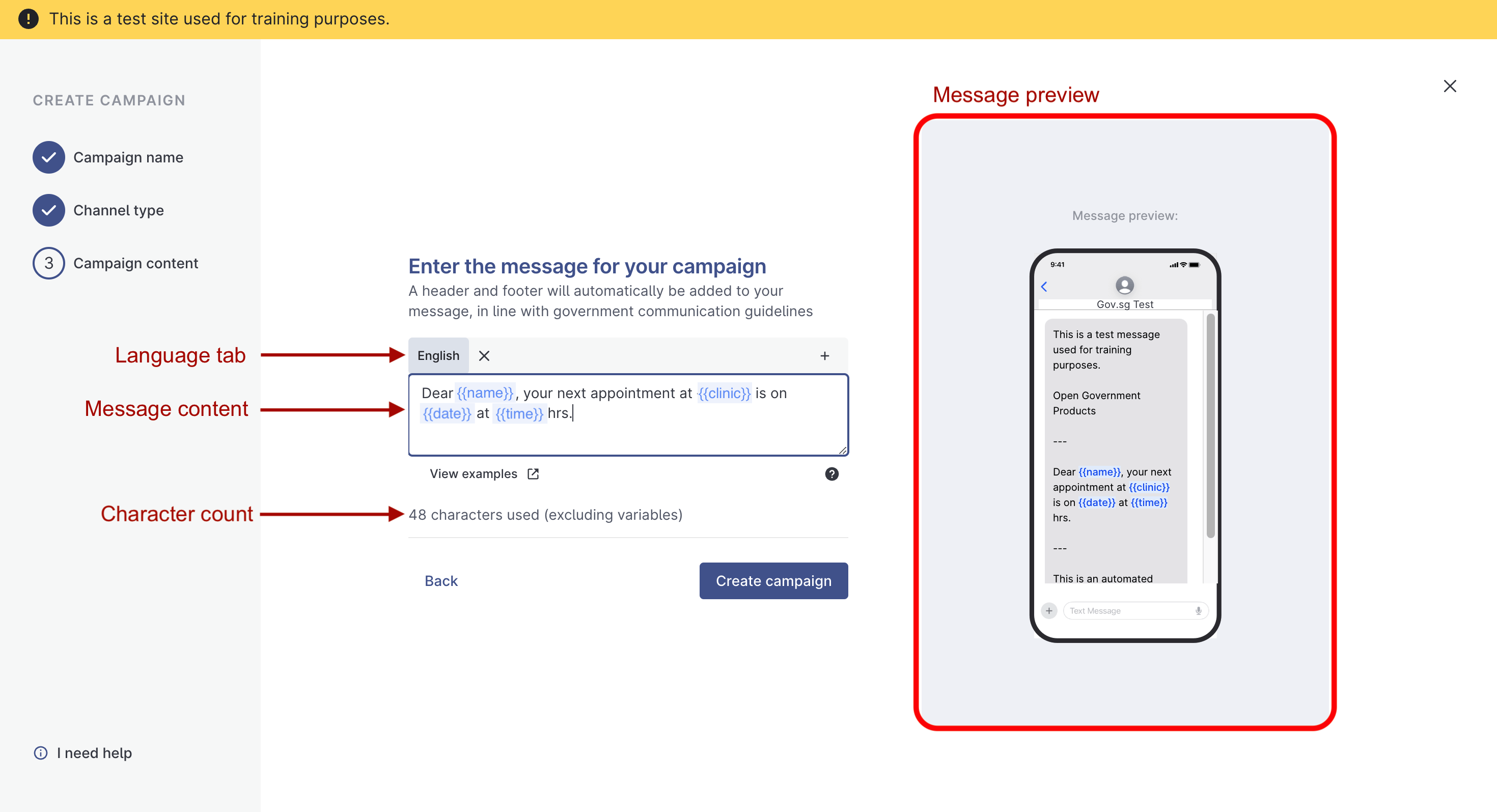
The campaign content is the content in the SMS that you will be sending out. You will be prompted to type out your campaign's message content. **Please use the** [**message segment calculator**](https://message-segment-calculator.postman.gov.sg/) **to check your message before sending.**

<figure><img src="/files/CQZx5BgEowfAMrnMLKyu" alt=""><figcaption></figcaption></figure>

There are different parts to the campaign content screen:

<details>

<summary>Message preview</summary>

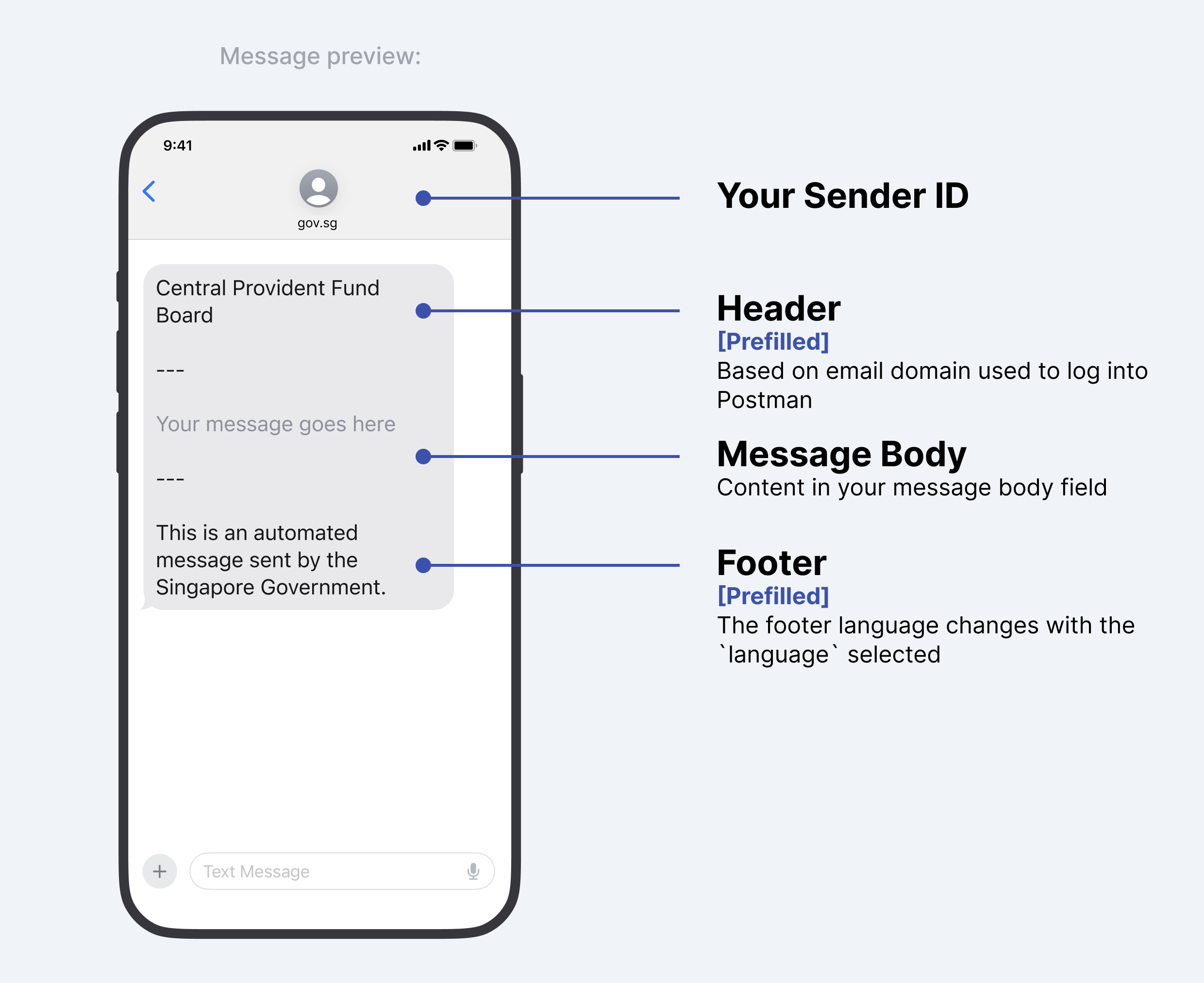
This is how your message will look like:

<figure><img src="https://file.go.gov.sg/message-preview.png" alt=""><figcaption><p>Message Preview</p></figcaption></figure>

#### Changing your message header

Header name changes are permitted in specific cases, and approved on a case-by-case basis. Some examples where header name changes are permitted.

\
**Platform products**&#x20;

Some products are used by multiple agencies, and recognised by the product name rather than agency name e.g. "Singpass", and not "Government Technology Agency". If you need to change the name in the header, please [contact us ](https://form.gov.sg/657025a2d2bd350012c82eb0)with your use case.

**Cases where header name changes are not permitted**

If your agency has a project that sends out surveys or information on welfare packages etc, these do not qualify for header name changes.

</details>

<details>

<summary>Language tab</summary>

If you are sending out messages in other languages, you can select the correct `language` tab before you key in your message content.

#### Message Content

* Content in the message body field of each `language` is **not automatically translated.**
* As a user, you will be required to input the correct language text into the message body field.
* eg. If you select Malay as your `language`, you should input your message **in Malay** into the message body field; messages will not be translated for you.

#### SMS Header

* SMS header will always remain in English.

#### SMS Footer

* The SMS Footer of each message changes with the `language` selected.
* eg. If you select Malay as your `language,` the SMS footer will change to Malay.

</details>

<details>

<summary>Message content</summary>

You can create multiple `{{variables}}` when typing out your message content. You can then input the values of each `{{variable}}`when you send the message from the admin portal.

<figure><img src="/files/t13HXzy6DYwOsZuvHGeU" alt=""><figcaption></figcaption></figure>

Variables have to fulfil the following in order to be successfully created

* Can only contain lowercase letters, numbers and `_`
* Must start with a lowercase letter
* If multiple languages are selected, the same variables must be present in all `language` tabs.
* Characters are within the GSM-7 character set. See section below on unsupported characters for more info.

#### Postman message segment calculator

{% hint style="danger" %}
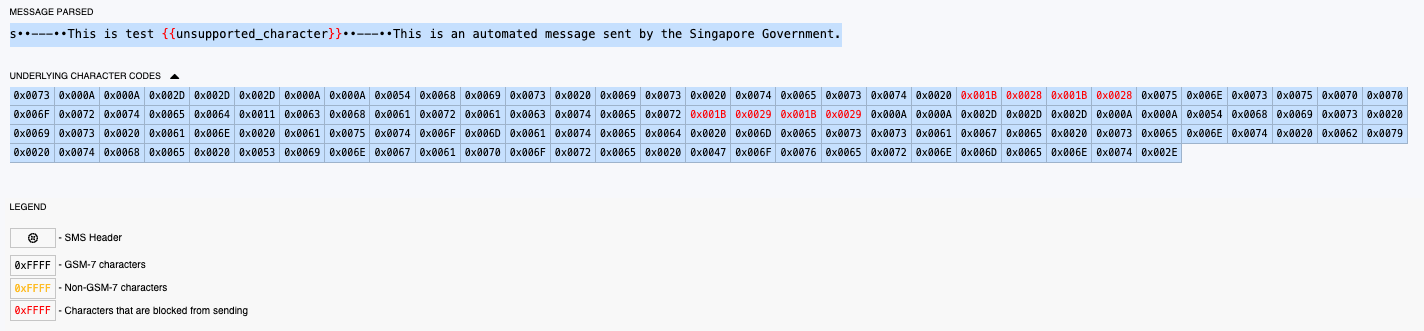
Messages containing avoidable unsupported characters **will be blocked** from sending. **Please use the** [**message segment calculator**](https://message-segment-calculator.postman.gov.sg/) **to check your message before sending.**
{% endhint %}

You should make use of [Postman's message segment calculator](https://message-segment-calculator.postman.gov.sg/) to

* identify unsupported characters within your message content
* identify non GSM characters within your message content
* check the number of message segments

#### Possible replacements to unsupported characters

{% hint style="warning" %}
Note that this unsupported character list below is not exhaustive. Please use the [message segment calculator ](https://message-segment-calculator.postman.gov.sg/)to check your message for unsupported characters.
{% endhint %}

<table><thead><tr><th width="199">Excluded/unsupported Characters</th><th width="182">Description</th><th>Possible Replacements that Postman supports</th><th data-hidden>Unsupported Unicode Character(s)</th></tr></thead><tbody><tr><td><code>|</code> </td><td>vertical line and variants</td><td>I (uppercase i)</td><td>U+FF5C<br>U+23B8<br>U+23B9<br>U+23D0<br>U+239C<br>U+239F<br>U+2223<br>U+20D3<br>U+20D2</td></tr><tr><td><code>€</code></td><td>euro</td><td><code>EUR</code></td><td>U+20AC</td></tr><tr><td><code>{</code></td><td>left curly bracket and variants</td><td><code>(</code></td><td>U+2774<br>U+FE5B<br>U+FF5B</td></tr><tr><td><code>}</code></td><td>right curly bracket and variants</td><td><code>)</code></td><td>U+2775<br>U+FE5C<br>U+FF5D</td></tr><tr><td><code>[</code></td><td>left square bracket</td><td><code>(</code></td><td>U+FF3B</td></tr><tr><td><code>]</code></td><td>right square bracket</td><td><code>)</code></td><td>U+FF3D</td></tr><tr><td><code>~</code></td><td>tilde and variants</td><td><code>-</code></td><td>U+02DC<br>U+02F7<br>U+0303<br>U+0330<br>U+0334<br>U+223C<br>U+FF5E</td></tr><tr><td><code>\</code></td><td>backslash and variants</td><td><code>'</code></td><td>U+29F9<br>U+29F5<br>U+20E5<br>U+FE68<br>U+FF3C</td></tr><tr><td><code>`</code>  </td><td>backtick (note that this is not an apostrophe <code>'</code> . You can find it to the left of the "1" on your keyboard) and variants</td><td><code>"</code></td><td>U+0060<br>U+02CB<br>U+0314<br>U+FE11<br>U+02BD<br>U+201B<br>U+0314<br>U+FE11</td></tr><tr><td><code>‘</code></td><td>acute accent and variants</td><td><code>'</code></td><td>U+2018<br>U+2019<br>U+02BB<br>U+02C8<br>U+02BC<br>U+02B9<br>U+00B4<br>U+02CA<br>U+0313<br>U+FE10</td></tr><tr><td><code>“</code></td><td>double prime quotation mark and variants</td><td><code>"</code></td><td>U+301E<br>U+02BA<br>U+201F</td></tr><tr><td><code>”</code></td><td>reversed double prime quotation mark and variants</td><td><code>"</code></td><td>U+301D<br>U+02EE</td></tr><tr><td><code>¬</code></td><td>logical negation</td><td><code>-</code></td><td>U+00AC</td></tr><tr><td><code>«</code></td><td>left-pointing double angle quotation mark</td><td><code>"</code></td><td>U+00AB</td></tr><tr><td><code>»</code></td><td>right-pointing double angle quotation mark</td><td><code>"</code></td><td>U+00BB</td></tr><tr><td>❝ or ❛</td><td>heavy double/single turned comma quotation mark ornament</td><td><code>"</code></td><td>U+275D<br>U+275B</td></tr><tr><td>❞ or ❜</td><td>heavy double/single comma quotation mark ornament</td><td><code>"</code></td><td>U+275E<br>U+275C</td></tr><tr><td><code>÷</code></td><td>division sign</td><td><code>/</code></td><td>U+00F7</td></tr><tr><td>¼, ½</td><td>vulgar fractions and variants</td><td>1/4, 1/2 etc.</td><td>U+00BC<br>U+00BD<br>U+00BE</td></tr><tr><td>•</td><td>bullet point</td><td><code>-</code></td><td>U+2022</td></tr><tr><td>⊛, ✢, ✣, ✤, ✥, ✺, ❃, ⧆ etc</td><td>asterisk and variants</td><td><code>*</code></td><td>U+204E<br>U+2217<br>U+229B<br>U+2722<br>U+2723<br>U+2724<br>U+2725<br>U+2731<br>U+2732<br>U+2733<br>U+273A<br>U+273B<br>U+273C<br>U+273D<br>U+2743<br>U+2749<br>U+274A<br>U+274B<br>U+29C6<br>U+FE61<br>U+FF0A</td></tr></tbody></table>

</details>

<details>

<summary>Character count</summary>

Postman allows a maximum of 1000 characters for a message body, excluding the header (agency’s name) and footer.

Agencies are strongly encouraged to limit their message body to **320 characters** (excluding the header and footer) to avoid potential delays with message deliverability. As a precautionary measure, a warning message will appear for messages beyond 320 characters.

If the message body exceeds 1000 characters, the system will disable the ability to send the message. Message parameters, such as {{variable}} are not counted as characters. However, when these parameters are populated with actual values, the character count of the populated value is added to the overall character count.

For example:&#x20;

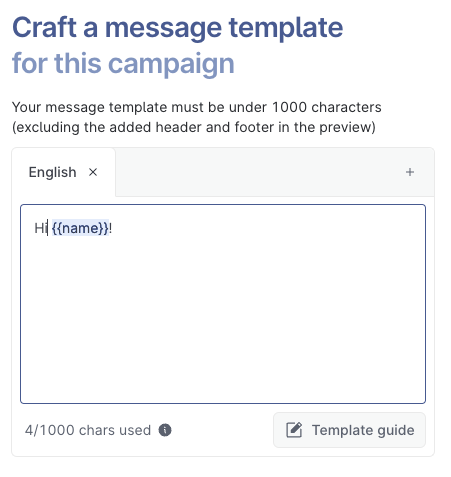
* Message variable placeholder <mark style="color:red;">{{name}}</mark> is not included in the character count when crafting the message template.

<figure><img src="/files/teeAZJGFaVxnJIesEYsC" alt=""><figcaption></figcaption></figure>

* Filling the <mark style="color:red;">{{name}}</mark> variable with “<mark style="color:orange;">**Jonathan**</mark>” adds 8 characters to the count

Visit [https://message-segment-calculator.postman.gov.sg](https://message-segment-calculator.postman.gov.sg/) to use the Postman Message Segment Calculator tool to count your total characters.

### Use the Message Segment Tool before sending messages

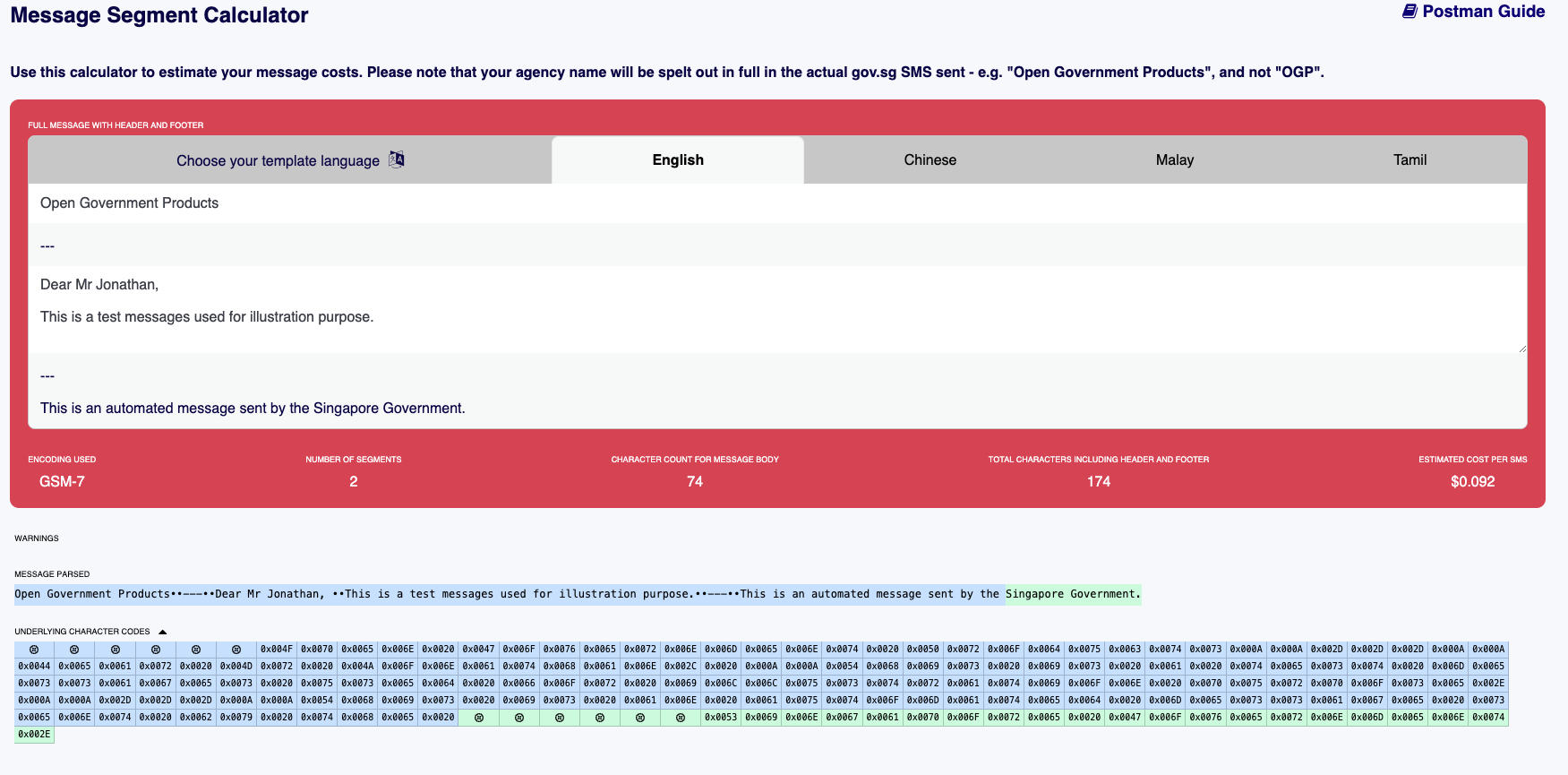
<figure><img src="/files/NqlYw12Rb3D7KOMtsQTi" alt=""><figcaption></figcaption></figure>

#### Characters - English Language

The characters in a single text message include the following for "English" language\*, with additional formatting details:&#x20;

* **Header**: Free text field in message segment tool to type your agency name
* **Line breaker**: use normal keyboard paragraphing to indicate line breaks. **Do not use `\n` as `\` will be blocked by Postman.**
* **Slash icon** ( <mark style="color:orange;">---</mark> ): 3 characters to separate sections&#x20;
* **Body**: Free text field for your message content
* **Line breaker**: use normal keyboard paragraphing to indicate line breaks. **Do not use `\n` as `\` will be blocked by Postman.**
* **Slash icon** ( <mark style="color:orange;">---</mark> ): 3 characters to separate sections&#x20;
* **Footer**: 62 characters\* for standardised "English" text used across all WOG messages

\*Do note that the character count is different for other languages such as Chinese and Tamil. &#x20;

#### Encoding used for English language

The encoding used for Postman SMS messages is **GSM-7** or **UCS (Unicode)**. Postman will not be able to send messages that contain [unsupported characters](https://postman-v2.guides.gov.sg/postman-v2-general-user-guide-mop/create-campaign/message-content#unsupported-characters), and a warning message will appear below the  calculator for using invalid characters.

<figure><img src="/files/iWplkmnNy5w6qrmYIOWA" alt=""><figcaption></figcaption></figure>

Enter your message template into the message segment tool to identify characters that are classified as GSM-7, non-GSM-7 and blocked characters in the "Underlying character codes" section.&#x20;

<figure><img src="/files/wD6HrBGdepWiTXhOJHig" alt=""><figcaption></figcaption></figure>

#### Encoding used for English language

The encoding used for other languages (Chinese and Tamil) is **Unicode**, where both the footer contains either Chinese or Tamil characters.&#x20;

#### Number of segment&#x20;

A message segment refers to a portion of a text message when the total length exceeds 160 **GSM-7** characters. If a single message is longer than 160 characters (including header and footer), it is divided into multiple segments. Each segment contains up to 160 GSM characters, including the header and footer. However, when a message uses more than one segment, the character limit per segment is **reduced to 153 characters**.&#x20;

If the text message contains a **Unicode** encoding character, the maximum character count for one segment is 70 characters. If the Unicode message is longer than 70 characters (including header and footer), the character limit per segment is reduced to **67 characters**.

You will be able to view how the message is broken up to multiple segments (as shown below) in “Message Parsed” and “Underlying Character Codes”, based on the character count, and this ensures that the character limits for each segment are properly managed.

<figure><img src="/files/x3jA1jYaXaOTWJPw0yzn" alt=""><figcaption><p>Blue blocks are considered as 1 segment and green blocks are considered as another segment</p></figcaption></figure>

#### Character count for message body

The character count applies only to the content typed in the free text box for the message template. The maximum number of characters Postman allows is 1000, excluding header and footer.

#### Total characters including header and footer

The total character count includes the entire messages including the agency name as the header, the body of the message and the standardised government text as the footer.

</details>


---

# Agent Instructions: Querying This Documentation

If you need additional information that is not directly available in this page, you can query the documentation dynamically by asking a question.

Perform an HTTP GET request on the current page URL with the `ask` query parameter:

```
GET https://postman-v2.guides.gov.sg/general-users-ui-portal/create-a-campaign.md?ask=<question>
```

The question should be specific, self-contained, and written in natural language.
The response will contain a direct answer to the question and relevant excerpts and sources from the documentation.

Use this mechanism when the answer is not explicitly present in the current page, you need clarification or additional context, or you want to retrieve related documentation sections.