# What is Postman SMS?

{% hint style="danger" %}
**ALL Singapore government agencies must use Postman to send out SMSes using the “gov.sg” sender ID** while disseminating official communications to the public. Agency CIOs will be notified of any non-compliance.
{% endhint %}

Postman SMS (also known as Postman v2) is a secure messaging platform developed by Open Government Products that enables government agencies to send mass, personalised communications to the public through SMS.

***

#### Getting started with Postman SMS

{% hint style="info" %}
Access the Postman Policy guide at <https://docs.developer.tech.gov.sg/docs/postman-sgdp-guide/>. Use your TechPass or agency email address to log in view the policy guide.&#x20;
{% endhint %}

There are two different ways in which you can start sending SMSes to citizen.

* **General Users (UI portal)** - the easiest method where non-technical users are able to send SMSes.
* **API** - for technical users that want to utilise Postman to programatically send SMSes.

<table data-card-size="large" data-view="cards"><thead><tr><th></th><th data-hidden data-card-cover data-type="image">Cover image</th><th data-hidden data-card-target data-type="content-ref"></th></tr></thead><tbody><tr><td><strong>Send SMSes via our UI portal</strong></td><td data-object-fit="cover"><a href="/files/wUCyBAJg0zYe46bQVbmr">/files/wUCyBAJg0zYe46bQVbmr</a></td><td><a href="/pages/yOYmvDsKAvv0XxtXQ7to">/pages/yOYmvDsKAvv0XxtXQ7to</a></td></tr><tr><td><strong>Send SMSes via our API</strong></td><td><a href="/files/JsZx7Rf469arYxLPhKvL">/files/JsZx7Rf469arYxLPhKvL</a></td><td><a href="/pages/Jyh23uX2gkclNAH9ksS3">/pages/Jyh23uX2gkclNAH9ksS3</a></td></tr></tbody></table>

***

#### Need other ways to reach citizens?

Check out these other products instead, also maintained by the Postman team.

<table data-view="cards"><thead><tr><th></th><th data-hidden data-card-target data-type="content-ref"></th><th data-hidden data-card-cover data-type="image">Cover image</th></tr></thead><tbody><tr><td><strong>Sending emails?</strong><br><br>Use legacy.postman.gov.sg</td><td><a href="https://postman-v1.guides.gov.sg/">https://postman-v1.guides.gov.sg/</a></td><td><a href="/files/qZd7vSM3OX5G96fpwCdZ">/files/qZd7vSM3OX5G96fpwCdZ</a></td></tr><tr><td><strong>Sending letters?</strong><br><br>Use letters.gov.sg</td><td><a href="https://guide.letters.gov.sg/">https://guide.letters.gov.sg/</a></td><td><a href="/files/LnAdmmvtqiqFLWLjK40s">/files/LnAdmmvtqiqFLWLjK40s</a></td></tr></tbody></table>

***

#### More about Postman SMS

By consolidating all government SMS communications under one recognisable sender ID, "gov.sg", we're making it easier for citizens to identify genuine government messages at a glance, trust important communications from agencies, and avoid falling victim to government impersonation scams.

Postman can handle up to `restricted sensitive-normal` data, and is compliant with the new-IM8 policy for Low-Risk systems.

| Non-Sensitive or Low Sensitivity | <ul><li>Transactions</li><li>Notifications</li><li>Information broadcast</li><li>Receipts</li><li>Reminders</li><li>Masked NRIC</li></ul> |
| -------------------------------- | ----------------------------------------------------------------------------------------------------------------------------------------- |
| Normal Sensitivity               | <ul><li>Personal details such as home address, mobile number, email ID, job roles</li><li>Full NRIC or FIN number</li></ul>               |


# Service Level Objectives (SLOs)

### 1. What are the Postman SLOs?

* It is important to distinguish between the Service Level Objectives (SLOs) for Postman and the overall systems SLOs. Postman, as an integrated component within the larger system, has its own specific SLOs. Postman-specific SLOs focus on the performance, reliability, and efficiency of the Postman product itself.  In other words, the Postman team is directly responsible for maintaining and monitoring these product-specific SLOs.&#x20;
* In contrast, the overall system SLOs encompass the end-to-end performance of the entire integrated system, including Postman and all downstream components such as Tier 1 SMS Aggregators and Telcos.&#x20;
* The Postman product contributes to the overall system performance. Therefore, our primary responsibilities and accountabilities lie with meeting and upholding the Postman-specific SLOs. The other individual players are held to their own SLOs and SLAs that are separate from Postman's SLOs with you.&#x20;
* We actively manage and optimise Postman to meet these objectives, thereby ensuring our component's optimal contribution to the broader system performance.

### 2. What is Postman v2’s system uptime?

* Postman aims to have an uptime of >99.5%. We have internal services to monitor Postman uptime 24/7. These services send alerts if the product is down to the engineer-on-call, so that we can respond as soon as possible.
* If you are unable to access Postman services and would like to check if it is due to an unplanned downtime, check our status page [here](https://www.sms.gov.sg/status).

### 3. Any maintenance downtime for Postman v2?

* No, we will inform all users if there is going to be a scheduled downtime.

### 4. Subscribe to status updates:

* If you are unable to access Postman services and would like to check if it is due to an unplanned downtime, check our status page [here](https://status.postman.gov.sg/). You can also subscribe yourself to email notifications.
* Typically, we inform users of downtime only if resolution is expected to take longer than a day, or if your campaign is directly affected.

### 5. How long can I expect a reply for my queries?

* Please ensure your requests are submitted via this [form](https://form.gov.sg/657025a2d2bd350012c82eb0), rather than through emailing the team, as we are unable to respond promptly to individual emails.
* Please note the following SLAs for response times. Do note that marking non-urgent requests as urgent will not result in a response immediately - the BTN team will filter requests based on the following table below.

| Priority Level                                           | Examples                                                                                                                                                                           | Approximate response time |
| -------------------------------------------------------- | ---------------------------------------------------------------------------------------------------------------------------------------------------------------------------------- | ------------------------- |
| <p>Urgent<br>(solely determined by the Postman Team)</p> | <p>Product incident causing widespread delays, and not due to agency's own lapses in campaign set-ups/processes.<br><br>Confidentiality or privacy breaches. User data losses.</p> | Within 3 hours.           |
| <p>High<br>(solely determined by the Postman Team)</p>   | Agency campaigns are affected due to errors related to Postman, and not due to agency's own lapses in incorrect setup.                                                             | Within 1 working day.     |
| Medium                                                   | General inquiries relating to campaigns, billing, product, etc.                                                                                                                    | Within 5 working days.    |
| Low                                                      | Feature requests, feedback/suggestions, answers that can already be found in guide.                                                                                                | Within 5 working days.    |

### 6. Where and when can I expect to be informed about updates to Postman?

* Whenever we make an update to the product, it will be listed on our [updates page](https://postman-v2.guides.gov.sg/postman-v2-api-docs/postman-guide-latest-updates).
* We will also communicate this on our BTN Microsoft Teams channel called "WOG Channel for BTN". If you are not in this channel, please let us know by submitting this [form](https://form.gov.sg/657025a2d2bd350012c82eb0). Note that only users with emails ending in ".gov.sg" can be added to the channel. Vendors cannot be added to the channel.
* Where a product update is significant and will affect your workflows, we will communicate this through email blasts to all users of the Postman v2 test and production environments.
* We seek your understanding that as the product is still developing and the situation remains dynamic, changes may be made along the way, and may affect your current system set-ups. As far as possible, we will try our best to communicate this to you with significant heads-up for you to make the necessary preparations.
* We apologise in advance for cases where we inform of changes in a short span of time.

### 7. What is the expected deliverability standards i can expect for my campaign? <a href="#id-8.-what-is-the-expected-deliverability-standards-i-can-expect-for-my-campaign" id="id-8.-what-is-the-expected-deliverability-standards-i-can-expect-for-my-campaign"></a>

If you're 1) sending to local numbers, 2) Using only GSM characters, 3) less than 6 message segments, you can expect:\
\
**Message delivery** **SLOs**

<table data-header-hidden><thead><tr><th width="337.857421875">Metrics</th><th>Description</th></tr></thead><tbody><tr><td><strong>Terminal status (%)</strong><br><em><mark style="color:$info;">measures when you will see the final delivery outcome on Postman for any message</mark></em></td><td><strong>Within 48 hours</strong><br><strong>95%</strong> of all messages will reach terminal status (<code>success</code> or <code>failure)</code>​<br><br><strong>After 80 hours</strong><br>All messages will reach terminal status (<code>success</code> or <code>failure</code>)</td></tr><tr><td><strong>Time taken for your message to reach your recipient</strong><br><em><mark style="color:$info;">measures how fast a typical message reaches the recipient (e.g. Batch Send campaign taking close to 24 hours for most messages, with the remainder resolving over the following days, is within SLO, not a delay.)</mark></em></td><td><strong>Single Send</strong> <br><strong>90%</strong> of messages will reach terminal status in under 2 minutes <br><br><strong>Batch Send</strong> <br>For batches of up to 1 Million messages, <strong>90%</strong> of messages will reach terminal status under 24 hours</td></tr></tbody></table>

**Postman System SLOs**

<table><thead><tr><th width="213">Metrics</th><th>Description</th></tr></thead><tbody><tr><td>Availability</td><td><p><strong>Single Send</strong> <br><strong>99.9%</strong> of requests per month have a successful response (Any HTTP response other than 500-599 is considered successful) <br><br><strong>Retrieve Single Send Messages</strong><br><strong>99.9%</strong> of requests per month have a successful response (Any HTTP response other than 500-599 is considered successful) </p><p><br><strong>Batch Send</strong><br><strong>99.9%</strong> of requests per month have a successful response (Any HTTP response other than 500-599 is considered successful) <br><br><strong>Retrieve Batch Send Messages</strong><br><strong>99.9%</strong> of requests per month have a successful response (Any HTTP response other than 500-599 is considered successful) </p></td></tr><tr><td>Latency</td><td><strong>Single Send</strong><br><strong>99.9%</strong> of requests per month, excluding network latency, have a response under 500ms<br><br><strong>Retrieve Single Send Messages</strong><br><strong>99.9%</strong> of requests per month, excluding network latency, have a response under 300ms<br><br><strong>Batch Send</strong><br><strong>95%</strong> of requests per month, excluding network latency, have a response under 3s<br><strong>99.9%</strong> of requests per month, excluding network latency, have a response under 15s<br><br><strong>Retrieve Batch Send Messages</strong><br><strong>95%</strong> of requests per month, excluding network latency, have a response under 500ms<br><strong>99.9%</strong> of requests per month, excluding network latency, have a response under 5s</td></tr></tbody></table>

**Sending to Foreign Numbers**

Messages sent to foreign numbers and overseas recipients will be delivered on a best-effort basis only, the Postman team will not investigate delivery errors for foreign numbers.

Additionally, you may experience increased failure rates for messages sent to Chinese mobile numbers (+86) due to updated sending requirements from Chinese operators. If you are sending time-critical messages (e.g., OTP messages), kindly consider alternatives like email.

### 8. Please see the table below for guidelines on incident handling: <a href="#id-9.-please-see-the-table-below-for-guidelines-on-incident-handling" id="id-9.-please-see-the-table-below-for-guidelines-on-incident-handling"></a>

Note that that these resolution times are guidelines and will change based on the actual incident.

| Severity level | What it means                                | Examples                                                                                                                                                                                     | Approx. response time   |
| -------------- | -------------------------------------------- | -------------------------------------------------------------------------------------------------------------------------------------------------------------------------------------------- | ----------------------- |
| 1              | A critical incident with very high impact    | <ul><li>A user-facing service like Postman is down for all users.</li><li>Confidentiality or privacy is breached.</li><li>User data loss.</li></ul>                                          | THREE (3) hours.        |
| 2              | An incident with low impact                  | <ul><li>A user-facing service like Postman is unavailable for a subset of users.</li><li>Core functionality (e.g. sending messages, creating campaigns) is significantly impacted.</li></ul> | TWENTY FOUR (24) hours. |
| 3              | A small bug or issue affecting a single user | <ul><li>A minor inconvenience to users as workarounds are already available.</li><li>Usable performance degradation.</li></ul>                                                               | THREE (3) working days. |


# Service status

Visit the following page for the latest updates on Postman's sending service and telco uptime

#### Non-GSIB laptops

{% embed url="<https://status.postman.gov.sg/>" %}

For non-GSIB users please access this page via <https://status.postman.gov.sg>

#### GSIB laptops

{% embed url="<https://safe.menlosecurity.com/status.postman.gov.sg>" %}

For GSIB users, please access this page via <https://safe.menlosecurity.com/status.postman.gov.sg>, do ensure that you add `https://safe.menlosecurity.com/` in front of your link.


# Log in to postman.gov.sg

## How do I login to Postman?

{% hint style="info" %}
All .gov.sg emails are allowed to login to Postman. \
\
If you are a vendor assisting government entities, please reach out to your government officer point of contact for whitelisting access.
{% endhint %}

#### **Email login with gov.sg email**

If you selected email login, you will need to key in an OTP that is sent to your email address.

<figure><img src="/files/e0NVoCqPj2GaBPFuVuCL" alt=""><figcaption></figcaption></figure>

#### Agency users without a gov.sg email

The following agencies without a `gov.sg` email domain can access Postman.&#x20;

* `edu.sg` *(Polytechnics and ITE only)*
* `synapxe.sg`
* `aic.sg`

{% hint style="info" %}
More information for users who require admin access can be found [here](/postman-v2-admin-portal-for-api-users-mop/campaign-settings#what-are-some-special-cases).
{% endhint %}


# Request for campaign creation rights from agency PICs

{% hint style="danger" %}
Before you are allowed to create campaigns on Postman, you will need to request for campaign creation rights from your agency PICs via email.
{% endhint %}

If this is your first time logging in into Postman, you would been shown the below screen. You will need to email your agency PICs to give you access to creating campaigns on behalf of your agency.

<figure><img src="/files/Y27D6JTOIAGZnPZhhXk8" alt=""><figcaption></figcaption></figure>

You can identify your agency PICs by clicking on the `?` button on your Postman dashboard (see screenshot below).

<figure><img src="/files/T1nxkuPN9eVDlXOyrQBJ" alt=""><figcaption></figcaption></figure>

Once your agency PIC grants you the ability to create campaigns, you become a **Postman Campaign Creator**.


# Create a campaign

{% hint style="info" %}
If your create campaign is greyed out and your are unable to create campaigns, please [Request for campaign creation rights from agency PICs](/general-users-ui-portal/request-for-campaign-creation-rights-from-agency-pics).
{% endhint %}

To start creating campaigns, select  `+ Create campaigns` on your home page

<figure><img src="/files/CwAcBNdGoW9wNKwHsMnj" alt=""><figcaption></figcaption></figure>

### Step 1. Give your campaign a name

Upon clicking on `+ Create Campaign` you will be taken to the campaign creation page and asked to name your campaign.

<figure><img src="/files/NXWh2yqNZw8Nc2H8rjrD" alt=""><figcaption></figcaption></figure>

### Step 2. Setup who will be receiving these messages

Postman has 2 types of campaign channels available - **Member of Public** and **Internal Staff**

1. Member of Public: to send out messages to MOPs
2. Internal Staff - to send out with your own sender ID
   * You will need to provide your own Twilio credentials if you choose the `Internal Staff` option

{% hint style="danger" %}
**ALL Singapore government agencies must use Postman to send out SMSes using the “gov.sg” sender ID** while disseminating official communications to the public. Agency CIOs will be notified of any non-compliance.
{% endhint %}

<figure><img src="/files/uDOwYW7HjthF1SfljeOx" alt=""><figcaption></figcaption></figure>

### Step 3. Enter your message content

{% hint style="info" %}
You will not be able to edit your campaign content after creating your campaign.
{% endhint %}

The campaign content is the content in the SMS that you will be sending out. You will be prompted to type out your campaign's message content. **Please use the** [**message segment calculator**](https://message-segment-calculator.postman.gov.sg/) **to check your message before sending.**

<figure><img src="/files/CQZx5BgEowfAMrnMLKyu" alt=""><figcaption></figcaption></figure>

There are different parts to the campaign content screen:

<details>

<summary>Message preview</summary>

This is how your message will look like:
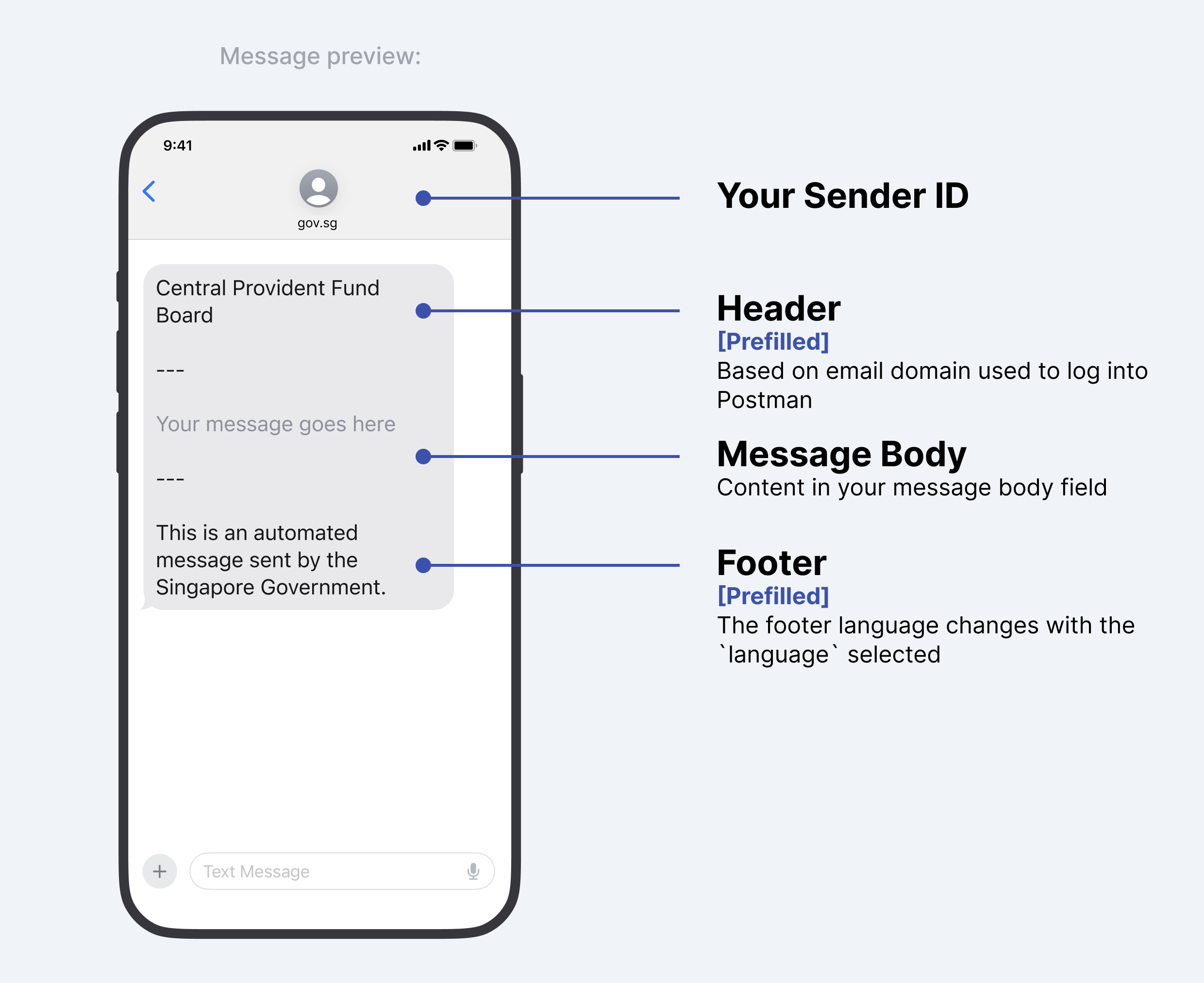
<figure><img src="https://file.go.gov.sg/message-preview.png" alt=""><figcaption><p>Message Preview</p></figcaption></figure>

#### Changing your message header

Header name changes are permitted in specific cases, and approved on a case-by-case basis. Some examples where header name changes are permitted.

\
**Platform products**&#x20;

Some products are used by multiple agencies, and recognised by the product name rather than agency name e.g. "Singpass", and not "Government Technology Agency". If you need to change the name in the header, please [contact us ](https://form.gov.sg/657025a2d2bd350012c82eb0)with your use case.

**Cases where header name changes are not permitted**

If your agency has a project that sends out surveys or information on welfare packages etc, these do not qualify for header name changes.

</details>

<details>

<summary>Language tab</summary>

If you are sending out messages in other languages, you can select the correct `language` tab before you key in your message content.

#### Message Content

* Content in the message body field of each `language` is **not automatically translated.**
* As a user, you will be required to input the correct language text into the message body field.
* eg. If you select Malay as your `language`, you should input your message **in Malay** into the message body field; messages will not be translated for you.

#### SMS Header

* SMS header will always remain in English.

#### SMS Footer

* The SMS Footer of each message changes with the `language` selected.
* eg. If you select Malay as your `language,` the SMS footer will change to Malay.

</details>

<details>

<summary>Message content</summary>

You can create multiple `{{variables}}` when typing out your message content. You can then input the values of each `{{variable}}`when you send the message from the admin portal.

<figure><img src="/files/t13HXzy6DYwOsZuvHGeU" alt=""><figcaption></figcaption></figure>

Variables have to fulfil the following in order to be successfully created

* Can only contain lowercase letters, numbers and `_`
* Must start with a lowercase letter
* If multiple languages are selected, the same variables must be present in all `language` tabs.
* Characters are within the GSM-7 character set. See section below on unsupported characters for more info.

#### Postman message segment calculator

{% hint style="danger" %}
Messages containing avoidable unsupported characters **will be blocked** from sending. **Please use the** [**message segment calculator**](https://message-segment-calculator.postman.gov.sg/) **to check your message before sending.**
{% endhint %}

You should make use of [Postman's message segment calculator](https://message-segment-calculator.postman.gov.sg/) to

* identify unsupported characters within your message content
* identify non GSM characters within your message content
* check the number of message segments

#### Possible replacements to unsupported characters

{% hint style="warning" %}
Note that this unsupported character list below is not exhaustive. Please use the [message segment calculator ](https://message-segment-calculator.postman.gov.sg/)to check your message for unsupported characters.
{% endhint %}

<table><thead><tr><th width="199">Excluded/unsupported Characters</th><th width="182">Description</th><th>Possible Replacements that Postman supports</th><th data-hidden>Unsupported Unicode Character(s)</th></tr></thead><tbody><tr><td><code>|</code> </td><td>vertical line and variants</td><td>I (uppercase i)</td><td>U+FF5C<br>U+23B8<br>U+23B9<br>U+23D0<br>U+239C<br>U+239F<br>U+2223<br>U+20D3<br>U+20D2</td></tr><tr><td><code>€</code></td><td>euro</td><td><code>EUR</code></td><td>U+20AC</td></tr><tr><td><code>{</code></td><td>left curly bracket and variants</td><td><code>(</code></td><td>U+2774<br>U+FE5B<br>U+FF5B</td></tr><tr><td><code>}</code></td><td>right curly bracket and variants</td><td><code>)</code></td><td>U+2775<br>U+FE5C<br>U+FF5D</td></tr><tr><td><code>[</code></td><td>left square bracket</td><td><code>(</code></td><td>U+FF3B</td></tr><tr><td><code>]</code></td><td>right square bracket</td><td><code>)</code></td><td>U+FF3D</td></tr><tr><td><code>~</code></td><td>tilde and variants</td><td><code>-</code></td><td>U+02DC<br>U+02F7<br>U+0303<br>U+0330<br>U+0334<br>U+223C<br>U+FF5E</td></tr><tr><td><code>\</code></td><td>backslash and variants</td><td><code>'</code></td><td>U+29F9<br>U+29F5<br>U+20E5<br>U+FE68<br>U+FF3C</td></tr><tr><td><code>`</code>  </td><td>backtick (note that this is not an apostrophe <code>'</code> . You can find it to the left of the "1" on your keyboard) and variants</td><td><code>"</code></td><td>U+0060<br>U+02CB<br>U+0314<br>U+FE11<br>U+02BD<br>U+201B<br>U+0314<br>U+FE11</td></tr><tr><td><code>‘</code></td><td>acute accent and variants</td><td><code>'</code></td><td>U+2018<br>U+2019<br>U+02BB<br>U+02C8<br>U+02BC<br>U+02B9<br>U+00B4<br>U+02CA<br>U+0313<br>U+FE10</td></tr><tr><td><code>“</code></td><td>double prime quotation mark and variants</td><td><code>"</code></td><td>U+301E<br>U+02BA<br>U+201F</td></tr><tr><td><code>”</code></td><td>reversed double prime quotation mark and variants</td><td><code>"</code></td><td>U+301D<br>U+02EE</td></tr><tr><td><code>¬</code></td><td>logical negation</td><td><code>-</code></td><td>U+00AC</td></tr><tr><td><code>«</code></td><td>left-pointing double angle quotation mark</td><td><code>"</code></td><td>U+00AB</td></tr><tr><td><code>»</code></td><td>right-pointing double angle quotation mark</td><td><code>"</code></td><td>U+00BB</td></tr><tr><td>❝ or ❛</td><td>heavy double/single turned comma quotation mark ornament</td><td><code>"</code></td><td>U+275D<br>U+275B</td></tr><tr><td>❞ or ❜</td><td>heavy double/single comma quotation mark ornament</td><td><code>"</code></td><td>U+275E<br>U+275C</td></tr><tr><td><code>÷</code></td><td>division sign</td><td><code>/</code></td><td>U+00F7</td></tr><tr><td>¼, ½</td><td>vulgar fractions and variants</td><td>1/4, 1/2 etc.</td><td>U+00BC<br>U+00BD<br>U+00BE</td></tr><tr><td>•</td><td>bullet point</td><td><code>-</code></td><td>U+2022</td></tr><tr><td>⊛, ✢, ✣, ✤, ✥, ✺, ❃, ⧆ etc</td><td>asterisk and variants</td><td><code>*</code></td><td>U+204E<br>U+2217<br>U+229B<br>U+2722<br>U+2723<br>U+2724<br>U+2725<br>U+2731<br>U+2732<br>U+2733<br>U+273A<br>U+273B<br>U+273C<br>U+273D<br>U+2743<br>U+2749<br>U+274A<br>U+274B<br>U+29C6<br>U+FE61<br>U+FF0A</td></tr></tbody></table>

</details>

<details>

<summary>Character count</summary>

Postman allows a maximum of 1000 characters for a message body, excluding the header (agency’s name) and footer.

Agencies are strongly encouraged to limit their message body to **320 characters** (excluding the header and footer) to avoid potential delays with message deliverability. As a precautionary measure, a warning message will appear for messages beyond 320 characters.

If the message body exceeds 1000 characters, the system will disable the ability to send the message. Message parameters, such as {{variable}} are not counted as characters. However, when these parameters are populated with actual values, the character count of the populated value is added to the overall character count.

For example:&#x20;

* Message variable placeholder <mark style="color:red;">{{name}}</mark> is not included in the character count when crafting the message template.

<figure><img src="/files/teeAZJGFaVxnJIesEYsC" alt=""><figcaption></figcaption></figure>

* Filling the <mark style="color:red;">{{name}}</mark> variable with “<mark style="color:orange;">**Jonathan**</mark>” adds 8 characters to the count

Visit [https://message-segment-calculator.postman.gov.sg](https://message-segment-calculator.postman.gov.sg/) to use the Postman Message Segment Calculator tool to count your total characters.

### Use the Message Segment Tool before sending messages

<figure><img src="/files/NqlYw12Rb3D7KOMtsQTi" alt=""><figcaption></figcaption></figure>

#### Characters - English Language

The characters in a single text message include the following for "English" language\*, with additional formatting details:&#x20;

* **Header**: Free text field in message segment tool to type your agency name
* **Line breaker**: use normal keyboard paragraphing to indicate line breaks. **Do not use `\n` as `\` will be blocked by Postman.**
* **Slash icon** ( <mark style="color:orange;">---</mark> ): 3 characters to separate sections&#x20;
* **Body**: Free text field for your message content
* **Line breaker**: use normal keyboard paragraphing to indicate line breaks. **Do not use `\n` as `\` will be blocked by Postman.**
* **Slash icon** ( <mark style="color:orange;">---</mark> ): 3 characters to separate sections&#x20;
* **Footer**: 62 characters\* for standardised "English" text used across all WOG messages

\*Do note that the character count is different for other languages such as Chinese and Tamil. &#x20;

#### Encoding used for English language

The encoding used for Postman SMS messages is **GSM-7** or **UCS (Unicode)**. Postman will not be able to send messages that contain [unsupported characters](https://postman-v2.guides.gov.sg/postman-v2-general-user-guide-mop/create-campaign/message-content#unsupported-characters), and a warning message will appear below the  calculator for using invalid characters.

<figure><img src="/files/iWplkmnNy5w6qrmYIOWA" alt=""><figcaption></figcaption></figure>

Enter your message template into the message segment tool to identify characters that are classified as GSM-7, non-GSM-7 and blocked characters in the "Underlying character codes" section.&#x20;

<figure><img src="/files/wD6HrBGdepWiTXhOJHig" alt=""><figcaption></figcaption></figure>

#### Encoding used for English language

The encoding used for other languages (Chinese and Tamil) is **Unicode**, where both the footer contains either Chinese or Tamil characters.&#x20;

#### Number of segment&#x20;

A message segment refers to a portion of a text message when the total length exceeds 160 **GSM-7** characters. If a single message is longer than 160 characters (including header and footer), it is divided into multiple segments. Each segment contains up to 160 GSM characters, including the header and footer. However, when a message uses more than one segment, the character limit per segment is **reduced to 153 characters**.&#x20;

If the text message contains a **Unicode** encoding character, the maximum character count for one segment is 70 characters. If the Unicode message is longer than 70 characters (including header and footer), the character limit per segment is reduced to **67 characters**.

You will be able to view how the message is broken up to multiple segments (as shown below) in “Message Parsed” and “Underlying Character Codes”, based on the character count, and this ensures that the character limits for each segment are properly managed.

<figure><img src="/files/x3jA1jYaXaOTWJPw0yzn" alt=""><figcaption><p>Blue blocks are considered as 1 segment and green blocks are considered as another segment</p></figcaption></figure>

#### Character count for message body

The character count applies only to the content typed in the free text box for the message template. The maximum number of characters Postman allows is 1000, excluding header and footer.

#### Total characters including header and footer

The total character count includes the entire messages including the agency name as the header, the body of the message and the standardised government text as the footer.

</details>


# Send messages

{% hint style="info" %}
**Planning a Large Campaign?**&#x20;

If your campaign will send to more than 200,000 recipients, submit the [large campaign form](https://form.gov.sg/67a17d1adcc3e09f3a56003a) in advance so the Postman team can deconflict with other agencies and reserve your send date.
{% endhint %}

To start sending out messages, select the campaign that you wish to use. This will take you to the campaign dashboard page. You may choose to send to a single recipient or multiple recipients

<figure><img src="/files/Tqs5aWPiRzYj9Vz9ANfP" alt=""><figcaption></figcaption></figure>

### Single recipient

Upon selecting `single recipient`, a pop-up will prompt you to key in your recipient's details.

* Recipient's phone number
* Message language\*
* Message parameters

Once the details have been filled in, click `send` to send out your message.&#x20;

{% hint style="info" %}
Message language option is only available if the campaign admin has selected multiple languages during the campaign creation process. If no languages have been added, the default language will be `English` and you will not be able to select other languages.&#x20;
{% endhint %}

{% hint style="info" %}
All message parameters needs to be filled before you can send out the message.
{% endhint %}

<figure><img src="/files/gcJzgNaPxuR2rC94Do5m" alt=""><figcaption><p>Populate the required fields</p></figcaption></figure>

### Formatting a single message

You may start entering fields into your message parameters.&#x20;

\
Should there be a need to add commas or quotation marks in your message parameters, you may enter them in your message parameters.

<figure><img src="/files/bZrojBAEoJn9jAqB9Rng" alt=""><figcaption></figcaption></figure>

### Multiple recipients

Upon selecting multiple recipients, you will be prompted to upload a .csv file containing

* recipient
* language
* message parameters

{% hint style="info" %}
All message parameters need to be filled before you can send out your messages.
{% endhint %}

We highly recommend the following steps when formatting your .csv file to send out messages

1. Download campaign .csv template
2. Edit the .csv template and save it as a .csv file
3. Upload your .csv file

<figure><img src="/files/WYX45LFcLov26XCllCwm" alt=""><figcaption><p>Step 1 and 3: Postman admin portal</p></figcaption></figure>

<figure><img src="/files/tTrG8QFhITQfjZRWOtX3" alt=""><figcaption><p>Step 2: Edit .csv file - the header row will be automatically populated based on the message parameters input in the message template</p></figcaption></figure>

In the multiple recipients sending format, any errors in the CSV file rows will result in failure to upload your file. You will need to fix the error(s) before all messages in the batch before you are able to successfully upload your file.

<figure><img src="/files/nFWK3Zt7TZu1op4UL0WM" alt=""><figcaption><p>Unable to upload file as csv was wrongly formatted</p></figcaption></figure>

The header row will require to match the variables created, such as containing lowercase letters, numbers and `_`.

#### Recipient

This contains mobile phone number of the recipient, prefixed by the country code but without the leading `+`. For example, when sending to a Singapore phone number, the value of recipient will be `6599999999.`

eg. `6591234567` is a recipient string for a Singapore (65) phone number (91234567)

{% hint style="info" %}
**Do not use "fake" numbers when sending SMS messages, even for testing purposes.**&#x20;

Reasons why this practice is avoided:&#x20;

1. Overloading the queue at the telco provider
2. Leading to failed delivery attempts, which generate error messages&#x20;
3. Failed delivery attempts are still being **charged**
4. These numbers are actually real numbers that are owned by MOPs

List of "fake" numbers:&#x20;

1. 6590000000
2. 6599999999
3. 6588888888

We have our dedicated load test environment if you wish to conduct load test using these numbers. Book your time slot for load test [here](https://cal.gov.sg/n2g21zn65d6nr2pd80cd051p).\
\
Please avoid sending messages to numbers that are not owned by you or your agency. Your agency PIC and CIO will also be informed. Click [here](https://docs.developer.tech.gov.sg/docs/postman-sgdp-guide/gov-sg-sms?id=what-if-i-send-accidental-test-messages-to-fake-numbers-that-actually-belong-to-real-mop) for more information.
{% endhint %}

#### Language

This column will need to be filled, even if there is only one available language that can be selected.

eg. If `English` is the only language you can choose in your message creation, you will need to fill every single entry with `English`.

### Formatting messages to multiple recipients

You may start entering fields into each message parameter in your csv file.&#x20;

#### Formatting in Excel

<figure><img src="/files/jRBEJCKEhQSCna1vsV1C" alt=""><figcaption></figcaption></figure>

**Excel: Commas and quotation marks**

Should there be a need to add commas or quotation marks in your message parameters, you may enter them in each cell within your excel file.

**Excel: Line Breaks**

Should there be a need for line breaks, you may add them in a single cell

#### Formatting in text editor

**Text Editor: Commas, line breaks, quotation marks**

When formatting your messages in a text editor,&#x20;

1. Ensure that all parameters are separated by commas

<figure><img src="/files/Hr41isadSVhkDzlJCJBZ" alt=""><figcaption><p>Example csv in text editor</p></figcaption></figure>

2. Should your content contain more than just letters, please encase them in quotations, see example above
   * Parameter containing more than just letters - highlighted in <mark style="background-color:blue;">blue</mark>
3. Should your message content contain line breaks, please add the line breaks in your parameters within quotations, see image "**Example csv in text editor**".

<figure><img src="/files/ceDAtUfxbO0e8CB4W8pz" alt="" width="375"><figcaption><p>Message with line breaks</p></figcaption></figure>

3. Should your content contain **quotation**, encase the entire quote, including the quotation marks, within a set of quotations, see image "**Example csv in text editor**".
   * quote - highlighted in <mark style="background-color:yellow;">yellow</mark>
   * quotations used to encase quote - highlighted in <mark style="background-color:red;">pink</mark>

These steps will ensure that messages sent out can contain commas and quotation marks.&#x20;

<figure><img src="/files/vfBZk7hTJrYamXh5pwhw" alt="" width="375"><figcaption><p>Quotation marks and commas within message</p></figcaption></figure>

### Postman Test Site: limitations

Postman's test site is meant for agency users to test out the platform. As such, you should test out the site like how you would send out messages to MOPs in a real scenario, where each number will only receive a single message.&#x20;

If you send test messages with exact same content to the same person multiple times in 1 sitting in the same campaign:

eg. "Hi your appointment is on 1 Jan 2024" was sent to Tom 10 times within 1 batch send,

The telcos' automatic spam filter may be triggered . This means the message may not be delivered  to Tom's phone at all, even though it will pass Postman’s send filters and status is reflected as `delivered`.  See screenshot below on how the batch .csv is formatted in this failed example.

<figure><img src="/files/SxrugvMnQImOL8fcbfad" alt=""><figcaption></figcaption></figure>


# Check message delivery status

{% hint style="info" %}
Note that delivery to foreign numbers are on a best-effort basis. Delivery failures are expected for foreign numbers and the Postman team will not be investigating the root causes of these delivery failures.
{% endhint %}

### Messages

Messages consists of all messages that you have sent out in a single campaign.&#x20;

Messages may be sent out as a single message, or can be part of a batch of messages. You may identify this through the `Job Type` column in the campaign dashboard.

<figure><img src="/files/Id1evJPOQ4LYkWaZquI3" alt=""><figcaption></figcaption></figure>

In order to download the message logs for this campaign, please click on the <img src="/files/A82uCDHDiCmF2iqhO7dW" alt="" data-size="line">icon on the screen.

<figure><img src="/files/to2Z9jNpreyVqTC1F4VZ" alt=""><figcaption></figcaption></figure>

You will then receive the logs in your email, and you may filter out the required logs you will need using excel.

Each message will have its own message ID, this message ID can be found in the message logs that you download.&#x20;

### Batches

A batch consists of multiple messages that are sent out at the same time. Each batch will come with its own Batch ID, and each batch can be downloaded by clicking on the <img src="/files/A82uCDHDiCmF2iqhO7dW" alt="" data-size="line"> icon tagged to each batch.&#x20;

<figure><img src="/files/NWLRGJwwHh4mnsx7Itq5" alt=""><figcaption></figcaption></figure>

Similarly, you will receive the logs in your email, and you may filter out the required logs you will need using excel.


# Campaign settings

Control all of your campaign's settings by clicking on the Settings button on the top right of your campaign.

<figure><img src="/files/JiG0ZLJpEfKzhZigQhuu" alt=""><figcaption></figcaption></figure>


# About your campaign

&#x20;You will be able to view the following details

* Campaign ID
* Campaign Channel
* Campaign Message
* Download campaign logs

<figure><img src="/files/Lb3SHW9a3dSnUBx2dqWK" alt=""><figcaption></figcaption></figure>


# Manage campaign members

Learn about the three types of access rights to Postman campaigns.&#x20;

<figure><img src="/files/GyAAslgS57WPPInZ9bjR" alt="" width="375"><figcaption><p>Campaign settings - granting different access rights</p></figcaption></figure>

<table><thead><tr><th width="232"></th><th width="181">Campaign Owner</th><th width="126">Member</th><th>Member Restricted</th></tr></thead><tbody><tr><td>Send messages with the campaign</td><td>Yes</td><td>Yes</td><td>Yes</td></tr><tr><td>Manage users and system integrations<br></td><td>Yes</td><td>No</td><td>No</td></tr><tr><td>View all messages sent</td><td>Yes</td><td>Yes</td><td>Only view messages sent by restricted member. Not able to view messages sent by other members in the campaign.</td></tr></tbody></table>

**Why is Campaign Creator not included as a role under Members?**

* Campaign Owner and Campaign Member are campaign-specific roles. They control what a user can do inside a specific campaign.
* [Campaign Creator](https://postman-v2.guides.gov.sg/general-users-ui-portal/request-for-campaign-creation-rights-from-agency-pics) is not a campaign-specific role, rather it is a Postman role.
  * A campaign creator merely has the permission to create campaigns on Postman. This permission is granted by agency PICs.

To read more FAQs regarding the abilities of Campaign Creators and Owners, please click [here](https://postman-v2.guides.gov.sg/general-users-ui-portal/faqs-ui-portal).

{% hint style="info" %}
For agency officers without a `.gov.sg` email domain, you will need to get `.gov.sg` email domain from your parent ministry.
{% endhint %}

### What are some special cases?

1. **Non `gov.sg` domains that are considered government entities**
   1. For now, this is limited to `aic.sg`, `synapxe.sg`, `edu.sg` *(Polytechnics and ITE only)*
   2. \*By default, every user with this domains has *member* access rights.
   3. Users with these domains who need **admin access** (i.e. can create campaigns, access and amend campaign settings) must request for specific email address whitelisting *through the agency PIC.*
   4. Otherwise, all users with these domains can already log into Postman and view campaigns they have been added to (i.e. member access)
2. **Vendors helping government entities with API integrations**
   1. In such cases, Postman will *not* be granting vendors access to the portal. This means vendors with non-whitelisted email domains cannot log into Postman.
   2. Agency officers should log into Postman, create the campaign and craft the message, whitelist the IP addresses, generate the API keys and pass the API keys to the vendors for the necessary integration.
3. **Vendors helping government entities send messages on Postman UI**
   1. In such cases, agency PICs must [submit a request](https://form.gov.sg/657025a2d2bd350012c82eb0) for the Postman team to whitelist the vendor's domain. This will allow vendors to log into Postman, and view campaigns that the vendors have been added to by the agency admins.
   2. Vendors will then be able to log in and send messages, but ***not*** create campaigns i.e. member access


# Manage integrations

#### Integrations - IP address whitelisting

Provide your IP address for whitelisting. You will be able to provide up to 20 IP addresses.

Whitelist only

* Static IP addresses
* IP addresses that you are using to call the Postman API.

<figure><img src="/files/nw05lLHPKl01kDCQnH4Y" alt=""><figcaption></figcaption></figure>

#### API Keys

You will only be able to obtain your API keys **after** you have whitelisted your IP address.&#x20;

One campaign can have up to 3 API keys.

<figure><img src="/files/KyAwk2BKCDDC9xFqmAW3" alt=""><figcaption></figcaption></figure>

#### Do API keys have an expiry?&#x20;

The API keys have no expiry.&#x20;

If you need to obtain a new API key, you can simply delete the old key and generate a new key.&#x20;


# Delete your campaign

### 1. Campaign deletion features

#### You will no longer be able to do the following once a campaign is deleted

1. You cannot retrieve a deleted campaign:&#x20;

   1. Campaign deletion is an **irreversible process**

2. No access to campaign
   1. No message can be sent out via this campaign, whether through the admin portal,  API or SFTP&#x20;
   2. No access to campaign logs - you will not be able to retrieve logs for this campaign
   3. No access to campaign or settings by all users except the agency's PIC

      1. This includes all members of the campaign that you have deleted

3. Unable to call the API endpoints with this campaign ID
   1. No access to campaign's settings, including API keys and whitelisted IP addresses
   2. Please ensure no one from your agency/vendors are using this campaign before deleting it

#### Actions that are still available after a campaign is deleted

1. Agencies will still be charged for messages sent from this campaign before campaign deletion
   1. Follows Postman billing

      1. Refer to our billing page in our policy guide for more information

2. Agency Person(s) In-charge (PICs) will still be able to view deleted campaigns by users in their agency&#x20;
   1. Able to do so via the Admin Dashboard

#### 2. When should you delete campaigns <a href="#id-2.-when-should-you-delete-campaigns" id="id-2.-when-should-you-delete-campaigns"></a>

**Scenario 1: Campaign created for testing purposes**

You have created a campaign to test out how to create a campaign, send a message and how to access the campaign settings.

* No messages to MOPs were sent out through this campaign

You **may delete** this campaign as it is a campaign that you've created to try Postman out - the campaign was created for testing purposes.

* For API users: Before deleting this campaign, you should make sure that **no other user/vendor** is using this campaign when calling Postman’s API endpoints.
* If messages were sent out
  * Before 1 July 2025: messages paid for by MDDI
  * From 1 July 2025: messages paid for by your agency

**Scenario 2: Campaign that is no longer in use**

It is now December. You have created this campaign for an event in August. Messages were sent out via Postman to MOPs in the month of August and you are not using the campaign now.

* You are not planning to use this campaign now (December)

You **should not delete** this campaign as:

* You will no longer be able to retrieve campaign logs once you have deleted this campaign
  * you may need the logs when your agency is doing reconciliation of messages sent out by your agency
* This campaign is not being used now, but may be used again in the future.


# FAQs (UI Portal)

{% hint style="info" %}
**Still need help?**\
*Postman is a fully self-service platform however we understand there may be times where you would like to reach out to someone.*

* Kindly [reach out to your PICs](/general-users-ui-portal/request-for-campaign-creation-rights-from-agency-pics) first who will be able provide you with more agency specific context on Postman
* Should your PIC be unable to assist, you may [reach out to the Postman team](https://form.gov.sg/657025a2d2bd350012c82eb0). In our responses, we will also be cc-ing your PICs.
  {% endhint %}

<details>

<summary><strong>I just logged in to Postman but I don't see any option to create a campaign. What do I do?</strong></summary>

Logging into Postman and having campaign creation permissions are two separate access levels. Login access alone does not allow you to create campaigns. \
\
You will need your agency's Person-In-Charge (PIC) to grant you campaign creation permissions within Postman. \
\
To find out who your agency PICs are, click the ? button on your Postman dashboard or refer to this page [Request for campaign creation rights from agency PICs](/general-users-ui-portal/request-for-campaign-creation-rights-from-agency-pics).

</details>

<details>

<summary><strong>How do I format my CSV file when sending to multiple recipients?</strong></summary>

Always start by downloading the CSV template from your campaign dashboard. The template will already have the correct headers based on your message template variables. \
\
Fill in the "recipient" column with phone numbers prefixed by the country code without the + sign (e.g. 6591234567), the "language" column (e.g. english, chinese, malay, or tamil), and the remaining columns with your message parameter values. Save the file as .csv before uploading. \
\
All rows must be error-free for the upload to succeed. If any row has an error, the entire file will be rejected and you will need to fix all errors before re-uploading.

</details>

<details>

<summary><strong>My message template contains characters that Postman won't accept. What characters are supported?</strong></summary>

Postman supports the GSM-7 character set for English messages. Common unsupported characters include backticks, smart quotes (curly quotes from Word or Outlook), and em dashes. These characters change the message encoding and significantly increase the number of message segments per SMS, which raises costs and can delay delivery. \
\
Type your message content directly into Postman rather than pasting from Word, Outlook, or other editors, as pasting often introduces unsupported characters. \
\
Use the Message Segment Calculator ([https://message-segment-calculator.postman.gov.sg](https://message-segment-calculator.postman.gov.sg/)) to check your message for unsupported characters before sending.

</details>

<details>

<summary><strong>How long can my SMS message be?</strong></summary>

Postman allows a maximum of 1,000 characters for the message body, excluding the header (your agency name) and footer. However, agencies are strongly encouraged to keep the message body within 320 characters to avoid potential delivery delays. \
\
If a message exceeds 160 GSM characters (including header and footer), it gets split into multiple message segments, each of which is charged separately. \
\
Note that template variables like {{name}} are not counted when crafting the template, but the actual values filled in are counted towards the character limit. \
\
Reliability cannot be guaranteed beyond 7 message segments per SMS due to telco limitations.

</details>

<details>

<summary><strong>My recipient says they did not receive the SMS, but the delivery status shows "successful". What should I do?</strong></summary>

When the status shows "successful", it means the message was delivered to the recipient's device. The most common reason recipients do not see the message is that their phone's messaging app has filtered gov.sg SMSes into a spam or junk folder.&#x20;

Share these troubleshooting steps with the recipient:

a. Check the Spam & blocked folder (Android) or Junk Messages folder (iOS) and mark gov.sg messages as "Not Junk". Detailed steps: <https://go.gov.sg/askgov-nosms>\
b. Restart the mobile phone.\
c. Remove old messages from the inbox to free up memory.\
d. Remove any third-party filtering apps (e.g. Truecaller).\
e. Disable the "Do Not Disturb" function.\
f. Remove and reinsert the SIM card.\
g. Try inserting the SIM card in another phone and request the SMS again.

</details>

<details>

<summary><strong>Can Postman Campaign Creators see all campaigns across their agency?</strong></summary>

No, they can only see the campaigns that they created.

</details>

<details>

<summary><strong>If I add someone as Campaign Owner, are they able to remove other Campaign Owners from my campaign?</strong></summary>

* Yes, it is possible.
* By default, the creator of a campaign will be the Campaign Owner. However, if they assign another Owner, this new Owner can change the initial Owner to a Member, even if he created the campaign.
* Before granting a Member “Campaign Owner” access, take note of the [permissions of a Campaign Owner](https://postman-v2.guides.gov.sg/general-users-ui-portal/campaign-settings/manage-campaign-members).

</details>


# Log in to postman.gov.sg

## How do I login to Postman?

{% hint style="info" %}
All .gov.sg emails are allowed to login to Postman. \
\
If you are a vendor assisting government entities with API integrations, you will not be given access rights to the Postman UI portal. Please reach out to the government officer to provide you with the campaign API key.
{% endhint %}

#### **Email login with gov.sg email**

If you selected email login, you will need to key in an OTP that is sent to your email address.

<figure><img src="/files/e0NVoCqPj2GaBPFuVuCL" alt=""><figcaption></figcaption></figure>

#### Agency users without a gov.sg email

The following agencies without a `gov.sg` email domain can access Postman.&#x20;

* `edu.sg`  *(Polytechnics and ITE only)*
* `synapxe.sg`
* `aic.sg`

{% hint style="info" %}
More information for users who require admin access can be found [here](/postman-v2-admin-portal-for-api-users-mop/campaign-settings#what-are-some-special-cases).
{% endhint %}


# Request for campaign creation rights from agency PICs

{% hint style="danger" %}
Before you are allowed to create campaigns on Postman, you will need to request for campaign creation rights from your agency PICs via email.
{% endhint %}

If this is your first time logging in into Postman, you would been shown the below screen. You will need to email your agency PICs to give you access to creating campaigns on behalf of your agency.

<figure><img src="/files/Y27D6JTOIAGZnPZhhXk8" alt=""><figcaption></figcaption></figure>

You can identify your agency PICs by clicking on the `?` button on your Postman dashboard (see screenshot below).

<figure><img src="/files/T1nxkuPN9eVDlXOyrQBJ" alt=""><figcaption></figcaption></figure>

Once your agency PIC grants you the ability to create campaigns, you become a **Postman Campaign Creator**.


# Create a campaign

{% hint style="info" %}
If your create campaign is greyed out and your are unable to create campaigns, please [Request for campaign creation rights from agency PICs](/general-users-ui-portal/request-for-campaign-creation-rights-from-agency-pics).
{% endhint %}

To start creating campaigns, select  `+ Create campaigns` on your home page

<figure><img src="/files/CwAcBNdGoW9wNKwHsMnj" alt=""><figcaption></figcaption></figure>

### Step 1. Give your campaign a name

Upon clicking on `+ Create Campaign` you will be taken to the campaign creation page and asked to name your campaign.

<figure><img src="/files/NXWh2yqNZw8Nc2H8rjrD" alt=""><figcaption></figcaption></figure>

### Step 2. Setup who will be receiving these messages

Postman has 2 types of campaign channels available - **Member of Public** and **Internal Staff**

1. Member of Public: to send out messages to MOPs
2. Internal Staff - to send out with your own sender ID
   * You will need to provide your own Twilio credentials if you choose the `Internal Staff` option

{% hint style="danger" %}
**ALL Singapore government agencies must use Postman to send out SMSes using the “gov.sg” sender ID** while disseminating official communications to the public. Agency CIOs will be notified of any non-compliance.
{% endhint %}

<figure><img src="/files/uDOwYW7HjthF1SfljeOx" alt=""><figcaption></figcaption></figure>

### Step 3. Enter your message content

{% hint style="info" %}
You will not be able to edit your campaign content after creating your campaign.
{% endhint %}

The campaign content is the content in the SMS that you will be sending out. You will be prompted to type out your campaign's message content. **Please use the** [**message segment calculator**](https://message-segment-calculator.postman.gov.sg/) **to check your message before sending.**

<figure><img src="/files/CQZx5BgEowfAMrnMLKyu" alt=""><figcaption></figcaption></figure>

There are different parts to the campaign content screen:

<details>

<summary>Message preview</summary>

This is how your message will look like:

<figure><img src="https://file.go.gov.sg/message-preview.png" alt=""><figcaption><p>Message Preview</p></figcaption></figure>

#### Changing your message header

Header name changes are permitted in specific cases, and approved on a case-by-case basis. Some examples where header name changes are permitted.

\
**Platform products**&#x20;

Some products are used by multiple agencies, and recognised by the product name rather than agency name e.g. "Singpass", and not "Government Technology Agency". If you need to change the name in the header, please [contact us ](https://form.gov.sg/657025a2d2bd350012c82eb0)with your use case.

**Cases where header name changes are not permitted**

If your agency has a project that sends out surveys or information on welfare packages etc, these do not qualify for header name changes.

</details>

<details>

<summary>Language tab</summary>

If you are sending out messages in other languages, you can select the correct `language` tab before you key in your message content.

#### Message Content

* Content in the message body field of each `language` is **not automatically translated.**
* As a user, you will be required to input the correct language text into the message body field.
* eg. If you select Malay as your `language`, you should input your message **in Malay** into the message body field; messages will not be translated for you.

#### SMS Header

* SMS header will always remain in English.

#### SMS Footer

* The SMS Footer of each message changes with the `language` selected.
* eg. If you select Malay as your `language,` the SMS footer will change to Malay.

</details>

<details>

<summary>Message content</summary>

You can create multiple `{{variables}}` when typing out your message content. You can then input the values of each `{{variable}}`when you send the message from the admin portal.

<figure><img src="/files/t13HXzy6DYwOsZuvHGeU" alt=""><figcaption></figcaption></figure>

Variables have to fulfil the following in order to be successfully created

* Can only contain lowercase letters, numbers and `_`
* Must start with a lowercase letter
* If multiple languages are selected, the same variables must be present in all `language` tabs.
* Characters are within the GSM-7 character set. See section below on unsupported characters for more info.

#### Postman message segment calculator

{% hint style="danger" %}
Messages containing avoidable unsupported characters **will be blocked** from sending. **Please use the** [**message segment calculator**](https://message-segment-calculator.postman.gov.sg/) **to check your message before sending.**
{% endhint %}

You should make use of [Postman's message segment calculator](https://message-segment-calculator.postman.gov.sg/) to

* identify unsupported characters within your message content
* identify non GSM characters within your message content
* check the number of message segments

#### Possible replacements to unsupported characters

{% hint style="warning" %}
Note that this unsupported character list below is not exhaustive. Please use the [message segment calculator ](https://message-segment-calculator.postman.gov.sg/)to check your message for unsupported characters.
{% endhint %}

<table><thead><tr><th width="199">Excluded/unsupported Characters</th><th width="182">Description</th><th>Possible Replacements that Postman supports</th><th data-hidden>Unsupported Unicode Character(s)</th></tr></thead><tbody><tr><td><code>|</code> </td><td>vertical line and variants</td><td>I (uppercase i)</td><td>U+FF5C<br>U+23B8<br>U+23B9<br>U+23D0<br>U+239C<br>U+239F<br>U+2223<br>U+20D3<br>U+20D2</td></tr><tr><td><code>€</code></td><td>euro</td><td><code>EUR</code></td><td>U+20AC</td></tr><tr><td><code>{</code></td><td>left curly bracket and variants</td><td><code>(</code></td><td>U+2774<br>U+FE5B<br>U+FF5B</td></tr><tr><td><code>}</code></td><td>right curly bracket and variants</td><td><code>)</code></td><td>U+2775<br>U+FE5C<br>U+FF5D</td></tr><tr><td><code>[</code></td><td>left square bracket</td><td><code>(</code></td><td>U+FF3B</td></tr><tr><td><code>]</code></td><td>right square bracket</td><td><code>)</code></td><td>U+FF3D</td></tr><tr><td><code>~</code></td><td>tilde and variants</td><td><code>-</code></td><td>U+02DC<br>U+02F7<br>U+0303<br>U+0330<br>U+0334<br>U+223C<br>U+FF5E</td></tr><tr><td><code>\</code></td><td>backslash and variants</td><td><code>'</code></td><td>U+29F9<br>U+29F5<br>U+20E5<br>U+FE68<br>U+FF3C</td></tr><tr><td><code>`</code>  </td><td>backtick (note that this is not an apostrophe <code>'</code> . You can find it to the left of the "1" on your keyboard) and variants</td><td><code>"</code></td><td>U+0060<br>U+02CB<br>U+0314<br>U+FE11<br>U+02BD<br>U+201B<br>U+0314<br>U+FE11</td></tr><tr><td><code>‘</code></td><td>acute accent and variants</td><td><code>'</code></td><td>U+2018<br>U+2019<br>U+02BB<br>U+02C8<br>U+02BC<br>U+02B9<br>U+00B4<br>U+02CA<br>U+0313<br>U+FE10</td></tr><tr><td><code>“</code></td><td>double prime quotation mark and variants</td><td><code>"</code></td><td>U+301E<br>U+02BA<br>U+201F</td></tr><tr><td><code>”</code></td><td>reversed double prime quotation mark and variants</td><td><code>"</code></td><td>U+301D<br>U+02EE</td></tr><tr><td><code>¬</code></td><td>logical negation</td><td><code>-</code></td><td>U+00AC</td></tr><tr><td><code>«</code></td><td>left-pointing double angle quotation mark</td><td><code>"</code></td><td>U+00AB</td></tr><tr><td><code>»</code></td><td>right-pointing double angle quotation mark</td><td><code>"</code></td><td>U+00BB</td></tr><tr><td>❝ or ❛</td><td>heavy double/single turned comma quotation mark ornament</td><td><code>"</code></td><td>U+275D<br>U+275B</td></tr><tr><td>❞ or ❜</td><td>heavy double/single comma quotation mark ornament</td><td><code>"</code></td><td>U+275E<br>U+275C</td></tr><tr><td><code>÷</code></td><td>division sign</td><td><code>/</code></td><td>U+00F7</td></tr><tr><td>¼, ½</td><td>vulgar fractions and variants</td><td>1/4, 1/2 etc.</td><td>U+00BC<br>U+00BD<br>U+00BE</td></tr><tr><td>•</td><td>bullet point</td><td><code>-</code></td><td>U+2022</td></tr><tr><td>⊛, ✢, ✣, ✤, ✥, ✺, ❃, ⧆ etc</td><td>asterisk and variants</td><td><code>*</code></td><td>U+204E<br>U+2217<br>U+229B<br>U+2722<br>U+2723<br>U+2724<br>U+2725<br>U+2731<br>U+2732<br>U+2733<br>U+273A<br>U+273B<br>U+273C<br>U+273D<br>U+2743<br>U+2749<br>U+274A<br>U+274B<br>U+29C6<br>U+FE61<br>U+FF0A</td></tr></tbody></table>

</details>

<details>

<summary>Character count</summary>

Postman allows a maximum of 1000 characters for a message body, excluding the header (agency’s name) and footer.

Agencies are strongly encouraged to limit their message body to **320 characters** (excluding the header and footer) to avoid potential delays with message deliverability. As a precautionary measure, a warning message will appear for messages beyond 320 characters.

If the message body exceeds 1000 characters, the system will disable the ability to send the message. Message parameters, such as {{variable}} are not counted as characters. However, when these parameters are populated with actual values, the character count of the populated value is added to the overall character count.

For example:&#x20;

* Message variable placeholder <mark style="color:red;">{{name}}</mark> is not included in the character count when crafting the message template.

<figure><img src="/files/teeAZJGFaVxnJIesEYsC" alt=""><figcaption></figcaption></figure>

* Filling the <mark style="color:red;">{{name}}</mark> variable with “<mark style="color:orange;">**Jonathan**</mark>” adds 8 characters to the count

Visit [https://message-segment-calculator.postman.gov.sg](https://message-segment-calculator.postman.gov.sg/) to use the Postman Message Segment Calculator tool to count your total characters.

### Use the Message Segment Tool before sending messages

<figure><img src="/files/NqlYw12Rb3D7KOMtsQTi" alt=""><figcaption></figcaption></figure>

#### Characters - English Language

The characters in a single text message include the following for "English" language\*, with additional formatting details:&#x20;

* **Header**: Free text field in message segment tool to type your agency name
* **Line breaker**: use normal keyboard paragraphing to indicate line breaks. **Do not use `\n` as `\` will be blocked by Postman.**
* **Slash icon** ( <mark style="color:orange;">---</mark> ): 3 characters to separate sections&#x20;
* **Body**: Free text field for your message content
* **Line breaker**: use normal keyboard paragraphing to indicate line breaks. **Do not use `\n` as `\` will be blocked by Postman.**
* **Slash icon** ( <mark style="color:orange;">---</mark> ): 3 characters to separate sections&#x20;
* **Footer**: 62 characters\* for standardised "English" text used across all WOG messages

\*Do note that the character count is different for other languages such as Chinese and Tamil. &#x20;

#### Encoding used for English language

The encoding used for Postman SMS messages is **GSM-7** or **UCS (Unicode)**. Postman will not be able to send messages that contain [unsupported characters](https://postman-v2.guides.gov.sg/postman-v2-general-user-guide-mop/create-campaign/message-content#unsupported-characters), and a warning message will appear below the  calculator for using invalid characters.

<figure><img src="/files/iWplkmnNy5w6qrmYIOWA" alt=""><figcaption></figcaption></figure>

Enter your message template into the message segment tool to identify characters that are classified as GSM-7, non-GSM-7 and blocked characters in the "Underlying character codes" section.&#x20;

<figure><img src="/files/wD6HrBGdepWiTXhOJHig" alt=""><figcaption></figcaption></figure>

#### Encoding used for English language

The encoding used for other languages (Chinese and Tamil) is **Unicode**, where both the footer contains either Chinese or Tamil characters.&#x20;

#### Number of segment&#x20;

A message segment refers to a portion of a text message when the total length exceeds 160 **GSM-7** characters. If a single message is longer than 160 characters (including header and footer), it is divided into multiple segments. Each segment contains up to 160 GSM characters, including the header and footer. However, when a message uses more than one segment, the character limit per segment is **reduced to 153 characters**.&#x20;

If the text message contains a **Unicode** encoding character, the maximum character count for one segment is 70 characters. If the Unicode message is longer than 70 characters (including header and footer), the character limit per segment is reduced to **67 characters**.

You will be able to view how the message is broken up to multiple segments (as shown below) in “Message Parsed” and “Underlying Character Codes”, based on the character count, and this ensures that the character limits for each segment are properly managed.

<figure><img src="/files/x3jA1jYaXaOTWJPw0yzn" alt=""><figcaption><p>Blue blocks are considered as 1 segment and green blocks are considered as another segment</p></figcaption></figure>

#### Character count for message body

The character count applies only to the content typed in the free text box for the message template. The maximum number of characters Postman allows is 1000, excluding header and footer.

#### Total characters including header and footer

The total character count includes the entire messages including the agency name as the header, the body of the message and the standardised government text as the footer.

</details>


# Whitelist your public IP address

{% hint style="info" %}
You will need to whitelist your IP addresses with us before you can obtain the API keys for integration.
{% endhint %}

Provide your external IP address for whitelisting. You will be able to provide up to 20 IP addresses.

Whitelist only

* Static IP addresses
* IP addresses that you are using to call the Postman API.

<figure><img src="/files/nw05lLHPKl01kDCQnH4Y" alt=""><figcaption></figcaption></figure>


# Generate your API key

You will only be able to obtain your API keys **after** you have whitelisted your IP address.&#x20;

One campaign can have up to 3 API keys.

<figure><img src="/files/KyAwk2BKCDDC9xFqmAW3" alt=""><figcaption></figcaption></figure>

#### Do API keys have an expiry?&#x20;

The API keys have no expiry.&#x20;

If you need to obtain a new API key, you can simply delete the old key and generate a new key.&#x20;


# Send SMSes using our API

{% hint style="warning" %}
**Before calling Postman's API endpoints, please ensure:**

1. You have whitelisted your external IP address for this campaign.
2. You have entered the correct API key.
   {% endhint %}

{% hint style="info" %}
**Planning a Large Campaign?**

If your campaign will send to more than 200,000 recipients, submit the [large campaign form](https://form.gov.sg/67a17d1adcc3e09f3a56003a) in advance so the Postman team can deconflict with other agencies and reserve your send date.&#x20;
{% endhint %}

### Multiple message parameters (variables)

In this example, we will be using the following message content with multiple message parameters (variables).

```markup
Dear {{name}}, your next appointment at {{clinic}} is on {{date}} at {{time}} hrs. 
```

#### Request Body example

{% code title="Example Request Body" %}

```json
{
    "recipient": "6599999999",
    "language": "english",
    "values": {
        // The following values are values for the parameters in the example template
        "name": "John Doe",
        "clinic": "Example Clinic",
        "date": "11 Dec 2023",
        "time": "11:30 am"
    }
}
```

{% endcode %}

**CSV example for batch send**

{% code title="Example CSV for batch send" %}

```csv
recipient,language,name,clinic,date,time
6599999999,ENGLISH,John Doe,Example Clinic,11 Dec 2023,11:30 am
```

{% endcode %}

### **A**PI users who do not want to manage your message templates within Postman

If you are an API user that

* manages message templates within your own system
* uses Postman solely for sending out the full text of your message

you may create a single variable, `{{body}}`, and insert the message into the `{{body}}` variable.

<figure><img src="/files/9X72HIFa6Zdnu2VPARIU" alt=""><figcaption></figcaption></figure>

**Request Body example - single variable `{{body}}`**

{% code title="Example Request body" %}

```
{
    "recipient": "6599999999",
    "language": "english",
    "values": {
    // The following values are values for the parameters in the example template
        "body": "Fill in your system constructed message here"
    },
}
```

{% endcode %}

**CSV example for batch send - single variable `{{body}}`**

{% code title="Example CSV for batch send" %}

```
recipient,language,body
6599999999,english,"Fill in your system constructed message here"
```

{% endcode %}

### Line breaks in {{body}} messages

When formatting line breaks in your request body, please note the differences between

1. [Campaign template creation](#creating-line-breaks-in-campaign-message-template)
2. [CSV file for batch messages](#creating-line-breaks-in-message-body)
3. API request body&#x20;

## Creating line breaks in campaign message template

If your campaign requires sending via single send with line breaks, we advise you to create the campaign message template with line breaks included, during the campaign creation stage.

<figure><img src="/files/7DgyfImwqxDD0kYtIzQm" alt=""><figcaption></figcaption></figure>

## Creating line breaks in message body for batch messages

If your message template is already created, and you need to fill in message content with line breaks within the CSV file, use simple keyboard paragraphing to create the line breaks within your CSV file, then upload them.

<figure><img src="/files/U67UREoy8aEk5co0op4k" alt=""><figcaption></figcaption></figure>

Excel automatically adds `""` to your file after you have saved it as a .csv file.

As such, **do not** encase the message in the `{{body}}` variable in `""`.

<figure><img src="/files/qLpD51GlgtMeTabaxjHA" alt=""><figcaption><p>Example of a CSV file</p></figcaption></figure>

**Another example:**

{% code title="" %}

```csv
recipient,language,body
6591234567,english,"Dear Amy 

Your appointment for VACCINATION is confirmed.

Please do not reply to this message."
6599999999,english,"Dear John 

Your appointment for VACCINATION is confirmed.

Please do not reply to this message."
```

{% endcode %}

Your message in the `{{body}}` variable will need to be encased in `""` if you are creating messages from a text editor.

## Creating line breaks in API request body

If you are sending an API single send message, you can add `\n` into the **JSON** request body. **Do** make sure your request body is in **JSON** format or you will receive an error.

**Example:**

```json
{
  "recipient": "6599999999",
  "language": "english",
  "values": {
    "test": "This is a test for line breaks \n this is one line spacing \n\n this is a paragraph spacing"
  }
}
```

And your message should look like this:

<figure><img src="/files/nlb3F28UakIBpoxhun08" alt=""><figcaption></figcaption></figure>

If you are sending an API bulk send message, then use simple keyboard paragraphing to create the line breaks within your CSV file (see [above](#creating-line-breaks-in-message-body-for-batch-messages)).

### Postman Test Site limitations

{% hint style="danger" %}
**DO NOT** conduct load testing on our test site.&#x20;

[Postman test site](https://test.postman.gov.sg/) has a .csv file limit of 20 rows to ensure no load testing is done on this site. More information [here](/load-test/load-test-booking-requirement) on load testing.
{% endhint %}

Postman's test site is meant for agency users to test out the platform. As such, you should test out the site like how you would send out messages to MOPs in a real scenario, where each number will only receive a single message.&#x20;

**Multiple messages to the same user**

If you send test messages with exact same content to the same person multiple times in 1 sitting in the same campaign:

eg. "Hi your appointment is on 1 Jan 2024" was sent to Tom 10 times within 1 batch send.

The telcos' automatic spam filter may be triggered . This means the message may not be delivered  to Tom's phone at all, even though it will pass Postman’s send filters and status is reflected as `delivered`.  See screenshot below on how the batch .csv is formatted in this failed example.

<figure><img src="/files/OzCuyOyfJkc2EIpx8Teo" alt=""><figcaption></figcaption></figure>


# API Reference

**Base URLs**

All API requests should be made to the following base URLs:

{% tabs %}
{% tab title="Production" %}
To send SMSes to the public, please use our production environment.

```url
https://postman.gov.sg/api/v2
```

<mark style="color:red;">**Do not use this for testing, please use our test or loadtest environments instead. Non-compliance will be reported to your agency's CIO.**</mark>
{% endtab %}

{% tab title="Test" %}
To send SMSes to yourself during the integration phase, please use our test environment.

```url
https://test.postman.gov.sg/api/v2
```

<mark style="color:red;">**Do not use this to send messages to the public, please use the production environment instead. Non-compliance will be reported to your agency's CIO.**</mark>

If you are planning to load test our systems, please use the loadtest environment instead.
{% endtab %}

{% tab title="Loadtest" %}
To use Postman for any load testing, please use our loadtest environment.

*Note that load testing is optional. Postman meets our internal load test standards and we have successfully supported multiple nationwide campaigns without any issues.*

```url
https://loadtest.postman.gov.sg/api/v2
```

<mark style="color:red;">**Please make a load test booking before conducting any load tests.**</mark>
{% endtab %}
{% endtabs %}

***

**Authentication**

The Postman v2 API uses API keys and static IP whitelisting to authenticate requests. Authentication is performed with HTTP Bearer Auth.

```
Authorization: Bearer YOUR_API_KEY
```

All API calls must be made over HTTPS. Calls over plain HTTP will fail. Requests without authentication will return HTTP 401.

***

**API Endpoints**

**Single send (for a single recipient)**

<table><thead><tr><th width="101.01171875">HTTP Method</th><th width="341.32421875">Endpoint</th><th>Description</th></tr></thead><tbody><tr><td><code>POST</code></td><td><code>/campaigns/&#x3C;campaignId>/messages</code></td><td>Send a single message to one recipient. Use this for time-sensitive, critical SMSes like OTPs or weather alerts. Returns the created message object immediately, but you must query the Retrieve Message endpoint to get the delivery status.</td></tr><tr><td><code>POST</code></td><td><code>/campaigns/&#x3C;campaignId>/messages/&#x3C;messageId>/retry</code></td><td>Retry a single failed message. The message retains its original message ID. Only works if the message <code>latestStatus</code> is <code>failure</code>. Maximum 3 retry attempts per message.</td></tr><tr><td><code>GET</code></td><td><code>/campaigns/&#x3C;campaignId>/messages/&#x3C;messageId></code></td><td>Retrieve a single message and its delivery status. Webhooks are not supported; you must poll this endpoint to check status changes.</td></tr><tr><td><code>GET</code></td><td><code>/campaigns/&#x3C;campaignId>/messages</code></td><td>Retrieve all messages and their delivery statuses for a campaign, with campaign template information. Supports searching by recipient phone number (substring match). Returns paginated results.</td></tr></tbody></table>

**Batch send (for multiple recipients)**

<table><thead><tr><th width="140.35546875">HTTP Method</th><th>Endpoint</th><th>Description</th></tr></thead><tbody><tr><td><code>POST</code></td><td><code>/campaigns/&#x3C;campaignId>/batch/messages</code></td><td>Send messages to multiple recipients in a single API request. Upload a CSV file via <code>multipart/form-data</code>. The CSV must include <code>recipient</code>, <code>language</code>, and columns for each template parameter. Test environment has a 20-row CSV limit.</td></tr><tr><td><code>POST</code></td><td><code>/campaigns/&#x3C;campaignId>/batch/&#x3C;batchId>/retry</code></td><td>Retry all failed messages in a batch. Only works if batch status is <code>messages_enqueued</code> or <code>messages_enqueuing_failed</code>. Will fail if any message in the batch still has <code>latestStatus</code> of <code>created</code>. Returns HTTP 201 with no response body.</td></tr><tr><td><code>GET</code></td><td><code>/campaigns/&#x3C;campaignId>/batch/&#x3C;batchId>/messages</code></td><td>Retrieve all messages and their delivery statuses for a batch. Supports searching by recipient phone number (substring match). Returns paginated results using cursor-based pagination.</td></tr></tbody></table>

***

**Pagination**

The Retrieve Batch and Retrieve Campaign Message endpoints use cursor-based pagination.

| Parameter | Description                                        |
| --------- | -------------------------------------------------- |
| `limit`   | Number of results per page                         |
| `search`  | Filter by recipient phone number (substring match) |
| `before`  | Cursor for fetching the previous page              |
| `after`   | Cursor for fetching the next page                  |

The response includes a `pageData` object:

```json
{
  "pageData": {
    "hasNextPage": false,
    "hasPreviousPage": false,
    "startCursor": "...",
    "endCursor": "..."
  }
}
```

Use `after` with `endCursor` to get the next page. Use `before` with `startCursor` to get the previous page.

***

**Message Statuses**

| Status          | Description                                                                                                                                                                                                                                 |
| --------------- | ------------------------------------------------------------------------------------------------------------------------------------------------------------------------------------------------------------------------------------------- |
| `created`       | Postman has created the message record but has not yet sent it to the messaging service provider.                                                                                                                                           |
| `enqueued`      | The message is in the queue, waiting to be sent to the messaging service provider.                                                                                                                                                          |
| `sending`       | The message has been taken out of the queue and is being sent to the messaging service provider.                                                                                                                                            |
| `sent`          | Postman has sent the message to the messaging service provider, but has not yet received a delivery confirmation.                                                                                                                           |
| `sent_to_telco` | The messaging service provider confirms the message has been sent to the recipient's telco. The message may or may not have reached the recipient's phone. If status remains here beyond 48 hours, a further update is unlikely.            |
| `success`       | The message has been delivered to the recipient. This is a terminal status.                                                                                                                                                                 |
| `failure`       | The message failed to send due to an error in Postman or the messaging service. This is a terminal status. See [Message Delivery Errors](https://postman-v2.guides.gov.sg/general-notes-for-api-users/message-delivery-errors) for details. |

***

**Rate Limits**

The default rate limit is **10 TPS (transactions per second) per campaign ID**. This is defined as the number of API calls per second, not the number of messages sent per second. The rate limit is shared across all API endpoints for a campaign.

Requests that exceed the rate limit are dropped (not queued) and return HTTP 429. You must retry these requests yourself.

To request a higher TPS, we require evidence of historical usage from your old systems where rate limits have been hit.

***


# Authentication

{% hint style="warning" %}

* Your API key is sensitive and should be treated as a secret.
* Only requests from whitelisted IP addresses will be accepted.
* If your API key is compromised, delete it immediately through the web UI and generate a new one.
  {% endhint %}

Postman's APIs uses API key-based and static IP whitelisting for authentication. API keys are on a per-campaign basis and can only send and retrieve messages from the same campaign.

Your API keys carry many privileges, so be sure to keep them secure. Don't share your secret API keys in publicly accessible areas such as GitHub, client-side code, and so forth.

Authentication to the API is performed with [HTTP Bearer Auth](https://developer.mozilla.org/en-US/docs/Web/HTTP/Authentication#authentication_schemes).&#x20;

Include your API key in the `Authorization` header:

```
Authorization: Bearer <YOUR_API_KEY>
```

{% tabs %}
{% tab title="Sample Request" %}
The following request sends a single message to a recipient.

```bash
curl -X POST https://postman.gov.sg/api/v2/campaigns/campaign_abc123/messages \
  -H "Content-Type: application/json" \
  -H "Authorization: Bearer key_prod_a1b2c3d4e5f6g7h8i9j0k1l2m3n4o5p6" \
  -d '{
    "recipient": "6591112222",
    "language": "english"
  }'
```

{% endtab %}

{% tab title="Sample Response" %}
Message successfully created and queued for sending.

```json
{
  "id": "msg_abc123xyz789",
  "recipient": "6591112222",
  "language": "english",
  "latestStatus": "created",
  "campaignId": "campaign_abc123",
  "createdAt": "2024-01-15T10:30:00Z",
  "updatedAt": "2024-01-15T10:30:00Z"
}
```

{% endtab %}
{% endtabs %}

You must make all API calls over [HTTPS](http://en.wikipedia.org/wiki/HTTP_Secure). Calls that you make over plain HTTP will fail. API requests without authentication will also fail.

If you make a request without authentication, you will receive HTTP 401 and the following in your response body:

```json
{
    "message": "Unauthorized",
    "statusCode": 401
}
```

***


# Rate limits

Postman APIs enforce rate limits to ensure fair usage and message delivery standards for WoG. Rate limits can be found in the Settings tab of your campaign.

Rate limits are applied globally - if your rate limit is 10 TPS, this includes all transactions (sending a message, querying for a message status, etc.).

Postman will **drop the request** and return with a `HTTP 429 Too Many Requests` status code to indicate that you have hit the rate limit. Your campaign's TPS will not be increased just because you hit a rate limit.

<mark style="color:red;">**Agencies are responsible for ensuring that retry mechanisms are in place (e.g., implementing exponential backoff).**</mark>

***

**Default Rate Limit**

The default rate limit is **10 TPS (transactions per second) per campaign ID**. This is defined as the number of API calls per second, not the number of messages sent per second.

***

**Shared Across All APIs**

The rate limit is shared across all API endpoints for a campaign. For example, if within your campaign you call the following simultaneously:

* Single Send at 6 TPS
* Retrieve Message at 2 TPS
* Batch Send at 4 TPS

This adds up to 12 TPS, which exceeds the 10 TPS limit. You will receive a `429` error on the requests that exceed the limit.

***

**Single Send vs Batch Send TPS**

The TPS counts **API calls**, not messages. The number of messages sent per API call differs between single send and batch send:

| Method      | 1 TPS equals                                                 |
| ----------- | ------------------------------------------------------------ |
| Single Send | 1 API call = 1 message                                       |
| Batch Send  | 1 API call = multiple messages (one per row in the CSV file) |

For example, if you are using batch send with a CSV file containing 20 rows, 1 API call sends 20 messages while only counting as 1 TPS.

***

**Message Priority**

The TPS limit applies only to messages entering the Postman system, not messages sent to end recipients. Message delivery speeds may be slower than the TPS rate during peak periods (8:00 am to 6:00 pm daily).

Messages are prioritised in the following order:

1. Time-sensitive/OTP messages using Single Send
   * If you are sending time-sensitive, life-or-death SMSes like lightning alerts, use the Single Send API.
2. All messages using Batch Send

***

**Requesting a Higher TPS**

You must provide evidence:

* Internal logs from your actual historical systems showing that you have previously hit that higher TPS
* Logs from testing on Postman are **not** considered proof

***

**Large Campaign Requirements**

If your campaign meets any of the following criteria, you must submit the [large campaign form](https://form.gov.sg/67a17d1adcc3e09f3a56003a) before sending:

* **Time-sensitive campaigns:** Making more than 50 API requests per second, or more than 100 message segments per second
* **Large campaigns:** Above 200,000 recipients

***

**5xx Server Errors and Queuing**

For 5xx server errors, requests are **not** queued on Postman's side. You will need to retry these requests yourself.

***

**Error Response**

When you hit the rate limit, you will receive:

```
HTTP 429 Too Many Requests
```

```json
{
  "error": {
    "code": "too_many_requests",
    "message": "Too many requests",
    "type": "domain_error",
    "id": "<TRACE_ID>"
  }
}
```

Implement exponential backoff to handle rate limit errors gracefully. Do not immediately retry at the same rate, as this will continue to trigger the rate limit.


# Message statuses

The `latestStatus` field on a message object indicates where the message is in the delivery lifecycle. Messages progress through the following statuses:

```
created → enqueued → sending → sent → sent_to_telco → success
                                  ↘                      ↘
                                   failure               failure
```

| Status          | Terminal | Description                                                                                                                                                                                                                                                                             |
| --------------- | -------- | --------------------------------------------------------------------------------------------------------------------------------------------------------------------------------------------------------------------------------------------------------------------------------------- |
| `created`       | No       | Postman is aware of your request and has created the necessary records. However, it has not yet made the request to the relevant messaging service provider to have the message sent.                                                                                                   |
| `enqueued`      | No       | Your message is now in the queue and in the process of getting sent to the relevant messaging service provider.                                                                                                                                                                         |
| `sending`       | No       | Your message has been taken out of the queue and is in the process of getting sent to the relevant messaging service provider.                                                                                                                                                          |
| `sent`          | No       | Postman has made the request to the relevant messaging service provider to have the message sent. However, it has not yet received a notification from the provider on the request status.                                                                                              |
| `sent_to_telco` | No\*     | The relevant messaging service provider has sent an update to Postman saying that the message has been sent to the recipient's telco. The message may or may not have been delivered to the recipient's phone (e.g. the phone could be off or in airplane mode).                        |
| `success`       | Yes      | The relevant messaging service provider has confirmed that the message has been delivered by the telco to the recipient.                                                                                                                                                                |
| `failure`       | Yes      | The message failed to send due to an error in Postman or from the messaging service. See the `error` object in the message's `attempts` array for details, or refer to [Message Delivery Errors](https://postman-v2.guides.gov.sg/general-notes-for-api-users/message-delivery-errors). |

\*If `latestStatus` remains `sent_to_telco` beyond 48 hours, it is unlikely that a further status update will be received from the telco. This is a telco limitation and is expected behaviour. For foreign numbers, `sent_to_telco` is the terminal status. You may compose a new message if needed, though the recipient may receive the same message twice.

***

**Checking Message Status**

* The response from the Single Send or Batch Send endpoint confirms the message was created, but does not indicate delivery status.
* You must poll the Retrieve Message or Retrieve Batch endpoint to get the `latestStatus`.
* Webhooks for delivery status updates are not currently supported.
* Telcos do not provide read statuses.

***

**Billing by Status**

Whether a message is charged depends on its final status. Messages sent to invalid phone numbers or with invalid content are still charged, as the attempt still consumes network resources.

| Status                   | Charged                                                                            |
| ------------------------ | ---------------------------------------------------------------------------------- |
| `success`                | Yes                                                                                |
| `recipient_invalid`      | Yes                                                                                |
| `recipient_unavailable`  | Yes                                                                                |
| `content_invalid`        | Yes                                                                                |
| `routing_error`          | Yes                                                                                |
| `message_expired`        | Yes                                                                                |
| `delivery_unknown_error` | No                                                                                 |
| `server_unknown_error`   | No                                                                                 |
| `sent_to_telco`          | Yes (only for foreign numbers, as this is the terminal status for foreign numbers) |

Verify your recipients' numbers and message content before sending to avoid unnecessary charges.

***

**Delivery Error Details**

When a message has `latestStatus` of `failure`, the `attempts` array in the Retrieve Message response will contain an `error` object with:

* `type`: the error type (`delivery_error` or `server_error`)
* `code`: the specific error code

| Error Type       | Error Code               | Retryable | Description                                                                                                                                                               |
| ---------------- | ------------------------ | --------- | ------------------------------------------------------------------------------------------------------------------------------------------------------------------------- |
| `delivery_error` | `recipient_invalid`      | No        | The recipient's mobile number is not recognised by the network operator. Caused by deactivated numbers, incorrect format, or numbers not released by the regulator.       |
| `delivery_error` | `recipient_unavailable`  | Yes       | The recipient's device is not currently connected to the mobile network. Caused by coverage gaps, SIM issues, or device problems.                                         |
| `delivery_error` | `content_invalid`        | No        | There is an issue with the message content, such as prohibited content or incorrect encoding.                                                                             |
| `delivery_error` | `routing_error`          | Maybe     | There is a failure in routing the message to the recipient's mobile network. Caused by operator routing infrastructure issues or unapproved numbers.                      |
| `delivery_error` | `message_expired`        | Maybe     | The message was not delivered within the 48-hour timeframe set by SMS aggregators. May be caused by network delays or temporary aggregator infrastructure issues.         |
| `delivery_error` | `delivery_unknown_error` | Maybe     | The exact cause of failure is not identifiable. May relate to recipient device configuration (e.g. third-party apps, expired prepaid card) or international restrictions. |
| `server_error`   | `server_unknown_error`   | Maybe     | An internal error, typically due to an unknown issue with Postman or the aggregator's server. May be caused by temporary server outages.                                  |

Not all messages are suitable for retries, especially OTPs, as the recipient's next step will be to request another OTP.

***

**Test Numbers**

The following test numbers are available in the <mark style="color:red;">**Postman test environment only**</mark> to simulate different delivery error codes. Do not use these numbers in the production environment.

| Test Number  | Error Code               |
| ------------ | ------------------------ |
| 65 1111 1111 | `recipient_invalid`      |
| 65 1111 2222 | `recipient_unavailable`  |
| 65 1111 3333 | `content_invalid`        |
| 65 1111 4444 | `routing_error`          |
| 65 1111 5555 | `message_expired`        |
| 65 1111 9999 | `delivery_unknown_error` |
| 65 2222 2222 | `server_unknown_error`   |


# API errors

## Error codes

This document provides a complete reference of all error codes, messages, and solutions documented in the API guides and codebase.

***

### API Error Response Format

Every API error response includes:

```json
{
  "error": {
    "code": "error_code_in_snake_case",
    "message": "Human-readable error message",
    "type": "domain_error",
    "id": "unique_trace_id"
  }
}
```

Use the `id` (trace ID) when contacting support. It helps identify the exact request in logs.

***

### Error Codes by HTTP Status

#### 400 Bad Request

| Error Code                                                 | Message                                                                                                                            | Cause                                                           | Solution                                                                             |
| ---------------------------------------------------------- | ---------------------------------------------------------------------------------------------------------------------------------- | --------------------------------------------------------------- | ------------------------------------------------------------------------------------ |
| `parameter_invalid`                                        | Invalid recipient, ensure it is a valid normalized phone number, eg 6591112222.                                                    | Phone number format is incorrect                                | Phone number must include country code and be properly formatted (e.g. `6591112222`) |
| `parameter_invalid`                                        | \[language] is not supported. available language(s) for this campaign: \[languages]                                                | Invalid or unsupported language                                 | Use only: english, chinese, malay, tamil                                             |
| `parameter_invalid`                                        | Validation failed (expected type is object)                                                                                        | Template variables missing or invalid                           | Ensure all `{{variables}}` are provided as non-empty strings in an object            |
| `parameter_invalid`                                        | File too large, max file size is 40MB                                                                                              | CSV file exceeds size limit                                     | Reduce CSV file size or split into multiple files                                    |
| `message_not_found_or_retry_message_not_in_failure_status` | Message cannot be retried as it does not exist or it has not failed.                                                               | Message not found or not in failure status                      | Check message exists; only failed messages can be retried                            |
| `too_many_message_attempts_error`                          | Message can no longer be retried as it has reached the maximum number of attempts of 3.                                            | Message already retried 3 times                                 | Accept failure and create a new message if needed                                    |
| `batch_not_found_or_is_not_retryable`                      | Batch cannot be retried as it does not exist or is currently not retryable.                                                        | Batch not found or still processing                             | Verify batch ID; wait for batch to complete before retrying                          |
| `unresolved_batch_messages`                                | Batch cannot be retried as there is at least one batch message that is still unresolved.                                           | Some batch messages still processing                            | Wait for batch to complete; check batch statistics                                   |
| `no_failed_batch_messages_to_retry`                        | Batch cannot be retried as either all messages are successful or all failed messages have exceeded the maximum number of attempts. | All messages succeeded or all failed messages exhausted retries | Check batch statistics; create a new batch if needed                                 |
| `nric_mobile_not_found`                                    | Recipient does not have a mobile number mapping                                                                                    | NRIC recipient has no phone number on file                      | Use phone number instead of NRIC, or verify recipient NRIC                           |

#### 401 Unauthorised

| Error Code                 | Message                                          | Cause                                     | Solution                                                     |
| -------------------------- | ------------------------------------------------ | ----------------------------------------- | ------------------------------------------------------------ |
| `invalid_api_key_provided` | The API key provided is invalid.                 | API key is incorrect, expired, or deleted | Verify API key format and confirm it is active in the web UI |
| `invalid_ip_address_error` | The IP address used for this request is invalid. | Request from non-whitelisted IP           | Whitelist your IP in the campaign settings Integrations page |

#### 403 Forbidden

| Error Code | Message  | Cause                                                        | Solution                                          |
| ---------- | -------- | ------------------------------------------------------------ | ------------------------------------------------- |
| `1010`     | (Varies) | The API key does not have permissions to perform the request | Check to ensure you are using the correct API key |

#### 404 Not Found

The requested resource does not exist. Verify the campaign ID, message ID, or batch ID in your request URL.

#### 429 Too Many Requests

| Error Code          | Message           | Cause                                                                     | Solution                                                |
| ------------------- | ----------------- | ------------------------------------------------------------------------- | ------------------------------------------------------- |
| `too_many_requests` | Too many requests | Rate limit exceeded (default 10 TPS per campaign, shared across all APIs) | Implement exponential backoff; reduce request frequency |

#### 500, 502, 503, 504 Server Errors

Something went wrong on Postman's end. These are rare. If persistent, contact support with the trace ID.

***

### Message Delivery Errors

These are not API request errors. They appear in the `latestStatus` of a message after it has been accepted by the API. Query the Retrieve Message endpoint to check delivery status.

#### Error Types

Delivery errors use two error types:

* `delivery_error`: Problem delivering the message to the recipient
* `server_error`: Internal issue with Postman or the aggregator

#### Error Codes

<table><thead><tr><th>Error Type</th><th>Error Code</th><th width="113.890625">Retryable</th><th>Test Number (in test.postman.gov.sg)</th><th>Description</th></tr></thead><tbody><tr><td><code>delivery_error</code></td><td><code>recipient_invalid</code></td><td>No</td><td>65 1111 1111</td><td>Recipient's mobile number is not recognised by the network operator. Caused by deactivated numbers, incorrect format, or numbers not released by the regulator.</td></tr><tr><td><code>delivery_error</code></td><td><code>recipient_unavailable</code></td><td>Yes</td><td>65 1111 2222</td><td>Recipient's device is not currently connected to the mobile network. Caused by coverage gaps, SIM issues, or device problems.</td></tr><tr><td><code>delivery_error</code></td><td><code>content_invalid</code></td><td>No</td><td>65 1111 3333</td><td>Issue with message content, such as prohibited content or incorrect encoding.</td></tr><tr><td><code>delivery_error</code></td><td><code>routing_error</code></td><td>Maybe</td><td>65 1111 4444</td><td>Failure routing the message to the recipient's mobile network. Caused by operator routing infrastructure issues or unapproved numbers.</td></tr><tr><td><code>delivery_error</code></td><td><code>message_expired</code></td><td>Maybe</td><td>65 1111 5555</td><td>Message was not delivered within the 48-hour timeframe set by SMS aggregators.</td></tr><tr><td><code>delivery_error</code></td><td><code>delivery_unknown_error</code></td><td>Maybe</td><td>65 1111 9999</td><td>Exact cause of failure is not identifiable. May relate to recipient device configuration or international restrictions.</td></tr><tr><td><code>server_error</code></td><td><code>server_unknown_error</code></td><td>Maybe</td><td>65 2222 2222</td><td>Internal error, typically due to an unknown issue with Postman or the aggregator's server.</td></tr></tbody></table>

> **Note on retries:** Not all messages are suitable for retries, especially OTPs, as the recipient's next step will be to request another OTP. Test numbers are only available in the Postman test environment; do not use them in production.

***

### Support Information

When contacting support, include:

1. **Error message**: The exact error message received
2. **Trace ID**: The `id` field from the error response
3. **Request details**: What you were trying to do (sanitised, no credentials)
4. **Timestamp**: When the error occurred
5. **Reproducibility**: Steps to reproduce the error

Example:

```
Error Code: parameter_invalid
Trace ID: abc123def456
Message: Invalid recipient, ensure it is a valid normalized phone number, eg 6591112222.
When: 2024-01-15 10:30:00
What I was doing: Sending a single message
Phone number: 91112222 (should have been 6591112222)
```

***


# The message object

The message object represents a single SMS message sent through Postman. It contains all information about the message content, delivery status, and attempts.

### Quick reference

{% code expandable="true" %}

```json
{
  "id": "message_19e23cf4-6f0f-47ed-8856-4623817684b1",
  "recipient": "6599999999",
  "language": "english",
  "values": {
    "name": "John Doe",
    "fruit": "apple"
  },
  "fullMessage": "Hello John Doe, enjoy your apple!",
  "latestStatus": "success",
  "campaignId": "<YOUR_CAMPAIGN_ID>",
  "creatorId": "<USER_ID_OF_MESSAGE_CREATOR>",
  "creatorEmail": "campaign_93530a5f-9efd-4d4a-8b27-6a3770b815c2@postman.gov.sg",
  "createdAt": "2024-05-16T10:30:50.904+08:00",
  "updatedAt": "2024-05-16T10:30:50.965+08:00",
  "templateBodyId": "<YOUR_TEMPLATE_BODY_ID>",
  "templateBody": {
    "id": "<YOUR_TEMPLATE_BODY_ID>",
    "templateId": "<YOUR_TEMPLATE_ID>",
    "body": "{{body}}",
    "language": "english",
    "createdAt": "2024-05-16T10:13:15.111+08:00",
    "updatedAt": "2024-05-16T10:13:15.111+08:00",
    "creatorId": "user_200972fc-2aa5-42f5-b6fd-4023d96afcd4"
  },
  "attempts": [
    {
      "status": "success",
      "createdAt": "2024-05-16T10:57:52.534+08:00"
    },
    {
      "status": "failure",
      "createdAt": "2024-05-16T10:30:50.906+08:00",
      "error": {
        "type": "server_error",
        "code": "server_unknown_error"
      }
    }
  ],
  "batches": []
}
```

{% endcode %}

### Attributes

#### Core fields

**`id`** ***string***

Unique identifier for the message. Use this to:

* Retrieve message details and delivery status
* Retry a failed message

**`recipient`** ***string*****&#x20;Required**

The phone number of the message recipient.

**Format**: Country code + phone number (no leading `+`)

**Example**: `6599999999` (Singapore mobile number)

**Sending via NRIC**

For selected agencies, you can send to NRIC numbers instead of phone numbers:

```json
{
  "recipient": {
    "value": "S1234567A",
    "type": "nric"
  }
}
```

> **Note**: This feature is being decommissioned and will be retired on 30 November 2026, no new agencies or use cases are being onboarded.&#x20;
>
> If you need to map NRIC to a phone number, use one of these alternatives:&#x20;
>
> 1. Ingest the mapping directly from Datahive (Singpass pushes the same data daily) and call Postman's standard Single Send / Batch Send API, or
> 2. Collect and maintain phone numbers at the agency level.

**`language`** ***string*****&#x20;Required**

The language of the message template. One of:

* `english`
* `chinese`
* `malay`
* `tamil`

**`values`** ***object*****&#x20;Required**

Template variables and their values that were inserted into the message.

```json
{
  "values": {
    "name": "John Doe",
    "recipient_name": "Jane",
    "topic": "tax filing"
  }
}
```

> **Important**: Avoid using `recipient` and `language` as value keys, as these are reserved mandatory fields.

#### Message content

**`fullMessage`** ***string***

The complete message as sent, including SMS header and footer.

**`templateBody`** ***object***

The template definition used to generate this message.

```json
{
  "id": "template_body_123",
  "templateId": "template_456",
  "body": "{{name}}, your application status: {{status}}",
  "language": "english"
}
```

#### Campaign & tracking

**`campaignId`** ***string***

Identifier linking this message to its campaign.

**`creatorId`** ***string***

User ID of the person who created this message on the first attempt.

**`creatorEmail`** ***string***

Email address of the creator.

#### Status & delivery

**`latestStatus`** ***string***

The current delivery status of the message.

**`attempts`** ***array of objects***

Delivery history showing each send attempt with status and timestamp.

```json
{
  "status": "success",
  "createdAt": "2024-05-16T10:57:52.534+08:00"
}
```

If a delivery failed, the attempt includes an `error` object:

```json
{
  "status": "failure",
  "createdAt": "2024-05-16T10:30:50.906+08:00",
  "error": {
    "type": "server_error",
    "code": "server_unknown_error"
  }
}
```

#### Timestamps

**`createdAt`** ***string***

ISO 8601 timestamp when the message was created.

**`updatedAt`** ***string***

ISO 8601 timestamp of the last status update.

***

### Message statuses

The table below shows all possible message statuses and what they mean:

| Status          | UI Label | Meaning                                                                                                  |
| --------------- | -------- | -------------------------------------------------------------------------------------------------------- |
| `created`       | Pending  | Message recorded in system, but not yet queued for sending                                               |
| `enqueued`      | Pending  | Message is in the send queue waiting to be processed                                                     |
| `sending`       | Pending  | Message is being sent to the messaging service provider                                                  |
| `sent`          | Sent     | Request sent to provider, awaiting delivery confirmation                                                 |
| `sent_to_telco` | Sent     | Message delivered to telco, awaiting device delivery. *May not reach device if recipient's phone is off* |
| `success`       | Success  | ✓ Message delivered to recipient's phone (terminal status)                                               |
| `failure`       | Failure  | ✗ Message failed to send (terminal status)                                                               |

#### Understanding `sent_to_telco`

When a message reaches `sent_to_telco` status:

* The message has successfully reached the recipient's telco
* The recipient's device may not have received it yet
* The device may be off, in airplane mode, or unreachable

> **48-hour limit**: After 48 hours in `sent_to_telco` status, you're unlikely to receive further updates from the telco. This is a telco limitation. If needed, compose a new message—the recipient may receive both versions.

***

### Message content guidelines

#### Supported characters

Postman supports the **GSM-7 character set**. All other characters are unsupported and should be excluded from message content.

> **Why this matters**: Unsupported characters significantly increase character count and segment count per SMS, which impacts:
>
> * Delivery cost
> * Send queue performance (affects all agencies)
> * Reliability (unsupported beyond 7 segments due to telco limits)

#### Best practices

**Avoid leading/trailing spaces**

The `values` object must not have content that starts or ends with whitespace. This will cause a `400 Bad Request` error.

```json
// ❌ Bad
{
  "values": {
    "name": " John Doe "
  }
}

// ✅ Good
{
  "values": {
    "name": "John Doe"
  }
}
```

**Keep messages concise**

* Limit to under 7 message segments
* Use supported characters only
* Test message length with the [Postman message segment calculator](https://message-segment-calculator.postman.gov.sg/)

***

### Error handling

When a message fails, the `attempts` array includes an error object with two fields:

**Error types**

| Type             | Meaning                                                        |
| ---------------- | -------------------------------------------------------------- |
| `delivery_error` | Message failed to deliver (recipient, routing, or telco issue) |
| `server_error`   | Postman system error                                           |

**Error codes**

| Code                     | Description                             |
| ------------------------ | --------------------------------------- |
| `recipient_invalid`      | Invalid phone number or NRIC format     |
| `recipient_unavailable`  | Recipient not reachable                 |
| `content_invalid`        | Message content failed validation       |
| `routing_error`          | Could not route to appropriate provider |
| `delivery_unknown_error` | Delivery failed for unknown reason      |
| `server_unknown_error`   | Postman system error                    |

***


# POST - Single send

{% hint style="danger" %}
**Do not use the test environment to send messages to the public.**
{% endhint %}

If you are sending time-sensitive, critical SMSes like OTPs or weather alerts, please use the single send API.

The response on whether the message was created will come in immediately. However, you will need to query the Retrieve a Single Message endpoint to get the message `latestStatus`.

```
POST /campaigns/<campaignId>/messages
```

***

**Path Parameters**

| Parameter    | Type   | Required | Description                                                                                                      |
| ------------ | ------ | -------- | ---------------------------------------------------------------------------------------------------------------- |
| `campaignId` | string | Yes      | The ID of the campaign to send the message through. Found in the Postman admin portal after creating a campaign. |

***

**Request Headers**

| Header          | Value                 | Required |
| --------------- | --------------------- | -------- |
| `Authorization` | `Bearer YOUR_API_KEY` | Yes      |
| `Content-Type`  | `application/json`    | Yes      |

***

**Request Body**

| Parameter   | Type   | Required | Description                                                                                                                                                                                            |
| ----------- | ------ | -------- | ------------------------------------------------------------------------------------------------------------------------------------------------------------------------------------------------------ |
| `recipient` | string | Yes      | The recipient's phone number with country code, without the `+` prefix. E.g. `6591234567` for a Singapore number.                                                                                      |
| `language`  | string | Yes      | The language of the message template. Possible values: `english`, `chinese`, `malay`, `tamil`. Must match one of the languages configured for the campaign.                                            |
| `values`    | object | Yes      | An object containing key-value pairs for the campaign's template parameters. The keys must match the `{{variables}}` defined in the campaign's message template. All values must be non-empty strings. |

**Example request body**

```json
{
  "recipient": "6599999999",
  "language": "english",
  "values": {
    "name": "John Doe",
    "fruit": "apple"
  }
}
```

**Using a single `{{body}}` variable**

If you manage message templates within your own system and use Postman solely for sending, you may create a single `{{body}}` variable and insert the full message into it.

```json
{
  "recipient": "6599999999",
  "language": "english",
  "values": {
    "body": "Fill in your system constructed message here"
  }
}
```

**Line breaks**

To include line breaks in your message, add `\n` into the JSON request body. Make sure your request body is in valid JSON format.

```json
{
  "recipient": "6599999999",
  "language": "english",
  "values": {
    "body": "Dear John,\n\nYour appointment is confirmed.\n\nPlease do not reply to this message."
  }
}
```

***

**Response**

**HTTP 201 Created**

Returns the created message object.

```json
{
  "createdAt": "2024-01-29T17:39:35.574+08:00",
  "updatedAt": "2024-01-29T17:39:35.574+08:00",
  "id": "<YOUR_GENERATED_MESSAGE_ID>",
  "recipient": "6599999999",
  "values": {
    "name": "John Doe",
    "fruit": "apple"
  },
  "fullMessage": "<YOUR_FULL_MESSAGE>",
  "latestStatus": "created",
  "templateBodyId": "<YOUR_TEMPLATE_BODY_ID>",
  "campaignId": "<YOUR_CAMPAIGN_ID>",
  "language": "english",
  "creatorId": "<USER_ID_OF_MESSAGE_CREATOR>"
}
```

| Field            | Type   | Description                                                                                                                      |
| ---------------- | ------ | -------------------------------------------------------------------------------------------------------------------------------- |
| `createdAt`      | string | ISO 8601 timestamp of when the message was created.                                                                              |
| `updatedAt`      | string | ISO 8601 timestamp of the last update to the message.                                                                            |
| `id`             | string | The unique message ID. Use this to query the Retrieve a Single Message endpoint.                                                 |
| `recipient`      | string | The recipient's phone number.                                                                                                    |
| `values`         | object | The template parameter values used in the message.                                                                               |
| `fullMessage`    | string | The full rendered message text, including Postman's header and footer.                                                           |
| `latestStatus`   | string | The current delivery status of the message. Will be `created` on initial response. See Message Statuses for all possible values. |
| `templateBodyId` | string | The ID of the template body used.                                                                                                |
| `campaignId`     | string | The campaign ID the message belongs to.                                                                                          |
| `language`       | string | The language used for the message.                                                                                               |
| `creatorId`      | string | The user ID of the message creator.                                                                                              |

***

**Error Responses**

**HTTP 400 Bad Request**

| Error Code          | Message                                                                             | Cause                                                                                 |
| ------------------- | ----------------------------------------------------------------------------------- | ------------------------------------------------------------------------------------- |
| `parameter_invalid` | Invalid recipient, ensure it is a valid normalized phone number, eg 6591112222.     | Phone number format is incorrect.                                                     |
| `parameter_invalid` | \[language] is not supported. available language(s) for this campaign: \[languages] | Language not configured for this campaign.                                            |
| `parameter_invalid` | Validation failed (expected type is object)                                         | Template variables missing or not provided as an object with non-empty string values. |

**HTTP 401 Unauthorized**

| Error Code                 | Message                                          | Cause                                           |
| -------------------------- | ------------------------------------------------ | ----------------------------------------------- |
| `invalid_api_key_provided` | The API key provided is invalid.                 | API key is incorrect, expired, or deleted.      |
| `invalid_ip_address_error` | The IP address used for this request is invalid. | Request sent from a non-whitelisted IP address. |

**HTTP 429 Too Many Requests**

| Error Code          | Message           | Cause                                                                                                                      |
| ------------------- | ----------------- | -------------------------------------------------------------------------------------------------------------------------- |
| `too_many_requests` | Too many requests | Rate limit exceeded. Default is 10 TPS per campaign, shared across all endpoints. Implement exponential backoff and retry. |

***

**Example: cURL**

```bash
curl -X POST \
  https://postman.gov.sg/api/v2/campaigns/<YOUR_CAMPAIGN_ID>/messages \
  -H "Authorization: Bearer YOUR_API_KEY" \
  -H "Content-Type: application/json" \
  -d '{
    "recipient": "6599999999",
    "language": "english",
    "values": {
      "name": "John Doe",
      "fruit": "apple"
    }
  }'
```

***

**Notes**

* The `latestStatus` in the response will always be `created`. You must poll the Retrieve a Single Message endpoint to get the final delivery status (`success` or `failure`).
* Webhooks for delivery status updates are not currently supported.
* Postman does not automatically retry failed messages. Use the Retry Single Send endpoint to retry failed messages manually.
* For single send, 1 TPS = 1 API call = 1 message. This differs from batch send, where 1 TPS = 1 API call = multiple messages. Use batch send to avoid hitting rate limits.


# POST - Retry single send

Retries a single failed message. The message will retain its original message ID.

```
POST /campaigns/<campaignId>/messages/<messageId>/retry
```

***

**Prerequisites**

The message retry will only go through if:

* The message `latestStatus` is `failure`
* If the message belongs to a batch, the batch status is either `messages_enqueued` or `messages_enqueuing_failed`

After a message is retried, the message `latestStatus` will be set to `created`.

***

**Path Parameters**

| Parameter    | Type   | Required | Description                                                                                                  |
| ------------ | ------ | -------- | ------------------------------------------------------------------------------------------------------------ |
| `campaignId` | string | Yes      | The ID of the campaign the message belongs to.                                                               |
| `messageId`  | string | Yes      | The ID of the failed message to retry. This is the same `id` returned from the original Single Send request. |

***

**Request Headers**

| Header          | Value                 | Required |
| --------------- | --------------------- | -------- |
| `Authorization` | `Bearer YOUR_API_KEY` | Yes      |

***

**Request Body**

This endpoint does not require a request body. The retry uses the same recipient, language, and template values from the original message.

***

**Response**

**HTTP 201 Created**

Returns the message object with the `latestStatus` reset to `created`.

```json
{
  "createdAt": "2024-05-16T16:48:42.247+08:00",
  "updatedAt": "2024-05-16T16:48:59.157+08:00",
  "id": "<YOUR_GENERATED_MESSAGE_ID>",
  "recipient": "6522222222",
  "values": {
    "name": "Emily Yeo"
  },
  "fullMessage": "<YOUR_FULL_MESSAGE>",
  "latestStatus": "created",
  "templateBodyId": "<YOUR_TEMPLATE_BODY_ID>",
  "campaignId": "<YOUR_CAMPAIGN_ID>",
  "creatorId": "<USER_ID_OF_MESSAGE_CREATOR>"
}
```

| Field            | Type   | Description                                                                                                                |
| ---------------- | ------ | -------------------------------------------------------------------------------------------------------------------------- |
| `createdAt`      | string | ISO 8601 timestamp of when the message was originally created.                                                             |
| `updatedAt`      | string | ISO 8601 timestamp of the last update to the message.                                                                      |
| `id`             | string | The original message ID. This does not change on retry.                                                                    |
| `recipient`      | string | The recipient's phone number.                                                                                              |
| `values`         | object | The template parameter values used in the message.                                                                         |
| `fullMessage`    | string | The full rendered message text, including Postman's header and footer.                                                     |
| `latestStatus`   | string | Reset to `created` after a successful retry. Poll the Retrieve a Single Message endpoint to get the final delivery status. |
| `templateBodyId` | string | The ID of the template body used.                                                                                          |
| `campaignId`     | string | The campaign ID the message belongs to.                                                                                    |
| `creatorId`      | string | The user ID of the message creator.                                                                                        |

***

**Error Responses**

**HTTP 400 Bad Request**

| Error Code                                                 | Message                                                                                 | Cause                                                                                                          |
| ---------------------------------------------------------- | --------------------------------------------------------------------------------------- | -------------------------------------------------------------------------------------------------------------- |
| `message_not_found_or_retry_message_not_in_failure_status` | Message cannot be retried as it does not exist or it has not failed.                    | The message ID does not exist, or the message `latestStatus` is not `failure`.                                 |
| `too_many_message_attempts_error`                          | Message can no longer be retried as it has reached the maximum number of attempts of 3. | The message has already been retried 3 times. You will need to create a new message via Single Send if needed. |

**HTTP 401 Unauthorized**

| Error Code                 | Message                                          | Cause                                           |
| -------------------------- | ------------------------------------------------ | ----------------------------------------------- |
| `invalid_api_key_provided` | The API key provided is invalid.                 | API key is incorrect, expired, or deleted.      |
| `invalid_ip_address_error` | The IP address used for this request is invalid. | Request sent from a non-whitelisted IP address. |

**HTTP 429 Too Many Requests**

| Error Code          | Message           | Cause                                                                                                                      |
| ------------------- | ----------------- | -------------------------------------------------------------------------------------------------------------------------- |
| `too_many_requests` | Too many requests | Rate limit exceeded. Default is 10 TPS per campaign, shared across all endpoints. Implement exponential backoff and retry. |

***

**Example: cURL**

```bash
curl -X POST \
  https://postman.gov.sg/api/v2/campaigns/<YOUR_CAMPAIGN_ID>/messages/<YOUR_MESSAGE_ID>/retry \
  -H "Authorization: Bearer YOUR_API_KEY"
```

***

**Notes**

* The `messageId` in the retry endpoint is the same ID generated from the original Single Send request. It does not change across retries.
* Each message can be retried a maximum of **3 times**. After that, you must create a new message.
* Not all messages are suitable for retries, especially OTPs. By the time a retry is processed, the recipient may have already requested a new OTP.
* After retrying, poll the Retrieve a Single Message endpoint to check the new delivery status.
* Postman does not automatically retry failed messages. All retries must be triggered manually via this endpoint.


# GET - Retrieve a single message

Retrieves a single message and its delivery status.

Postman does not support pushing delivery status to your server via webhooks when the status of a message changes. You must poll this endpoint to get the message `latestStatus`.

```
GET /campaigns/<campaignId>/messages/<messageId>
```

***

**Path Parameters**

| Parameter    | Type   | Required | Description                                                                                                        |
| ------------ | ------ | -------- | ------------------------------------------------------------------------------------------------------------------ |
| `campaignId` | string | Yes      | The ID of the campaign the message belongs to.                                                                     |
| `messageId`  | string | Yes      | The ID of the message to retrieve. This is the `id` returned from the Single Send or Single Send - Retry response. |

***

**Request Headers**

| Header          | Value                 | Required |
| --------------- | --------------------- | -------- |
| `Authorization` | `Bearer YOUR_API_KEY` | Yes      |

***

**Request Body**

This endpoint does not require a request body.

***

**Response**

**HTTP 200 OK**

Returns the message object with full delivery status, template information, and attempt history.

```json
{
  "createdAt": "2024-05-16T10:30:50.904+08:00",
  "updatedAt": "2024-05-16T10:30:50.965+08:00",
  "id": "<YOUR_MESSAGE_ID>",
  "recipient": "6599999999",
  "values": {
    "name": "John Doe",
    "fruit": "apple"
  },
  "fullMessage": "<YOUR_FULL_MESSAGE>",
  "latestStatus": "success",
  "templateBodyId": "<YOUR_TEMPLATE_BODY_ID>",
  "campaignId": "<YOUR_CAMPAIGN_ID>",
  "templateBody": {
    "createdAt": "2024-05-16T10:13:15.111+08:00",
    "updatedAt": "2024-05-16T10:13:15.111+08:00",
    "id": "<YOUR_TEMPLATE_BODY_ID>",
    "templateId": "<YOUR_TEMPLATE_ID>",
    "language": "english",
    "body": "Dear {{name}}, here is your {{fruit}}.",
    "creatorId": "<YOUR_CREATOR_ID>"
  },
  "batches": [],
  "language": "english",
  "creatorEmail": "<YOUR_CREATOR_EMAIL>",
  "creatorId": "<USER_ID_OF_MESSAGE_CREATOR>",
  "attempts": [
    {
      "status": "success",
      "createdAt": "2024-05-16T10:57:52.534+08:00"
    }
  ]
}
```

**Response fields**

| Field            | Type   | Description                                                                                              |
| ---------------- | ------ | -------------------------------------------------------------------------------------------------------- |
| `createdAt`      | string | ISO 8601 timestamp of when the message was created.                                                      |
| `updatedAt`      | string | ISO 8601 timestamp of the last update to the message.                                                    |
| `id`             | string | The unique message ID.                                                                                   |
| `recipient`      | string | The recipient's phone number.                                                                            |
| `values`         | object | The template parameter values used in the message.                                                       |
| `fullMessage`    | string | The full rendered message text, including Postman's header and footer.                                   |
| `latestStatus`   | string | The current delivery status. See Message Statuses for all possible values.                               |
| `templateBodyId` | string | The ID of the template body used.                                                                        |
| `campaignId`     | string | The campaign ID the message belongs to.                                                                  |
| `templateBody`   | object | The template body object (see below).                                                                    |
| `batches`        | array  | Array of batch objects if the message was sent as part of a batch. Empty array for single send messages. |
| `language`       | string | The language used for the message.                                                                       |
| `creatorEmail`   | string | The email address of the message creator.                                                                |
| `creatorId`      | string | The user ID of the message creator.                                                                      |
| `attempts`       | array  | Array of delivery attempt objects (see below).                                                           |

**`templateBody` object**

| Field        | Type   | Description                                                 |
| ------------ | ------ | ----------------------------------------------------------- |
| `createdAt`  | string | ISO 8601 timestamp of when the template body was created.   |
| `updatedAt`  | string | ISO 8601 timestamp of the last update to the template body. |
| `id`         | string | The template body ID.                                       |
| `templateId` | string | The parent template ID.                                     |
| `language`   | string | The language of this template body.                         |
| `body`       | string | The raw template body with `{{variables}}` placeholders.    |
| `creatorId`  | string | The user ID of the template creator.                        |

**`attempts` array**

Each attempt object contains the status and timestamp for a delivery attempt. If the status is `failure`, there will be an additional `error` object.

| Field         | Type           | Description                                                                                     |
| ------------- | -------------- | ----------------------------------------------------------------------------------------------- |
| `status`      | string         | The status of this attempt: `success` or `failure`.                                             |
| `createdAt`   | string         | ISO 8601 timestamp of when the attempt was created.                                             |
| `sentAt`      | string         | ISO 8601 timestamp of when the message was sent to the provider. Present on `failure` attempts. |
| `deliveredAt` | string or null | ISO 8601 timestamp of when the message was delivered. `null` if not delivered.                  |
| `error`       | object         | Present only on `failure` attempts. Contains `type` and `code` fields.                          |

**`error` object (within an attempt)**

| Field  | Type   | Description                                                    |
| ------ | ------ | -------------------------------------------------------------- |
| `type` | string | The error type: `delivery_error` or `server_error`.            |
| `code` | string | The error code. See Message Delivery Errors for the full list. |

**Example response with a failed attempt followed by a successful retry:**

```json
{
  "createdAt": "2024-05-16T10:30:50.904+08:00",
  "updatedAt": "2024-05-16T10:57:52.534+08:00",
  "id": "<YOUR_MESSAGE_ID>",
  "recipient": "6599999999",
  "values": {
    "name": "John Doe",
    "fruit": "apple"
  },
  "fullMessage": "<YOUR_FULL_MESSAGE>",
  "latestStatus": "success",
  "templateBodyId": "<YOUR_TEMPLATE_BODY_ID>",
  "campaignId": "<YOUR_CAMPAIGN_ID>",
  "templateBody": {
    "createdAt": "2024-05-16T10:13:15.111+08:00",
    "updatedAt": "2024-05-16T10:13:15.111+08:00",
    "id": "<YOUR_TEMPLATE_BODY_ID>",
    "templateId": "<YOUR_TEMPLATE_ID>",
    "language": "english",
    "body": "Dear {{name}}, here is your {{fruit}}.",
    "creatorId": "<YOUR_CREATOR_ID>"
  },
  "batches": [],
  "language": "english",
  "creatorEmail": "<YOUR_CREATOR_EMAIL>",
  "creatorId": "<USER_ID_OF_MESSAGE_CREATOR>",
  "attempts": [
    {
      "status": "success",
      "createdAt": "2024-05-16T10:57:52.534+08:00"
    },
    {
      "status": "failure",
      "createdAt": "2024-05-16T10:30:50.906+08:00",
      "sentAt": "2024-05-16T10:31:50.187+08:00",
      "deliveredAt": null,
      "error": {
        "type": "server_error",
        "code": "server_unknown_error"
      }
    }
  ]
}
```

In this example, the first attempt failed with `server_unknown_error`. After a retry via the [Single Send - Retry](https://postman-v2.guides.gov.sg/endpoints-for-api-users/single-send-retry) endpoint, the second attempt succeeded. The `latestStatus` reflects the most recent outcome.

***

**Error Responses**

**HTTP 401 Unauthorized**

| Error Code                 | Message                                          | Cause                                           |
| -------------------------- | ------------------------------------------------ | ----------------------------------------------- |
| `invalid_api_key_provided` | The API key provided is invalid.                 | API key is incorrect, expired, or deleted.      |
| `invalid_ip_address_error` | The IP address used for this request is invalid. | Request sent from a non-whitelisted IP address. |

**HTTP 404 Not Found**

The message ID does not exist or belongs to a campaign you do not have access to.

**HTTP 429 Too Many Requests**

| Error Code          | Message           | Cause                                                                                                                      |
| ------------------- | ----------------- | -------------------------------------------------------------------------------------------------------------------------- |
| `too_many_requests` | Too many requests | Rate limit exceeded. Default is 10 TPS per campaign, shared across all endpoints. Implement exponential backoff and retry. |

***

**Example: cURL**

```bash
curl -X GET \
  https://postman.gov.sg/api/v2/campaigns/<YOUR_CAMPAIGN_ID>/messages/<YOUR_MESSAGE_ID> \
  -H "Authorization: Bearer YOUR_API_KEY"
```

***

**Notes**

* Webhooks for delivery status updates are not currently supported. You must poll this endpoint to check for status changes.
* The `attempts` array shows the full history of delivery attempts, including any retries. The most recent attempt is listed first.
* The `latestStatus` field reflects the outcome of the most recent attempt.
* Telcos do not provide read statuses. The terminal statuses are `success` (delivered) and `failure` (failed).
* SMSes with `failure` as the `latestStatus` will not be charged.
* If `latestStatus` is `sent_to_telco` beyond 48 hours, it is unlikely that a further status update will be received. This is a telco limitation.


# POST - Batch send

Sends messages to multiple recipients in a single API request. You will need to prepare a CSV file and upload it to this endpoint.

```
POST /campaigns/<campaignId>/batch/messages
```

***

**Path Parameters**

| Parameter    | Type   | Required | Description                                                                                                   |
| ------------ | ------ | -------- | ------------------------------------------------------------------------------------------------------------- |
| `campaignId` | string | Yes      | The ID of the campaign to send messages through. Found in the Postman admin portal after creating a campaign. |

***

**Request Headers**

| Header          | Value                 | Required |
| --------------- | --------------------- | -------- |
| `Authorization` | `Bearer YOUR_API_KEY` | Yes      |
| `Content-Type`  | `multipart/form-data` | Yes      |

***

**Request Body**

Upload your CSV file as a `multipart/form-data` request. The form field name must be `file`.

**CSV format**

The CSV must include `recipient` and `language` as the first two columns, followed by columns for each template parameter defined in the campaign's message template.

```csv
recipient,language,recipient_name,topic
6599999999,english,Emily Yeo,passport application #12345F
6599999998,chinese,James Tan,passport application #67890A
```

**CSV requirements**

| Requirement            | Detail                                                                                                                |
| ---------------------- | --------------------------------------------------------------------------------------------------------------------- |
| Header row             | Must match the template parameter names exactly (lowercase letters, numbers, and `_` only).                           |
| `recipient` column     | Phone number with country code, without the `+` prefix. E.g. `6591234567`.                                            |
| `language` column      | Must be one of: `english`, `chinese`, `malay`, `tamil`. Must match a language configured for the campaign.            |
| Template parameters    | All template parameters must be filled for every row.                                                                 |
| Max file size          | 40 MB.                                                                                                                |
| Test environment limit | 20 rows maximum if you are in the test environment.                                                                   |
| Row errors             | Any errors in the CSV rows will cause the entire file upload to fail. You must fix all errors before uploading again. |

**Using a single `{{body}}` variable**

If you manage message templates within your own system, you may use a single `{{body}}` variable.

```csv
recipient,language,body
6599999999,english,"Fill in your system constructed message here"
6599999998,english,"Another message here"
```

**Line breaks in CSV**

Use keyboard line breaks directly within the CSV cell (not `\n`). Excel will automatically wrap the content in double quotes when saving as CSV.

```csv
recipient,language,body
6591234567,english,"Dear Amy
Your appointment for VACCINATION is confirmed.
Please do not reply to this message."
6599999999,english,"Dear John
Your appointment for VACCINATION is confirmed.
Please do not reply to this message."
```

Do not manually add double quotes around the `{{body}}` value if you are using Excel, as Excel adds them automatically when saving as CSV.

***

**Response**

**HTTP 201 Created**

Returns a validation result with the batch ID.

```json
{
  "isValid": true,
  "batchId": "<YOUR_BATCH_ID>"
}
```

| Field     | Type    | Description                                                                                                   |
| --------- | ------- | ------------------------------------------------------------------------------------------------------------- |
| `isValid` | boolean | Whether the CSV was valid and the batch was created.                                                          |
| `batchId` | string  | The unique batch ID. Use this to query the Retrieve Batch Messages endpoint or the Retry Batch Send endpoint. |

***

**Error Responses**

**HTTP 400 Bad Request**

| Error Code          | Message                                     | Cause                                                                                         |
| ------------------- | ------------------------------------------- | --------------------------------------------------------------------------------------------- |
| `parameter_invalid` | File too large, max file size is 40MB       | CSV file exceeds the 40 MB size limit.                                                        |
| `parameter_invalid` | Validation failed (expected type is object) | CSV headers do not match the campaign's template parameters, or required columns are missing. |

**HTTP 401 Unauthorized**

| Error Code                 | Message                                          | Cause                                           |
| -------------------------- | ------------------------------------------------ | ----------------------------------------------- |
| `invalid_api_key_provided` | The API key provided is invalid.                 | API key is incorrect, expired, or deleted.      |
| `invalid_ip_address_error` | The IP address used for this request is invalid. | Request sent from a non-whitelisted IP address. |

**HTTP 429 Too Many Requests**

| Error Code          | Message           | Cause                                                                                                                      |
| ------------------- | ----------------- | -------------------------------------------------------------------------------------------------------------------------- |
| `too_many_requests` | Too many requests | Rate limit exceeded. Default is 10 TPS per campaign, shared across all endpoints. Implement exponential backoff and retry. |

***

**Example: cURL**

```bash
curl -X POST \
  https://postman.gov.sg/api/v2/campaigns/<YOUR_CAMPAIGN_ID>/batch/messages \
  -H "Authorization: Bearer YOUR_API_KEY" \
  -F "file=@/path/to/your/file.csv"
```

***

**Notes**

{% hint style="warning" %}
If your campaign sends more than 200,000 recipients or makes more than 50 API requests per second (or more than 100 message segments per second), you must submit the [large campaign form](https://form.gov.sg/67a17d1adcc3e09f3a56003a) to ensure other large campaigns are not also happening on the same day. Otherwise, delivery for all campaigns will be affected.
{% endhint %}

* For batch send, 1 TPS = 1 API call = multiple messages. If your CSV has 20 rows, one API call sends 20 messages. This differs from single send, where 1 TPS = 1 API call = 1 message.
* OTP messages should always use Single Send.
* The response confirms the batch was created, but does not indicate delivery status. Use the Retrieve Batch Messages endpoint to check the delivery status of individual messages in the batch.
* To retry failed messages in a batch, use the Retry Batch Send endpoint.


# POST - Retry batch send

Retries all failed messages that belong to a batch. All messages that are retried will retain their original message IDs.

```
POST /campaigns/<campaignId>/batch/<batchId>/retry
```

***

**Prerequisites**

The batch retry will only return a HTTP 201 response if:

* The batch status is `messages_enqueued` or `messages_enqueuing_failed`

The batch retry will fail if:

* Any message in the batch still has a `latestStatus` of `created` (in this case, the batch status will be set to `messages_enqueuing_failed`)
* All messages in the batch are successful
* All failed messages have already exceeded the maximum number of retry attempts (3 per message)

***

**Path Parameters**

| Parameter    | Type   | Required | Description                                                                                                                                                                    |
| ------------ | ------ | -------- | ------------------------------------------------------------------------------------------------------------------------------------------------------------------------------ |
| `campaignId` | string | Yes      | The ID of the campaign the batch belongs to.                                                                                                                                   |
| `batchId`    | string | Yes      | The ID of the batch to retry. This is the same `batchId` returned from the original [Batch Send](https://postman-v2.guides.gov.sg/endpoints-for-api-users/batch-send) request. |

***

**Request Headers**

| Header          | Value                 | Required |
| --------------- | --------------------- | -------- |
| `Authorization` | `Bearer YOUR_API_KEY` | Yes      |

***

**Request Body**

This endpoint does not require a request body. The retry uses the same recipients, languages, and template values from the original batch.

***

**Response**

**HTTP 201 Created**

This endpoint has no response body. A HTTP 201 response indicates the batch retry has been attempted.

***

**Error Responses**

**HTTP 400 Bad Request**

| Error Code                            | Message                                                                                                                            | Cause                                                                                                                                         |
| ------------------------------------- | ---------------------------------------------------------------------------------------------------------------------------------- | --------------------------------------------------------------------------------------------------------------------------------------------- |
| `batch_not_found_or_is_not_retryable` | Batch cannot be retried as it does not exist or is currently not retryable.                                                        | The batch ID does not exist, or the batch is still processing (status is not `messages_enqueued` or `messages_enqueuing_failed`).             |
| `unresolved_batch_messages`           | Batch cannot be retried as there is at least one batch message that is still unresolved.                                           | One or more messages in the batch still have a `latestStatus` of `created`. Wait for all messages to reach a terminal status before retrying. |
| `no_failed_batch_messages_to_retry`   | Batch cannot be retried as either all messages are successful or all failed messages have exceeded the maximum number of attempts. | No retryable messages remain. Either all messages succeeded, or all failed messages have already been retried 3 times.                        |

**HTTP 401 Unauthorized**

| Error Code                 | Message                                          | Cause                                           |
| -------------------------- | ------------------------------------------------ | ----------------------------------------------- |
| `invalid_api_key_provided` | The API key provided is invalid.                 | API key is incorrect, expired, or deleted.      |
| `invalid_ip_address_error` | The IP address used for this request is invalid. | Request sent from a non-whitelisted IP address. |

**HTTP 429 Too Many Requests**

| Error Code          | Message           | Cause                                                                                                                      |
| ------------------- | ----------------- | -------------------------------------------------------------------------------------------------------------------------- |
| `too_many_requests` | Too many requests | Rate limit exceeded. Default is 10 TPS per campaign, shared across all endpoints. Implement exponential backoff and retry. |

***

**Example: cURL**

```bash
curl -X POST \
  https://postman.gov.sg/api/v2/campaigns/<YOUR_CAMPAIGN_ID>/batch/<YOUR_BATCH_ID>/retry \
  -H "Authorization: Bearer YOUR_API_KEY"
```

***

**Notes**

* The `batchId` in the retry endpoint is the same ID returned from the original Batch Send request. It does not change across retries.
* Batch retry retries **all** failed messages in the batch at once. You cannot selectively retry individual messages within a batch using this endpoint. To retry a single message, use the Retry Single Send endpoint with the individual message ID.
* Each message can be retried a maximum of **3 times**. After that, a new batch must be created.
* Before retrying, use the Retrieve Batch Messages endpoint to check the batch status and confirm all messages have resolved (no messages with `latestStatus` of `created`).
* After retrying, use the Retrieve Batch Messages endpoint to check the updated delivery statuses.


# GET - Retrieve batch messages

Retrieves messages and their delivery statuses for a given batch ID. Use this endpoint to check the delivery outcome of messages sent via Batch Send.

```
GET /campaigns/<campaignId>/batch/<batchId>/messages
```

***

**Path Parameters**

| Parameter    | Type   | Required | Description                                                                                   |
| ------------ | ------ | -------- | --------------------------------------------------------------------------------------------- |
| `campaignId` | string | Yes      | The ID of the campaign the batch belongs to.                                                  |
| `batchId`    | string | Yes      | The ID of the batch to retrieve. This is the `batchId` returned from the Batch Send response. |

***

**Query Parameters**

This endpoint supports cursor-based pagination and search.

| Parameter | Type   | Required | Description                                                                                                 |
| --------- | ------ | -------- | ----------------------------------------------------------------------------------------------------------- |
| `limit`   | number | No       | Number of results per page.                                                                                 |
| `search`  | string | No       | Filter by recipient phone number. This is a substring match (e.g. `"11"` would match `"91122233"`).         |
| `after`   | string | No       | Cursor for fetching the next page. Use the `endCursor` value from the previous response's `pageData`.       |
| `before`  | string | No       | Cursor for fetching the previous page. Use the `startCursor` value from the previous response's `pageData`. |

***

**Request Headers**

| Header          | Value                 | Required |
| --------------- | --------------------- | -------- |
| `Authorization` | `Bearer YOUR_API_KEY` | Yes      |

***

**Request Body**

This endpoint does not require a request body.

***

**Response**

**HTTP 200 OK**

Returns a paginated list of message objects with delivery statuses.

```json
{
  "data": [
    {
      "createdAt": "2024-05-16T16:34:06.582+08:00",
      "updatedAt": "2024-05-16T16:36:05.595+08:00",
      "id": "<YOUR_MESSAGE_ID>",
      "recipient": "6599999999",
      "values": {
        "body": "test"
      },
      "fullMessage": "<YOUR_FULL_MESSAGE>",
      "latestStatus": "success",
      "templateBodyId": "<YOUR_TEMPLATE_BODY_ID>",
      "campaignId": "<YOUR_CAMPAIGN_ID>",
      "templateBody": {
        "createdAt": "2024-05-06T11:00:03.467+08:00",
        "updatedAt": "2024-05-06T11:00:03.467+08:00",
        "id": "<YOUR_TEMPLATE_BODY_ID>",
        "templateId": "<YOUR_TEMPLATE_ID>",
        "language": "english",
        "body": "{{body}}",
        "creatorId": "<YOUR_CREATOR_ID>"
      },
      "messageAttempts": [
        {
          "sentAt": "2024-05-16T16:35:43.009+08:00",
          "deliveredAt": null,
          "createdAt": "2024-05-16T16:34:06.604+08:00",
          "updatedAt": "2024-05-16T16:36:05.593+08:00",
          "id": "<YOUR_MESSAGE_ATTEMPT_ID>",
          "messageId": "<YOUR_MESSAGE_ID>",
          "externalAttemptId": "<YOUR_EXTERNAL_ATTEMPT_ID>",
          "status": "success",
          "errorType": null,
          "errorCode": null,
          "metadata": {},
          "creatorId": "<YOUR_CREATOR_ID>",
          "creator": {
            "email": "<YOUR_CREATOR_EMAIL>"
          }
        }
      ],
      "language": "english",
      "creatorEmail": "<YOUR_CREATOR_EMAIL>",
      "creatorId": "<USER_ID_OF_MESSAGE_CREATOR>",
      "numAttempts": 1
    },
    {
      "createdAt": "2024-05-16T16:34:06.582+08:00",
      "updatedAt": "2024-05-16T16:35:13.122+08:00",
      "id": "<YOUR_MESSAGE_ID>",
      "recipient": "6522222222",
      "values": {
        "body": "test"
      },
      "fullMessage": "<YOUR_FULL_MESSAGE>",
      "latestStatus": "failure",
      "templateBodyId": "<YOUR_TEMPLATE_BODY_ID>",
      "campaignId": "<YOUR_CAMPAIGN_ID>",
      "templateBody": {
        "createdAt": "2024-05-06T11:00:03.467+08:00",
        "updatedAt": "2024-05-06T11:00:03.467+08:00",
        "id": "<YOUR_TEMPLATE_BODY_ID>",
        "templateId": "<YOUR_TEMPLATE_ID>",
        "language": "english",
        "body": "{{body}}",
        "creatorId": "<YOUR_CREATOR_ID>"
      },
      "messageAttempts": [
        {
          "sentAt": "2024-05-16T16:35:13.118+08:00",
          "deliveredAt": null,
          "createdAt": "2024-05-16T16:34:06.604+08:00",
          "updatedAt": "2024-05-16T16:35:13.118+08:00",
          "id": "<YOUR_MESSAGE_ATTEMPT_ID>",
          "messageId": "<YOUR_MESSAGE_ID>",
          "externalAttemptId": "",
          "status": "failure",
          "errorType": "server_error",
          "errorCode": "server_unknown_error",
          "metadata": {},
          "creatorId": "<YOUR_CREATOR_ID>",
          "creator": {
            "email": "<YOUR_CREATOR_EMAIL>"
          }
        }
      ],
      "language": "english",
      "creatorEmail": "<YOUR_CREATOR_EMAIL>",
      "creatorId": "<USER_ID_OF_MESSAGE_CREATOR>",
      "numAttempts": 1
    }
  ],
  "pageData": {
    "hasNextPage": false,
    "hasPreviousPage": false,
    "startCursor": "WyIyMDI0LTA1LTE2VDE2OjM0OjA2LjU5MCswODowMCIsIjMwMjE5Il0=",
    "endCursor": "WyIyMDI0LTA1LTE2VDE2OjM0OjA2LjU5MCswODowMCIsIjMwMjE3Il0="
  }
}
```

**Top-level response fields**

| Field      | Type   | Description                      |
| ---------- | ------ | -------------------------------- |
| `data`     | array  | Array of message objects.        |
| `pageData` | object | Pagination metadata (see below). |

**Message object fields**

| Field             | Type   | Description                                                                                  |
| ----------------- | ------ | -------------------------------------------------------------------------------------------- |
| `createdAt`       | string | ISO 8601 timestamp of when the message was created.                                          |
| `updatedAt`       | string | ISO 8601 timestamp of the last update to the message.                                        |
| `id`              | string | The unique message ID.                                                                       |
| `recipient`       | string | The recipient's phone number.                                                                |
| `values`          | object | The template parameter values used in the message.                                           |
| `fullMessage`     | string | The full rendered message text, including Postman's header and footer.                       |
| `latestStatus`    | string | The current delivery status. See Message Statuses for all possible values.                   |
| `templateBodyId`  | string | The ID of the template body used.                                                            |
| `campaignId`      | string | The campaign ID the message belongs to.                                                      |
| `templateBody`    | object | The template body object containing `id`, `templateId`, `language`, `body`, and `creatorId`. |
| `messageAttempts` | array  | Array of delivery attempt objects (see below).                                               |
| `language`        | string | The language used for the message.                                                           |
| `creatorEmail`    | string | The email address of the message creator.                                                    |
| `creatorId`       | string | The user ID of the message creator.                                                          |
| `numAttempts`     | number | Total number of delivery attempts for this message.                                          |

**`messageAttempts` array**

Each attempt object contains the delivery attempt details.

| Field               | Type           | Description                                                                                              |
| ------------------- | -------------- | -------------------------------------------------------------------------------------------------------- |
| `sentAt`            | string         | ISO 8601 timestamp of when the message was sent to the provider.                                         |
| `deliveredAt`       | string or null | ISO 8601 timestamp of when the message was delivered. `null` if not delivered.                           |
| `createdAt`         | string         | ISO 8601 timestamp of when the attempt was created.                                                      |
| `updatedAt`         | string         | ISO 8601 timestamp of the last update to the attempt.                                                    |
| `id`                | string         | The unique attempt ID.                                                                                   |
| `messageId`         | string         | The message ID this attempt belongs to.                                                                  |
| `externalAttemptId` | string         | The external attempt ID from the messaging service provider. May be empty.                               |
| `status`            | string         | The status of this attempt (e.g. `success`, `failure`, `sent`).                                          |
| `errorType`         | string or null | The error type if the attempt failed: `delivery_error` or `server_error`. `null` if no error.            |
| `errorCode`         | string or null | The error code if the attempt failed. See Message Delivery Errors for the full list. `null` if no error. |
| `metadata`          | object         | Additional metadata for the attempt.                                                                     |
| `creatorId`         | string         | The user ID of the message creator.                                                                      |
| `creator`           | object         | Object containing the `email` of the message creator.                                                    |

**`pageData` object**

| Field             | Type    | Description                                                                             |
| ----------------- | ------- | --------------------------------------------------------------------------------------- |
| `hasNextPage`     | boolean | Whether there is a next page of results.                                                |
| `hasPreviousPage` | boolean | Whether there is a previous page of results.                                            |
| `startCursor`     | string  | Cursor for the first record on the current page. Use with the `before` query parameter. |
| `endCursor`       | string  | Cursor for the last record on the current page. Use with the `after` query parameter.   |

***

**Error Responses**

**HTTP 401 Unauthorized**

| Error Code                 | Message                                          | Cause                                           |
| -------------------------- | ------------------------------------------------ | ----------------------------------------------- |
| `invalid_api_key_provided` | The API key provided is invalid.                 | API key is incorrect, expired, or deleted.      |
| `invalid_ip_address_error` | The IP address used for this request is invalid. | Request sent from a non-whitelisted IP address. |

**HTTP 404 Not Found**

The batch ID does not exist or belongs to a campaign you do not have access to.

**HTTP 429 Too Many Requests**

| Error Code          | Message           | Cause                                                                                                                      |
| ------------------- | ----------------- | -------------------------------------------------------------------------------------------------------------------------- |
| `too_many_requests` | Too many requests | Rate limit exceeded. Default is 10 TPS per campaign, shared across all endpoints. Implement exponential backoff and retry. |

***

**Example: cURL**

```bash
curl -X GET \
  "https://postman.gov.sg/api/v2/campaigns/<YOUR_CAMPAIGN_ID>/batch/<YOUR_BATCH_ID>/messages" \
  -H "Authorization: Bearer YOUR_API_KEY"
```

**With pagination and search:**

```bash
curl -X GET \
  "https://postman.gov.sg/api/v2/campaigns/<YOUR_CAMPAIGN_ID>/batch/<YOUR_BATCH_ID>/messages?limit=10&search=9999&after=<END_CURSOR>" \
  -H "Authorization: Bearer YOUR_API_KEY"
```

***

**Notes**

* Results are sorted by `createdAt` followed by `id`.
* The `search` parameter performs a substring match on the recipient phone number. For example, searching for `"11"` will match `"91122233"`.
* Webhooks for delivery status updates are not currently supported. You must poll this endpoint to check for status changes.
* Telcos do not provide read statuses. The terminal statuses are `success` (delivered) and `failure` (failed).
* To retry failed messages in the batch, use the Retry Batch Send endpoint.


# GET - Retrieve all campaign messages

Retrieves all messages and their delivery statuses for a given campaign ID, along with campaign template information. This includes messages sent via both Single Send and Batch Send.

```
GET /campaigns/<campaignId>/messages
```

***

**Path Parameters**

| Parameter    | Type   | Required | Description                                      |
| ------------ | ------ | -------- | ------------------------------------------------ |
| `campaignId` | string | Yes      | The ID of the campaign to retrieve messages for. |

***

**Query Parameters**

This endpoint supports cursor-based pagination and search.

| Parameter | Type   | Required | Description                                                                                                 |
| --------- | ------ | -------- | ----------------------------------------------------------------------------------------------------------- |
| `limit`   | number | No       | Number of results per page.                                                                                 |
| `search`  | string | No       | Filter by recipient phone number. This is a substring match (e.g. `"11"` would match `"91122233"`).         |
| `after`   | string | No       | Cursor for fetching the next page. Use the `endCursor` value from the previous response's `pageData`.       |
| `before`  | string | No       | Cursor for fetching the previous page. Use the `startCursor` value from the previous response's `pageData`. |

***

**Request Headers**

| Header          | Value                 | Required |
| --------------- | --------------------- | -------- |
| `Authorization` | `Bearer YOUR_API_KEY` | Yes      |

***

**Request Body**

This endpoint does not require a request body.

***

**Response**

**HTTP 200 OK**

Returns a paginated list of message objects with delivery statuses, template information, and batch details (if applicable).

```json
{
  "data": [
    {
      "createdAt": "2024-05-16T17:04:09.071+08:00",
      "updatedAt": "2024-05-16T17:05:39.704+08:00",
      "id": "<YOUR_MESSAGE_ID>",
      "recipient": "6511112222",
      "values": {
        "otp": "123456",
        "name": "tom"
      },
      "fullMessage": "<YOUR_FULL_MESSAGE>",
      "latestStatus": "failure",
      "templateBodyId": "<YOUR_TEMPLATE_BODY_ID>",
      "campaignId": "<YOUR_CAMPAIGN_ID>",
      "templateBody": {
        "createdAt": "2024-05-16T16:55:30.736+08:00",
        "updatedAt": "2024-05-16T16:55:30.736+08:00",
        "id": "<YOUR_TEMPLATE_BODY_ID>",
        "templateId": "<YOUR_TEMPLATE_ID>",
        "language": "english",
        "body": "Dear {{name}}, here is your {{otp}}.",
        "creatorId": "<YOUR_CREATOR_ID>"
      },
      "batches": [
        {
          "createdAt": "2024-05-16T17:02:59.467+08:00",
          "updatedAt": "2024-05-16T17:05:09.690+08:00",
          "id": "<YOUR_BATCH_ID>",
          "originalFileName": "(sample) API Test.csv",
          "status": "messages_enqueued",
          "campaignId": "<YOUR_CAMPAIGN_ID>",
          "creatorId": "<YOUR_CREATOR_ID>",
          "totalMessages": 3,
          "BatchMessage": {
            "createdAt": "2024-05-16T17:04:09.079+08:00",
            "updatedAt": "2024-05-16T17:04:09.079+08:00",
            "id": "30234",
            "batchId": "<YOUR_BATCH_ID>",
            "messageId": "<YOUR_MESSAGE_ID>"
          }
        }
      ],
      "messageAttempts": [
        {
          "sentAt": "2024-05-16T17:05:39.702+08:00",
          "deliveredAt": null,
          "createdAt": "2024-05-16T17:04:09.092+08:00",
          "updatedAt": "2024-05-16T17:05:39.702+08:00",
          "id": "<YOUR_MESSAGE_ATTEMPT_ID>",
          "messageId": "<YOUR_MESSAGE_ID>",
          "externalAttemptId": "",
          "status": "failure",
          "errorType": "delivery_error",
          "errorCode": "recipient_unavailable",
          "metadata": {},
          "creatorId": "<YOUR_CREATOR_ID>",
          "creator": {
            "email": "<YOUR_CREATOR_EMAIL>"
          }
        }
      ],
      "language": "english",
      "batchId": "<YOUR_BATCH_ID>",
      "creatorEmail": "<YOUR_CREATOR_EMAIL>",
      "creatorId": "<USER_ID_OF_MESSAGE_CREATOR>",
      "numAttempts": 1
    },
    {
      "createdAt": "2024-05-16T16:57:53.761+08:00",
      "updatedAt": "2024-05-16T16:58:06.526+08:00",
      "id": "<YOUR_MESSAGE_ID>",
      "recipient": "6599999999",
      "values": {
        "otp": "12345",
        "name": "John Doe"
      },
      "fullMessage": "<YOUR_FULL_MESSAGE>",
      "latestStatus": "success",
      "templateBodyId": "<YOUR_TEMPLATE_BODY_ID>",
      "campaignId": "<YOUR_CAMPAIGN_ID>",
      "templateBody": {
        "createdAt": "2024-05-16T16:55:30.736+08:00",
        "updatedAt": "2024-05-16T16:55:30.736+08:00",
        "id": "<YOUR_TEMPLATE_BODY_ID>",
        "templateId": "<YOUR_TEMPLATE_ID>",
        "language": "english",
        "body": "Dear {{name}}, here is your {{otp}}.",
        "creatorId": "<YOUR_CREATOR_ID>"
      },
      "batches": [],
      "messageAttempts": [
        {
          "sentAt": "2024-05-16T16:57:53.908+08:00",
          "deliveredAt": null,
          "createdAt": "2024-05-16T16:57:53.763+08:00",
          "updatedAt": "2024-05-16T16:58:06.525+08:00",
          "id": "<YOUR_MESSAGE_ATTEMPT_ID>",
          "messageId": "<YOUR_MESSAGE_ID>",
          "externalAttemptId": "<YOUR_EXTERNAL_ATTEMPT_ID>",
          "status": "success",
          "errorType": null,
          "errorCode": null,
          "metadata": {},
          "creatorId": "<YOUR_CREATOR_ID>",
          "creator": {
            "email": "<YOUR_CREATOR_EMAIL>"
          }
        }
      ],
      "language": "english",
      "creatorEmail": "<YOUR_CREATOR_EMAIL>",
      "creatorId": "<USER_ID_OF_MESSAGE_CREATOR>",
      "numAttempts": 1
    }
  ],
  "pageData": {
    "hasNextPage": false,
    "hasPreviousPage": false,
    "startCursor": "WyIyMDI0LTA1LTE2VDE3OjA0OjA5LjA3MSswODowMCIsIm1lc3NhZ2VfZTgxN2NjM2EtMTA0NC01ODYxLWJmZDUtMDMwM2IwYzczYjcxIl0=",
    "endCursor": "WyIyMDI0LTA1LTE2VDE2OjU3OjUzLjc2MSswODowMCIsIm1lc3NhZ2VfZDhiNWY5M2QtZDgyYi00NWRkLWIyZTctMWYxMTlmMjUwMTcyIl0="
  }
}
```

**Top-level response fields**

| Field      | Type   | Description                      |
| ---------- | ------ | -------------------------------- |
| `data`     | array  | Array of message objects.        |
| `pageData` | object | Pagination metadata (see below). |

**Message object fields**

| Field             | Type   | Description                                                                                          |
| ----------------- | ------ | ---------------------------------------------------------------------------------------------------- |
| `createdAt`       | string | ISO 8601 timestamp of when the message was created.                                                  |
| `updatedAt`       | string | ISO 8601 timestamp of the last update to the message.                                                |
| `id`              | string | The unique message ID.                                                                               |
| `recipient`       | string | The recipient's phone number.                                                                        |
| `values`          | object | The template parameter values used in the message.                                                   |
| `fullMessage`     | string | The full rendered message text, including Postman's header and footer.                               |
| `latestStatus`    | string | The current delivery status. See Message Statuses for all possible values.                           |
| `templateBodyId`  | string | The ID of the template body used.                                                                    |
| `campaignId`      | string | The campaign ID the message belongs to.                                                              |
| `templateBody`    | object | The template body object containing `id`, `templateId`, `language`, `body`, and `creatorId`.         |
| `batches`         | array  | Array of batch objects if the message was sent via batch send. Empty array for single send messages. |
| `messageAttempts` | array  | Array of delivery attempt objects (see below).                                                       |
| `language`        | string | The language used for the message.                                                                   |
| `batchId`         | string | The batch ID if the message was sent via batch send. Absent for single send messages.                |
| `creatorEmail`    | string | The email address of the message creator.                                                            |
| `creatorId`       | string | The user ID of the message creator.                                                                  |
| `numAttempts`     | number | Total number of delivery attempts for this message.                                                  |

**`batches` array (for batch send messages)**

Each batch object describes the batch the message belongs to.

| Field              | Type   | Description                                                                           |
| ------------------ | ------ | ------------------------------------------------------------------------------------- |
| `createdAt`        | string | ISO 8601 timestamp of when the batch was created.                                     |
| `updatedAt`        | string | ISO 8601 timestamp of the last update to the batch.                                   |
| `id`               | string | The unique batch ID.                                                                  |
| `originalFileName` | string | The original CSV file name that was uploaded.                                         |
| `status`           | string | The batch status (e.g. `messages_enqueued`, `messages_enqueuing_failed`).             |
| `campaignId`       | string | The campaign ID the batch belongs to.                                                 |
| `creatorId`        | string | The user ID of the batch creator.                                                     |
| `totalMessages`    | number | Total number of messages in the batch.                                                |
| `BatchMessage`     | object | Object linking the batch to the message, containing `id`, `batchId`, and `messageId`. |

**`messageAttempts` array**

Each attempt object contains the delivery attempt details.

| Field               | Type           | Description                                                                                                                                                                                      |
| ------------------- | -------------- | ------------------------------------------------------------------------------------------------------------------------------------------------------------------------------------------------ |
| `sentAt`            | string         | ISO 8601 timestamp of when the message was sent to the provider.                                                                                                                                 |
| `deliveredAt`       | string or null | ISO 8601 timestamp of when the message was delivered. `null` if not delivered.                                                                                                                   |
| `createdAt`         | string         | ISO 8601 timestamp of when the attempt was created.                                                                                                                                              |
| `updatedAt`         | string         | ISO 8601 timestamp of the last update to the attempt.                                                                                                                                            |
| `id`                | string         | The unique attempt ID.                                                                                                                                                                           |
| `messageId`         | string         | The message ID this attempt belongs to.                                                                                                                                                          |
| `externalAttemptId` | string         | The external attempt ID from the messaging service provider. May be empty.                                                                                                                       |
| `status`            | string         | The status of this attempt (e.g. `success`, `failure`, `sent`).                                                                                                                                  |
| `errorType`         | string or null | The error type if the attempt failed: `delivery_error` or `server_error`. `null` if no error.                                                                                                    |
| `errorCode`         | string or null | The error code if the attempt failed. See [Message Delivery Errors](https://postman-v2.guides.gov.sg/general-notes-for-api-users/message-delivery-errors) for the full list. `null` if no error. |
| `metadata`          | object         | Additional metadata for the attempt.                                                                                                                                                             |
| `creatorId`         | string         | The user ID of the message creator.                                                                                                                                                              |
| `creator`           | object         | Object containing the `email` of the message creator.                                                                                                                                            |

**`pageData` object**

| Field             | Type    | Description                                                                             |
| ----------------- | ------- | --------------------------------------------------------------------------------------- |
| `hasNextPage`     | boolean | Whether there is a next page of results.                                                |
| `hasPreviousPage` | boolean | Whether there is a previous page of results.                                            |
| `startCursor`     | string  | Cursor for the first record on the current page. Use with the `before` query parameter. |
| `endCursor`       | string  | Cursor for the last record on the current page. Use with the `after` query parameter.   |

***

**Error Responses**

**HTTP 401 Unauthorized**

| Error Code                 | Message                                          | Cause                                           |
| -------------------------- | ------------------------------------------------ | ----------------------------------------------- |
| `invalid_api_key_provided` | The API key provided is invalid.                 | API key is incorrect, expired, or deleted.      |
| `invalid_ip_address_error` | The IP address used for this request is invalid. | Request sent from a non-whitelisted IP address. |

**HTTP 404 Not Found**

The campaign ID does not exist or you do not have access to it.

**HTTP 429 Too Many Requests**

| Error Code          | Message           | Cause                                                                                                                      |
| ------------------- | ----------------- | -------------------------------------------------------------------------------------------------------------------------- |
| `too_many_requests` | Too many requests | Rate limit exceeded. Default is 10 TPS per campaign, shared across all endpoints. Implement exponential backoff and retry. |

***

**Example: cURL**

```bash
curl -X GET \
  "https://postman.gov.sg/api/v2/campaigns/<YOUR_CAMPAIGN_ID>/messages" \
  -H "Authorization: Bearer YOUR_API_KEY"
```

**With pagination and search:**

```bash
curl -X GET \
  "https://postman.gov.sg/api/v2/campaigns/<YOUR_CAMPAIGN_ID>/messages?limit=10&search=9999&after=<END_CURSOR>" \
  -H "Authorization: Bearer YOUR_API_KEY"
```

***

**Notes**

* This endpoint returns **all** messages for a campaign, including both single send and batch send messages. You can distinguish them by checking the `batches` array: it is empty for single send messages and populated for batch send messages.
* Results are sorted by `createdAt` followed by `id`.
* The `search` parameter performs a substring match on the recipient phone number. For example, searching for `"11"` will match `"91122233"`.
* Webhooks for delivery status updates are not currently supported. You must poll this endpoint to check for status changes.
* Telcos do not provide read statuses. The terminal statuses are `success` (delivered) and `failure` (failed).


# Optional load testing

Load testing is optional. Postman meets internal load test standards and has successfully supported multiple nationwide campaigns without any issues.

<mark style="color:$danger;">**The purpose of load testing is to evaluate your system's capacity and performance when calling Postman's APIs, not to verify SMS delivery to recipients.**</mark>

***

**Load Test Environment**

All load testing must be conducted in the dedicated load test environment. Do **not** conduct load tests on the production or test environments.

|              | URL                                      |
| ------------ | ---------------------------------------- |
| Admin Portal | <https://loadtest.postman.gov.sg>        |
| API Base URL | <https://loadtest.postman.gov.sg/api/v2> |

***

**How Load Testing Works**

SMS messages sent from the load test environment are processed only at the aggregator level and **do not reach the telco level**. This means:

* Messages will **not** be delivered to actual mobile phones
* Message status will remain `Pending` on Postman, not `success`
* Messages sent in the load test environment are **not charged**

The load test environment is designed solely for testing your system's capabilities under load conditions.

***

**Booking a Load Test**

You must book a time slot before conducting any load test. Submit your booking at least **seven days in advance**. Otherwise, the Postman team will be unable to provide any support.

**Step 1: Complete the booking form**

Submit your booking request via the [load test booking form](https://cal.gov.sg/n2g21zn65d6nr2pd80cd051p).

<mark style="color:red;">**Do not perform load tests outside your booked time slot. Conducting load tests during unapproved timeframes can affect other scheduled activities and hinder accurate test results.**</mark>

***

**Do Not Use the Test or Production Environments for Load Testing**

The test environment (`test.postman.gov.sg`) is for functional integration testing only, not load testing.

* The test site has a CSV file limit of **20 rows** to prevent load testing
* Do not use "fake" numbers (e.g. `6590000000`, `6599999999`, `6588888888`) on the test or production environments, as these are real numbers owned by members of the public
* Failed delivery attempts from fake numbers still incur charges and overload the telco queue
* Non-compliance will be reported to your agency's PIC and CIO


# FAQs (API)

{% hint style="info" %}
**Still need help?**\
*Postman is a fully self-service platform however we understand there may be times where you would like to reach out to someone.*

* Kindly [reach out to your PICs](/general-users-ui-portal/request-for-campaign-creation-rights-from-agency-pics) first who will be able provide you with more agency specific context on Postman
* Should your PIC be unable to assist, you may [reach out to the Postman team](https://form.gov.sg/657025a2d2bd350012c82eb0). In our responses, we will also be cc-ing your PICs.
  {% endhint %}

### API Keys & Authentication

<details>

<summary><strong>How do I obtain my API keys?</strong></summary>

API keys are generated from the Postman Admin Portal. You will first need to:

1. Create a campaign and obtain a campaign ID
2. Whitelist your IP address
3. Generate your API keys

You can only obtain your API keys after you have whitelisted your IP address. Each campaign can have up to 3 API keys. For testing, you can obtain your API keys on [test.postman.gov.sg](https://test.postman.gov.sg).

</details>

<details>

<summary><strong>Do API keys expire?</strong></summary>

No, API keys have no expiry. If you need a new API key, you can delete the old key and generate a new one from the campaign settings.

</details>

<details>

<summary><strong>Does each agency get one API key, or can each system have its own?</strong></summary>

API keys are tied to each campaign, not to agencies. Each campaign can have up to 3 API keys. The number of keys depends on how many campaigns your agency has created.

</details>

<details>

<summary><strong>What authentication method does Postman use?</strong></summary>

Postman uses HTTP Bearer Auth. Include your API key in the `Authorization` header of every request:

```
Authorization: Bearer YOUR_API_KEY
```

All API calls must be made over HTTPS. Calls over plain HTTP will fail, and requests without authentication will return HTTP 401.

</details>

### IP Address Whitelisting

<details>

<summary><strong>What type of IP addresses can I whitelist?</strong></summary>

You must whitelist static public IP addresses. These must be the IP addresses you are using to call the Postman API. If you are connecting via VPN, whitelist the VPN's public IP address.

</details>

<details>

<summary><strong>How many IP addresses can I whitelist?</strong></summary>

You can whitelist up to 20 IP addresses per campaign on the admin portal.

</details>

<details>

<summary><strong>Does Postman accept CIDR blocks?</strong></summary>

No, you need to whitelist individual IP addresses. Bulk upload is also not supported; you will need to add them one at a time.

</details>

<details>

<summary><strong>What is Postman's IP address?</strong></summary>

We do not provide our IP address. You can whitelist our domain name instead. If you really need the IP address, you can resolve the domain to find it, but you will be responsible for updating it if it changes.

</details>

<details>

<summary><strong>Do I need to open any firewall rules?</strong></summary>

You will need to whitelist your IP addresses with us before you can obtain your API keys. There are no additional firewall rules required on Postman's side. Whitelisting the source IP address is sufficient for you to use Postman to send SMSes.

</details>

### Sending Messages

<details>

<summary><strong>Should I use Single Send or Batch Send?</strong></summary>

Use **Single Send** for time-sensitive, critical SMSes like OTPs or weather alerts. OTP messages via Single Send are given the highest priority in the message queue.\
\
Use **Batch Send** for sending to multiple recipients in a single API call via CSV upload. Batch send messages are given lower priority than single send messages.\
\
For single send, 1 TPS = 1 API call = 1 message. For batch send, 1 TPS = 1 API call = multiple messages (one per row in the CSV).

</details>

<details>

<summary><strong>How do I add line breaks in my single send API request?</strong></summary>

Add `\n` into the JSON request body. Make sure your request body is in valid JSON format.

```json
{
  "recipient": "6599999999",
  "language": "english",
  "values": {
    "body": "Dear John,\n\nYour appointment is confirmed.\n\nPlease do not reply."
  }
}
```

For batch send CSV files, use keyboard line breaks directly within the CSV cell instead of `\n`.

</details>

<details>

<summary><strong>Where do I find my campaign ID?</strong></summary>

Your campaign ID is generated when you create a campaign on the Postman admin portal. You can find it in the campaign settings page. Refer to our API documents for more information.

</details>

### Message Status & Delivery

<details>

<summary><strong>How do I check if my message was delivered?</strong></summary>

The response from the Single Send or Batch Send endpoint only confirms the message was created. You must poll the Retrieve Message or Retrieve Batch endpoint to get the `latestStatus`.\
\
Webhooks for delivery status updates are not currently supported.

</details>

<details>

<summary><strong>How long does it take for a message to be delivered?</strong></summary>

Postman does not publish specific SLAs on delivery timing. The time taken depends on system load at the point of sending. Message delivery speeds may be slower during peak periods (8:00 am to 6:00 pm daily).

</details>

<details>

<summary><strong>Does Postman provide a webhook for delivery status updates?</strong></summary>

No, webhooks are not currently supported. You must poll the Retrieve Message or Retrieve Batch endpoint to check for status changes.

</details>

<details>

<summary><strong>Will Postman automatically retry failed messages?</strong></summary>

No. You must manually retry failed messages using the Single Send - Retry or Batch Send - Retry endpoint. Each message can be retried up to 3 times.

</details>

<details>

<summary><strong>What does the status <code>sent_to_telco</code> mean? Is the message delivered?</strong></summary>

`sent_to_telco` means the messaging service provider has sent the message to the recipient's telco, but it may or may not have been delivered to the recipient's phone (e.g. the phone could be off or in airplane mode).\
\
If the status remains `sent_to_telco` beyond 48 hours, it is unlikely that a further update will be received. This is a telco limitation. You may compose a new message if needed, though there is a possibility of the recipient receiving the same message twice.

</details>

### Rate Limits & Errors

<details>

<summary><strong>What is the default rate limit?</strong></summary>

The default rate limit is 10 TPS (transactions per second) per campaign ID. This is the number of API calls per second, not the number of messages. The rate limit is shared across all API endpoints for a campaign.\
\
For example, if you call Single Send at 6 TPS, Retrieve Message at 2 TPS, and Batch Send at 4 TPS simultaneously, that totals 12 TPS and you will hit the rate limit.

</details>

<details>

<summary><strong>How do I request a higher TPS?</strong></summary>

Submit a request via the [contact form](https://form.gov.sg/657025a2d2bd350012c82eb0) with your use case and ideal TPS. We require evidence of historical usage (not from Postman test logs).

</details>

<details>

<summary><strong>For 5xx server errors, will my requests be queued?</strong></summary>

No. Requests are not queued on Postman's side for 5xx errors. You will need to retry these requests yourself. Implement exponential backoff in your retry logic.

</details>

<details>

<summary><strong>What happens when I hit the rate limit?</strong></summary>

Postman will drop the request and return `HTTP 429 Too Many Requests`. Dropped requests are not queued. You are responsible for implementing retry mechanisms (e.g. exponential backoff). Your campaign's TPS will not be increased because you hit the rate limit.

</details>

### Vendor Access

<details>

<summary><strong>I am a vendor helping a government agency with API integration. How do I get access?</strong></summary>

Postman does not grant portal access to vendors with non-whitelisted email domains. The agency officer should:\
\
1\. Log into Postman and create the campaign\
2\. Craft the message template\
3\. Whitelist the vendor's IP addresses\
4\. Generate the API keys and pass them to the vendor\
\
Vendors will use the API keys provided by the agency for integration. If you have questions about the API, include the contact details of the government officer-in-charge and their agency email address in your [form response](https://form.gov.sg/657025a2d2bd350012c82eb0).

</details>

### Testing

<details>

<summary><strong>Where can I test the Postman API?</strong></summary>

Use the test environment at [test.postman.gov.sg](https://test.postman.gov.sg) for functional integration testing. The test environment API base URL is:\
\
`https://test.postman.gov.sg/api/v2`\
\
Do not use the production environment for testing. Non-compliance will be reported to your agency's CIO.\
\
The test site has a CSV file limit of 20 rows. Do not conduct load testing on the test site. Use the [load test environment](https://loadtest.postman.gov.sg) instead.

</details>

<details>

<summary><strong>Do I need to conduct a load test before going to production?</strong></summary>

Load testing is optional. Postman meets internal load test standards and has successfully supported multiple nationwide campaigns. If you do wish to load test, you must use the dedicated [load test environment](https://loadtest.postman.gov.sg) and [book a time slot](https://cal.gov.sg/n2g21zn65d6nr2pd80cd051p) at least five day in advance.

</details>

<details>

<summary><strong>Are messages sent in the test environment charged?</strong></summary>

No, messages sent in the test environment are not charged. These messages are for testing purposes only and cannot be sent to members of the public.

</details>


# What are legacy integrations

{% hint style="warning" %}
Please note that the Postman Team will not be actively supporting these integrations. These integrations were created to assist agencies during the transition of the gov.sg sender id mandate.\
\
All agencies should migrate these legacy systems to use Postman to send SMSes via our UI or APIs.
{% endhint %}

The Postman Team created the following integrations to support agencies with legacy systems:

* **SFTP** - agencies who had legacy systems which were unable to make direct API calls
* **Postman NRIC** - agencies who were dependent on Singpass Notify feature

Given that the team is no longer onboarding any new users and these integrations are meant to be decommissioned, the guides for this section will not be available.

Should you require any assistance please reference this page [FAQs (SFTP, Postman NRIC)](/legacy-integrations/faqs-sftp-postman-nric) as the team will not be providing active support.


# FAQs (SFTP, Postman NRIC)

{% hint style="warning" %}
Please note that the Postman Team will not be actively supporting these integrations. These integrations were created to assist agencies during the transition of the gov.sg sender id mandate.\
\
All agencies should migrate these legacy systems to use Postman to send SMSes via our UI or APIs.
{% endhint %}

1. **I heard that Postman will have SFTP integration. Are the documents ready?**

   * Yes, documentations has already been provided to agencies which have such systems

2. **When can I test out SFTP integration?**

   * We are not supporting any new use cases as this is a integration which will be sunset soon.

3. **Are there plans to provide SMPP to Postman integration?**

   * No, please migrate over to use Postman via our UI or APIs instead.

4. **Are there plans to provide SMTP to Postman integration?**

   * No, please migrate over to use Postman via our UI or APIs instead.

5. **How can I onboard to Postman NRIC?**

   * Postman NRIC is only meant for agencies which have had legacy systems. No new use cases are allowed.

6. **Can we send encrypted files via SFTP?**

   * No, the files need to be in CSV format.

7. **For SFTP, when will the SMSes be sent and when should the files be deposited?**

   * They are sent out in real time upon Postman receiving the files from agencies.

8. **What if the test environment cannot handle my production load?**
   * You should not be using Postman to conduct load testing. Please refer to [this page](https://postman-v2.guides.gov.sg/legacy-integrations/pages/VLlgLVLllxueiDjZmsGg#id-4.-whats-the-sms-throughput-rate) for more information.


# Billing Overview

{% hint style="warning" %}
From 1 July 2025, SMSes sent out via Postman will be charged to agencies. Please read this page to understand about the billing process along with the [prerequisites for billing](/postman-v2-pricing-from-1-july-2025/billing-overview/billing-checklist).
{% endhint %}

## Cost of messages

Only messages sent out from Postman's production environment will be charged (messages to members-of-public must be sent from the production environment).

Messages will be charged based on the recipient's number. All charges are subject to GST which will be charged in the final invoice. The cost of sending messages are shown below.

For messages sent 1 February 2026 - 31 January 2027:

* Local numbers (+65) - $0.052 SGD per message segment
* Foreign numbers (all other numbers) - $0.26 SGD per message segment

{% hint style="warning" %}
**GST will be included in the final invoice at the prevailing GST rate**.
{% endhint %}

Also note that prices above are based on message segments. Each message to recipients can contain multiple message segments based on its length. Refer to the [message segment calculator](/postman-v2-pricing-from-1-july-2025/billing-overview/message-segment-calculator) page below for more details on how message segments are calculated.

Messages which have failed to be delivered due to invalid numbers will also be charged. Refer to the [detailed charges and pricing](/postman-v2-pricing-from-1-july-2025/billing-overview/detailed-charges-and-pricing) page below for more details.

{% content-ref url="/pages/blnIf448OJYGR8BrqIrT" %}
[Message segment calculator](/postman-v2-pricing-from-1-july-2025/billing-overview/message-segment-calculator)
{% endcontent-ref %}

{% content-ref url="/pages/0MQbGi08Ebjd3tvWXzih" %}
[Detailed charges and pricing](/postman-v2-pricing-from-1-july-2025/billing-overview/detailed-charges-and-pricing)
{% endcontent-ref %}

## Billing Process

Billing will be based on the campaign creator's email domain.

* e.g. if a campaign is created by <john@cpf.gov.sg>, SMS charges will be billed to CPF directly via an invoice from GovTech.

{% hint style="warning" %}
Please ensure that all campaigns have the correct campaign creator set as billing charges will not be reversed.
{% endhint %}

PICs and campaign creators can see monthly billing reports in the billing dashboard (invoices are only sent out yearly). A yearly report will also be made available for download in mid-March.

If there are any discrepancies for the monthly reports, a dispute can be raised with the Postman team via email within 30 days from the posted date.

Billing will follow a post-paid model, where agencies will be invoiced annually in March for their previous year's usage. A breakdown of the billing cycles are shown below.

| Usage Period                                                             | Invoice Date                                                                      |
| ------------------------------------------------------------------------ | --------------------------------------------------------------------------------- |
| <p><strong>First year</strong><br>1 July 2025 - 31 January 2026</p>      | GovTech invoice will be sent to agencies in mid-March 2026.                       |
| <p><strong>Second year</strong><br>1 February 2026 - 31 January 2027</p> | GovTech invoice will be sent to agencies in mid-March 2027.                       |
| <p><strong>Subsequent years</strong><br>(same cycle as second year)</p>  | GovTech invoice will be sent to agencies in mid-March similar to the second year. |

*Note: Annual billing reports are available from 7 March at the earliest, as the January bill*\
*(issued around 7 February) requires 30 days for dispute resolution.*

**Agency PICs will need to submit their agency's payment information to OGP** [**via this form**](https://form.gov.sg/671b4f5f9a8e16123ab720de) **before November 2025.**

{% content-ref url="/pages/r93zo8XUy22p9SL2JsUR" %}
[Billing checklist](/postman-v2-pricing-from-1-july-2025/billing-overview/billing-checklist)
{% endcontent-ref %}

## Monitoring Usage

PICs and campaign creator are able to see to costs on SMS usage via the Postman dashboard.

{% content-ref url="/pages/zhigHeizbanBiYJiMSXs" %}
[How to use the billing dashboard](/postman-v2-pricing-from-1-july-2025/billing-overview/how-to-use-the-billing-dashboard)
{% endcontent-ref %}

## Discrepancies on monthly billing reports

Billing reports are available to PICs and campaigns creators on a monthly basis via the billing dashboard.

Should there be any discrepancies, disputes can be raised via email **within 30 days of the report being available**. After 30 days, the billing report will be final and **no changes can be made**.

{% content-ref url="/pages/XkIPJvNzHuTrfAH3cbi5" %}
[FAQs on billing](/postman-v2-pricing-from-1-july-2025/billing-overview/faqs-on-billing)
{% endcontent-ref %}


# Detailed charges and pricing

## How much will messages cost?

Only messages sent out from Postman's production environment will be charged.

The below pricing is independent of where the recipient is located (i.e. local number pricing will still apply to recipients who are overseas but own Singapore numbers).

All charges are subject to GST which will be applied in the invoice. The table below reflects the pricing for messages sent 1 February 2026 - 31 January 2027.

| Local Number (numbers starting with +65) | Foreign Numbers (all other numbers) |
| ---------------------------------------- | ----------------------------------- |
| $0.052 SGD per segment                   | $0.26 SGD per segment               |

{% hint style="warning" %}
**GST will be included in the final invoice at the prevailing GST rate**.
{% endhint %}

Refer to the [message segment calculator](/postman-v2-pricing-from-1-july-2025/billing-overview/message-segment-calculator) to understand more about message segments.

## What kind of messages will be charged?

A breakdown of when a message is charged is dependent on the status of a message.

{% hint style="warning" %}
Note that messages sent to recipients with invalid phone numbers or message content will still be charged. Please verify your recipients' numbers and use the [Postman message segment calculator](/postman-v2-pricing-from-1-july-2025/billing-overview/message-segment-calculator) before sending.
{% endhint %}

<table><thead><tr><th width="237.07421875">Message status</th><th>Will the message be charged?</th></tr></thead><tbody><tr><td><code>success</code></td><td>✅ Yes</td></tr><tr><td><code>recipient_invalid</code></td><td>✅ Yes</td></tr><tr><td><code>recipient_unavailable</code></td><td>✅ Yes</td></tr><tr><td><code>content_invalid</code></td><td>✅ Yes</td></tr><tr><td><code>routing_error</code></td><td>✅ Yes</td></tr><tr><td><code>message_expired</code></td><td>✅ Yes</td></tr><tr><td><code>sent_to_telco</code></td><td>✅ Yes (only for foreign numbers as this is the terminal state for foreign numbers)</td></tr><tr><td><code>delivery_unknown_error</code></td><td>🚫 No</td></tr><tr><td><code>server_unknown_error</code></td><td>🚫 No</td></tr></tbody></table>

## Why are charges applied to non-success message statuses?

* **recipient\_invalid** *- Mobile number is not recognised by the network operator:*\
  The system must validate the number and attempt initial routing, using resources as it tries to establish if the message can be delivered. We advise all users to ensure that recipients' numbers are updated to avoid unnecessary costs.
* **recipient\_unavailable** *- Recipient is not currently connected to the mobile network:*\
  While the message remains undelivered, the attempt to route it still consumes network resources and incurs charges from the operator as it processes the delivery.
* **content\_invalid** *- Message content contains prohibited elements or incorrect encoding:*\
  Although messages with invalid content are blocked by the network, they still pass through several stages of processing, including identifying and handling these messages which involves costs. We advise all users to ensure that their message content does not contain invalid characters to avoid unnecessary costs.
* **routing\_error** *- Issues with routing to the recipient’s mobile network:*\
  Network operators still process these messages and attempt routing, so the resources used in these steps incur costs.
* **message\_expired** *- Message was not successfully delivered within the expected timeframe:*\
  The message remains in the network queue, and several delivery attempts may be made, incurring costs throughout the process.


# How to use the billing dashboard

{% hint style="info" %}
The billing dashboard is used to track charged costs and billing reports for all campaigns associated with your email domain based on selected billing period.\
\
The billing dashboard can be accessed via <https://postman.gov.sg/billing>. Note that only PICs and campaign owners have access to the billing dashboard.
{% endhint %}

## What can be done on the billing dashboard?

* View charged costs across different billing periods
* Have an overview of the charged costs and number of charged segments for a selected billing period
* Download annual and monthly reports of the charged costs

<figure><img src="/files/QDQlLFLXYpehIjYIeKT3" alt=""><figcaption><p>An example billing dashboard</p></figcaption></figure>

## How do I change the billing period?

Click on the dropdown on the top right and you will be able to toggle between the different billing periods.

<figure><img src="/files/6eS4b5OK1n0pHm5KpuPD" alt=""><figcaption><p>The billing period toggle</p></figcaption></figure>

## What is in the Overview section?

**Selected billing period** - the billing period which you selected.

**Charged cost for selected period** - the total amount spent (including message segments sent to both local and foreign numbers). Learn how message segments are charged [here](/postman-v2-pricing-from-1-july-2025/billing-overview/detailed-charges-and-pricing).

**No. of charged segments for selected period** - the total number of message segments which were charged (including message segments sent to both local and foreign numbers). Learn how message segments are calculated [here](/postman-v2-pricing-from-1-july-2025/billing-overview/message-segment-calculator).

<figure><img src="/files/3xoAqKgIzOPqKxZoPPad" alt=""><figcaption><p>The overview section</p></figcaption></figure>

## What is in the Reports section?

**Annual report** - this report will consolidate all charges for the billing period. It will only be available in February. GovTech will send out the invoice for the charges listed in mid-March. Learn more about the billing process [here](/postman-v2-pricing-from-1-july-2025/billing-overview#billing-process).

**Monthly report** - this report contains are breakdown of all campaigns, local and foreign charges, and total charged cost. Learn more about the monthly report [here](#what-is-in-the-monthly-report).

**Total segments** - the total number of message segments which were charged (including message segments sent to both local and foreign numbers). Learn how message segments are calculated [here](/postman-v2-pricing-from-1-july-2025/billing-overview/message-segment-calculator).

**Charged cost** - the total amount spent (including message segments sent to both local and foreign numbers). Learn how message segments are charged [here](/postman-v2-pricing-from-1-july-2025/billing-overview/detailed-charges-and-pricing).

**Dispute by** - the date which you will need to notify the Postman team for any discrepancies found. Charges cannot be reversed after this date.

<figure><img src="/files/f3CyP5gkaqFwIbVpXhEw" alt=""><figcaption><p>The reports section</p></figcaption></figure>

## What is in the Monthly Report?

There will be two different tabs in the monthly report:

**Summary** - this page contains an overview of all charges, broken down into local and foreign recipients.

<figure><img src="/files/YMvSq8YYsKCLgSuuBugg" alt=""><figcaption><p>An example monthly report's summary page</p></figcaption></figure>

**Breakdown-by-campaign -** this page shows the usage for each campaign, along with relevant campaign information

<figure><img src="/files/STZ8B8VGCHIqhZHIZkGQ" alt=""><figcaption><p>An example monthly report's breakdown-by-campaign page</p></figcaption></figure>

## What is in the annual report?

The contents of the annual report will be the same as the monthly reports but over the whole billing period.

Messages sent from campaigns deleted during the year will still be charged and reflected in the report.

## What do I do if I notice a discrepancy?

The reports have costs rounded to 2 decimal places and rounding discrepancies are expected between the monthly and yearly report.

If there are any disputes, they must be raised to the Postman team **within 30 days of the report being available**. After 30 days, the billing report will be final and **no changes can be made**.&#x20;

<br>


# Message segment calculator

## What is a message segment? <a href="#what-is-an-sms-segment" id="what-is-an-sms-segment"></a>

If a message is over 160 characters long (including header and footer), it gets split into separate message segments. Each message segment includes up to 160 GSM characters, including the header and footer.

<figure><img src="/files/VWflyOVLn6RY5EGuhHc8" alt=""><figcaption></figcaption></figure>

## How do I calculate message segments?

The Postman team has created a message segment calculator specifically to help ease this calculation process. Use this calculator to count the number of segments in a message and identify any invalid characters.

{% embed url="<https://message-segment-calculator.postman.gov.sg/>" %}


# Billing checklist

## Checklist for PICs

* [ ] Ensure that all of your agency users are aware that Postman SMS will be charged from 1 July 2025
* [ ] Ensure that the [agency payment information form](https://form.gov.sg/671b4f5f9a8e16123ab720de) is submitted to the BTN Finance team
* [ ] Ensure that internal agency budget is set aside for Postman SMS usage
* [ ] Assist campaign creators in raising any discrepancies for monthly billing reports if required
* [ ] Understand what kind of message statuses are chargeable [here](/postman-v2-pricing-from-1-july-2025/billing-overview/detailed-charges-and-pricing).

## Checklist for Campaign Creators

* [ ] Ensure that you are the right owner for campaigns as SMSes will be billed to your agency
* [ ] When creating a new campaign, ensure that content in the message template does not contain invalid characters. Use the [Postman message segment calculator](/postman-v2-pricing-from-1-july-2025/billing-overview/message-segment-calculator) to verify.
* [ ] When sending messages, ensure that content within message parameters are valid as invalid messages will still be billed to your agency (as explained in our [detailed charges and pricing page](/postman-v2-pricing-from-1-july-2025/billing-overview/detailed-charges-and-pricing)).
* [ ] When sending messages, ensure that the recipients numbers are valid as invalid numbers will still be billed to your agency in accordance with our message charges (as explained in our [detailed charges and pricing page](/postman-v2-pricing-from-1-july-2025/billing-overview/detailed-charges-and-pricing)).
* [ ] Work with PICs and assist them on any requests about billing information
* [ ] Reach out to PICs and raise any discrepancies for monthly billing reports if required

## Checklist for Campaign Members

* [ ] Ensure that your campaign creator is set correctly. All SMSes will be billed to the campaign creators' agency
* [ ] Remind campaign creators and admins on billing requirements
* [ ] When sending messages within your campaigns, also ensure that content within message parameters are valid. Use the [Postman message segment calculator](/postman-v2-pricing-from-1-july-2025/billing-overview/message-segment-calculator) to verify.


# FAQs (Billing)

{% hint style="info" %}
All information can be found in our billing pages here. **Please read through them before reaching out to your PICs for support**.
{% endhint %}

{% content-ref url="/pages/e0K700tseh9oMtgFsGOQ" %}
[Billing Overview](/postman-v2-pricing-from-1-july-2025/billing-overview)
{% endcontent-ref %}

{% content-ref url="/pages/blnIf448OJYGR8BrqIrT" %}
[Message segment calculator](/postman-v2-pricing-from-1-july-2025/billing-overview/message-segment-calculator)
{% endcontent-ref %}

{% content-ref url="/pages/0MQbGi08Ebjd3tvWXzih" %}
[Detailed charges and pricing](/postman-v2-pricing-from-1-july-2025/billing-overview/detailed-charges-and-pricing)
{% endcontent-ref %}

{% content-ref url="/pages/r93zo8XUy22p9SL2JsUR" %}
[Billing checklist](/postman-v2-pricing-from-1-july-2025/billing-overview/billing-checklist)
{% endcontent-ref %}

{% content-ref url="/pages/zhigHeizbanBiYJiMSXs" %}
[How to use the billing dashboard](/postman-v2-pricing-from-1-july-2025/billing-overview/how-to-use-the-billing-dashboard)
{% endcontent-ref %}

***

## General FAQs

<details>

<summary><strong>Can campaigns creators be billed separately?</strong></summary>

No, we do not issue separate bills for individual campaign creators. We will issue one consolidated bill to the agency.

</details>

<details>

<summary><strong>Do I have to check each month if the charges are correct and let the Postman team know?</strong></summary>

No, you do not need to confirm monthly billing reports.&#x20;

If there are any discrepancies, you must email the Postman team within 30 days of the posted date to dispute the charges.&#x20;

\
Both message logs and billing reports originate from the same source.&#x20;

</details>

<details>

<summary><strong>How do I get an estimate on how much I will be spending each year?</strong></summary>

You may download the message logs for your campaigns and multiply that with the cost of each message (cost breakdown listed [here](/postman-v2-pricing-from-1-july-2025/billing-overview/detailed-charges-and-pricing)) to get an estimated cost. You may also look at your own historical usage prior to Postman.

</details>

<details>

<summary><strong>I can't see the billing dashboard, how do I get access?</strong></summary>

The billing dashboard is only available for PICs and campaign creators. Please reach out to your PIC to get campaign creation rights. Once you have campaign creation rights, you will be able to view the billing dashboard.

</details>

<details>

<summary><strong>What if various agencies are members to a campaign and the main agency who is paying for the campaign is not the agency who created the campaign?</strong></summary>

Please ensure that the campaign creator is from the agency paying for the campaign. Campaign ownership cannot be transferred by the Postman team.

</details>

<details>

<summary><strong>Why is the billing cycle different from the usual financial year? Can we match it up?</strong></summary>

No, the billing cycle will not be matched to the financial year. This is due to payment cycles associated with the aggregators, and the BTN team needs to ensure sufficient funding to pay the SMS bills to keep Postman continually running for agencies all year round.

</details>

<details>

<summary><strong>Why were agencies not billed for the first year of the BTN launch (1 July 2024 - 30 June 2025)?</strong></summary>

SMS charges during the first year of the BTN launch were waived to help agencies onboard quickly. Agencies will need to pay for their SMS messages from second year onwards.

</details>

<details>

<summary><strong>Will I be charged for messages on test.postman.gov.sg?</strong></summary>

No, messages in our test environment will not be charged. Note that these messages are only for testing purposes and cannot be sent to members of public.

</details>

## Agency billing information form FAQs

<details>

<summary><strong>How many billing information forms should an agency submit?</strong></summary>

Only 1 form per agency. If multiple forms are submitted, GovTech will be in touch with agency PIC to ensure that only 1 billing point of contact is submitted per agency.<br>

Please do not submit 1 form for each project either. If in doubt, please check with agency PIC.

</details>

<details>

<summary><strong>Who should submit the agency billing form?</strong></summary>

Only 1 PIC per agency should be submitting the form.

</details>

<details>

<summary><strong>What is a customer ID in the billing information form? What is a Sub-BU?</strong></summary>

Customer ID is the ID that GovTech will reference when billing agencies (eg. C-12345678 MINISTRY OF MANPOWER).\
\
Sub-BU is for routing. If you have a customer ID, it will have an underlying Sub-BU reference number.

If you’re unsure of your customer ID or Sub-BU, reach out to your internal finance team.

</details>


# How do I find help

Postman is meant to be a **fully self-service platform** for agencies to self-onboard with the assistance of their PICs.

Please reach out to your PICs first for any assistance required.

{% hint style="info" %}
**Still need help?**\
*Postman is a fully self-service platform however we understand there may be times where you would like to reach out to someone.*

* Kindly [reach out to your PICs](/general-users-ui-portal/request-for-campaign-creation-rights-from-agency-pics) first who will be able provide you with more agency specific context on Postman
* Should your PIC be unable to assist, you may [reach out to the Postman team](https://form.gov.sg/657025a2d2bd350012c82eb0). In our responses, we will also be cc-ing your PICs.
  {% endhint %}


# Useful links

| Link                                                                                      | Remarks                                 |
| ----------------------------------------------------------------------------------------- | --------------------------------------- |
| ​[BTN Contact Us Form](https://form.gov.sg/657025a2d2bd350012c82eb0)​                     | General enquiries related to BTN        |
| [Postman Message Segment Calculator](https://message-segment-calculator.postman.gov.sg/)​ | Postman's message segment calculator    |
| ​[E2E Load Test Booking](https://cal.gov.sg/n2g21zn65d6nr2pd80cd051p)​                    | Book a time slot for your TPS load test |


# Terms & Conditions

## 1. General

1.1. These Terms of Use govern your access to and use of our services, including the application (whether as software or as a website or otherwise), its contents (including APIs, if any), push notifications and all other accompanying materials as identified in the Schedule below (collectively, the "**Service**”).&#x20;

1.2. This Service is provided to you by the Government Technology Agency ("**GovTech**"). GovTech’s office is located at 10 Pasir Panjang Road, #10-01, Mapletree Business City, Singapore 117438.

1.3. By accessing or using any part of this Service, you unconditionally agree and accept to be legally bound by these Terms of Use and any amendments thereto from time to time. **GovTech reserves the right to amend these Terms of Use at its sole discretion and at any time, with or without notice to you. Please read the Terms of Use carefully each time you access or use any part of this Service as (without prejudice to any other means your agreement to the Terms of Use as amended may manifest) such access or use shall constitute your agreement to the Terms of Use and any amendments to it. Your failure to do so shall not prejudice the effect or enforceability of the Terms of Use or any amendments thereto.** GovTech may, at its sole discretion and without prejudice to its other rights under this Clause 1.3, also amend these Terms of Use by providing you with notice effective immediately or such other time designated by GovTech, and such notice may be provided by any means GovTech deems appropriate (for example, by posting the notice through the Service, any website related to the Service, or by email).&#x20;

**1.4. If you do not agree to these Terms of Use, please do not use this Service or any part of this Service.**

1.5. If you are accessing or using the Service for and on behalf of another entity (such as your employer), you warrant and represent that you have the necessary authority to bind such entity to these Terms of Use.

## 2. Nature of this Service

Please see the Schedule for more information and terms concerning this Service.

## 3. Licence Terms and Restrictions&#x20;

3.1. The Service, including the materials made available on or through the Service, is owned by, licensed to, managed or controlled by GovTech. Please see clause 4 (Third Party Materials) for more information.

3.2. Subject to these Terms of Use, GovTech grants to you a non-exclusive, revocable, and non-transferable right to access and use the Service for personal or internal purposes only, and only for such use permitted by the functions of the Service and intended by GovTech.&#x20;

3.2A You shall not, and shall not authorise or permit any third party to:&#x20;

3.2A.1   bypass or circumvent any technical restrictions or digital protection measures in the Service or attempt to circumvent any such restrictions;&#x20;

3.2A.2. reverse engineer, decompile, disassemble, modify, translate, adapt or create derivative works of the Service (whether in relation to its source code, object code, underlying structure, ideas, algorithms or otherwise);&#x20;

3.2A.3. reproduce, publish, distribute, transfer, publicly display, resell, rent, lease, or sublicense the Service, or loan, lend, pledge, assign, or otherwise encumber the Service to or in favour of any third party;&#x20;

3.2A.4. remove or obscure the copyright, trademark and other proprietary notices contained on or in the Service;&#x20;

3.2A.5. use the Service in any manner that is contrary to any applicable laws or regulations or rights of third parties (however arising and of whatever nature), or in a manner that constitutes harmful, fraudulent, or obscene activity; &#x20;

3.2A.6. make the Service available in or through a network, file-sharing service, service bureau or any similar timesharing arrangement or as a managed service provider; &#x20;

3.2A.7. perform any benchmarking tests or analyses of the Service;&#x20;

3.2A.8. use the Service to create anything that would compete with the Service;&#x20;

3.2A.9. transfer, assign or permit the sharing of license keys to or with a third party;&#x20;

3.2A.10. use the Service to process or permit to be processed any code of a third party;&#x20;

3.2A.11. provide third party access to the Service; or.&#x20;

3.2A.12.  export the Service in violation of any international sanctions or laws applicable to US entities.

3.2B   All express or implied rights to the Service not specifically granted herein are expressly reserved to GovTech.

3.3. GovTech reserves the right to:

3.3.1. Update or modify this Service from time to time;

3.3.2. Deny or restrict access to or use of the Service by any particular person without ascribing any reasons whatsoever; and

3.3.3. Discontinue or terminate this Service at any time without notice or liability    to you whatsoever, whereupon all rights granted to you hereunder shall also terminate forthwith. You shall further upon notice from GovTech return or destroy all copies of the Service or materials therein that you may have been provided with.

3.4. You will not interfere or attempt to interfere with the proper working of the Service or otherwise do anything that imposes an unreasonable or disproportionately large load on GovTech’s servers.

\
3.5. You shall comply with all set-up procedures and requirements, as well as all policies, guidelines, rules, notices and instructions relating to the Service as may be issued by and/or amended by GovTech from time to time.

### 3A.   Account Access and Security

3A.1. You are solely responsible for maintaining the confidentiality and security of any authentication credentials associated with your use of the Service, including the security of any of your devices which store the authentication credentials.&#x20;

3A.2. GovTech shall be entitled, but not obliged, to verify the identity of the person using the Service.  Without prejudice to the foregoing, GovTech is not under any duty to verify that any biometric identifier used with the Service, or on your device, belongs to you.

3A.3. GovTech shall have the sole and absolute discretion to invalidate any authentication credentials at any time, or require you to have to re-authenticate or refresh your authentication credentials at any time, without having to give any reason for the same.

3A.4. GovTech shall be entitled, but not obliged, to act upon or rely on any instructions, information, transmissions of data, or communications received from the account or use of the Service in relation to your authentication credentials, as if such instructions, information, data or communications were issued by you, whether or not the same was authorized by you.

3A.5. For the avoidance of doubt, you are solely responsible for any loss of whatever nature arising from unauthorized or unofficial modifications made to your device which permit or escalate privileged access, or remove restrictions to such access, which are not intended by the manufacturer or provider of your device or operating system of your device (e.g., “rooting” or “jailbreaking” your mobile phone).

## 4. Third Party Materials

4.1. The Service may require, enable or facilitate access to or use of software or services of a third party (“**Third Party**”). In such an event, there may be terms of use of the third party software or service (the “**Third Party Terms**”). GovTech may be required under or as a result of the Third Party Terms to notify you of certain terms that apply to you (either directly as an end user, or as a party whose acts or omissions could cause GovTech to breach the Third Party Terms) when you use the Services. An example of Third Party Terms may be open source software terms or standard form terms of the distribution platform from which you obtain any part of the Service (e.g. Google Play Store or Apple App Store terms) which bind GovTech as a developer or user of the distribution platform (the “**Distribution Terms**”). Information on the Third Party Terms are embedded in the Service, already accounted for in these Terms of Use, publicly available (e.g the Distribution Terms) or otherwise indicated in the Schedule herein. For the avoidance of doubt, insofar as this Clause 4 relates to the Distribution Terms, the relevant Distribution Terms are the terms of the specific platform from which you obtained a copy of the software or application that is part of the Service. For example, if you obtained the said copy from the Google Play Store, then the relevant terms are Google’s Distribution Terms.&#x20;

4.2. **It is your responsibility to check and read the most up-to-date versions of these Third Party Terms and you are deemed to have notice of the same.** In particular, you are deemed to have notice of the Third Party Terms that GovTech (under the Third Party Terms) is required to notify you, and you unconditionally agree to be bound by all the obligations in the Third Party Terms which are applicable to you (whether as end user, or as a party whose acts or omissions could cause GovTech to breach the Third Party Terms, or otherwise).  For the avoidance of doubt, where Third Party Terms are listed, such Third Party Terms shall be deemed to include any privacy policies and acceptable use policies as are applicable to you.

4.3. If the Third Party Terms require you to enter into an agreement directly with the Third Party, then you unconditionally agree to enter into such agreement, and in any event, to be legally bound by the Third Party Terms. For the avoidance of doubt:

4.3.1. some Third Party Terms (particularly open-source terms) permit either a direct licence to you from the Third Party or a sublicence from GovTech to you. In such cases, your licence is a direct licence from the Third Party to you; and

4.3.2. the terms of your agreement with the Third Party will govern your use of the relevant third party software or service, and not these Terms of Use.

&#x20;4.4. If the Third Party Terms expressly or impliedly require GovTech to incorporate certain terms in these Terms of Use (inclusive of terms which impose any minimum or maximum standards herein, and/or terms described in Clause 4.5 below), such terms are deemed to have been so incorporated (the “**Incorporated Terms**”). Examples of Incorporated Terms include provisions which require GovTech to give you notice of certain rights and liabilities or require GovTech to ensure that you acknowledge certain matters. Similarly, if the Third Party Terms expressly or impliedly require these Terms of Use to be altered such that the Third Party Terms are complied with, the parties herein agree that the Terms of Use shall be deemed to be so altered but only to the extent necessary for compliance.

4.5. Some Third Party Terms grant the Third Party, or require GovTech to grant the Third Party, direct rights of enforcement of these Terms of Use as a third party beneficiary, against you. Such Third Party Terms are deemed to have been incorporated into these Terms of Use as Incorporated Terms, and you hereby agree to grant such Third Party, such direct rights of enforcement against you.&#x20;

4.5A Unless the applicable Third Party Terms permit you to commence legal proceedings against the relevant Third Party, you shall not threaten or commence legal proceedings against a Third Party without GovTech’s prior written approval.

4.6. For the avoidance of doubt, without prejudice to Clause 4.4, to the extent of any inconsistency between these Terms of Use and the Third Party Terms, the latter shall prevail provided nothing in the Third Party Terms increases the liability of GovTech beyond that stated in Clause 6.&#x20;

4.7. Without prejudice and in addition to the foregoing, GovTech shall not be responsible for your use of any software or service of a Third Party.

## 5. Your Consent to Your Data and to Access Functions of Your Device&#x20;

5.1. You hereby grant to GovTech a non-exclusive, worldwide, perpetual and royalty-free right to collect, use, disclose, process, modify, adapt, create derivative works of, reproduce, and sublicense any and all information or data submitted, uploaded or shared by you to the extent necessary to provide the Service or for any other purpose expressly or impliedly provided in these Terms of Use, or as permitted by law.&#x20;

5.2. Use of the Service may require you to allow access by the Service to certain functions of your device, such as push notifications, the obtaining and/or sharing of your location, or the collection of data from you in connection with the Service. Your use of the Service shall constitute your consent to the access by the Service of such functions of your device as may be reasonably required by the Service.

5.3. You further irrevocably and unconditionally waive, and shall cause to be irrevocably and unconditionally waived, all existing and future moral rights (including the right of identification) wherever in the world in respect of any information or data submitted, uploaded or shared by you (including feedback, requests or suggestions concerning the Services) to GovTech. Such waiver shall also extend to GovTech’s licencees, assigns and successors-in-title.

5.4. Please also see clause 8 (Privacy Statement).

### 5A. Ownership of Feedback/Requests/Suggestions

You agree that all title and interest in any feedback, requests or suggestions from you concerning the Services provided to GovTech shall be owned by GovTech and, without prejudice and in addition to clause 5.3, you shall waive all rights existing in or in respect of the same (including, for the avoidance of doubt, any signature requirements).

### 5B. Confidentiality

5B.1 If you receive information or data (in whatever form) from GovTech or a Third Party which is designated confidential or proprietary or is otherwise reasonably understood to be confidential or proprietary (collectively, “Confidential Information”), you shall not use, disclose or reproduce the Confidential Information except for the purpose for which it was provided to you. If consent to disclose the Confidential Information to a third party is given by GovTech or the Third Party to you, any act or omission in respect of the Confidential Information by that person shall be deemed to be your act or omission and you agree to be fully liable for the same. In all cases, you shall protect the Confidential Information to the same extent you protect your own confidential information but in no event less than a reasonable standard of care. You shall ensure that any recipients are bound by confidentiality terms at least as restrictive as this Clause.

5B.2 You shall destroy any Confidential Information immediately upon request by GovTech or the Third Party.

5B.3 In the event:

5B.3.1 you are, or likely to be, required by an order of court to disclose Confidential Information; or

5B.3.2 you have reasonable grounds to suspect the unauthorised use or disclosure or reproduction of Confidential Information;

you shall immediately notify GovTech or the Third Party of the same and cooperate with GovTech or the Third Party to prevent or limit such disclosure.

5B.4 Nothing in this Clause 5B shall prejudice GovTech’s or the Third Party’s other rights at law.

## 6. Disclaimers and Indemnity

**6.1. The Service is provided on an "as is" and “as available” basis without warranties of any kind. To the fullest extent permitted by law, GovTech does not make any representations or warranties of any kind whatsoever in relation to the Service or its output and hereby disclaims all express, implied and/or statutory warranties of any kind to you or any third party, whether arising from usage or custom or trade or by operation of law or otherwise, including but not limited to any representations or warranties:**

**6.1.1. as to the accuracy, completeness, correctness, currency, timeliness, reliability, availability, interoperability, security, non-infringement, title, merchantability, quality or fitness for any particular purpose of the Service or its output; and/or**

**6.1.2. that the Service or its output or any functions associated therewith will be uninterrupted or error-free, or that defects will be corrected or that this Service, its output, website and the server are and will be free of all viruses and/or other malicious, destructive or corrupting code, programme or macro.**

**6.2. GovTech shall also not be liable to you or any third party for any damage or loss of any kind whatsoever and howsoever caused, including but not limited to any direct or indirect, special or consequential damages, loss of income, revenue or profits, lost or damaged data, or damage to your computer, software or any other property, whether or not arising directly or indirectly from –**

**6.2.1. your access to or use of this Service or its output, or any part thereof;**

**6.2.2. any loss of access or use of this Service or any part of this Service or its output, howsoever caused;**

**6.2.3. any inaccuracy or incompleteness in, or errors or omissions in the transmission of, the Service or its output;**

**6.2.4. any delay or interruption in the transmission of the Service or its output, whether caused by delay or interruption in transmission over the internet or otherwise; or**

**6.2.5. any decision made or action taken by you or any third party in reliance upon the Service or its output,**

**regardless of whether GovTech has been advised of the possibility of such damage or loss.**&#x20;

**6.3. Without prejudice and in addition to the foregoing, insofar as the Service facilitates or requires the provision, use or functioning of, or is provided in conjunction with, other products, software, materials and/or services not provided by GovTech, GovTech makes no representation or warranty in relation to such products, software, materials and/or services (including without limitation any representation or warranties as to timeliness, reliability, availability, interoperability, quality, fitness for purpose, non-infringement, suitability or accuracy).**

6.4. You shall not rely on any part of the Service or its output to claim or assert any form of legitimate expectation against GovTech, whether or not arising out of or in connection with GovTech’s roles and functions as a public authority. GovTech shall have no responsibility or liability to you or any third party arising out of or in connection with any fraud, phishing, or any other illegal act or omission by other parties in relation to the Service and it is your own responsibility to ensure that the Service you are using or accessing is from a legitimate source.

**6.5. You agree to defend and indemnify and keep GovTech and its officers, employees, agents and contractors harmless against all liabilities, losses, damages, costs or expenses (including legal costs on an indemnity basis) howsoever arising out of or in connection with your access or use of the Service (including third party software or services) or its output or your non-compliance with the Terms of Use, Third Party Terms or Incorporated Terms, whether or not you had been advised or informed of the nature or extent of such liabilities, losses, damages, costs or expenses. You warrant and represent that your access or use of the Service and its output does not and will not breach or violate any laws, regulations, trade, economic and/or export sanctions (wherever in the world) applicable to you, and that you shall not transmit any malicious code, illegal, infringing or undesirable content or materials to GovTech or its agents or any Third Party.**

6.6. GovTech shall have the right to take any and all necessary actions/omissions to protect its interests, including complying with any legal requirements (such as taking down, disabling and disabling access to, removing (permanently or temporarily),  and/or restoring (including restoring access to) any materials contained in, accessed through, uploaded to, and/or made available via the Service in response to any take-down or restoration notices). You agree that GovTech is not obliged to determine the merits of any take-down or restoration notices. You further waive any rights arising as a result of the actions/omissions taken by GovTech.

6.7. Without prejudice and in addition to GovTech’s other rights:

6.7.1. in no event shall GovTech’s total cumulative liability arising out of or in connection with these Terms of Use to you exceed the amount of fees or payment received by GovTech (and not paid or given to any Third Party by GovTech) from you for the Service in the 12 months preceding the date of the first cause of action; and

6.7.2. no action may be brought by you against GovTech arising out of or in connection with these Terms of Use more than one (1) year after the cause of action arose.<br>

## 7. Hyperlinks

7.1. Insofar as the Service provides a hyperlink to material not maintained or controlled by GovTech, GovTech shall not be responsible for the content of the hyperlinked material and shall not be liable for any damages or loss arising from access to the hyperlinked material. Use of the hyperlinks and access to such hyperlinked materials are entirely at your own risk. The hyperlinks are provided merely as a convenience to you and do not imply endorsement by, association or affiliation with GovTech of the contents of or provider of the hyperlinked materials.&#x20;

\
7.2. Caching and hyperlinking to, and the framing of, any part of the Service is prohibited save where you have obtained GovTech’s prior written consent. Such consent may be subject to any conditions as may be determined by GovTech in its sole discretion. If you hyperlink to or frame any part of the Service, that shall constitute your acceptance of these Terms of Use and all amendments thereto. If you do not accept these Terms of Use as may be amended from time to time, you must immediately discontinue linking to or framing of any part of the Service.

7.3. GovTech reserves all rights:

7.3.1. to disable any links to, or frames of, any materials which are unauthorised (including without limitation materials which imply endorsement by or association or affiliation with GovTech, materials containing inappropriate, profane, defamatory, infringing, obscene, indecent or unlawful topics, names, or information that violates any written law, any applicable intellectual property, proprietary, privacy or publicity rights); and

7.3.2. to disclaim responsibility and/or liability for materials that link to or frame any part of the Service.&#x20;

## 8. Privacy Statement

You also agree to the terms of the Government Agency Privacy Statement for this Service as may be amended from time to time. The Government Agency Privacy Statement will form part of these Terms of Use.

## 9. Rights of Third Parties

Subject to the rights of the Third Party and/or Singapore public sector agencies, a person who is not a party to this Terms of Use shall have no right under the Contract (Rights of Third Parties) Act or otherwise to enforce any of its terms. Variation or rescission of these Terms of Use shall not require the consent of any third party, including any Third Party and/or other Singapore public sector agencies.

## 10. Assignment

10.1. You may not assign or sub-contract this Terms of Use without the prior written consent of GovTech.

\
10.2. GovTech may assign, novate, transfer, or sub-contract the rights and liabilities in respect of the Service and this Terms of Use, without notifying you and without further reference to you. Your acceptance of this Terms of Use shall also constitute your consent to such assignment, novation, transfer or sub-contract.

### 10A. Severability

If any term of these Terms of Use is held by a court or tribunal of competent jurisdiction to be invalid or unenforceable, then these Terms of Use, including all of the remaining terms, will remain in full force and effect as if such invalid or unenforceable term had never been included but, to the extent permissible, such invalid or unenforceable terms shall be deemed to have been replaced by terms that are (a) valid and enforceable and (b) express the intention or produce the result closest to the original intention of the invalid or unenforceable terms.

### 10B. Order of Precedence

In the event of any conflict, inconsistency or ambiguity between or in any one or more terms in these Terms of Use, such conflict, inconsistency or ambiguity shall be resolved in favour of GovTech and the provision or interpretation which is more favourable to GovTech shall prevail. Notwithstanding any other term, GovTech has the sole and absolute discretion to determine which term or interpretation is more favourable to it and such decision shall be binding on you.

### 10C. Entire Agreement

These Terms of Use contains the entire and whole agreement concerning the subject matter of these Terms of Use. The Terms of Use supersedes all prior written or oral representations, agreements and/or understandings between GovTech and yourself. Except for amendments by GovTech under these Terms of Use, no amendment to these Terms of Use shall be of any force unless agreed upon in writing by both parties.

### 10D. Waiver

10D.1. Any delay, failure or omission on the part of GovTech in enforcing any right, power, privilege, claim or remedy (“**Remedy**”), which is conferred under the Terms of Use or at law or in equity, or arises from any breach by you, shall not (a) be deemed to be or be construed as a waiver or variation of the Remedy, or of any other such Remedy, in respect of the particular circumstances in question, or (b) operate so as to bar the enforcement or exercise of the Remedy, or of any other such Remedy in any other subsequent instances.

10D.2. No waiver by GovTech of any breach of the Terms of Use by you shall be deemed to be a waiver of any other or of any subsequent breach.

10D.3. Any waiver by GovTech granted under the Terms of Use must be in writing and may be given subject to conditions. Such waiver under the Terms of Use shall be effective only in the instance and for the purpose for which it is given.

## 11. Governing Law and Dispute Resolution

11.1. These Terms of Use shall be governed by and construed in accordance with laws of Singapore.

11.2. Subject to clause 11.3, any dispute arising out of or in connection with these Terms of Use, including any question regarding its existence, validity or termination, shall be referred to and finally resolved in the Courts of the Republic of Singapore and the parties hereby submit to the exclusive jurisdiction of the Courts of the Republic of Singapore.

\
11.3. GovTech may, at its sole discretion, refer any dispute referred to in clause 11.2 above to arbitration administered by the Singapore International Arbitration Centre (“**SIAC**”) in Singapore in accordance with the Arbitration Rules of the SIAC ("**SIAC Rules**") for the time being in force, which rules are deemed to be incorporated by reference in this clause. Further:&#x20;

11.3.1. The seat of the arbitration shall be Singapore.

11.3.2. The tribunal shall consist of one (1) arbitrator.&#x20;

11.3.3. The language of the arbitration shall be English.

11.3.4. All information, pleadings, documents, evidence and all matters relating to the arbitration shall be confidential.<br>

Where GovTech is the defendant or respondent, it shall be given at least 30 days before the commencement of any legal action against it to elect to exercise the right herein to have the dispute submitted to arbitration. This right to elect shall not prejudice GovTech’s right to a limitation defence and the period to exercise the right shall not be abridged by reason of any accrual of a limitation defence in favour of GovTech during the said period.

These Terms of Use are dated 4 June 2024.

## SCHEDULE

### **1. Name of Service: Postman**

### **2. Nature of Service**

1. Notwithstanding anything in the Terms of Use, the Service is intended for use by a Singapore public sector agency, or an education institution permitted by GovTech in its sole and absolute discretion.
2. This Service is a tool for the permitted entities (listed in sub-paragraph 2a. above) to create mass messaging campaigns that reach Members of Public (MOPs) and / or staff. This Service also allows permitted entities to invite each other to collaborate on campaigns.
3. You are responsible for ensuring that your use of the Service is compliant with all applicable laws, including without limitation the Personal Data Protection Act and the Spam Control Act.
4. GovTech is not responsible for the content of the messages you choose to send, nor for any agreement you have (or purport to have) with the recipient of your messages.
5. Use of the Service may require you to already have the right to use certain third party service providers. For example, you may be required to have a Twilio account in order to use the Services. You may be required to provide details of your account via email in order to use the Services.
6. You warrant and represent to GovTech that (without prejudice to GovTech’s other rights in the Terms of Use such as Clauses 3.2 and 6) you have full rights to use such third party services within or with the Service and your acts and/or omissions in respect of the such services will not cause GovTech to incur liability to any third party, including the service provider.
7. Please note that GovTech may collect, store and/or process data created by the Service. Please see the Privacy Statement for more details.
8. GovTech shall have the right to give your message recipients notice of GovTech’s Terms of Use and Privacy Statement in the campaigns you create. For clarity, GovTech is able to access and store the messages sent using the Service.&#x20;
9. Without prejudice and in addition to GovTech’s other rights in the Terms of Use, GovTech shall have the right to halt or suspend your use of the Service where you have or run any campaigns that affect overall system health (such as system abuse, unannounced huge campaigns, etc) GovTech has the sole and absolute discretion to determine whether any campaign affects overall system health.<br>

### 3. Third party software/services

1. Twilio, Inc.’s[ Terms of Service](http://www.twilio.com/legal/tos), Acceptable Use Policy, Privacy Policy (<http://www.twilio.com/legal/tos>)
2. NestJS - Service Terms (<https://devtools.nestjs.com/legal/terms-of-service>)
3. Axios - Service Terms (<https://github.com/axios/axios/blob/v1.x/LICENSE>)
4. Bluebird - Service Terms (<https://github.com/petkaantonov/bluebird/?tab=MIT-1-ov-file>)
5. Express - Service Terms (<https://github.com/expressjs/express?tab=MIT-1-ov-file>)
6. Helmet - Service Terms (<https://github.com/helmetjs/helmet?tab=MIT-1-ov-file>)
7. Nanoid - Service Terms (<https://github.com/ai/nanoid?tab=MIT-1-ov-file>)
8. Pino - Service Terms (<https://github.com/pinojs/pino?tab=MIT-1-ov-file>)
9. Postmark - Service Terms (<https://postmarkapp.com/terms-of-service>)
10. Sequelize - Service Terms (<https://github.com/sequelize/sequelize?tab=MIT-1-ov-file>)
11. Typescript - Service Terms (<https://github.com/microsoft/TypeScript?tab=Apache-2.0-1-ov-file>)
12. Chakra UI - Service Terms (<https://github.com/chakra-ui/chakra-ui?tab=MIT-1-ov-file>)
13. React - Service Terms (<https://github.com/facebook/react?tab=MIT-1-ov-file>)
14. Vite - Service Terms (<https://github.com/vitejs/vite?tab=MIT-1-ov-file>)


# Privacy Policy

## Government Agency Privacy Statement

This Government Agency Privacy Statement (“Privacy Statement”) must be read in conjunction with the Terms of Use that accompany the applicable service you are requesting from us (the “Service”).&#x20;

## General

1\. This is a Government Agency digital service.

2\. Please note that:

2.1. We may use "cookies", where a small data file is sent to your browser to store and track information about you when you enter our digital services. The cookie is used to track information such as the number of users and their frequency of use, profiles of users and their preferred digital services. While this cookie can tell us when you enter our digital services and which pages you visit, it cannot read data off your hard disk.

2.2. You can choose to accept or decline cookies. Most web browsers automatically accept cookies, but you can usually modify your browser setting to decline cookies if you prefer. This may prevent you from taking full advantage of the digital service.

2.3. The Service may utilise cookies to facilitate authentication and/or login to the Service. If such cookies are rejected, you might not be able to use the Service.

3\. Please see the Annex for any additional terms or information.

4\. Nothing in this Privacy Statement shall be construed as limiting or prejudicing our rights at law to collect, use or disclose any data without your consent or agreement.&#x20;

## Use of data

5\. We may request or collect certain types of data from you in connection with your access or use of the Service. The data that may be requested/collected include those identified in the Annex herein. Your data may be stored in our servers, systems or devices, in the servers, systems or devices of our third party service providers or collaborators, or on your device, and may be used by us or our third party service providers or collaborators to facilitate your access or use of the Service. We or our third party service providers or collaborators may collect system configuration information and/or traffic information (such as an IP address) and/or use information or statistical information to operate, maintain or improve the Services or the underlying service of the third party service provider or collaborator. For the avoidance of doubt, in this Privacy Statement, a reference to a third party service provider or collaborator includes other third parties who provide a service or collaborate with our third party service provider or collaborator.

6\. If you provide us with personal data, or where we collect personal data from you:

6.1. We may use, disclose and process the data for any one or more of the following purposes:

6.1.1. to assist, process and facilitate your access or use of the Service;

6.1.2. to administer, process and facilitate any transactions or activities by you, whether with us or any other Government Agency or third party service provider or collaborator, and whether for your own benefit, or for the benefit of a third party on whose behalf you are duly authorized to act;

6.1.3. to carry out your instructions or respond to any queries, feedback or complaints provided by (or purported to be provided by) you or on your behalf, or otherwise for the purposes of responding to or dealing with your interactions with us;

6.1.4. to monitor and track your usage of the Service, to conduct research, data analytics, surveys, market studies and similar activities, in order to assist us in understanding your interests, concerns and preferences and improving the Service (including any service of a third party service provider or collaborator) and other services and products provided by Government Agencies. For the avoidance of doubt, we may also collect, use, disclose and process such information to create reports and produce statistics regarding your transactions with us and your usage of the Services and other services and products provided by Government Agencies for record-keeping and reporting or publication purposes (whether internally or externally);

6.1.5. for the purposes of storing or creating backups of your data (whether for contingency or business continuity purposes or otherwise), whether within or outside Singapore;

6.1.6. to enable us to contact you or communicate with you on any matters relating to your access or use of the Service, including but not limited to the purposes set out above, via email, push notifications or such other forms of communication that we may introduce from time to time depending on the functionality of the Service and/or your device.

6.2. We may share necessary data with other Government Agencies, and third party service providers or collaborators in connection with the Service, so as to improve or facilitate the discharge of public functions and/or serve you in the most efficient and effective way, unless such sharing is prohibited by law.

6.3. We may share your personal data with non-Government Agency entities that have been authorised to carry out specific Government Agency services. We will NOT share your personal data with other non-Government Agency entities without your consent, except where such sharing is necessary for fulfilling any of the purposes herein, or complies with the law.

6.4. For your convenience, we may also display to you data you had previously supplied us or other Government Agencies.  This will speed up the transaction and save you the trouble of repeating previous submissions. Should the data be out-of-date, please supply us the latest data.

6A. Please note that we may be required to disclose your data by law, including any law governing the use/provision of any service of a third party service provider or collaborator.

7\. You may withdraw your consent to the use and disclosure of your data by us with reasonable notice and subject to any prevailing legal or contractual restrictions; however, doing so may prevent the proper functioning of the Service and may also result in the cessation of the Service to you.

## Protection of data

8\. To safeguard your personal data, all electronic storage and transmission of personal data is secured with appropriate security technologies.

9\. The Service may contain links to external sites or services whose data protection and privacy practices may differ from ours.  We are not responsible for the content and privacy practices of these other websites or services and encourage you to consult the privacy notices of those sites or services.

## Contact information

10\. Please contact <sgc@open.gov.sg> if you:

10.1. have any enquires or feedback on our data protection policies and procedures; or

10.2. need more information on or access to data which you have provided to us directly in the past.

## Definitions

11\. In this Privacy Statement, “Government Agency” refers to an Organ of State, Ministry, Department or Statutory Board and “personal data” shall have the same meaning as its definition in the Personal Data Protection Act 2012 (No. 26 of 2012), provided our obligations in respect of personal data under this Privacy Statement do not apply to:

11.1. Business contact information; and

11.2. Personal data of a deceased individual. However, clauses relating to the disclosure of personal data and protection of personal data shall apply in respect of the personal data of an individual who has been dead for 10 or less years.

This version of the Privacy Statement is dated 4 June 2024.

## ANNEX

1. **Name of Service:** Postman
2. **Types of data requested/collected:**<br>

a. If you are a campaign creator, please note that GovTech will collect: (a) your email address; (b) other contact details; (c) details of your browser client; (d) device brand; (e) operating system; (f) IP address; (g) message content; (h) recipient number; (i) login sessions; (j) campaign content; and (k) all activities on Postman. In the event you request data from us concerning the campaign respondents, you warrant and represent that you have the consent of campaign respondents for us to provide the data to you or that such consent is not necessary under the applicable rules/laws.

b. If you are a recipient of an SMS, please note that GovTech may collect, store and/or process data in accordance with this Privacy Statement (which applies in addition to the privacy policy/statement of the campaign administrator/creator agency(/ies)) and disclose the data to the campaign administrators/creator, or process the data for the campaign administrators/creator. However, if you have any enquiries or feedback on the campaign creator’s data protection, policies and procedures or need more information on or access to data which you have provided directly to the campaign creator in the past, please consult the privacy policy/statement of the campaign creator agency(/ies) and contact the campaign creator agency(/ies) directly.

This version of the Privacy Policy is dated 8 April 2024.


# About Postman v2

Read this guide for integration and/or testing information with Postman v2. You will need to use Postman v2 for sending SMSes to external recipients using the authorised sender ID.

{% hint style="success" %}
Please access the Postman Policy guide at [https://docs.developer.tech.gov.sg/docs/postman-sgdp-guide/.](https://docs.developer.tech.gov.sg/docs/postman-sgdp-guide/)\
Click "log in" and use your TechPass or agency email address to view the policy guide.&#x20;
{% endhint %}

This site is for Postman v2, used for sending SMSes with the authorised sender ID only.

{% hint style="warning" %}
Subscribe to the Postman v2 status page at <https://status.postman.gov.sg/> to receive automated email notifications when incidents happen. Users are also encouraged to regularly check this page for potential system degradations due to large campaigns or internal testing.
{% endhint %}

{% hint style="info" %}
To continue using the old Postman (Postman Legacy) to send out email campaigns, please access Postman V1 (Postman Legacy) here: <https://legacy.postman.gov.sg/>
{% endhint %}

## Test Platform

#### Test Environment

<table><thead><tr><th width="196">Type</th><th width="267">Base URL</th><th>Remarks</th></tr></thead><tbody><tr><td>Postman API </td><td><a href="https://test.postman.gov.sg/api/v2">https://test.postman.gov.sg/api/v2</a></td><td>Create campaign, whitelist IP addresses, generate API keys</td></tr><tr><td>Postman Admin Portal (UI)</td><td><a href="https://test.postman.gov.sg">https://test.postman.gov.sg</a></td><td>Create campaign, send using UI</td></tr><tr><td>Postman SFTP</td><td><a href="https://test.sftp.postman.gov.sg/api/v2">https://test.sftp.postman.gov.sg</a></td><td>Create campaign, whitelist Postman's IP addresses, generate API keys, then submit this <a href="https://form.gov.sg/65a62a71f2138c001218d4e7">form</a>.</td></tr></tbody></table>

## Production Platform

{% hint style="info" %}
Please submit your system's [API Integration Test](https://form.gov.sg/65953383e41b750012808d83) before using Postman v2's production site.&#x20;
{% endhint %}

#### Production Environment

<table><thead><tr><th width="196">Type</th><th width="267">Base URL</th><th>Remarks</th></tr></thead><tbody><tr><td>Postman API </td><td><a href="https://postman.gov.sg/api/v2">https://postman.gov.sg/api/v2</a></td><td>Create campaign, whitelist IP addresses, generate API keys</td></tr><tr><td>Postman Admin Portal (UI)</td><td><a href="https://test.postman.gov.sg">https://postman.gov.sg</a></td><td>Create campaign, send using UI</td></tr><tr><td>Postman SFTP</td><td><a href="https://sftp.postman.gov.sg">https://sftp.postman.gov.sg</a></td><td>Create campaign, whitelist Postman's IP addresses, generate API keys, then submit this <a href="https://form.gov.sg/65a62a71f2138c001218d4e7">form</a>.</td></tr></tbody></table>

## What types of data can Postman handle?

Postman can handle up to `restricted sensitive-normal` data, and is compliant with the new-IM8 policy for Low-Risk systems.&#x20;

| Non-Sensitive or Low Sensitivity | <ul><li>Transactions</li><li>Notifications</li><li>Information broadcast</li><li>Receipts</li><li>Reminders</li><li>Masked NRIC</li></ul> |
| -------------------------------- | ----------------------------------------------------------------------------------------------------------------------------------------- |
| Normal Sensitivity               | <ul><li>Personal details such as home address, mobile number, email ID, job roles</li><li>Full NRIC or FIN number</li></ul>               |

For more information, you may refer to the section of our guide on [IM8 Policies](https://postman-v1.guides.gov.sg/email-api-guide/overview/im8-policies) which requires 'gov.sg' email domain for login.

## Inquiries and FAQ

If you have any questions, please refer to our [FAQ page](/faq/postman-v2-sms-api-faq) for a list of frequently asked questions.&#x20;

If your questions have not been answered, you may fill up our [Contact Us](https://form.gov.sg/657025a2d2bd350012c82eb0) form and our team will get back to you.

If you are a vendor with questions regarding our API documents, please indicate the contact details of the **government officer-in-charge and their agency email address** in your form response.&#x20;


# Postman v2 SLOs

SLOs are Service Level Objectives, which provide you with insight on the goals and objectives that the Postman product holds itself to.

### 1. What are the Postman SLOs?

* It is important to distinguish between the Service Level Objectives (SLOs) for Postman and the overall systems SLOs. Postman, as an integrated component within the larger system, has its own specific SLOs. Postman-specific SLOs focus on the performance, reliability, and efficiency of the Postman product itself.  In other words, the Postman team is directly responsible for maintaining and monitoring these product-specific SLOs.&#x20;
* In contrast, the overall system SLOs encompass the end-to-end performance of the entire integrated system, including Postman and all downstream components such as Tier 1 SMS Aggregators and Telcos.&#x20;
* The Postman product contributes to the overall system performance. Therefore, our primary responsibilities and accountabilities lie with meeting and upholding the Postman-specific SLOs. The other individual players are held to their own SLOs and SLAs that are separate from Postman's SLOs with you.&#x20;
* We actively manage and optimise Postman to meet these objectives, thereby ensuring our component's optimal contribution to the broader system performance.

### **2. What is Postman v2’s system uptime?**

* Postman aims to have an uptime of >99.5%. We have internal services to monitor Postman uptime 24/7. These services send alerts if the product is down to the engineer-on-call, so that we can respond as soon as possible.
* If you are unable to access Postman services and would like to check if it is due to an unplanned downtime, check our status page [here](https://www.sms.gov.sg/status).

### 3. **Any maintenance downtime for Postman v2?**

* No, we will inform all users if there is going to be a scheduled downtime.

### 4. Subscribe to status updates:

* If you are unable to access Postman services and would like to check if it is due to an unplanned downtime, check our status page [here](https://status.postman.gov.sg/). You can also subscribe yourself to email notifications.
* Typically, we inform users of downtime only if resolution is expected to take longer than a day, or if your campaign is directly affected.

### **5. How long can I expect a reply for my queries?**

* Please ensure your requests are submitted via this [form](https://form.gov.sg/657025a2d2bd350012c82eb0), rather than through emailing the team, as we are unable to respond promptly to individual emails.
* Please note the following SLAs for response times. Do note that marking non-urgent requests as urgent will not result in a response immediately - the BTN team will filter requests based on the following table below.

<table><thead><tr><th width="115.41796875">Priority Level</th><th width="378.3046875">Examples (non-exhaustive)</th><th>You can expect a first response...</th></tr></thead><tbody><tr><td>Urgent</td><td>Product incident causing widespread delays, and not due to agency's own lapses in campaign set-ups/processes.<br><br>Confidentiality or privacy breaches.<br><br>User data losses.</td><td>Within 3 hours.</td></tr><tr><td>High</td><td>Agency campaigns are affected due to errors related to Postman.</td><td>Within 1 working day.</td></tr><tr><td>Medium</td><td>General inquiries relating to campaigns, billing, product, etc.</td><td>Within 3 working days.</td></tr><tr><td>Low</td><td>Feature requests, feedback/suggestions, answers that can already be found in guide.</td><td>Within 5 working days.</td></tr></tbody></table>

### 6. **What are Postman's rate limits?**

* For more information on rate limits, please click [here](https://postman-v2.guides.gov.sg/general-notes-for-api-users/rate-limits).

### 7. Where and when can I expect to be informed about updates to Postman?

* Whenever we make an update to the product, it will be listed on our [updates page](https://postman-v2.guides.gov.sg/postman-v2-api-docs/postman-guide-latest-updates).
* We will also communicate this on our BTN Microsoft Teams channel called "WOG Channel for BTN". If you are not in this channel, please let us know by submitting this [form](https://form.gov.sg/657025a2d2bd350012c82eb0). Note that only users with emails ending in ".gov.sg" can be added to the channel. Vendors cannot be added to the channel.
* Where a product update is significant and will affect your workflows, we will communicate this through email blasts to all users of the Postman v2 test and production environments.
* We seek your understanding that as the product is still developing and the situation remains dynamic, changes may be made along the way, and may affect your current system set-ups. As far as possible, we will try our best to communicate this to you with significant heads-up for you to make the necessary preparations.
* We apologise in advance for cases where we inform of changes in a short span of time.

### 8. What is the expected deliverability standards i can expect for my campaign?

If you're 1) sending to local numbers, 2) Using only GSM characters, 3) less than 6 message segments, you can expect:

**Overall Systems** **SLOs**

<table><thead><tr><th width="274">Metrics</th><th>Description</th></tr></thead><tbody><tr><td>Terminal status (%)</td><td><p><strong>Within 48 hours</strong></p><p><strong>95%</strong> of all messages will reach terminal status (<code>success</code> or <code>failure)</code></p><p></p><p><strong>After 80 hours</strong></p><p>All messages will reach terminal status (<code>success</code> or <code>failure</code>)</p></td></tr><tr><td>Time taken for your message to reach your recipient</td><td><strong>Single Send</strong><br><strong>90%</strong> of messages will reach terminal status in under 2 minute<br><br><strong>Batch Send</strong><br>For batches of up to 1 Million messages, <strong>90%</strong> of messages will reach terminal status under 24 hours</td></tr></tbody></table>

**Postman System SLOs**

<table><thead><tr><th width="213">Metrics</th><th>Description</th></tr></thead><tbody><tr><td>Availability</td><td><p><strong>Single Send</strong> <br><strong>99.9%</strong> of requests per month have a successful response (Any HTTP response other than 500-599 is considered successful) <br><br><strong>Retrieve Single Send Messages</strong><br><strong>99.9%</strong> of requests per month have a successful response (Any HTTP response other than 500-599 is considered successful) </p><p><br><strong>Batch Send</strong><br><strong>99.9%</strong> of requests per month have a successful response (Any HTTP response other than 500-599 is considered successful) <br><br><strong>Retrieve Batch Send Messages</strong><br><strong>99.9%</strong> of requests per month have a successful response (Any HTTP response other than 500-599 is considered successful) </p></td></tr><tr><td>Latency</td><td><strong>Single Send</strong><br><strong>99.9%</strong> of requests per month, excluding network latency, have a response under 500ms<br><br><strong>Retrieve Single Send Messages</strong><br><strong>99.9%</strong> of requests per month, excluding network latency, have a response under 300ms<br><br><strong>Batch Send</strong><br><strong>95%</strong> of requests per month, excluding network latency, have a response under 3s<br><strong>99.9%</strong> of requests per month, excluding network latency, have a response under 15s<br><br><strong>Retrieve Batch Send Messages</strong><br><strong>95%</strong> of requests per month, excluding network latency, have a response under 500ms<br><strong>99.9%</strong> of requests per month, excluding network latency, have a response under 5s</td></tr></tbody></table>

**Sending to Foreign Numbers**

Messages sent to foreign numbers and overseas recipients will be delivered on a best-effort basis only.&#x20;

Additionally, you may experience increased failure rates for messages sent to Chinese mobile numbers (+86) due to updated sending requirements from Chinese operators. If you are sending time-critical messages (e.g., OTP messages), kindly consider alternatives like email.

### 9. Please see the table below for guidelines on incident handling:

| Severity level | What it means                                | Examples                                                                                                                                                                                     | Resolution time                |
| -------------- | -------------------------------------------- | -------------------------------------------------------------------------------------------------------------------------------------------------------------------------------------------- | ------------------------------ |
| 1              | A critical incident with very high impact    | <ul><li>A user-facing service like Postman is down for all users.</li><li>Confidentiality or privacy is breached.</li><li>User data loss.</li></ul>                                          | Within THREE (3) hours.        |
| 2              | An incident with low impact                  | <ul><li>A user-facing service like Postman is unavailable for a subset of users.</li><li>Core functionality (e.g. sending messages, creating campaigns) is significantly impacted.</li></ul> | Within TWENTY FOUR (24) hours. |
| 3              | A small bug or issue affecting a single user | <ul><li>A minor inconvenience to users as workarounds are already available.</li><li>Usable performance degration.</li></ul>                                                                 | Within THREE (3) working days. |


# Postman v2 SMS API user documentation

## General notes for SMS API users

Please note that this documentation is a work-in-progress and is subjected to minor changes based on requests and response bodies.


# Service Status

Visit the following page for the latest updates on Postman's sending service and telco uptime

#### Non-GSIB laptops

{% embed url="<https://status.postman.gov.sg/>" %}

For non-GSIB users please access this page via <https://status.postman.gov.sg>

#### GSIB laptops

{% embed url="<https://safe.menlosecurity.com/status.postman.gov.sg>" %}

For GSIB users, please access this page via <https://safe.menlosecurity.com/status.postman.gov.sg>, do ensure that you add `https://safe.menlosecurity.com/` in front of your link.


# Postman Guide latest updates

Latest updates made to this document

<table><thead><tr><th width="153">Date</th><th width="339">Pages</th><th width="392">Updates</th></tr></thead><tbody><tr><td>31 July 2025</td><td><a href="/pages/3KiRXf2bcrCeIR1KYNyX#line-breaks-in-body-messages">Updates to line breaks formatting</a><br><br><a href="/pages/VLlgLVLllxueiDjZmsGg#id-5.-how-long-can-i-expect-a-reply-for-my-queries">Updates to ticket response SLOs</a></td><td>How to have line breaks without using <code>\n</code>.<br><br>Updated expectations for ticket response times.</td></tr><tr><td>23 July 2025</td><td><a href="/pages/VLlgLVLllxueiDjZmsGg#id-8.-what-is-the-expected-deliverability-standards-i-can-expect-for-my-campaign">Sending to Foreign Numbers</a></td><td>Added deliverability expectations for sending to foreign numbers and overseas recipients</td></tr><tr><td>1 July 2025</td><td><a data-mention href="/pages/0MQbGi08Ebjd3tvWXzih">/pages/0MQbGi08Ebjd3tvWXzih</a></td><td>Added clarity that only messages sent out from Postman's production environment are charged.</td></tr><tr><td>30 June 2025</td><td><a data-mention href="/pages/e0K700tseh9oMtgFsGOQ">/pages/e0K700tseh9oMtgFsGOQ</a><br><a data-mention href="/pages/blnIf448OJYGR8BrqIrT">/pages/blnIf448OJYGR8BrqIrT</a><br><a data-mention href="/pages/0MQbGi08Ebjd3tvWXzih">/pages/0MQbGi08Ebjd3tvWXzih</a><br><a data-mention href="/pages/r93zo8XUy22p9SL2JsUR">/pages/r93zo8XUy22p9SL2JsUR</a><br><a data-mention href="/pages/zhigHeizbanBiYJiMSXs">/pages/zhigHeizbanBiYJiMSXs</a><br><a data-mention href="/pages/XkIPJvNzHuTrfAH3cbi5">/pages/XkIPJvNzHuTrfAH3cbi5</a></td><td>Added a new section on Billing as all messages sent from Postman v2 will be charged from 1 July 2025.</td></tr><tr><td>17 June 2025</td><td><a href="/pages/NJ6VAgvTIeGKnFLFXf8F">Sending Messages via SFTP</a></td><td>Added information on max file size limits</td></tr><tr><td></td><td><a href="/pages/nZDnjlOE4WHgris2cj9K">SFTP and Other integration methods</a></td><td>Removed outdated information.</td></tr><tr><td>5 May 2025</td><td><a href="https://postman-v2.guides.gov.sg/postman-v2-general-user-guide-mop/create-campaign/message-content">Message content</a></td><td>Direct users to Postman <a href="https://message-segment-calculator.postman.gov.sg/">message segment calculator</a> to detect unsupported characters and updated replacement suggestions</td></tr><tr><td>21 Apr 2025</td><td><a href="https://postman-v2.guides.gov.sg/sending-smses-using-nric">Sending SMS using NRIC</a></td><td>Release of endpoints</td></tr><tr><td>8 Apr 2025</td><td><a href="/pages/84IbjJ0eQgWBMlXaNfRH">Sending SMS using NRIC</a></td><td>Updated feature to support decommission of Notify</td></tr><tr><td>4 Apr 2025</td><td><a href="/pages/2jhFxI002C6gy8Ivh4Px">Terms of Use</a></td><td>Updated the Terms of Use</td></tr><tr><td>25 Feb 2025</td><td><a href="/pages/xBVZXeyZANwJUQ5XBH8T">Rate Limits</a></td><td>Updated Default API Rate Limit to 10</td></tr><tr><td>18 Feb 2025</td><td><a href="/pages/DcJw4zGKVI21X0WPAyTM#what-types-of-data-can-postman-handle">Postman Data Security and Sensitivity classification</a></td><td>Restricted sensitive-normal data</td></tr><tr><td>10 Feb 2025</td><td><a href="/pages/iCrH5SCcTC7I22RnEIrl">Blocking unsupported characters at the API layer</a></td><td>Details on blocking unsupported characters at the API layer<br>Relevant API response error message</td></tr><tr><td>22 Jan 2025</td><td><a href="/pages/fjXUyXbaonk6JYsYpBsM">Load Test Booking Requirement</a></td><td>What is load test and how can you book for load test</td></tr><tr><td>16 Jan 2025</td><td><a href="/pages/YQqJFKfQVyJYpMFXip9h">The message object</a><br><a href="/pages/cZj47T6ZA1DfANV236wo">Single Send</a><br><a href="/pages/vxCc3ANw6NuqUL1EhmC2">Single Send - Retry</a><br><a href="/pages/7ai7z1GAhhQ9AspRe6jO">Retrieve Message</a><br><a href="/pages/sgT2DqbZJKHIFSBF7aUi">Retrieve Batch</a><br><a href="/pages/y04UnR1izsfZw1oiOcJV">Retrieve Campaign Message</a></td><td><p>Explanation of <code>creatorId</code> string</p><p>Inserted <code>creatorId</code> into new response payloads effective <strong>24 Feb</strong> 2025</p></td></tr><tr><td>26 Dec 2024</td><td><a href="/pages/H8Ka3ERHWDVfJop9Snjp">Deleting Campaigns</a></td><td>How to delete campaigns</td></tr><tr><td>10 Dec 2024</td><td><a href="/pages/TbAJv5QgsmPanvqnQacn#how-do-identify-my-agency-pics">How do identify my agency PICs?</a></td><td>How to identify your agency PIC(s)</td></tr><tr><td>26 Nov 2024</td><td><a href="/pages/DgaW4FqOkJkClEwHi7mE">Service Status</a></td><td>Postman's service status</td></tr><tr><td></td><td><a href="https://docs.developer.tech.gov.sg/docs/postman-sgdp-guide/postman-certificates">Postman Certificates</a></td><td>Link to Policy Document - for users who need to identify root CAs</td></tr><tr><td>19 Nov 2024</td><td><a href="/pages/VLlgLVLllxueiDjZmsGg">Postman v2 SLOs</a></td><td>Updated terminology<br>Included more details on SLOs</td></tr><tr><td>14 Nov 2024</td><td><a href="/pages/VLlgLVLllxueiDjZmsGg">Postman v2 SLAs</a></td><td>Updated our SLAs</td></tr><tr><td>12 Nov 2024</td><td>Campaign creation</td><td>Changed "full access" and "can send messages only" campaign role terms to "campaign owner" and "member" respectively</td></tr><tr><td>24 Oct 2024</td><td><a href="/pages/EMsQ0q5QQdw75pHeKbc0">Message delivery errors</a></td><td>Updates on retrying routing_error</td></tr><tr><td>30 Sep 2024</td><td><a href="/pages/EySxxKxp4LbHMEmAKCUg">Estimated SMS costs</a></td><td>Updates on new estimated costs for SMS</td></tr><tr><td>18 Sep 2024</td><td><a href="/pages/YQqJFKfQVyJYpMFXip9h#attributes">The message object</a></td><td><code>recipients</code>: changed from <strong>string</strong> to <strong>numeric</strong></td></tr><tr><td>17 Sep 2024</td><td><a href="/pages/WTReUSZO1fk8q8SaAnZJ">Sending emails to users (Legacy Postman)</a></td><td>Updated link to access Legacy Postman to send emails out</td></tr><tr><td></td><td><a href="/pages/8tzBcOJjutB7AJguy057#formatting-a-single-message">Sending messages via the Admin Portal</a></td><td>How to format messages to contain commas, line breaks and quotation marks</td></tr><tr><td></td><td><a href="/pages/EMsQ0q5QQdw75pHeKbc0">Detailed explanation of error codes and new error code type: message_expired</a></td><td>Detailing error codes with troubleshooting steps, and introducing <code>message_expired</code> error code (release on 30 September 2024)</td></tr><tr><td></td><td><a href="/pages/5CAPdTSmUDFjPGGfE42F">Load test booking link <br></a></td><td>Book your TPS load test on Postman load test environment</td></tr><tr><td></td><td><a href="https://postman-v2.guides.gov.sg/endpoints-for-api-users/retrieve-message">New fields to Retrieve Message API Body</a></td><td>Added "sent_at" and "delivered_at" fields to Retrieve Message API body. </td></tr><tr><td>21 Aug 2024</td><td><a href="https://postman-v2.guides.gov.sg/postman-v2-admin-portal-for-ui-users-mop/sending-messages-via-the-admin-portal#recipient">Updates to using "fake" numbers</a></td><td>Updated consequence of using "fake" numbers </td></tr><tr><td>20 Aug 2024</td><td><a href="/pages/mq8dUMfjONcOePAQWGXE">Checking whether sending via SFTP is successful</a></td><td>Updated examples of successful and failed file uploads</td></tr><tr><td>2 Aug 2024</td><td><a href="/pages/dC4xMpXcU1kCGAIYFJns">User Access</a></td><td>Adding and removing PIC(s)</td></tr><tr><td></td><td><a href="/pages/LvTfD3VzCvJPevFjCPqw">Fill your Twilio credentials on Postman</a></td><td>Merged step 6 into step 4 as the information was repeated.<br><br>Added some troubleshooting tips in step 5</td></tr><tr><td>2 Aug 2024</td><td><a href="https://postman-v2.guides.gov.sg/general-notes-for-api-users/message-delivery-errors">Message Delivery Error</a></td><td>Removed 65 9999 9999 from example trigger conditions for recipient_invalid error code</td></tr><tr><td>24 Jul 2024</td><td><a href="https://docs.developer.tech.gov.sg/docs/postman-sgdp-guide/">Postman Policy Guide</a></td><td><strong>[25 Jul 2024]</strong> Fix deployed for Postman Policy guide. <br>Please log in with your TechPass/agency email address to view. </td></tr><tr><td>16 Jul 2024</td><td><a href="/pages/iCrH5SCcTC7I22RnEIrl#unsupported-characters">Message Content</a><br><a href="/pages/EySxxKxp4LbHMEmAKCUg#how-many-characters-does-my-message-contain">Character Count</a></td><td>Updated with Postman's message segment calculator</td></tr><tr><td>4 Jul 2024</td><td><a href="/pages/VLlgLVLllxueiDjZmsGg">Postman v2 SLAs</a></td><td>Updated SLA</td></tr><tr><td>2 Jul 2024</td><td><a href="https://postman-v2.guides.gov.sg/postman-v2-admin-portal-for-ui-users-mop/sending-messages-via-the-admin-portal#recipient">Do not use "fake" numbers as recipients</a></td><td>Do not use fake numbers to send SMSes for testing purposes </td></tr><tr><td>27 Jun 2024</td><td><a href="/pages/iCrH5SCcTC7I22RnEIrl#unsupported-characters">Message Content</a><br><br><a href="/pages/YQqJFKfQVyJYpMFXip9h#lateststatus-string">Message Object</a></td><td>Update on unsupported characters<br><br>Update for corresponding status in dashboard</td></tr><tr><td>19 Jun 2024</td><td><a href="/pages/YQqJFKfQVyJYpMFXip9h#lateststatus-string">Message Object</a></td><td><p><code>success</code> definition under <strong>From 31 May</strong> had errors but has since been amended</p><p><br><strong>No changes</strong> to the <code>success</code> definiiton in the <a href="/pages/YQqJFKfQVyJYpMFXip9h#lateststatus-string">lateststatus string</a> table</p></td></tr><tr><td>12 Jun 2024</td><td><a href="/pages/iCrH5SCcTC7I22RnEIrl#unsupported-characters">Message Content</a></td><td>Removed <code>。</code> from unsupported characters list</td></tr><tr><td>12 Jun 2024</td><td><a href="/pages/xBVZXeyZANwJUQ5XBH8T">Rate Limits</a><br><a href="/pages/iCrH5SCcTC7I22RnEIrl#unsupported-characters">Message Content</a><br><a href="/pages/YQqJFKfQVyJYpMFXip9h#attributes">Message Object</a></td><td>Provided updates for Rate Limits and SLAs.<br>Added more unsupported characters.</td></tr><tr><td>10 Jun 2024</td><td><a href="/pages/xBVZXeyZANwJUQ5XBH8T">Rate Limits</a><br><a href="https://postman-v2.guides.gov.sg/postman-v2-api-docs/about-postman-v2/postman-v2-slas">SLAs</a></td><td>Provided updates for Rate Limits and SLAs.</td></tr><tr><td>5 Jun 2024</td><td><a href="/pages/iCrH5SCcTC7I22RnEIrl#unsupported-characters">Message Content</a><br><a href="/pages/YQqJFKfQVyJYpMFXip9h#attributes">Message Object</a></td><td>Updated variables where variable content should not start or end with a space. </td></tr><tr><td>4 Jun 2024</td><td><a href="/pages/Nm7SgiQLOLd18GqpMMk7">Authorised Sender ID Switch</a></td><td>New page how to switch sender IDs</td></tr><tr><td>30 May 2024</td><td><a href="/pages/iCrH5SCcTC7I22RnEIrl#unsupported-characters">Message Content</a><br><a href="/pages/YQqJFKfQVyJYpMFXip9h#attributes">Message Object</a></td><td>Added <strong><code>`</code></strong> (backtick) to list of unsupported characters. <br>Added list of unsupported characters to Message Content page</td></tr><tr><td>24 May 2024</td><td><a href="/pages/B0dWV2OnSvkkmin4W4Dm">SFTP Integration</a></td><td>Removal of Oracle guide on SSH Key generation</td></tr><tr><td></td><td><a href="/pages/uj3WaTrC8SrpjyCRMKYp">Generating SSH Keys</a></td><td>New commands to generate your SSH key pair<br>Example of SSH keys</td></tr><tr><td>20 May 2024</td><td><a href="/pages/YQqJFKfQVyJYpMFXip9h#lateststatus-string">The message object</a></td><td>Updated latest status</td></tr><tr><td>16 May 2024</td><td><a href="/pages/DcJw4zGKVI21X0WPAyTM#production-platform">Postman SFTP Production Site Launch</a></td><td>Launch of Postman SFTP Production Site</td></tr><tr><td></td><td><a href="/pages/xPKBvarDKtEpMdjLGxnO">API Errors</a></td><td>Renamed Errors page to API Errors</td></tr><tr><td></td><td><a href="/pages/YQqJFKfQVyJYpMFXip9h#lateststatus-string">The message object</a></td><td>Updated API response <br>Updated status</td></tr><tr><td></td><td><a href="/pages/YQqJFKfQVyJYpMFXip9h#attempts-array-of-objects">Attempt array of objects</a></td><td>New message objects for attempts</td></tr><tr><td></td><td><a href="/pages/YQqJFKfQVyJYpMFXip9h#lateststatus-string">Latest status</a></td><td>Updated with <code>delivered</code></td></tr><tr><td></td><td><a href="/pages/6oCePGDXY3iyQokc3JXm">Message delivery errors</a></td><td>New page - <code>errors</code></td></tr><tr><td></td><td><a href="/pages/7ai7z1GAhhQ9AspRe6jO">Retrieve message</a></td><td>Updated API response</td></tr><tr><td></td><td><a href="/pages/sgT2DqbZJKHIFSBF7aUi">Retrieve batch</a></td><td>Updated API response</td></tr><tr><td></td><td><a href="/pages/y04UnR1izsfZw1oiOcJV">Retrieve campaign message</a></td><td>Updated API response</td></tr><tr><td>14 May 2024</td><td><a href="/pages/vxCc3ANw6NuqUL1EhmC2">Single Send - Retry</a><br><a href="/pages/NmRL4GnL47fmGec8NNKn">Batch Send - Retry</a></td><td>Added Single and Batch Send Retry endpoints</td></tr><tr><td></td><td><a href="/pages/TbAJv5QgsmPanvqnQacn#campaign-create-access">Create campaign</a></td><td>Feature release: Campaign create access</td></tr><tr><td>3 May 2024</td><td><a href="/pages/AA7Bw2hKm8No5FLZq2tJ#email-login">Logging into Postman v2</a></td><td>Removed Singpass login</td></tr><tr><td></td><td><a href="/pages/P8q4CWXGZPljpIelh757">Access related inquiries</a></td><td>Updated with Singpass login FAQ</td></tr><tr><td>26 Apr 2024</td><td><a href="/pages/CEVjNT59pfeK2TbPOYRV#changing-your-message-header">Changing your message header</a></td><td>Updated criteria and examples where header name changes are permitted.</td></tr><tr><td>15 Apr 2024</td><td><a href="/pages/5CAPdTSmUDFjPGGfE42F">Postman SFTP Integration Test </a></td><td>Updated with <a href="https://form.gov.sg/65f17fe71b019bf7b55179d5">form link</a></td></tr><tr><td>8 Apr 2024</td><td><p><a href="/pages/2jhFxI002C6gy8Ivh4Px">Terms &#x26; Condition</a></p><p><a href="/pages/iLlMQlEzy3tffyqls0eH">Privacy Policy</a><br></p></td><td>Added Terms &#x26; Condition and Privacy Policy</td></tr><tr><td>31 Mar 2024</td><td><a href="/pages/DcJw4zGKVI21X0WPAyTM#production-platform">Postman v2 Production site launch</a></td><td>Updated production base URL.<br>Please note that message sending is currently unavailable.</td></tr><tr><td></td><td><a href="/pages/5CAPdTSmUDFjPGGfE42F">Useful links</a></td><td>Updated with <a href="https://form.gov.sg/65953383e41b750012808d83">Postman v2's API Integration Test</a></td></tr><tr><td></td><td><a href="/pages/kImcrAFigpKVbjPJ1ewp">SFTP on Production Site</a></td><td>SFTP is <strong>not available</strong> on Postman v2's production site until June 2024. </td></tr><tr><td></td><td><a href="/pages/TbAJv5QgsmPanvqnQacn#temporary-sender-name-april-2024-to-launch">Temporary Sender Name</a></td><td>Updated conditions for agency's sender ID to appear under Postman v2's dropdown on production site. </td></tr><tr><td>21 Mar 2024</td><td><a href="/pages/PMFFRFiCtOsb3dqoGRPT">Internal SMS</a></td><td>Created guide for admin portal users on sending internal messages</td></tr><tr><td>13 Mar 2024</td><td><a href="/pages/YdWvpRVo4X0fMEhv99H1">Important dates</a></td><td>Updated UI Training dates</td></tr><tr><td>8 Mar 2024</td><td><a href="/pages/3KiRXf2bcrCeIR1KYNyX#postman-test-site-limitations">Load testing information</a></td><td>Do not conduct load testing on our test site</td></tr><tr><td>26 Feb 2024</td><td><a href="/pages/TbAJv5QgsmPanvqnQacn">Create campaign</a></td><td>General campaign creation guide for all users</td></tr><tr><td></td><td><a href="/pages/cAX86yd0lkCQy3A1zIHz">Message Logs</a></td><td>Created message logs page</td></tr><tr><td></td><td><a href="/pages/NJ6VAgvTIeGKnFLFXf8F">Sending messages via the Admin Portal</a></td><td>Created guide for admin portal users on sending messages</td></tr><tr><td></td><td><a href="/pages/7x1SUlfaOfAuoAIxhzE1">Postman FAQ</a></td><td>Updated FAQ</td></tr><tr><td>23 Feb 2024</td><td><a href="https://app.gitbook.com/o/QLgaqqZYDEHNkRvAtT8a/s/l3mC1ibWq8HG4BKl4qlL/~/changes/71/postman-v2-api-docs/about-postman-v2/postman-v2-slas">SLAs</a></td><td>SLAs for Postman v2.</td></tr><tr><td></td><td><a href="https://postman-v2.guides.gov.sg/sftp/sftp-integration">SFTP update</a></td><td>Updated the SFTP documentation</td></tr><tr><td></td><td>FAQ updates</td><td>Added questions on SMS retry, priority tags, read statuses.</td></tr><tr><td>19 Feb 2024</td><td><a href="https://postman-v2.guides.gov.sg/sftp/sftp-integration">SFTP update</a></td><td>Updated key types and info on IP address whitelisting</td></tr><tr><td>9 Feb 2024</td><td><a href="https://postman-v2.guides.gov.sg/postman-v2-admin-portal-for-api-users/create-message#character-count">Character Count</a></td><td>Updated character count rules</td></tr><tr><td></td><td><a href="https://postman-v2.guides.gov.sg/postman-v2-admin-portal-for-api-users/campaign-settings#settings-members">Admin/member access</a></td><td>Differences between admin and member access</td></tr><tr><td></td><td><a href="https://postman-v2.guides.gov.sg/sftp/sftp-integration">SFTP update</a></td><td>Updated port number</td></tr><tr><td>29 Jan 2024</td><td><a href="/pages/xBVZXeyZANwJUQ5XBH8T">Rate Limits</a></td><td>Actual rate limits will be released at a later date</td></tr><tr><td></td><td>Endpoints for API users</td><td>Updated full API payload for endpoints</td></tr><tr><td></td><td><a href="/pages/3KiRXf2bcrCeIR1KYNyX#character-count">Character Count</a></td><td>Updated character count per message</td></tr><tr><td>23 Jan 2024</td><td><a href="/pages/3KiRXf2bcrCeIR1KYNyX#api-users-who-do-not-want-to-manage-your-message-templates-within-postman">API users who do not want to manage your message templates within Postman</a></td><td>How to create line breaks in a message</td></tr><tr><td></td><td>Postman v2 Admin Portal for API users</td><td>Updated screens</td></tr><tr><td>22 Jan 2024</td><td><a href="/pages/TbAJv5QgsmPanvqnQacn#temporary-sender-name-mid-april-2024-to-launch">Create campaign - Temporary </a><a href="/pages/TbAJv5QgsmPanvqnQacn#temporary-sender-name-mid-april-2024-to-launch">sender name</a></td><td>Created temporary sender name section</td></tr><tr><td></td><td><a href="/pages/LKyrQBwRcZdpEiHdPOP4#production-environment-base-url">Overview</a></td><td>Updated production environment release dates</td></tr><tr><td>19 Jan 2024</td><td><a href="/pages/YQqJFKfQVyJYpMFXip9h">The message object</a></td><td>Updated list of <strong>unsupported characters</strong></td></tr><tr><td></td><td><a href="/pages/WbPrWFMOfSr7r3HLJGHA#integrations-ip-address-whitelisting">Integrations - IP address whitelisting</a></td><td>Updated IP address whitelisting</td></tr><tr><td>16 Jan 2024</td><td><a href="/pages/B0dWV2OnSvkkmin4W4Dm">SFTP Integration</a></td><td>Updated SFTP Docs</td></tr><tr><td>11 Jan 2024</td><td><a href="/pages/YdWvpRVo4X0fMEhv99H1#wog-training-dates">Important Dates</a></td><td>Training dates updated on MS Teams</td></tr><tr><td>8 Jan 2024</td><td><a href="/pages/DcJw4zGKVI21X0WPAyTM#test-platform">Release of Postman test environment</a></td><td>Postman API test environment is now live. <br>This site is meant for <strong>API testing purpose</strong> only.</td></tr><tr><td>5 Jan 2024</td><td>Release of WOG BTN MS Teams channel</td><td>WOG BTN Teams channel set up for agency PICs</td></tr><tr><td>4 Jan 2024</td><td><a href="/pages/3KiRXf2bcrCeIR1KYNyX">Create message</a><br><a href="/pages/qwXD9CtTzwkfkneEi82I">Endpoints for API users</a><br><a href="/pages/MmazCd8YSwYn5ArGcYQW">Batch Send</a><br><a href="/pages/sgT2DqbZJKHIFSBF7aUi">Retrieve Batch</a></td><td>Edited <code>bulk</code> to <code>batch</code><br>Edited endpoints containing word <code>bulk</code> to <code>batch</code></td></tr><tr><td>31 Dec 2023</td><td>Postman test environment</td><td>We will be migrating our test environment domain, URL release will be shifted from <strong>31 Dec 2023</strong> to <strong>8 Jan 2024</strong></td></tr><tr><td></td><td><a href="/pages/YQqJFKfQVyJYpMFXip9h#attributes">The message object</a></td><td>recipient <strong>string -</strong> Removed the <code>+</code> in front of the country code</td></tr><tr><td></td><td><a href="/pages/AA7Bw2hKm8No5FLZq2tJ">Postman v2 admin portal</a></td><td>Created the UI flow for API users - end goal for users to whitelist IP addresses and obtain API keys</td></tr><tr><td>20 Dec 2023</td><td><a href="/pages/3KiRXf2bcrCeIR1KYNyX">Create message workflow</a></td><td><p>Updated workflow process</p><p>Removal of "Option 2"</p></td></tr><tr><td></td><td><a href="/pages/NL7lQ2MgzUnPpU5CE6Dg">API documents latest updates</a></td><td>Created page for updates to the API documents</td></tr><tr><td></td><td><a href="/pages/rnt4Ta7vWJGZMlfehd1L">Postman v2 SMS API FAQ</a></td><td>Updated FAQ list</td></tr><tr><td>19 Dec 2023</td><td><a href="/pages/sgT2DqbZJKHIFSBF7aUi">Retrieve Batch</a></td><td>Updated <a href="/pages/sgT2DqbZJKHIFSBF7aUi#supported-query-parameters">Supported Query Parameters</a></td></tr><tr><td>18 Dec 2023</td><td><a href="/pages/rnt4Ta7vWJGZMlfehd1L">Postman v2 SMS API FAQ</a></td><td>Updated FAQ list</td></tr><tr><td>16 Dec 2023</td><td><a href="/pages/kImcrAFigpKVbjPJ1ewp">SFTP</a></td><td>Released SFTP documentation</td></tr><tr><td></td><td><a href="/pages/rnt4Ta7vWJGZMlfehd1L">Postman v2 SMS API FAQ</a></td><td>Updated FAQ list</td></tr></tbody></table>


# Important dates

## WOG Training Dates

The training dates below are for using the Postman v2 UI.&#x20;

<table><thead><tr><th width="144">Date</th><th width="157">Time</th><th>Description</th><th>Remarks</th></tr></thead><tbody><tr><td>13 Mar 2024</td><td>2.30pm-4.30pm </td><td>BTN UI Briefing 1</td><td>For meeting link, please contact the BTN team.</td></tr><tr><td>17 Apr 2024</td><td>2.30pm-4.30pm</td><td>BTN UI Briefing 2</td><td>For meeting link, please contact the BTN team.</td></tr><tr><td>20 May 2024</td><td>10am-11.30am</td><td>Briefing on Access Controls</td><td>For meeting link, please contact the BTN team.</td></tr></tbody></table>


# Useful Links

<table><thead><tr><th width="269">Link</th><th>Remarks</th></tr></thead><tbody><tr><td><a href="https://form.gov.sg/657025a2d2bd350012c82eb0">BTN Contact Us Form</a></td><td>General enquiries related to BTN</td></tr><tr><td><a href="https://form.gov.sg/65a62a71f2138c001218d4e7">SFTP Application Form for Postman (BTN)</a></td><td>Interest form to use SFTP for Postman test site<br>*note that Production site is not up at the moment</td></tr><tr><td><a href="https://form.gov.sg/65a78789a82e8aa7662f25b1">Campaign Creation Access</a></td><td><strong>Only</strong> for agency PICs to submit</td></tr><tr><td><a href="https://message-segment-calculator.postman.gov.sg/"><strong>(NEW)</strong> Postman Message Segment Calculator</a></td><td>Postman's message segment calculator</td></tr><tr><td><a href="https://cal.gov.sg/n2g21zn65d6nr2pd80cd051p">E2E Load Test Booking</a></td><td>Book a time slot for your TPS load test </td></tr><tr><td><a href="https://form.gov.sg/65953383e41b750012808d83">Postman API Integration Test</a></td><td>For agency users/vendors to submit before using Postman v2 Production Site</td></tr><tr><td><a href="https://form.gov.sg/65f17fe71b019bf7b55179d5">Postman SFTP Integration Test</a></td><td>For agency users/vendors <strong>using SFTP</strong> to submit before using Postman v2 Production Site</td></tr><tr><td><a href="https://docs.developer.tech.gov.sg/docs/postman-sgdp-guide/">Postman Policy Guide</a></td><td>Please log in with your TechPass/agency email address to view our policy guide.</td></tr></tbody></table>


# Billing Overview

{% hint style="warning" %}
From 1 July 2025, SMSes sent out via Postman will be charged to agencies. Please read this page to understand about the billing process along with the [prerequisites for billing](/postman-v2-pricing-from-1-july-2025/billing-overview/billing-checklist).
{% endhint %}

## Cost of messages

Only messages sent out from Postman's production environment will be charged (messages to members-of-public must be sent from the production environment).

Messages will be charged based on the recipient's number. All charges are subject to GST which will be charged in the final invoice. The cost for recipients are as follows:

* Local numbers (+65) - $0.046 SGD per message segment
* Foreign numbers (all other numbers) - $0.23 SGD per message segment

{% hint style="warning" %}
**GST will be included in the final invoice at the prevailing GST rate**.\
\
The Postman team previously communicated to several agencies that no GST would be included.\
\
We regret this error and apologise for any inconvenience caused. Please reach out to the BTN Finance team via email should you have any questions.
{% endhint %}

Also note that prices above are based on message segments. Each message to recipients can contain multiple message segments based on its length. Refer to the [message segment calculator](/postman-v2-pricing-from-1-july-2025/billing-overview/message-segment-calculator) page below for more details on how message segments are calculated.

Messages which have failed to be delivered due to invalid numbers will also be charged. Refer to the [detailed charges and pricing](/postman-v2-pricing-from-1-july-2025/billing-overview/detailed-charges-and-pricing) page below for more details.

{% content-ref url="/pages/blnIf448OJYGR8BrqIrT" %}
[Message segment calculator](/postman-v2-pricing-from-1-july-2025/billing-overview/message-segment-calculator)
{% endcontent-ref %}

{% content-ref url="/pages/0MQbGi08Ebjd3tvWXzih" %}
[Detailed charges and pricing](/postman-v2-pricing-from-1-july-2025/billing-overview/detailed-charges-and-pricing)
{% endcontent-ref %}

## Billing Process

Billing will be based on the campaign creator's email domain.

* e.g. if a campaign is created by <john@cpf.gov.sg>, SMS charges will be billed to CPF directly via an invoice from GovTech.

{% hint style="warning" %}
Please ensure that all campaigns have the correct campaign creator set as billing charges will not be reversed.
{% endhint %}

PICs and campaign creators can see monthly billing reports in the billing dashboard (invoices are only sent out yearly). A yearly report will also be made available for download in mid-March.

If there are any discrepancies for the monthly reports, a dispute can be raised with the Postman team via email within 30 days from the posted date.

Billing will follow a post-paid model, where agencies will be invoiced annually in March for their previous year's usage. A breakdown of the billing cycles are shown below.

| Usage Period                                                             | Invoice Date                                                                       |
| ------------------------------------------------------------------------ | ---------------------------------------------------------------------------------- |
| <p><strong>First year</strong><br>1 July 2025 - 31 January 2026</p>      | GovTech invoice will be sent to agencies in mid-March 2026                         |
| <p><strong>Second year</strong><br>1 February 2026 - 31 January 2027</p> | GovTech invoice will be sent to agencies in mid-March 2027                         |
| <p><strong>Subsequent years</strong><br>(same cycle as second year)</p>  | (GovTech invoice will be sent to agencies in mid-March similar to the second year) |

**Agency PICs will need to submit their agency's payment information to OGP** [**via this form**](https://form.gov.sg/671b4f5f9a8e16123ab720de) **before November 2025.**

{% content-ref url="/pages/r93zo8XUy22p9SL2JsUR" %}
[Billing checklist](/postman-v2-pricing-from-1-july-2025/billing-overview/billing-checklist)
{% endcontent-ref %}

## Monitoring Usage

PICs and campaign creator are able to see to costs on SMS usage via the Postman dashboard.

{% content-ref url="/pages/zhigHeizbanBiYJiMSXs" %}
[How to use the billing dashboard](/postman-v2-pricing-from-1-july-2025/billing-overview/how-to-use-the-billing-dashboard)
{% endcontent-ref %}

## Discrepancies on monthly billing reports

Billing reports are available to PICs and campaigns creators on a monthly basis via the billing dashboard.

Should there be any discrepancies, disputes can be raised via email **within 30 days of the report being available**. After 30 days, the billing report will be final and **no changes can be made**.

{% content-ref url="/pages/XkIPJvNzHuTrfAH3cbi5" %}
[FAQs on billing](/postman-v2-pricing-from-1-july-2025/billing-overview/faqs-on-billing)
{% endcontent-ref %}


# Message segment calculator

## What is a message segment? <a href="#what-is-an-sms-segment" id="what-is-an-sms-segment"></a>

If a message is over 160 characters long (including header and footer), it gets split into separate message segments. Each message segment includes up to 160 GSM characters, including the header and footer.

<figure><img src="/files/VWflyOVLn6RY5EGuhHc8" alt=""><figcaption></figcaption></figure>

## How do I calculate message segments?

The Postman team has created a message segment calculator specifically to help ease this calculation process. Use this calculator to count the number of segments in a message and identify any invalid characters.

{% embed url="<https://message-segment-calculator.postman.gov.sg/>" %}


# Detailed charges and pricing

## How much will messages cost?

Only messages sent out from Postman's production environment will be charged.

The below pricing is independent of where the recipient is located (i.e. local number pricing will still apply to recipients who are overseas but own Singapore numbers).

All charges are subject to GST which will be applied in the invoice.

| Local Number (numbers starting with +65) | Foreign Numbers (all other numbers) |
| ---------------------------------------- | ----------------------------------- |
| $0.046 SGD per segment                   | $0.23 SGD per segment               |

{% hint style="warning" %}
**GST will be included in the final invoice at the prevailing GST rate**.\
\
The Postman team previously communicated to several agencies that no GST would be included.\
\
We regret this error and apologise for any inconvenience caused. Please reach out to the BTN Finance team via email should you have any questions.
{% endhint %}

Refer to the [message segment calculator](/postman-v2-pricing-from-1-july-2025/billing-overview/message-segment-calculator) to understand more about message segments.

## What kind of messages will be charged?

A breakdown of when a message is charged is dependent on the status of a message.

{% hint style="warning" %}
Note that messages sent to recipients with invalid phone numbers or message content will still be charged. Please verify your recipients' numbers and use the [Postman message segment calculator](/postman-v2-pricing-from-1-july-2025/billing-overview/message-segment-calculator) before sending.
{% endhint %}

<table><thead><tr><th width="237.07421875">Message status</th><th>Will the message be charged?</th></tr></thead><tbody><tr><td><code>success</code></td><td>✅ Yes</td></tr><tr><td><code>recipient_invalid</code></td><td>✅ Yes</td></tr><tr><td><code>recipient_unavailable</code></td><td>✅ Yes</td></tr><tr><td><code>content_invalid</code></td><td>✅ Yes</td></tr><tr><td><code>routing_error</code></td><td>✅ Yes</td></tr><tr><td><code>message_expired</code></td><td>✅ Yes</td></tr><tr><td><code>sent_to_telco</code></td><td>✅ Yes (only for foreign numbers as this is the terminal state for foreign numbers)</td></tr><tr><td><code>delivery_unknown_error</code></td><td>🚫 No</td></tr><tr><td><code>server_unknown_error</code></td><td>🚫 No</td></tr></tbody></table>

## Why are charges applied to non-success message statuses?

* **recipient\_invalid** *- Mobile number is not recognised by the network operator:*\
  The system must validate the number and attempt initial routing, using resources as it tries to establish if the message can be delivered. We advise all users to ensure that recipients' numbers are updated to avoid unnecessary costs.
* **recipient\_unavailable** *- Recipient is not currently connected to the mobile network:*\
  While the message remains undelivered, the attempt to route it still consumes network resources and incurs charges from the operator as it processes the delivery.
* **content\_invalid** *- Message content contains prohibited elements or incorrect encoding:*\
  Although messages with invalid content are blocked by the network, they still pass through several stages of processing, including identifying and handling these messages which involves costs. We advise all users to ensure that their message content does not contain invalid characters to avoid unnecessary costs.
* **routing\_error** *- Issues with routing to the recipient’s mobile network:*\
  Network operators still process these messages and attempt routing, so the resources used in these steps incur costs.
* **message\_expired** *- Message was not successfully delivered within the expected timeframe:*\
  The message remains in the network queue, and several delivery attempts may be made, incurring costs throughout the process.


# Billing checklist

## Checklist for PICs

* [ ] Ensure that all of your agency users are aware that Postman SMS will be charged from 1 July 2025
* [ ] Ensure that the [agency payment information form](https://form.gov.sg/671b4f5f9a8e16123ab720de) is filled up before November 2025
* [ ] Ensure that internal agency budget is set aside for Postman SMS usage
* [ ] Assist campaign creators in raising any discrepancies for monthly billing reports if required
* [ ] Understand what kind of message statuses are chargeable [here](/postman-v2-pricing-from-1-july-2025/billing-overview/detailed-charges-and-pricing).

## Checklist for Campaign Creators

* [ ] Ensure that you are the right owner for campaigns as SMSes will be billed to your agency
* [ ] When creating a new campaign, ensure that content in the message template does not contain invalid characters. Use the [Postman message segment calculator](/postman-v2-pricing-from-1-july-2025/billing-overview/message-segment-calculator) to verify.
* [ ] When sending messages, ensure that content within message parameters are valid as invalid messages will still be billed to your agency (as explained in our [detailed charges and pricing page](/postman-v2-pricing-from-1-july-2025/billing-overview/detailed-charges-and-pricing)).
* [ ] When sending messages, ensure that the recipients numbers are valid as invalid numbers will still be billed to your agency in accordance with our message charges (as explained in our [detailed charges and pricing page](/postman-v2-pricing-from-1-july-2025/billing-overview/detailed-charges-and-pricing)).
* [ ] Work with PICs and assist them on any requests about billing information
* [ ] Reach out to PICs and raise any discrepancies for monthly billing reports if required

## Checklist for Campaign Members

* [ ] Ensure that your campaign creator is set correctly. All SMSes will be billed to the campaign creators' agency
* [ ] Remind campaign creators and admins on billing requirements
* [ ] When sending messages within your campaigns, also ensure that content within message parameters are valid. Use the [Postman message segment calculator](/postman-v2-pricing-from-1-july-2025/billing-overview/message-segment-calculator) to verify.


# How to use the billing dashboard

{% hint style="info" %}
The billing dashboard is used to track charged costs and billing reports for all campaigns associated with your email domain based on selected billing period.\
\
The billing dashboard can be accessed via <https://postman.gov.sg/billing>. Note that only PICs and campaign owners have access to the billing dashboard.
{% endhint %}

## What can be done on the billing dashboard?

* View charged costs across different billing periods
* Have an overview of the charged costs and number of charged segments for a selected billing period
* Download annual and monthly reports of the charged costs

<figure><img src="/files/QDQlLFLXYpehIjYIeKT3" alt=""><figcaption><p>An example billing dashboard</p></figcaption></figure>

## How do I change the billing period?

Click on the dropdown on the top right and you will be able to toggle between the different billing periods.

<figure><img src="/files/6eS4b5OK1n0pHm5KpuPD" alt=""><figcaption><p>The billing period toggle</p></figcaption></figure>

## What is in the Overview section?

**Selected billing period** - the billing period which you selected.

**Charged cost for selected period** - the total amount spent (including message segments sent to both local and foreign numbers). Learn how message segments are charged [here](/postman-v2-pricing-from-1-july-2025/billing-overview/detailed-charges-and-pricing).

**No. of charged segments for selected period** - the total number of message segments which were charged (including message segments sent to both local and foreign numbers). Learn how message segments are calculated [here](/postman-v2-pricing-from-1-july-2025/billing-overview/message-segment-calculator).

<figure><img src="/files/3xoAqKgIzOPqKxZoPPad" alt=""><figcaption><p>The overview section</p></figcaption></figure>

## What is in the Reports section?

**Annual report** - this report will consolidate all charges for the billing period. It will only be available in February. GovTech will send out the invoice for the charges listed in mid-March. Learn more about the billing process [here](/postman-v2-pricing-from-1-july-2025/billing-overview#billing-process).

**Monthly report** - this report contains are breakdown of all campaigns, local and foreign charges, and total charged cost. Learn more about the monthly report [here](#what-is-in-the-monthly-report).

**Total segments** - the total number of message segments which were charged (including message segments sent to both local and foreign numbers). Learn how message segments are calculated [here](/postman-v2-pricing-from-1-july-2025/billing-overview/message-segment-calculator).

**Charged cost** - the total amount spent (including message segments sent to both local and foreign numbers). Learn how message segments are charged [here](/postman-v2-pricing-from-1-july-2025/billing-overview/detailed-charges-and-pricing).

**Dispute by** - the date which you will need to notify the Postman team for any discrepancies found. Charges cannot be reversed after this date.

<figure><img src="/files/f3CyP5gkaqFwIbVpXhEw" alt=""><figcaption><p>The reports section</p></figcaption></figure>

## What is in the Monthly Report?

There will be two different tabs in the monthly report:

**Summary** - this page contains an overview of all charges, broken down into local and foreign recipients.

<figure><img src="/files/YMvSq8YYsKCLgSuuBugg" alt=""><figcaption><p>An example monthly report's summary page</p></figcaption></figure>

**Breakdown-by-campaign -** this page shows the usage for each campaign, along with relevant campaign information

<figure><img src="/files/STZ8B8VGCHIqhZHIZkGQ" alt=""><figcaption><p>An example monthly report's breakdown-by-campaign page</p></figcaption></figure>

## What is in the annual report?

The contents of the annual report will be the same as the monthly reports but over the whole billing period.

Messages sent from campaigns deleted during the year will still be charged and reflected in the report.

## What do I do if I notice a discrepancy?

The reports have costs rounded to 2 decimal places and rounding discrepancies are expected between the monthly and yearly report.

If there are any disputes, they must be raised to the Postman team **within 30 days of the report being available**. After 30 days, the billing report will be final and **no changes can be made**.&#x20;

<br>


# FAQs on billing

{% hint style="info" %}
All information can be found in our billing pages here. **Please read through them before reaching out to your PICs for support**.
{% endhint %}

{% content-ref url="/pages/e0K700tseh9oMtgFsGOQ" %}
[Billing Overview](/postman-v2-pricing-from-1-july-2025/billing-overview)
{% endcontent-ref %}

{% content-ref url="/pages/blnIf448OJYGR8BrqIrT" %}
[Message segment calculator](/postman-v2-pricing-from-1-july-2025/billing-overview/message-segment-calculator)
{% endcontent-ref %}

{% content-ref url="/pages/0MQbGi08Ebjd3tvWXzih" %}
[Detailed charges and pricing](/postman-v2-pricing-from-1-july-2025/billing-overview/detailed-charges-and-pricing)
{% endcontent-ref %}

{% content-ref url="/pages/r93zo8XUy22p9SL2JsUR" %}
[Billing checklist](/postman-v2-pricing-from-1-july-2025/billing-overview/billing-checklist)
{% endcontent-ref %}

{% content-ref url="/pages/zhigHeizbanBiYJiMSXs" %}
[How to use the billing dashboard](/postman-v2-pricing-from-1-july-2025/billing-overview/how-to-use-the-billing-dashboard)
{% endcontent-ref %}

***

## General FAQs

<details>

<summary><strong>Can campaigns creators be billed separately?</strong></summary>

No, we do not issue separate bills for individual campaign creators. We will issue one consolidated bill to the agency.

</details>

<details>

<summary>Do I have to check each month if the charges are correct and let the Postman team know?</summary>

No, you do not need to confirm monthly billing reports.&#x20;

If there are any discrepancies, you must email the Postman team within 30 days of the posted date to dispute the charges.&#x20;

\
Both message logs and billing reports originate from the same source.&#x20;

</details>

<details>

<summary>How do I get an estimate on how much I will be spending each year?</summary>

You may download the message logs for your campaigns and multiply that with the cost of each message (cost breakdown listed [here](/postman-v2-pricing-from-1-july-2025/billing-overview/detailed-charges-and-pricing)) to get an estimated cost. You may also look at your own historical usage prior to Postman.

</details>

<details>

<summary>I can't see the billing dashboard, how do I get access?</summary>

The billing dashboard is only available for PICs and campaign creators. Please reach out to your PIC to get campaign creation rights. Once you have campaign creation rights, you will be able to view the billing dashboard.

</details>

<details>

<summary><strong>What if various agencies are members to a campaign and the main agency who is paying for the campaign is not the agency who created the campaign?</strong></summary>

Please ensure that the campaign creator is from the agency paying for the campaign. Campaign ownership cannot be transferred by the Postman team.

</details>

<details>

<summary><strong>Why is the billing cycle different from the usual financial year? Can we match it up?</strong></summary>

No, the billing cycle will not be matched to the financial year. This is due to payment cycles associated with the aggregators, and the BTN team needs to ensure sufficient funding to pay the SMS bills to keep Postman continually running for agencies all year round.

</details>

<details>

<summary><strong>Why were agencies not billed for the first year of the BTN launch (1 July 2024 - 30 June 2025)?</strong></summary>

SMS charges during the first year of the BTN launch were waived to help agencies onboard quickly. Agencies will need to pay for their SMS messages from second year onwards.

</details>

<details>

<summary>Will I be charged for messages on test.postman.gov.sg?</summary>

No, messages in our test environment will not be charged. Note that these messages are only for testing purposes and cannot be sent to members of public.

</details>

## Agency billing information form FAQs

<details>

<summary>How many billing information forms should an agency submit?</summary>

Only 1 form per agency. If multiple forms are submitted, GovTech will be in touch with agency PIC to ensure that only 1 billing point of contact is submitted per agency.<br>

Please do not submit 1 form for each project either. If in doubt, please check with agency PIC.

</details>

<details>

<summary>Who should submit the agency billing form?</summary>

Only 1 PIC per agency should be submitting the form.

</details>

<details>

<summary>What is a customer ID in the billing information form? What is a Sub-BU?</summary>

Customer ID is the ID that GovTech will reference when billing agencies (eg. C-12345678 MINISTRY OF MANPOWER).\
\
Sub-BU is for routing. If you have a customer ID, it will have an underlying Sub-BU reference number.

If you’re unsure of your customer ID or Sub-BU, reach out to your internal finance team.

</details>


# Logging into Postman v2

Login method for both admin portal users and API users are the same.

## Government Officers

{% hint style="warning" %}
From 3 May 2023, Singpass login for Postman has been removed. Please log in using your `gov.sg` email accounts.
{% endhint %}

{% hint style="info" %}
Vendors may request for access to Postman v2 to **view** campaigns

Please request for access from a government officer.
{% endhint %}

#### **Email login**

If you selected email login, you will need to key in an OTP that is sent to your email address.

<figure><img src="/files/e0NVoCqPj2GaBPFuVuCL" alt=""><figcaption></figcaption></figure>

### Agency users without a `gov.sg` email domain

The following agencies without a `gov.sg` email domain can access Postman and are given [member access](/postman-v2-admin-portal-for-api-users-mop/campaign-settings#settings-members).&#x20;

* `edu.sg` *(Polytechnics and ITE only)*
* `synapxe.sg`
* `aic.sg`

{% hint style="info" %}
More information for users who require admin access can be found [here](/postman-v2-admin-portal-for-api-users-mop/campaign-settings#what-are-some-special-cases).
{% endhint %}


# Create Campaign

How do I start creating a campaign?

{% hint style="warning" %}
Campaign creators **must** log in with their `.gov.sg` email address, and request for access to create campaigns from their agency PICs.  \
Users with no `.gov.sg` email address are **not allowed** to create campaigns.&#x20;
{% endhint %}

#### Campaign Creation and API keys for API users

Campaign creation should be the first step for all users, regardless if they are Admin portal, API users or SFTP users.&#x20;

In order for API users to obtain the API keys for system integration, you will need to&#x20;

1. Create Campaign and obtain a Campaign ID
2. [Whitelist your IP address](/postman-v2-admin-portal-for-api-users-mop/campaign-settings#ip-address-whitelisting)
3. [Generate your API keys](/postman-v2-admin-portal-for-api-users-mop/campaign-settings#api-keys)

## Campaign Create Access

Postman will be implementing tighter access on creating campaigns.&#x20;

From 20 May 2024, you will need to request for campaign create access from your agency person-in-charge (Agency PIC), before you can start creating campaigns. This change will be implemented on both our test and production platform.&#x20;

More information can be found in our [**policy guide**](https://docs.developer.tech.gov.sg/docs/postman-sgdp-guide/campaign-create-access)**.**

<figure><img src="/files/Y27D6JTOIAGZnPZhhXk8" alt=""><figcaption></figcaption></figure>

### How do identify my agency PICs?

You can idenfy your agency PICs by clicking on the `?` button on your Postman dashboard.

<figure><img src="/files/T1nxkuPN9eVDlXOyrQBJ" alt=""><figcaption></figcaption></figure>

## Create Campaign

To start creating campaigns, select  `+ Create campaigns` on your home page

<figure><img src="/files/CwAcBNdGoW9wNKwHsMnj" alt=""><figcaption></figcaption></figure>

Campaign creation will consist of 3 steps:

1. [Campaign name](#campaign-name)
2. [Channel type](#id-2.-channel-type)
3. [Campaign content](#id-3.-campaign-content)

### 1. Campaign Name

Upon clicking on `+ Create Campaign` you will be taken to the campaign creation page and asked to name your campaign.

<figure><img src="/files/NXWh2yqNZw8Nc2H8rjrD" alt=""><figcaption></figcaption></figure>

### 2. Channel Type

Postman has 2 types of campaign channels available - **Member of Public** and **Internal Staff**

1. Member of Public: To send out messages to MOPs
2. Internal Staff - to send out with your own sender ID
   * You will need to provide your own Twilio credentials if you choose the `Internal Staff` option

<figure><img src="/files/uDOwYW7HjthF1SfljeOx" alt=""><figcaption></figcaption></figure>

{% hint style="info" %}
All messages sent out to MOPs via the `Members of Public` option will come from the `gov.sg` sender ID.
{% endhint %}

### 3. Campaign content

{% hint style="warning" %}
You will not be able to edit your campaign content after creating your campaign.&#x20;
{% endhint %}

The campaign content is the content in the SMS that you will be sending out. You will be prompted to type out your campaign's message content.

There are different parts to the campaign content screen:

* [Message preview](#message-preview)
* [Language tab](#language-tab)
* [Message content](#message-content)
* [Character count](#character-count)

<figure><img src="/files/CQZx5BgEowfAMrnMLKyu" alt=""><figcaption></figcaption></figure>


# Message Preview

### Message Preview

This is how your message will look like:

<figure><img src="https://file.go.gov.sg/message-preview.png" alt=""><figcaption><p>Message Preview</p></figcaption></figure>

#### **Header**

The `Header` corresponds to the email account that you have logged into Postman with.

You may check on the email account that you've used to log into Postman by clicking on the avatar at the bottom right of the page. Refer to the image for more information

{% hint style="info" %}
If you have more than 1 official email address belonging to different agencies, ensure that you have [logged in with the correct email address](/postman-v2-general-user-guide-mop/logging-into-postman-v2#singpass-login).
{% endhint %}

<figure><img src="/files/pcm4rGPNjxL7wanowRFP" alt=""><figcaption><p>Click on the avatar (bottom left) of page to check for the email address used to log into Postman</p></figcaption></figure>

#### Changing your message header

Header name changes are permitted in specific cases, and approved on a case-by-case basis. Some examples where header name changes are permitted.

**Platform products**&#x20;

Some products are used by multiple agencies, and recognised by the product name rather than agency name e.g. "Singpass", and not "Government Technology Agency". If you need to change the name in the header, please [contact us ](https://form.gov.sg/657025a2d2bd350012c82eb0)with your use case.

**An agency sending on behalf of another agency**

If you are helping another agency send messages, the main agency should add your agency's users as members/admins to the campaign so they are able to send messages from the main agency's created campaign. Please [contact us](https://form.gov.sg/657025a2d2bd350012c82eb0) if you need further clarification for your specific use case.

**Cases where header name changes are not permitted**

If your agency has a project that sends out surveys or information on welfare packages etc, these do not qualify for header name changes.


# Language tab

### Language tab

If you are sending out messages in other languages, you can select the correct `language` tab before you key in your message content.

1. Message Content
   * Content in the message body field of each `language` is **not automatically translated.**
   * As a user, you will be required to input the correct language text into the message body field.
   * eg. If you select Malay as your `language`, you should input your message **in Malay** into the message body field; messages will not be translated for you.
2. SMS Header
   * SMS header will always remain in English.
3. SMS Footer
   * The SMS Footer of each message changes with the `language` selected.
   * eg. If you select Malay as your `language,` the SMS footer will change to Malay.


# Message content

## Message content

This flow allows you to create your own message in Postman using an editor and can be used by both admin portal and API users.

{% hint style="info" %}
For API users who do not want to manage your message templates within Postman, click [here](https://postman-v2.guides.gov.sg/postman-v2-admin-portal-for-api-users/create-message#api-users-who-do-not-want-to-manage-your-message-templates-within-postman) for more information.
{% endhint %}

### **Message parameters (variables)**

You can create multiple `{{variables}}` when typing out your message content. You can then input the values of each `{{variable}}`when you send the message from the admin portal or via API.

<figure><img src="/files/t13HXzy6DYwOsZuvHGeU" alt=""><figcaption></figcaption></figure>

Variables have to fulfil the following in order to be successfully created

* Can only contain lowercase letters, numbers and `_`
* Must start with a lowercase letter
* If multiple languages are selected, the same variables must be present in all `language` tabs.
* Characters are within the GSM-7 character set. See section below on unsupported characters for more info.

### Additional notes to message content

#### **Unsupported characters**

{% hint style="warning" %}
It is recommended to NOT paste message content into Postman from another editor/MS word/Outlook etc., as this may convert characters into unsupported (non-GSM-7) characters. Please type the message content directly into Postman.
{% endhint %}

#### Postman message segment calculator

You may make use of [Postman's message segment calculator](https://message-segment-calculator.postman.gov.sg/) to

* identify unsupported characters within your message content
* identify non GSM characters within your message content
* check the number of message segments

#### This is what happens if you include unsupported characters in your messages:

1. unsupported characters changes the message encoding and therefore, **significantly increases the number of message segments** per SMS.
2. besides cost, long messages with multiple segments will jam the send queue, affecting even the campaigns of other agencies besides your own.
3. Reliability of sending messages cannot be guaranteed beyond 7 message segments per SMS, a limitation imposed by telcos. Hence, we advise you to keep your messages below 7 segments.

**Blocking unsupported characters at the UI and API layers \[English language only]**

{% hint style="danger" %}
Messages containing avoidable unsupported characters **will be blocked** from sending. **Please use the** [**message segment calculator**](https://message-segment-calculator.postman.gov.sg/) **to check your message before sending.**
{% endhint %}

Message content containing unsupported characters will be blocked from sending.&#x20;

1. On the UI:

Campaign templates that contain unsupported characters cannot be created on the UI/Postman admin portal. This blocking has been implemented since June 2024.

2. On the API:

If your message content is created only at the API layer, we will implement blocking on the Postman production environment from **5 May 2025.** This blocking will be available on the Postman test environment from **17 February 2025.**&#x20;

Details have been sent to you via email on 7 February 2025, and also available on the policy guide [here](https://docs.developer.tech.gov.sg/docs/postman-sgdp-guide/advisory_implementing_blocking_for_expensive_and_avoidable_characters_on_the_API_layer).

Error message if your message contains unsupported characters at the API layer:

```
{
	"error": {
		"code": "parameter_invalid",
		"message": "Parameter values cannot contain avoidable expensive characters. Please refer to the guide (https://postman-v2.guides.gov.sg) to learn more.",
		"type": "domain_error",
		"id": "8758298681140894082"
	}
}
```

#### Trailing white spaces in variables

Note that the content within your variables should not start nor end with a space, as this will trigger an error where your message will not be created (400 Bad Request).

eg. "Please report to    *<mark style="background-color:purple;">Clinic A</mark>*  ."&#x20;

In this example, contents in the variable are coloured, and the trailing spaces at the start/end of the variable content are highlighted in blue. The additional spaces will trigger an error where your message will not be created in Postman.&#x20;

### Possible replacements to unsupported characters

{% hint style="warning" %}
Note that this unsupported character list below is not exhaustive. Please use the [message segment calculator ](https://message-segment-calculator.postman.gov.sg/)to check your message for unsupported characters.
{% endhint %}

<table><thead><tr><th width="199">Excluded/unsupported Characters</th><th width="182">Description</th><th>Possible Replacements that Postman supports</th><th data-hidden>Unsupported Unicode Character(s)</th></tr></thead><tbody><tr><td><code>|</code> </td><td>vertical line and variants</td><td>I (uppercase i)</td><td>U+FF5C<br>U+23B8<br>U+23B9<br>U+23D0<br>U+239C<br>U+239F<br>U+2223<br>U+20D3<br>U+20D2</td></tr><tr><td><code>€</code></td><td>euro</td><td><code>EUR</code></td><td>U+20AC</td></tr><tr><td><code>{</code></td><td>left curly bracket and variants</td><td><code>(</code></td><td>U+2774<br>U+FE5B<br>U+FF5B</td></tr><tr><td><code>}</code></td><td>right curly bracket and variants</td><td><code>)</code></td><td>U+2775<br>U+FE5C<br>U+FF5D</td></tr><tr><td><code>[</code></td><td>left square bracket</td><td><code>(</code></td><td>U+FF3B</td></tr><tr><td><code>]</code></td><td>right square bracket</td><td><code>)</code></td><td>U+FF3D</td></tr><tr><td><code>~</code></td><td>tilde and variants</td><td><code>-</code></td><td>U+02DC<br>U+02F7<br>U+0303<br>U+0330<br>U+0334<br>U+223C<br>U+FF5E</td></tr><tr><td><code>\</code></td><td>backslash and variants</td><td><code>'</code></td><td>U+29F9<br>U+29F5<br>U+20E5<br>U+FE68<br>U+FF3C</td></tr><tr><td><code>`</code>  </td><td>backtick (note that this is not an apostrophe <code>'</code> . You can find it to the left of the "1" on your keyboard) and variants</td><td><code>"</code></td><td>U+0060<br>U+02CB<br>U+0314<br>U+FE11<br>U+02BD<br>U+201B<br>U+0314<br>U+FE11</td></tr><tr><td><code>‘</code></td><td>acute accent and variants</td><td><code>'</code></td><td>U+2018<br>U+2019<br>U+02BB<br>U+02C8<br>U+02BC<br>U+02B9<br>U+00B4<br>U+02CA<br>U+0313<br>U+FE10</td></tr><tr><td><code>“</code></td><td>double prime quotation mark and variants</td><td><code>"</code></td><td>U+301E<br>U+02BA<br>U+201F</td></tr><tr><td><code>”</code></td><td>reversed double prime quotation mark and variants</td><td><code>"</code></td><td>U+301D<br>U+02EE</td></tr><tr><td><code>¬</code></td><td>logical negation</td><td><code>-</code></td><td>U+00AC</td></tr><tr><td><code>«</code></td><td>left-pointing double angle quotation mark</td><td><code>"</code></td><td>U+00AB</td></tr><tr><td><code>»</code></td><td>right-pointing double angle quotation mark</td><td><code>"</code></td><td>U+00BB</td></tr><tr><td>❝ or ❛</td><td>heavy double/single turned comma quotation mark ornament</td><td><code>"</code></td><td>U+275D<br>U+275B</td></tr><tr><td>❞ or ❜</td><td>heavy double/single comma quotation mark ornament</td><td><code>"</code></td><td>U+275E<br>U+275C</td></tr><tr><td><code>÷</code></td><td>division sign</td><td><code>/</code></td><td>U+00F7</td></tr><tr><td>¼, ½</td><td>vulgar fractions and variants</td><td>1/4, 1/2 etc.</td><td>U+00BC<br>U+00BD<br>U+00BE</td></tr><tr><td>•</td><td>bullet point</td><td><code>-</code></td><td>U+2022</td></tr><tr><td>⊛, ✢, ✣, ✤, ✥, ✺, ❃, ⧆ etc</td><td>asterisk and variants</td><td><code>*</code></td><td>U+204E<br>U+2217<br>U+229B<br>U+2722<br>U+2723<br>U+2724<br>U+2725<br>U+2731<br>U+2732<br>U+2733<br>U+273A<br>U+273B<br>U+273C<br>U+273D<br>U+2743<br>U+2749<br>U+274A<br>U+274B<br>U+29C6<br>U+FE61<br>U+FF0A</td></tr></tbody></table>


# Character count

Visit https\://message-segment-calculator.postman.gov.sg for message segment and character counts

Postman allows a maximum of 1000 characters for a message body, excluding the header (agency’s name) and footer.&#x20;

Agencies are strongly encouraged to limit their message body to **320 characters** (excluding the header and footer) to avoid potential delays with message deliverability. As a precautionary measure, a warning message will appear for messages beyond 320 characters.

If the message body exceeds 1000 characters, the system will disable the ability to send the message. Message parameters, such as <mark style="color:red;">{{variable}}</mark> are not counted as characters. However, when these parameters are populated with actual values, the character count of the populated value is added to the overall character count.

For example:&#x20;

* Message variable placeholder <mark style="color:red;">{{name}}</mark> is not included in the character count when crafting the message template.

<figure><img src="/files/teeAZJGFaVxnJIesEYsC" alt=""><figcaption></figcaption></figure>

* Filling the <mark style="color:red;">{{name}}</mark> variable with “<mark style="color:orange;">**Jonathan**</mark>” adds 8 characters to the count

Visit [https://message-segment-calculator.postman.gov.sg](https://message-segment-calculator.postman.gov.sg/) to use the Postman Message Segment Calculator tool to count your total characters.

### Use the Message Segment Tool before sending messages

<figure><img src="/files/NqlYw12Rb3D7KOMtsQTi" alt=""><figcaption></figcaption></figure>

#### Characters - English Language

The characters in a single text message include the following for "English" language\*, with additional formatting details:&#x20;

* **Header**: Free text field in message segment tool to type your agency name
* **Line breaker**: use normal keyboard paragraphing to indicate line breaks. **Do not use `\n` as `\` will be blocked by Postman.**
* **Slash icon** ( <mark style="color:orange;">---</mark> ): 3 characters to separate sections&#x20;
* **Body**: Free text field for your message content
* **Line breaker**: use normal keyboard paragraphing to indicate line breaks. **Do not use `\n` as `\` will be blocked by Postman.**
* **Slash icon** ( <mark style="color:orange;">---</mark> ): 3 characters to separate sections&#x20;
* **Footer**: 62 characters\* for standardised "English" text used across all WOG messages

\*Do note that the character count is different for other languages such as Chinese and Tamil. &#x20;

#### Encoding used for English language

The encoding used for Postman SMS messages is **GSM-7** or **UCS (Unicode)**. Postman will not be able to send messages that contain [unsupported characters](https://postman-v2.guides.gov.sg/postman-v2-general-user-guide-mop/create-campaign/message-content#unsupported-characters), and a warning message will appear below the  calculator for using invalid characters.

<figure><img src="/files/iWplkmnNy5w6qrmYIOWA" alt=""><figcaption></figcaption></figure>

Enter your message template into the message segment tool to identify characters that are classified as GSM-7, non-GSM-7 and blocked characters in the "Underlying character codes" section.&#x20;

<figure><img src="/files/wD6HrBGdepWiTXhOJHig" alt=""><figcaption></figcaption></figure>

#### Encoding used for English language

The encoding used for other languages (Chinese and Tamil) is **Unicode**, where both the footer contains either Chinese or Tamil characters.&#x20;

#### Number of segment&#x20;

A message segment refers to a portion of a text message when the total length exceeds 160 **GSM-7** characters. If a single message is longer than 160 characters (including header and footer), it is divided into multiple segments. Each segment contains up to 160 GSM characters, including the header and footer. However, when a message uses more than one segment, the character limit per segment is **reduced to 153 characters**.&#x20;

If the text message contains a **Unicode** encoding character, the maximum character count for one segment is 70 characters. If the Unicode message is longer than 70 characters (including header and footer), the character limit per segment is reduced to **67 characters**.

* Understand more about [message segment](https://docs.developer.tech.gov.sg/docs/postman-sgdp-guide/sms-terminology) terminology&#x20;

You will be able to view how the message is broken up to multiple segments (as shown below) in “Message Parsed” and “Underlying Character Codes”, based on the character count, and this ensures that the character limits for each segment are properly managed.

<figure><img src="/files/x3jA1jYaXaOTWJPw0yzn" alt=""><figcaption><p>Blue blocks are considered as 1 segment and green blocks are considered as another segment</p></figcaption></figure>

#### Character count for message body

The character count applies only to the content typed in the free text box for the message template. The maximum number of characters Postman allows is 1000, excluding header and footer.

#### Total characters including header and footer

The total character count includes the entire messages including the agency name as the header, the body of the message and the standardised government text as the footer.

#### Estimated cost per SMS

Use the message segment tool to estimate the cost for your SMS message. Do note that the cost is based on message segment which include header, body and footer. Refer to the [policy guide](https://docs.developer.tech.gov.sg/docs/postman-sgdp-guide/sms-charges-pricing) on SMS charges and pricing.


# Message Logs

How do I download message logs for my campaign?

In the campaign dashboard, there are 2 categories:

1. [Messages](#messages)
2. [Batches](#batches)

### Messages

Messages consists of all messages that you have sent out in a single campaign.&#x20;

Messages may be sent out as a single message, or can be part of a batch of messages. You may identify this through the `Job Type` column in the campaign dashboard.

*(Please ignore the details under From column.)*

<figure><img src="/files/Id1evJPOQ4LYkWaZquI3" alt=""><figcaption></figcaption></figure>

In order to download the message logs for this campaign, please click on the <img src="/files/A82uCDHDiCmF2iqhO7dW" alt="" data-size="line">icon on the screen.

<figure><img src="/files/to2Z9jNpreyVqTC1F4VZ" alt=""><figcaption></figcaption></figure>

You will then receive the logs in your email, and you may filter out the required logs you will need using excel.

Each message will have its own message ID, this message ID can be found in the message logs that you download.&#x20;

### Batches

A batch consists of multiple messages that are sent out at the same time. Each batch will come with its own Batch ID, and each batch can be downloaded by clicking on the <img src="/files/A82uCDHDiCmF2iqhO7dW" alt="" data-size="line"> icon tagged to each batch.&#x20;

<figure><img src="/files/NWLRGJwwHh4mnsx7Itq5" alt=""><figcaption></figcaption></figure>

Similarly, you will receive the logs in your email, and you may filter out the required logs you will need using excel.

### Retrieving logs by calling Postman API endpoints

Refer to the following pages to retrieve the message status for your campaigns

* [Retrieve Message](#messages)
* [Retrieve Batch](#batches)


# Deleting campaigns

How do I delete campaigns?

{% hint style="danger" %}
Only delete campaigns which are created for testing purposes.&#x20;

**Do not** delete campaigns which are currently not in use.
{% endhint %}

### 1. Campaign deletion features

#### You will no longer be able to do the following once a campaign is deleted

1. You cannot retrieve a deleted campaign:&#x20;

   1. Campaign deletion is an **irreversible process**

2. No access to campaign
   1. No message can be sent out via this campaign, whether through the admin portal,  API or SFTP&#x20;
   2. No access to campaign logs - you will not be able to retrieve logs for this campaign
   3. No access to campaign or settings by all users except the agency's PIC

      1. This includes all members of the campaign that you have deleted

3. Unable to call the API endpoints with this campaign ID
   1. No access to campaign's settings, including API keys and whitelisted IP addresses
   2. Please synsure no one from your agency/vendors are using this campaign before deleting it

#### Actions that are still available after a campaign is deleted

1. Agencies will still be charged for messages sent from this campaign before campaign deletion
   1. Follows Postman billing

      1. Paid for by MDDI before 1 July 2025
      2. Paid for by your agency from 1 July 2025
      3. Refer to our billing page in our policy guide for more information

2. Agency Person(s) In-charge (PICs) will still be able to view deleted campaigns by users in their agency&#x20;
   1. Able to do so via the Admin Dashboard
   2. Refer to our policy guide on how to navigate the [Admin Dashboard here](https://docs.developer.tech.gov.sg/docs/postman-sgdp-guide/admin-dashboard)

### 2. When should you delete campaigns

#### Scenario 1: Campaign created for testing purposes

You have created a campaign to test out how to create a campaign, send a message and how to access the campaign settings.

* No messages to MOPs were sent out through this campaign

You **may delete** this campaign as it is a campaign that you've created to try Postman out - the campaign was created for testing purposes.

* For API users: Before deleting this campaign, you should make sure that **no other user/vendor** is using this campaign when calling Postman’s API endpoints.
* If messages were sent out&#x20;
  * Before 1 July 2025: messages paid for by MDDI&#x20;
  * From 1 July 2025: messages paid for by your agency

#### Scenario 2: Campaign that is no longer in use

It is now December. You have created this campaign for an event in August. Messages were sent out via Postman to MOPs in the month of August and you are not using the campaign now.

* You are not planning to use this campaign now (December)

You **should not delete** this campaign as:

* You will no longer be able to retrieve campaign logs once you have deleted this campaign
  * you may need the logs when your agency is doing reconciliation of messages sent out by your agency
* This campaign is not being used now, but may be used again in the future.

### 3. Accessing campaign deleting feature

1. Click on the campaign you wish to delete on Postman's admin portal
2. Click on `Settings`

   <figure><img src="/files/SA0FZRr8dsVo9fOcuN7c" alt=""><figcaption></figcaption></figure>
3. Click on `Delete campaign`

   <figure><img src="/files/5spF2OS2P6CTrx29eLRe" alt=""><figcaption></figcaption></figure>


# Sending messages via the Admin Portal

How do I use the admin portal (Postman UI) to send out messages?

To start sending out messages, select the campaign that you wish to use. This will take you to the campaign dashboard page. You may choose to send to a single recipient or multiple recipients

<figure><img src="/files/Tqs5aWPiRzYj9Vz9ANfP" alt=""><figcaption></figcaption></figure>

### Single recipient

Upon selecting `single recipient`, a pop-up will prompt you to key in your recipient's details.

* Recipient's phone number
* Message language\*
* Message parameters

Once the details have been filled in, click `send` to send out your message.&#x20;

{% hint style="info" %}
Message language option is only available if the campaign admin has selected multiple languages during the [campaign creation process](/postman-v2-general-user-guide-mop/create-campaign#language-tab). If no languages have been added, the default language will be `English` and you will not be able to select other languages.&#x20;
{% endhint %}

{% hint style="info" %}
All message parameters needs to be filled before you can send out the message.
{% endhint %}

<figure><img src="/files/gcJzgNaPxuR2rC94Do5m" alt=""><figcaption><p>Populate the required fields</p></figcaption></figure>

### Formatting a single message

You may start entering fields into your message parameters.&#x20;

\
Should there be a need to add commas or quotation marks in your message parameters, you may enter them in your message parameters.

<figure><img src="/files/bZrojBAEoJn9jAqB9Rng" alt=""><figcaption></figcaption></figure>

### Multiple recipients

Upon selecting multiple recipients, you will be prompted to upload a .csv file containing

* [recipient](#recipient)
* [language](#language)
* message parameters

{% hint style="info" %}
All message parameters need to be filled before you can send out your messages.
{% endhint %}

We highly recommend the following steps when formatting your .csv file to send out messages

1. Download campaign .csv template
2. Edit the .csv template and save it as a .csv file
3. Upload your .csv file

<figure><img src="/files/WYX45LFcLov26XCllCwm" alt=""><figcaption><p>Step 1 and 3: Postman admin portal</p></figcaption></figure>

<figure><img src="/files/tTrG8QFhITQfjZRWOtX3" alt=""><figcaption><p>Step 2: Edit .csv file - the header row will be automatically populated based on the message parameters input in the message template</p></figcaption></figure>

In the multiple recipients sending format, any errors in the CSV file rows will result in failure to upload your file. You will need to fix the error(s) before all messages in the batch before you are able to successfully upload your file.

<figure><img src="/files/nFWK3Zt7TZu1op4UL0WM" alt=""><figcaption><p>Unable to upload file as csv was wrongly formatted</p></figcaption></figure>

The header row will require to match the [variables](/postman-v2-general-user-guide-mop/create-campaign#message-parameters-variables) created, such as containing lowercase letters, numbers and `_`.

#### Recipient

This contains mobile phone number of the recipient, prefixed by the country code but without the leading `+`. For example, when sending to a Singapore phone number, the value of recipient will be `6599999999.`

eg. `6591234567` is a recipient string for a Singapore (65) phone number (91234567)

{% hint style="info" %}
**Do not use "fake" numbers when sending SMS messages, even for testing purposes.**&#x20;

Reasons why this practice is avoided:&#x20;

1. Overloading the queue at the telco provider
2. Leading to failed delivery attempts, which generate error messages&#x20;
3. Failed delivery attempts are still being **charged**
4. These numbers are actually real numbers that are owned by MOPs

List of "fake" numbers:&#x20;

1. 6590000000
2. 6599999999
3. 6588888888

We have our dedicated load test environment if you wish to conduct load test using these numbers. Book your time slot for load test [here](https://cal.gov.sg/n2g21zn65d6nr2pd80cd051p).\
\
Please avoid sending messages to numbers that are not owned by you or your agency. Your agency PIC and CIO will also be informed. Click [here](https://docs.developer.tech.gov.sg/docs/postman-sgdp-guide/gov-sg-sms?id=what-if-i-send-accidental-test-messages-to-fake-numbers-that-actually-belong-to-real-mop) for more information.
{% endhint %}

#### Language

This column will need to be filled, even if there is only one available language that can be selected.

eg. If `English` is the only language you can choose in your message creation, you will need to fill every single entry with `English`.

### Formatting messages to multiple recipients

You may start entering fields into each message parameter in your csv file.&#x20;

#### Formatting in Excel

<figure><img src="/files/jRBEJCKEhQSCna1vsV1C" alt=""><figcaption></figcaption></figure>

**Excel: Commas and quotation marks**

Should there be a need to add commas or quotation marks in your message parameters, you may enter them in each cell within your excel file.

**Excel: Line Breaks**

Should there be a need for line breaks, you may add them in a single cell

#### Formatting in text editor

**Text Editor: Commas, line breaks, quotation marks**

When formatting your messages in a text editor,&#x20;

1. Ensure that all parameters are separated by commas

<figure><img src="/files/Hr41isadSVhkDzlJCJBZ" alt=""><figcaption><p>Example csv in text editor</p></figcaption></figure>

2. Should your content contain more than just letters, please encase them in quotations, see example above
   * Parameter containing more than just letters - highlighted in <mark style="background-color:blue;">blue</mark>
3. Should your message content contain line breaks, please add the line breaks in your parameters within quotations, see image "**Example csv in text editor**".

<figure><img src="/files/ceDAtUfxbO0e8CB4W8pz" alt="" width="375"><figcaption><p>Message with line breaks</p></figcaption></figure>

3. Should your content contain **quotation**, encase the entire quote, including the quotation marks, within a set of quotations, see image "**Example csv in text editor**".
   * quote - highlighted in <mark style="background-color:yellow;">yellow</mark>
   * quotations used to encase quote - highlighted in <mark style="background-color:red;">pink</mark>

These steps will ensure that messages sent out can contain commas and quotation marks.&#x20;

<figure><img src="/files/vfBZk7hTJrYamXh5pwhw" alt="" width="375"><figcaption><p>Quotation marks and commas within message</p></figcaption></figure>

### Postman Test Site: limitations

Postman's test site is meant for agency users to test out the platform. As such, you should test out the site like how you would send out messages to MOPs in a real scenario, where each number will only receive a single message.&#x20;

If you send test messages with exact same content to the same person multiple times in 1 sitting in the same campaign:

eg. "Hi your appointment is on 1 Jan 2024" was sent to Tom 10 times within 1 batch send,

The telcos' automatic spam filter may be triggered . This means the message may not be delivered  to Tom's phone at all, even though it will pass Postman’s send filters and status is reflected as `delivered`.  See screenshot below on how the batch .csv is formatted in this failed example.

<figure><img src="/files/SxrugvMnQImOL8fcbfad" alt=""><figcaption></figcaption></figure>


# Campaign Settings

How do I whitelist my IP address and obtain my API keys?

You will be able to obtain your campaign API keys and whitelist your IP address from your campaign's `settings` pop-up, under the `integrations` tab. This part will be accessible after you have [created](/postman-v2-general-user-guide-mop/create-campaign) and saved your campaign.&#x20;

Click on your campaign and the `settings` icon, this will open up your `settings` pop-up.

{% hint style="info" %}
Please ignore `TODO: Persist sender ID` under the `Sender ID` field.
{% endhint %}

<figure><img src="/files/GYkB6beyC0qNlezHlncp" alt=""><figcaption></figcaption></figure>

### Settings - About&#x20;

You will be able to view the following details

* Campaign ID
* Campaign Channel
* Campaign Message
* Download campaign logs

<figure><img src="/files/Lb3SHW9a3dSnUBx2dqWK" alt=""><figcaption></figcaption></figure>

### Settings - Members

Learn about the three types of access rights to Postman campaigns.&#x20;

<figure><img src="/files/GyAAslgS57WPPInZ9bjR" alt="" width="375"><figcaption><p>Campaign settings - granting different access rights</p></figcaption></figure>

<table><thead><tr><th width="232"></th><th width="181">Campaign Owner</th><th width="126">Member</th><th>Member Restricted</th></tr></thead><tbody><tr><td>Send messages with the campaign</td><td>Yes</td><td>Yes</td><td>Yes</td></tr><tr><td>Manage users and system integrations<br></td><td>Yes</td><td>No</td><td>No</td></tr><tr><td>View all messages sent</td><td>Yes</td><td>Yes</td><td>Only view messages sent by restricted member. Not able to view messages sent by other members in the campaign.</td></tr></tbody></table>

{% hint style="info" %}
For agency officers without a `.gov.sg` email domain, you will need to get `.gov.sg` email domain from your parent ministry.
{% endhint %}

### What are some special cases?

1. **Non `gov.sg` domains that are considered government entities**
   1. For now, this is limited to `aic.sg`, `synapxe.sg`, `edu.sg` *(Polytechnics and ITE only)*
   2. \*By default, every user with this domains has *member* access rights.
   3. Users with these domains who need **admin access** (i.e. can create campaigns, access and amend campaign settings) must request for specific email address whitelisting *through the agency PIC* using this [form](https://form.gov.sg/65a78789a82e8aa7662f25b1)
   4. Otherwise, all users with these domains can already log into Postman and view campaigns they have been added to (i.e. member access)
2. **Vendors helping government entities with API integrations**
   1. In such cases, Postman will *not* be granting vendors access to the portal. This means vendors with non-whitelisted email domains cannot log into Postman.
   2. Agency officers should log into Postman, create the campaign and craft the message, whitelist the IP addresses, generate the API keys and pass the API keys to the vendors for the necessary integration.
3. **Vendors helping government entities send messages on Postman UI**
   1. In such cases, agency PICs must [submit a request](https://form.gov.sg/657025a2d2bd350012c82eb0) for the Postman team to whitelist the vendor's domain. This will allow vendors to log into Postman, and view campaigns that the vendors have been added to by the agency admins.
   2. Vendors will then be able to log in and send messages, but ***not*** create campaigns i.e. member access

### Integrations

Integrations are where you can whitelist your IP addresses and generate your API keys.&#x20;

#### Integrations - IP address whitelisting

Provide your IP address for whitelisting. You will be able to provide up to 20 IP addresses.

Whitelist only

* Static IP addresses
* IP addresses that you are using to call the Postman API.

Connect to a VPN before calling the Postman APIs.&#x20;

<figure><img src="/files/nw05lLHPKl01kDCQnH4Y" alt=""><figcaption></figcaption></figure>

#### API Keys

You will only be able to obtain your API keys **after** you have whitelisted your IP address.&#x20;

One campaign can have up to 3 API keys.

<figure><img src="/files/KyAwk2BKCDDC9xFqmAW3" alt=""><figcaption></figcaption></figure>

#### Do API keys have an expiry?&#x20;

The API keys have no expiry.&#x20;

If you need to obtain a new API key, you can simply delete the old key and generate a new key.&#x20;


# Sending Messages via Postman API

How do I send out messages if I want to call Postman's API Endpoints

{% hint style="info" %}
Please ensure that you have read the [Campaign Settings page](/postman-v2-admin-portal-for-api-users-mop/campaign-settings) before reading this page.&#x20;
{% endhint %}

Before calling Postman's API endpoints, please ensure

1. You are connected to the [whitelisted IP address for this campaign](/postman-v2-admin-portal-for-api-users-mop/campaign-settings#integrations-ip-address-whitelisting).
2. You have entered the [correct API key](/postman-v2-admin-portal-for-api-users-mop/campaign-settings#api-keys).

### Multiple message parameters (variables)

In this example, we will be using the following message content with multiple message parameters (variables).

```markup
Dear {{name}}, your next appointment at {{clinic}} is on {{date}} at {{time}} hrs. 
```

#### Request Body example

{% code title="Example Request Body" %}

```json
{
    "recipient": "6599999999",
    "language": "english",
    "values": {
        // The following values are values for the parameters in the example template
        "name": "John Doe",
        "clinic": "Example Clinic",
        "date": "11 Dec 2023",
        "time": "11:30 am"
    }
}
```

{% endcode %}

**CSV example for batch send**

{% code title="Example CSV for batch send" %}

```csv
recipient,language,name,clinic,date,time
6599999999,ENGLISH,John Doe,Example Clinic,11 Dec 2023,11:30 am
```

{% endcode %}

### **A**PI users who do not want to manage your message templates within Postman

If you are an API user that

* manages message templates within your own system
* uses Postman solely for sending out the full text of your message

you may create a single variable, `{{body}}`, and insert the message into the `{{body}}` variable.

<figure><img src="/files/9X72HIFa6Zdnu2VPARIU" alt=""><figcaption></figcaption></figure>

**Request Body example - single variable `{{body}}`**

{% code title="Example Request body" %}

```
{
    "recipient": "6599999999",
    "language": "english",
    "values": {
    // The following values are values for the parameters in the example template
        "body": "Fill in your system constructed message here"
    },
}
```

{% endcode %}

**CSV example for batch send - single variable `{{body}}`**

{% code title="Example CSV for batch send" %}

```
recipient,language,body
6599999999,english,"Fill in your system constructed message here"
```

{% endcode %}

### Line breaks in {{body}} messages

When formatting line breaks in your request body, please note the differences between

1. [Campaign template creation](#creating-line-breaks-in-campaign-message-template)
2. [CSV file for batch messages](#creating-line-breaks-in-message-body)
3. API request body&#x20;

## Creating line breaks in campaign message template

If your campaign requires sending via single send with line breaks, we advise you to create the campaign message template with line breaks included, during the campaign creation stage.

<figure><img src="/files/7DgyfImwqxDD0kYtIzQm" alt=""><figcaption></figcaption></figure>

## Creating line breaks in message body for batch messages

If your message template is already created, and you need to fill in message content with line breaks within the CSV file, use simple keyboard paragraphing to create the line breaks within your CSV file, then upload them.

<figure><img src="/files/U67UREoy8aEk5co0op4k" alt=""><figcaption></figcaption></figure>

Excel automatically adds `""` to your file after you have saved it as a .csv file.

As such, **do not** encase the message in the `{{body}}` variable in `""`.

<figure><img src="/files/qLpD51GlgtMeTabaxjHA" alt=""><figcaption><p>Example of a CSV file</p></figcaption></figure>

**Another example:**

{% code title="" %}

```csv
recipient,language,body
6591234567,english,"Dear Amy 

Your appointment for VACCINATION is confirmed.

Please do not reply to this message."
6599999999,english,"Dear John 

Your appointment for VACCINATION is confirmed.

Please do not reply to this message."
```

{% endcode %}

Your message in the `{{body}}` variable will need to be encased in `""` if you are creating messages from a text editor.

## Creating line breaks in API request body

If you are sending an API single send message, you can add `\n` into the **JSON** request body. **Do** make sure your request body is in **JSON** format or you will receive an error.

**Example:**

```json
{
  "recipient": "6599999999",
  "language": "english",
  "values": {
    "test": "This is a test for line breaks \n this is one line spacing \n\n this is a paragraph spacing"
  }
}
```

And your message should look like this:

<figure><img src="/files/nlb3F28UakIBpoxhun08" alt=""><figcaption></figcaption></figure>

If you are sending an API bulk send message, then use simple keyboard paragraphing to create the line breaks within your CSV file (see [above](#creating-line-breaks-in-message-body-for-batch-messages)).

### Postman Test Site limitations

{% hint style="danger" %}
**DO NOT** conduct load testing on our test site.&#x20;

[Postman test site](https://test.postman.gov.sg/) has a .csv file limit of 20 rows to ensure no load testing is done on this site. More information [here](/load-test/load-test-booking-requirement) on load testing.
{% endhint %}

Postman's test site is meant for agency users to test out the platform. As such, you should test out the site like how you would send out messages to MOPs in a real scenario, where each number will only receive a single message.&#x20;

**Multiple messages to the same user**

If you send test messages with exact same content to the same person multiple times in 1 sitting in the same campaign:

eg. "Hi your appointment is on 1 Jan 2024" was sent to Tom 10 times within 1 batch send.

The telcos' automatic spam filter may be triggered . This means the message may not be delivered  to Tom's phone at all, even though it will pass Postman’s send filters and status is reflected as `delivered`.  See screenshot below on how the batch .csv is formatted in this failed example.

<figure><img src="/files/OzCuyOyfJkc2EIpx8Teo" alt=""><figcaption></figcaption></figure>


# Sending SMSes using NRIC

The Postman team will release the API specs and test environment for this feature after April 20, 2025.

{% hint style="warning" %}
This feature is only available to selected users who were previously using Notify. If you did not receive an invitation by the Postman team to use this endpoint, you **will not** be able to use this feature.&#x20;

**This feature is being decommissioned and will be retired on 30 November 2026**. We are not onboarding any new agencies or use cases. If you need to map NRIC to a phone number, use one of these alternatives: \
(1) Ingest the mapping directly from Datahive (Singpass pushes the same data daily) and call Postman's standard Single Send / Batch Send API, or \
(2) Collect and maintain phone numbers at the agency level
{% endhint %}

### **What is this feature about?**

This feature enables agencies to send messages to recipients using their NRIC instead of phone numbers, supporting the transition from Notify to Postman. Previously, some agencies relied on Notify for message delivery when they only had access to recipients' NRICs.

Authorised users can make API calls to Postman by providing the recipient's NRIC. The system will retrieve the associated phone number and deliver the message to the recipient. Users can expect the same experience they had with Notify.

This feature is exclusively available for authorised users, only through the Postman API.

### Does this guarantee my messages will be sent to the recipient, as long as I have their NRIC?

No.

If the recipient does not have a phone number mapped to his/her NRIC in Singpass, no messages will be sent to the recipient even if you have their NRIC.

### Release Schedule

**Production Environment**&#x20;

The target release date is June 2025, subject to potential delays.

### Is there anything I will need to do before the release of this feature

Existing Notify users should have already received an email containing specific instructions and a form. You must complete this form before accessing the new feature in Postman's test environment.

### What this does?

<figure><img src="/files/smUvkCycgAZFmNGuDWUJ" alt=""><figcaption></figcaption></figure>

In Postman's test database, we will create a simulated database mapping unique identifiers to mobile numbers. These unique identifiers are designed to simulate NRIC-to-mobile number mapping, but they are not actual NRIC numbers.

When a form is submitted, Postman will assign a unique identifier to each submitted phone number in our test environment. Once this process is complete, we will inform agencies of the mapping.

When you make an API request using one of these unique identifiers, we will send a message to the corresponding phone number.

However, when calling our endpoints with a real NRIC, no message will be sent, as the test environment does not have real NRIC data; users should only call the unique identifier provided to them.

#### Attributes (sending SMSes using NRIC)

**recipient** (send smses using nric, mandatory)

***

To trigger a message to be sent to a mobile number when the recipient’s NRIC is provided, you will need to make some changes to the `recipient` attribute

<table><thead><tr><th width="136.72265625">recipient</th><th width="168.078125">input</th><th>Remarks</th></tr></thead><tbody><tr><td>value</td><td><code>SXXXXXXXA</code></td><td>The recipient’s NRIC number, <strong>case sensitive</strong></td></tr><tr><td>type</td><td><code>nric</code></td><td>Explanation of the value</td></tr></tbody></table>

Refer to [this page](#attributes-sending-smses-using-nric) for more information.

### Endpoints (sending SMSes using NRIC)

{% code title="Endpoint: Sending SMS using NRIC" %}

```
POST /campaigns/:campaignId/messages
```

{% endcode %}

{% hint style="warning" %}
Test environment:

The `value` should be the **unique identifier** assigned to the phone number you have previously submitted.

If the `value` used in our test environment is a real NRIC, no message will be sent out and a HTTP 400 error will be returned instead.
{% endhint %}

{% code title="Example request body" %}

```json
{
  "recipient": {
	  "value": "SXXXXXXXA",
	  "type": "nric"
  },
 // request below is the same as that of existing single send endpoint
  "language": "english",
  "values": {
      "name": "John Doe",
      "fruit": "apple"
  }
}
```

{% endcode %}

{% code title="Example response body" %}

```json
{
    "createdAt": "2024-01-29T17:39:35.574+08:00",
    "updatedAt": "2024-01-29T17:39:35.574+08:00",
    "id": "<YOUR_GENERATED_MESSAGE_ID>",
    "recipient": "6511111111",
    "values": {
        "name": "John Doe",
        "fruit": "apple"
    },
    "fullMessage": "<YOUR_FULL_MESSAGE>",
    "latestStatus": "created",
    "templateBodyId": "<YOUR_TEMPALTE_BODY_ID>",
    "campaignId": "<YOUR_CAMPAIGN_ID>",
    "language": "english"
}
```

{% endcode %}

If there is no NRIC mapped to the provided phone number, [HTTP 400](/general-notes-for-api-users/api-errors#attributes) will be returned with the following response body.

{% code title="Example error response body" %}

```json
  "code": "nric_mobile_not_found",
  "message": "Recipient does not have a mobile number mapping",
  "type": "domain_error", 
  "id": "..." // Tracking ID to be provided to Postman team for inquiries
```

{% endcode %}

The following diagram illustrates how the message is created on Postman and sent to recipients.

<figure><img src="/files/Y4rwTA8NNu9LuQXdHM5I" alt=""><figcaption><p>Sending SMSes using NRIC in Postman production environment</p></figcaption></figure>


# Internal SMS

Postman's internal SMS set up is exactly the same as Postman Legacy SMS set up

{% hint style="info" %}
**This page is for approved BTN exemptions only.**&#x20;

Under the [BTN (Building Trusted Networks) mandate](https://docs.developer.tech.gov.sg/docs/postman-sgdp-guide/introduction-to-btn?product=Postman), all Singapore government agencies must send public-facing SMS using the consolidated [gov.sg](http://gov.sg/) sender ID. A custom sender ID is only available under specific, approved exemptions ([here](https://www.sms.gov.sg/exceptions)) — standard agencies cannot register their own sender ID.
{% endhint %}

Postman v2 connects with Twilio to send out messages within the agency.&#x20;

### What is the difference between Twilio and Postman? <a href="#what-is-the-difference-between-twilio-and-postman" id="what-is-the-difference-between-twilio-and-postman"></a>

Postman is a free multi-channel communications platform built by Open Government Products for all public service agencies. Postman provides a convenient interface for you to craft your message, upload your recipient list, and send your campaign. Using Postman itself is free.

Twilio is a commercial cloud communication service that allows users to send messages (including SMS) through an Application Program Interface (API). Twilio bills users directly for its services; in this case, any SMSes you send using the Postman interface will be billed to you directly by Twilio. Postman does not pay for the SMSes that you send, but neither does Postman charge you for sending SMSes using our interface.

### Why Twilio? <a href="#why-twilio" id="why-twilio"></a>

We evaluated other cloud-based SMS service providers like Nexmo and AWS SNS before we chose Twilio. We chose Twilio for its simple user interface with an interactive debugger. Its API documentation is also well written, and its API easy to set up. The API also optimises the rate limit to send bulk messages, and allow for users to retry for messages with errors during the first attempted delivery.

Importantly, Twilio API's success rate is 99.999% & uptime is around 99.95% monthly.

Since inception, we have used Twilio for SMS sending services, such as NDP ticketing, Digital MCs, SGH's elective surgery appointment reminders, and quarantine ops by MOH and ICA during Covid-19.

### Can I trial using Postman to send SMSes before deciding whether to onboard onto Twilio? <a href="#can-i-trial-using-postman-to-send-smses-before-deciding-whether-to-onboard-onto-twilio" id="can-i-trial-using-postman-to-send-smses-before-deciding-whether-to-onboard-onto-twilio"></a>

Unlike Postman Legacy, Postman v2 does not offer users accounts with free demo campaigns.&#x20;

You will need to have valid Twilio credentials, put them in Postman, and use this to send SMSes. You can send test SMSes to your own phone number, but this will be charged to your Twilio account directly.


# Information for new Twilio users

This information is meant for users who are only sending out messages to an internal/non-MOP audience.

<table><thead><tr><th width="206">Topic</th><th>Details</th></tr></thead><tbody><tr><td><a href="https://support.twilio.com/hc/en-us/articles/115002943027-Understanding-Twilio-Rate-Limits-and-Message-Queues">Send Rate</a></td><td>SMSes are sent by Twilio at a default of 10 messages per second. </td></tr><tr><td>SMS character <a href="https://www.twilio.com/docs/glossary/what-sms-character-limit">limit</a></td><td><p>Each message segment is capped at <strong>160 characters</strong>. </p><p></p><p>Beyond this character limit, the single SMS will consist of 2 or more message segments, depending on the length of your SMS. </p><p></p><p>You will be charged at a <strong>per-message-segment rate</strong>.</p></td></tr><tr><td>Resources</td><td><p></p><p>Each agency/department will need its own Twilio account set up before SMSes can be sent via Postman. </p><p></p><p>This is for billing and governance purposes. </p><p></p><p>Not to worry - we will guide you through the set up of this account!</p><p><br></p></td></tr><tr><td>Maximum number of SMSes</td><td><p></p><p>There is no limit to how many SMSes or recipients you can send using Postman's interface. Our record is 144,000 SMSes sent in 1 batch by a government agency.</p></td></tr><tr><td>1-way SMS</td><td>Postman only allows for sending of 1-way messages. <br><br>This means that agencies can send mass SMSes to recipients using Postman, but there is currently no functionality on Postman for you to receive any responses that your recipients might send.</td></tr></tbody></table>

### Billing and Costs <a href="#billing-and-costs" id="billing-and-costs"></a>

Twilio works on a pre-payment method - you will need to top up your account with credits before SMSes can be sent. [Recharge triggers](https://support.twilio.com/hc/en-us/articles/223135607-How-do-I-set-a-recharge-or-notification-trigger-) can be set so that you don't have to manually top up these credits.

Billing is generally done using a ***corporate credit card**.* Read more about Twilio's billing methods [here](https://support.twilio.com/hc/en-us/articles/360042138913-Payment-Options-for-Twilio-Invoices).

If you are unable to obtain a corporate credit card, you can explore direct invoicing with Twilio. However, Twilio requires a minimum spend of US12,000 annual (or about 25,000 SMSes per month) to qualify for this mode of payment.

### **What is the cost?**

At this point of writing (March 2024), it costs USD$0.0415 per message segment of 160 characters to send to recipients with Singapore numbers. If your message is longer than 160 characters, you will be charged the cost of as many message segments.

You may refer to Twilio's [page](https://www.twilio.com/sms/pricing/sg) for the latest rates. You will be charged the cost according to the destination handset i.e. you will be charged the US rate for sending to a US number, even if the recipient with this number is based in Singapore.


# Summary of Costs

The details on this page pertain ONLY to messages sent using agencies' own sender IDs, to an internal/non-MOP audience. For details on MOP-facing SMSes, refer to the billing overview page.

Using the Postman platform itself to send the SMSes are **free**.

However, there are 2 other costs that will need to be borne by agencies:

1. **Sender ID registration costs (IMDA)**
   * This is charged by IMDA for the registration and maintenance of your sender ID, which is a nation-wide regulation.
   * Total costs - one-time set-up fee of $500 per organisation + $200 annually per sender ID.
   * This is charged regardless of which aggregator you use.
   * Read more [here](https://www.sgnic.sg/smsregistry/overview).
2. **Twilio per-SMS costs (Twilio)**
   * This is charged by Twilio for each SMS that you send, at USD$0.0415 per message segment of 160 characters to send to recipients with Singapore numbers. Do note that the cost may vary depending on the country code of your recipient's mobile number.
   * Read more [here](https://guide.postman.gov.sg/campaign-guide-sms/sms-campaigns/before-starting-out#billing-and-costs).


# How do I onboard Postman v2 Internal SMS

Unlike Postman V1 (Legacy Postman), agencies will no longer need to submit the SMS onboarding form. Please directly apply for an account with Twilio.

1. Register your desired Sender ID with SGNIC - note that these sender IDs should be used only for internal-facing SMSes.
2. Sign up for a Twilio account
3. Set Up your Twilio account
4. Configure your Twilio account
5. Send a test message on Twilio
6. Fill in your Twilio credentials in your campaign in Postman.


# 1. Sender ID Registration

Note: for internal-facing SMSes only.

Now that you've decided to use Postman for your internal SMS campaigns, first ensure your desired Sender ID is registered under the Full SSIR Regime.

As part of national scam prevention efforts to filter out non-legitimate SMSes to citizens, IMDA has necessitated the registration of SMS Sender IDs for all organisations in Singapore on the SMS Sender ID Registry (SSIR), including public agencies, from 31 January 2023. You can read more about this new policy [here](https://www.imda.gov.sg/Content-and-News/Press-Releases-and-Speeches/Press-Releases/2022/Full-SMS-Sender-ID-Registration-to-be-required-by-January-2023). The Sender ID refers to the name that you see at the top of an SMS sent to you by an officially-registered organisation.

<figure><img src="/files/Uhjsu2p5ujkPcBXWhnrB" alt=""><figcaption></figcaption></figure>

Some large agencies might already have registered their Sender IDs. This is especially the case for generic agency-name Sender IDs like `MSF` or `MTI`. If you are unsure if the Sender ID you would like to use has already been registered by your agency, please do check internally before submitting your registration.

#### **How do I register for a Sender ID?**

You will need to register via the SSIR portal [here](https://smsregistry.sg/web/login). Approval will take a few days as the Singapore Network Information Centre (SGNIC) - a wholly-owned subsidiary of IMDA - will need to conduct specific name and homoglyphic checks on your desired Sender ID. More information on Sender IDs and fees imposed by IMDA [here](https://www.sgnic.sg/faq/sms-sender-id-registry).


# 2. Sign up for a Twilio account

How do I get started with Twilio?

{% hint style="info" %}
Unlike Postman V1 (Legacy Postman), agencies will no longer need to submit the SMS onboarding form. Please directly apply for an account with Twilio, and work with them to have your registered sender IDs tagged to your accounts.

Postman **does not** manage Twilio accounts on behalf of agencies.&#x20;
{% endhint %}

### Before creating a Twilio account

You will need the following before signing up for a Twilio account:

1. Email address: This email address will be associated with the Twilio account that you are signing up for
2. Mobile Number: This number will be receiving security codes required when logging into your Twilio account.&#x20;
3. [Complete your sender ID registration](/postman-v2-admin-portal-for-ui-users-internal/how-do-i-onboard-postman-v2-internal-sms/1.-sender-id-registration)

### Creating a Twilio account

1. Refer to Twilio's documentation on how to [sign up for your free Twilio trial](https://www.twilio.com/docs/messaging/guides/how-to-use-your-free-trial-account#sign-up-for-your-free-twilio-trial) to use their messaging service.
2. Upon signing up for a free account on Twilio, you will be taken to your Twilio Console Dashboard Homepage.&#x20;

<figure><img src="/files/tKKZmCjqlKywkYUkijlL" alt=""><figcaption></figcaption></figure>


# 3. Set up your Twilio account

Log into Twilio to set up your profile and billing details.

To complete your set up, you will need to

1. [Set up your account name](#id-1.-set-up-your-account-name)
2. [Set up your billing details](#id-2.-set-up-your-billing-details)
3. [Map your registered Sender ID to your Twilio account](#id-3.-map-your-registered-sender-id-to-your-twilio-account)

### 1. Set up your account name

This helps us and Twilio better identify your account should you need help, without having to go into your account itself, which we prefer in order to respect the privacy and security of your account.

Go to `Account` > `General settings` > `Account details` > `Account name.`

<figure><img src="/files/pXYj9jDRmqVO3KVTTWJ3" alt=""><figcaption></figcaption></figure>

### **2. Set up your billing details**

{% hint style="danger" %}
Postman **does not** manage the billing of Twilio accounts on behalf of agencies.
{% endhint %}

{% hint style="info" %}
Setting up your billing details is necessary so that your tagged Sender ID will reflect correctly on your SMSes. Otherwise, your SMSes will continue to show "Likely-scam".
{% endhint %}

**Information about Twilio billing**

Twilio works like a prepaid phone card. You will need to top up the credits in your Twilio account to start sending SMSes. We strongly recommend using your **corporate credit card** for this.

The alternative is direct invoicing, which is only available as an option if you send more than 25,000 SMSes a month (or meet the minimum spend of USD$12,000 annually). If this is your preferred option, please contact us so we can put you in touch with our Twilio account manager.

For more information about billing, refer to Twilio's document [here](https://www.twilio.com/docs/messaging/guides/how-to-use-your-free-trial-account#how-to-upgrade-your-account).

*Note: if you do not upgrade your account, you will not be able to send SMSes with your registered alphanumeric Sender ID.*

#### Set up Billing options - corporate credit card

To set up your billing options, go to `Billing` > `Manage Billing` > `Upgrade`.

<figure><img src="/files/RIcNmURFJ4wAV2siWpmU" alt=""><figcaption><p>Fill in the requested information</p></figcaption></figure>

<figure><img src="/files/sxAUWsshLigeSTU7O1EF" alt=""><figcaption><p>Insert your tax number (GST number)</p></figcaption></figure>

<figure><img src="/files/cWAAzNAI8OnQvPNwcCpu" alt=""><figcaption><p>Key in your corporate credit card details</p></figcaption></figure>

### 3. Map your registered Sender ID to your Twilio account

{% hint style="info" %}
You can only submit start mapping your Sender ID after you've set up your billing details.
{% endhint %}

You will need to prepare the following documents and submit them to Twilio via their application form.

&#x20;As part of the Know-Your-Customer (KYC) processes, Twilio is required by IMDA to conduct checks on all approved Sender IDs submitted by organisations, before they can proceed to tag your SMSes with the Sender IDs after your campaign leaves the Postman gateway.

You will need to submit the following to Twilio, to get your sender IDs mapped:

1. **ACRA BizFile Report**
   * Bizfile Report should not be more than 3 months old
2. **Proof of Registration with SSIR**
   * Screenshot of confirmation that the Sender ID is registered with SSIR (Screenshot(s) should reflect Company Name and Sender ID approval)
3. **Letter of Authorisation**&#x20;

For more information on how to submit Twilio's application form, refer to their documentation [here](https://help.twilio.com/articles/15390253628059).&#x20;


# 4. Fill your Twilio credentials on Postman

{% hint style="info" %}
You can only start configuring your Twilio account after you have completed the [setup](/postman-v2-admin-portal-for-ui-users-internal/how-do-i-onboard-postman-v2-internal-sms/3.-set-up-your-twilio-account).
{% endhint %}

You will first need to configure your Twilio account to ensure that it is functioning and is mapped to your Sender ID.&#x20;

### 1. Campaign Channel Type

Upon creating a campaign name, you will be taken to select the campaign channel type.

<figure><img src="/files/iMTqzoRpqU04ve28ji92" alt=""><figcaption></figcaption></figure>

### 2. Adding Twilio Credentials

Select `Internal Staff` and scroll down to key in your Twilio Credentials.&#x20;

Upon configuring your Twilio account, you will be able to obtain the necessary Twilio credentials required for you to input into your Postman campaign. More information can be found in [Step 6. Fill in your Twilio credentials in Postman](broken://pages/rb97iU1NhnL37XBh7YC2)

<figure><img src="/files/Y9G6mD1YBGUfDuBSgW88" alt=""><figcaption><p>Add your Twilio credentials into your Postman campaign</p></figcaption></figure>

### Take note of the credentials you'll need to save-keep to input into Postman: <a href="#before-you-start-note-the-credentials-youll-need-to-save-keep-to-input-into-postman" id="before-you-start-note-the-credentials-youll-need-to-save-keep-to-input-into-postman"></a>

1. [Account SID](#id-1.-your-account-sid)
2. [API key SID](#id-2.-api-key-sid)
3. [API Secret](#api-secret) (*this is unretrievable once you proceed beyond this step, so make sure you have saved somewhere, or you will need to redo the set-up process to generate new keys*).
4. [Messaging Service ID](#id-4.-message-service-id)

### 1. Account SID <a href="#id-1.-your-account-sid" id="id-1.-your-account-sid"></a>

An account SID is the unique identifier assigned to your agency account, much like an NRIC number. This is immediately available on your dashboard once you log into your account console.&#x20;

<figure><img src="/files/YTs0tZoWF7VT8b6c0OfH" alt=""><figcaption><p>Locate your account SID</p></figcaption></figure>

#### 1a. Account SID - Postman campaign settings

Insert your Account SID from your Twilio account console into Postman.&#x20;

<figure><img src="/files/7DtDIf6555nVPcs7JpeG" alt=""><figcaption></figcaption></figure>

### 2. API key SID

To set up your API key for Postman, select **`API keys & tokens`** on the side dashboard under **Accounts**.

<figure><img src="/files/CAAs5BokEM8HTShpnQbE" alt=""><figcaption><p>Select "API keys &#x26; tokens"</p></figcaption></figure>

Then, create a new **standard** API key by selecting `Create API key`.

<figure><img src="/files/knfUQpIdJPVZVQkCHgBl" alt=""><figcaption><p>Select "Create API key"</p></figcaption></figure>

Create a `friendly name` for your API key so you can easily identify it in the future, and select `Standard` as the API key type.

<figure><img src="/files/4t1Z5qoR3GTeHzxTFGA2" alt=""><figcaption><p>Name your API key, and set key type as "standard"</p></figcaption></figure>

You can find your API key under the Auth Tokens & API keys page.&#x20;

<figure><img src="/files/5Jl3sbAoCPvgSlohmYcc" alt=""><figcaption></figcaption></figure>

#### 2a. API Key SID - Postman campaign settings

Insert your API Key SID from your Twilio account console into Postman.&#x20;

<figure><img src="/files/IA0DWaZasSaAyAuQhYGY" alt=""><figcaption></figcaption></figure>

### 3. API Secret

When creating your API key, a `secret key` associated with your API key will be shown.

Save your secret key

{% hint style="danger" %}
**Once you lose this secret key or if you do not save it, you will NOT be able to retrieve it again after moving on to the next step**
{% endhint %}

<figure><img src="/files/teRRTtLi39EttRaOzrlD" alt=""><figcaption><p>Save the API key SID and Secret Key somewhere safe!</p></figcaption></figure>

{% hint style="danger" %}
Make sure you **copy and save** these details somewhere safe
{% endhint %}

Check the box and click `Done`.

#### 3a. API Secret - Postman campaign settings

Insert your API Secret Key from your Twilio account console into Postman.&#x20;

<figure><img src="/files/2pZ9yl9oKPughpssV7Z5" alt=""><figcaption></figcaption></figure>

### 4. Message Service ID

This is the last detail you need to save before proceeding to Postman.

{% hint style="info" %}
There is no need to purchase a US phone number if your are sending messages **only** to Singapore numbers.
{% endhint %}

**If you are sending SMSes to foreign numbers,** you will still need to purchase a phone number at USD$1.15. Otherwise, your messages will not be delivered. Find out how to purchase a phone number [here](https://postman-v1.guides.gov.sg/campaign-guide-sms/onboarding-overview/step-4-configure-your-twilio-account/what-if-i-need-to-buy-a-phone-number), and follow these [steps](https://postman-v1.guides.gov.sg/campaign-guide-sms/onboarding-overview/step-4-configure-your-twilio-account/what-if-i-need-to-buy-a-phone-number) to set up your messaging service ID. You can ignore the steps below if you are purchasing a phone number.

**If you don't have a need to purchase a phone number, follow these steps to obtain your messaging service SID.**

Go back to your Twilio home page, and select `Set up a Messaging Service`.

<figure><img src="/files/Xa3qfYgtTfJeHdEo3Vru" alt=""><figcaption></figcaption></figure>

On the side bar, click `Develop` > `Messaging` > `Services` > `Create Messaging Service.`

<figure><img src="/files/Mg8YTPVM60eVuvdQSDGr" alt=""><figcaption><p>Create your messaging service</p></figcaption></figure>

Name your messaging service and indicate the purpose. This will help you better identify your use cases, especially if you have multiple, and will also help Twilio detect your specific use case quicker should you need their help for troubleshooting.

<figure><img src="/files/DEyRZNxjdiiH4b4ofTuv" alt=""><figcaption><p>Fill in the required details</p></figcaption></figure>

**Set up your alphanumeric Sender ID**

Configure your alphanumeric Sender ID by selecting `Alpha Sender` under `Add Senders` > `Sender Type.`

<figure><img src="/files/pSwp0YSY6gZuWIv9KrYg" alt=""><figcaption><p>Select "Alpha Sender"</p></figcaption></figure>

Click `Continue`. *You may ignore the notification indicating that Alphanumeric Sender is not enabled for this account.*

Specify the Alphanumeric Sender ID you want to use in the text box.&#x20;

{% hint style="info" %}
**It is best to align the Alphanumeric Sender ID with the Sender ID that you registered with SGNIC.**
{% endhint %}

<figure><img src="/files/YKbmidE6xrUNxWTYvLqR" alt=""><figcaption><p>Add in your Sender ID</p></figcaption></figure>

**If the Alphanumeric Sender ID you chose is protected,** you will notice either of the two things below.

* You encounter an error when setting it up on the Sender Pool page
* You may not receive any message when you send a test SMS

This also means that this Sender ID has been registered by another entity and you will not be able to use it.

Once you have completed the step above, you may click the `Skip Setup` button below.

<figure><img src="/files/Of7wKLX7MdBIo2UkhsYd" alt=""><figcaption><p>Complete the set up</p></figcaption></figure>

After clicking "Skip setup" in the step above, you should be brought to the Properties page of this Messaging Service.&#x20;

On this page, you should be able to find the **Messaging Service ID**.

<figure><img src="/files/ZhPJSyXYBj9l3XSBPAOR" alt=""><figcaption><p>This is your messaging service SID</p></figcaption></figure>

#### 4a. Message Service ID - Postman campaign settings

Insert your Messaging Service SID into Postman.&#x20;

<figure><img src="/files/iWVhyDJwv5hJG8AjQtsb" alt=""><figcaption></figcaption></figure>

### Expected Sender Name

Under your `Expected Sender Name`, enter your registered Sender ID.

<figure><img src="/files/njv0SZPl6MCP2CALHdVe" alt=""><figcaption></figcaption></figure>

You have now completed the set up of your internal channel. Continue creating the campaign by typing in your [Campaign Content](https://postman-v2.guides.gov.sg/postman-v2-admin-portal-for-ui-users-internal/how-do-i-onboard-postman-v2-internal-sms/pages/TbAJv5QgsmPanvqnQacn#id-3.-campaign-content).


# What if I need to buy a phone number?

Phone number purchase is necessary if you are sending SMSes to **foreign numbers**. Follow the steps here to purchase a number.

{% hint style="danger" %}
This step must be done before setting up your messaging service ID
{% endhint %}

### How to buy a phone number?

On the left console, select `Develop > Phone Numbers > Manage > Buy a number.`

<figure><img src="/files/g88IB8CXA9BSjdS3WIK4" alt=""><figcaption></figcaption></figure>

Select the phone number that you prefer.

<figure><img src="/files/fGUxwYiwbBKdEpyc86V6" alt=""><figcaption><p>Buy your number</p></figcaption></figure>

#### How to set up messaging service ID with phone number? <a href="#how-to-set-up-messaging-service-id-with-phone-number" id="how-to-set-up-messaging-service-id-with-phone-number"></a>

You need to create a messaging service and tie the phone number that you bought to this messaging service before you can send SMSes.

Go back to your Twilio home page, and select`Set up a Messaging Service`.

<figure><img src="/files/8IiJFlmfSE2rguqmmhgZ" alt=""><figcaption></figcaption></figure>

On the side bar, click `Develop > Messaging > Services > Create Messaging Service.`

<figure><img src="/files/qWHloWHKcNGEOVJQzXPC" alt=""><figcaption><p>Create your messaging service</p></figcaption></figure>

Name your messaging service and indicate the purpose. This will help you better identify your use cases if you have multiple, and will also help Twilio detect your specific use case quicker should you need their help for troubleshooting.

<figure><img src="/files/m92PKwMcqNH5ND1yh4Ni" alt=""><figcaption></figcaption></figure>

Add your `Sender Pool`. Sender Pool is where you configure the sender details such as the phone number you bought, and input your alphanumeric Sender ID.

Click `Add Senders.`

<figure><img src="/files/wSxfhynnlrNaMXF1JVer" alt=""><figcaption><p>Set up sender pool</p></figcaption></figure>

Add the phone number you purchased to this service.

<figure><img src="/files/rOTrj9MJ5Vs21lLGWA71" alt=""><figcaption><p>Select <code>Phone Number</code></p></figcaption></figure>

Select the number you want to associate with this messaging service (if you have more than one).

<figure><img src="/files/Jk5SmQG32s19CtQJ01kt" alt=""><figcaption><p>Select desired number</p></figcaption></figure>

<figure><img src="/files/SPXRBSxNExXYFjtal1WJ" alt=""><figcaption><p>Number selected successfully</p></figcaption></figure>

Then, go back [here](https://postman-v2.guides.gov.sg/postman-v2-admin-portal-for-ui-users-internal/how-do-i-onboard-postman-v2-internal-sms/4.-fill-your-twilio-credentials-on-postman/pages/LvTfD3VzCvJPevFjCPqw#id-4.-message-service-id) to continue the set-up of your alphanumeric Sender ID.


# 5. Send a Test Message

## Send a test message on Twilio

Note that this step is done in Twilio, not Postman, yet.

Navigate back to the console and under **Try it out**, select **Send an SMS.** Insert your own phone number and select the messaging service that you set up earlier in step 4.

Type your message and click send to check if you receive the SMS and if the Sender ID is accurate.

<figure><img src="/files/RMwW8ByGOK4hF8pQXBP8" alt=""><figcaption><p>Send a test SMS</p></figcaption></figure>

**If you encounter an error with sending a test SMS**, it is likely that the Sender ID has yet to be mapped to Twilio. You may reach out to us so that we can link you up with our Twilio account manager.

**If you don't receive your test SMS**, it is likely that this Sender ID has been taken by another agency. You should use the Alphanumeric Sender ID that you have registered with SGNIC in this field.

## Send a message on Postman

Once you have successfully sent a test message on Twilio, you will be able to start sending messages on Postman.

**If you encounter an error with sending your first SMS on Postman (Internal SMS) but have no errors with a test message on Twilio,** it is likely that you may not have [configured your Twilio credentials on Postman correctly](/postman-v2-admin-portal-for-ui-users-internal/how-do-i-onboard-postman-v2-internal-sms/4.-fill-your-twilio-credentials-on-postman).

Do ensure that you have completed configuration correctly before reattempting to send messages via Postman


# Overview

The Postman v2 API is organised around REST. Our API has predictable resource-oriented URLs, accepts JSON request bodies, returns JSON response bodies, and uses standard HTTP response codes, authentication, and verbs.

To optimise performance and reliability, Postman v2 has established rate limits and allocations for API endpoints ([Rate limits](/general-notes-for-api-users/rate-limits)).

{% code title="Base Url" %}

```
https://<POSTMAN_V2_API_BASE_URL>/api/v2
```

{% endcode %}

#### Test Environment Base URL

<table><thead><tr><th width="196">Type</th><th width="267">Base URL</th><th>Remarks</th></tr></thead><tbody><tr><td>Postman API </td><td><a href="https://test.postman.gov.sg">https://test.postman.gov.sg</a></td><td></td></tr><tr><td>Postman Admin Portal</td><td><a href="https://test.postman.gov.sg">https://test.postman.gov.sg</a></td><td></td></tr></tbody></table>

#### Production Environment Base URL

| Type                            | Base URL                 | Remarks |
| ------------------------------- | ------------------------ | ------- |
| Postman API Production Platform | <https://postman.gov.sg> |         |
| Postman Admin Platform          | <https://postman.gov.sg> |         |


# Authentication

The Postman v2 API uses [API keys](/postman-v2-admin-portal-for-api-users-mop/campaign-settings#api-keys) and static [IP whitelisting](/postman-v2-admin-portal-for-api-users-mop/campaign-settings#ip-address-whitelisting) to authenticate incoming requests from your server.

Your API keys carry many privileges, so be sure to keep them secure. Don't share your secret API keys in publicly accessible areas such as GitHub, client-side code, and so forth.

Authentication to the API is performed with [HTTP Bearer Auth](https://developer.mozilla.org/en-US/docs/Web/HTTP/Authentication#authentication_schemes).&#x20;

{% hint style="info" %}
You will first need to [Create Campaign](/postman-v2-general-user-guide-mop/create-campaign) on the admin portal before you can generate your `campaignId`
{% endhint %}

{% code title="An example curl request:" overflow="wrap" %}

```sh
curl https://<POSTMAN_V2_API_BASE_URL>/api/v2/campaigns/:campaignId/messages -H "Authorization: Bearer YOUR_API_KEY"
```

{% endcode %}

You must make all API calls over [HTTPS](http://en.wikipedia.org/wiki/HTTP_Secure). Calls that you make over plain HTTP will fail. API requests without authentication will also fail.

If you make a request without authentication, you will receive HTTP 401 and the following in your response body:

```json
{
    "message": "Unauthorized",
    "statusCode": 401
}
```


# API Errors

The Postman v2 API uses conventional HTTP response codes to indicate the success or failure of an API request. In general: Codes in the `2xx` range indicate success. Codes in the `4xx` range indicate a request that failed given the information provided (e.g., a required parameter was omitted, not having access to the campaign due to wrong API key, etc.). Codes in the `5xx` range indicate an error with Postman’s servers (these will be rare).

Some `4xx` errors that could be handled programmatically include an error code that briefly explains the error reported.

### Attributes

***

**message** string

A human-readable message providing more details about the error.

***

**statusCode** number

The HTTP status code of the error.

***

**HTTP status code summary**

<table><thead><tr><th width="266">Status code</th><th>What it means</th></tr></thead><tbody><tr><td>200 - OK</td><td>Everything worked as expected - you will get this status code for successful GET requests.</td></tr><tr><td>201 - Created</td><td>Everything worked as expected - your message(s) is/are created in our system. You will get this status code for successful POST requests that lead to the creation of messages.</td></tr><tr><td>400 - Bad Request</td><td>The request was unacceptable, often due to missing a required parameter.</td></tr><tr><td>401 - Unauthorized</td><td>No valid API key provided.</td></tr><tr><td>403 - Forbidden</td><td>The API key doesn't have permissions to perform the request.<br><br>If you receive a HTTP response code 403 and error code 1010, please contact us <a href="https://go.gov.sg/postman-v2-btn-contact-us">here</a>.</td></tr><tr><td>404 - Not Found</td><td>The requested resource doesn't exist.</td></tr><tr><td>429 - Too Many Requests</td><td>Too many requests hit the API too quickly. We recommend an exponential backoff of your requests.</td></tr><tr><td>500, 502, 503, 504 - Server Errors</td><td>Something went wrong on Postman’s end. (These will be rare.)</td></tr></tbody></table>


# Message Delivery Errors

Each error type is mapped to its corresponding code, as returned by the system, to diagnose delivery failures.

<table data-full-width="true"><thead><tr><th>Error Type</th><th width="336">Error Code</th><th width="235">Worth Retrying</th><th>Test number for simulated error in Postman Test environment only**</th></tr></thead><tbody><tr><td><code>delivery_error</code></td><td><code>recipient_invalid</code></td><td>No</td><td>65 1111 1111</td></tr><tr><td></td><td><code>recipient_unavailable</code></td><td>Yes</td><td>65 1111 2222</td></tr><tr><td></td><td><code>content_invalid</code></td><td>No</td><td>65 1111 3333</td></tr><tr><td></td><td><code>routing_error</code></td><td>Maybe*</td><td>65 1111 4444</td></tr><tr><td></td><td><code>message_expired</code></td><td>Maybe*</td><td>65 1111 5555</td></tr><tr><td></td><td><code>delivery_unknown_error</code></td><td>Maybe*</td><td>65 1111 9999</td></tr><tr><td><code>server_error</code></td><td><code>server_unknown_error</code></td><td>Maybe*</td><td>65 2222 2222</td></tr></tbody></table>

{% hint style="info" %}
**Important information**\
\*Not all messages are suitable for retries, especially OTPs, as the recipient's next steps will be to request for another OTP.&#x20;

\*\*The test numbers are only available in the [Postman test environment](https://test.postman.gov.sg/login), as they are used to simulate different error messages. **Do not use test numbers in the Postman production environment.**&#x20;
{% endhint %}

## Detailed explanation of error codes for specific troubleshooting steps

### `recipient_invalid` error code

***

The recipient’s mobile number is not recognised by the network operator and cannot receive your SMS.

#### Common causes for **`recipient_invalid`:**&#x20;

1. **Deactivated or invalid number**&#x20;

   The recipient’s number might have been deactivated or is no longer in use.
2. **Incorrect number format**

   The mobile number may be incorrectly formatted when entering the number (e.g. wrong country code, missing digits).

#### <mark style="color:blue;">Steps to troubleshoot:</mark>

1. <mark style="color:blue;">Verify the mobile number.</mark>
2. <mark style="color:blue;">Ensure your database is kept up to date by regularly validating the mobile numbers.</mark>

### `recipient_unavailable` error code

***

The recipient’s device is not currently connected to the mobile network.&#x20;

#### Common causes for **`recipient_unavailable`:**&#x20;

1. **Out of network coverage**&#x20;

   The recipient might be in an area with poor or no mobile network coverage, or there may be an ongoing issue with the telco operator.&#x20;
2. **SIM card issue**

   The recipient’s SIM card may be malfunctioning or damaged, causing the device to fail to connect to the network.
3. **Device issue**

   There might be a technical issue with the handset, preventing it from connecting to the network.

#### <mark style="color:blue;">Steps to troubleshoot:</mark>

1. <mark style="color:blue;">Attempt to resend the message after some time.</mark>&#x20;
2. <mark style="color:blue;">Instruct the recipient to check if their SIM card is functioning properly. They can try inserting the SIM or testing it in another device to rule out SIM issues.</mark>&#x20;
3. <mark style="color:blue;">Ask the recipient to restart their device. If the problem persists, the recipient may need to reset their network settings, or consult their mobile operator for troubleshooting.</mark>

### `content_invalid` error code

***

There is an issue with the message content, such as prohibited content or incorrect encoding.

#### Common causes for `content_invalid`:

1. **Prohibited or sensitive content**

   The message contains inappropriate keywords or phrases that are banned by the service provider.
2. **Special characters or unsupported encoding**&#x20;

   Certain characters or symbols in the message (e.g., non-GSM characters, emojis) are not supported by the declared message encoding.&#x20;

#### <mark style="color:blue;">Steps to troubleshoot:</mark>

1. <mark style="color:blue;">Recreate a new campaign after modifying your content. You can refer</mark> [<mark style="color:blue;">here</mark>](https://postman-v2.guides.gov.sg/postman-v2-general-user-guide-mop/create-campaign/message-content#unsupported-characters) <mark style="color:blue;">for the list of characters which Postman</mark> <mark style="color:blue;"></mark><mark style="color:blue;">**does not support**</mark><mark style="color:blue;">.</mark>&#x20;
2. <mark style="color:blue;">Identify non-GSM characters using</mark> [<mark style="color:blue;">Postman's message segment calculator</mark>](https://message-segment-calculator.postman.gov.sg/) <mark style="color:blue;">tool.</mark>&#x20;

### `routing_error` error code

***

There is a failure in routing the messages to the recipient’s mobile network.&#x20;

#### Common causes for `routing_error`:

1. **Mobile number is not released by the regulator**

   The mobile number is not approved for messaging by the country's telecom regulator.
2. **Networking routing configuration issue**

   There is an issue with the mobile operator's routing infrastructure.

#### <mark style="color:blue;">Steps to troubleshoot:</mark>

1. <mark style="color:blue;">Confirm the mobile number is active and valid in the recipient's country.</mark>

### `message_expired` error code&#x20;

***

When a message from Postman is not delivered to the recipient handset within the 48-hour timeframe set by the SMS aggregators. This means that although the message was dispatched, it was not successfully delivered within the expected period, and its delivery status remains unknown.

#### Common cause for `message_expired`:

1. **Delivery time frame exceeded**

   Due to network delays, temporary issues with the aggregator's infrastructure may have caused delays in the message delivery.&#x20;

#### <mark style="color:blue;">Steps to troubleshoot:</mark>

1. <mark style="color:blue;">It is unknown if the recipient has successfully received the message. You can consider resending critical messages.</mark>&#x20;

### `delivery_unknown_error` error code

***

The exact cause of the failure is not identifiable due to unknown configurations or issues on the recipient’s end. This means that while the message was sent successfully from Postman, the system cannot determine why it was not delivered.

#### Common causes for `delivery_unknown_error`:

1. **Recipient's device configuration**&#x20;

   Unknown settings or configuration (e.g., third party mobile application, expired prepaid card) on the recipient's devices could affect the message delivery.&#x20;
2. **International restrictions**

   Certain countries or regions may have restrictions on SMS delivery to specific number ranges, or certain carries may block messages from external providers.&#x20;

#### <mark style="color:blue;">Steps to troubleshoot:</mark>

1. <mark style="color:blue;">Contact the recipient to confirm if their device is active, properly configured, and connected to the network. If the problem persists, the recipient may need to reset their network settings, or consult their mobile operator for</mark> [<mark style="color:blue;">troubleshooting</mark>](https://file.go.gov.sg/guide-to-troubleshooting.pdf)<mark style="color:blue;">.</mark>&#x20;
2. <mark style="color:blue;">For</mark> <mark style="color:blue;"></mark><mark style="color:blue;">**international restrictions issue**</mark><mark style="color:blue;">, raise it to <btn-ops@open.gov.sg> and provide us with the</mark> <mark style="color:blue;"></mark><mark style="color:blue;">`message_ID`</mark> <mark style="color:blue;"></mark><mark style="color:blue;">of the affected messages.</mark>&#x20;

### `server_unknown_error` error code

***

This occurs when there is an internal error, typically due to an unknown issue with either Postman or the aggregator's server.

#### Common cause for `server_unknown_error`:&#x20;

1. **Temporary server outages**&#x20;

   One of the servers may experience temporary connectivity issues

#### <mark style="color:blue;">Steps to troubleshoot:</mark>

1. <mark style="color:blue;">For server issues, raise it to <btn-ops@open.gov.sg> immediately and provide us with the</mark> <mark style="color:blue;"></mark><mark style="color:blue;">`message_ID`</mark> <mark style="color:blue;"></mark><mark style="color:blue;">of the affected messages.</mark>
2. <mark style="color:blue;">Once we have fixed the issue with the server, you may resend the message after some time.</mark>&#x20;


# Pagination

We are using a Cursor-based pagination, a method of pagination that uses a unique identifier (cursor) to keep track of the current position in the dataset.

Here's a general overview of how it works:

1. **Usage**: The [Retrieve Batch API](/endpoints-for-api-users/retrieve-batch) takes in parameters such as `limit`, `search` ,`before`, and `after` to control the pagination.
2. **Cursor**: The `before` and `after` parameters are used to specify the cursor for fetching the previous or next page of results. The cursor typically represents the position of a specific record in the dataset.
3. **Sorting**: The data is sorted by the `createdAt` followed by `id`
4. **Result**: The response returns the paginated results along with cursors for the next and previous pages, allowing for easy navigation through the dataset.

{% code title="Example Response" %}

```
{
  "data": [
    {
      "id": "message_62a2a141-97f8-4fc8-82db-36f539228322",
      "recipient": "6599999999",
      "values": {
        "recipientName": "Emily Yeo",
        "topic": "passport application #12345F"
      },
      "language": "english",
      "latestStatus": "success",
      "error": ""
    },
    ...
  ],
  "pageData": {
		"hasNextPage": false,
		"hasPreviousPage": false,
		"startCursor": "WyIyMDIzLTEwLTI0VDE3OjQwOjI1Ljk2OCswODowMCIsIm1lc3NhZ2VfM2E1MWI1ODctMzQ5OS00YTBmLTlkNGUtZTRlOWYzNWZkNmMxIl0=",
		"endCursor": "WyIyMDIzLTEwLTI0VDE3OjQwOjI1Ljk2OCswODowMCIsIm1lc3NhZ2VfM2E1MWI1ODctMzQ5OS00YTBmLTlkNGUtZTRlOWYzNWZkNmMxIl0="
	}
}
```

{% endcode %}

For example:

1. `hasNextPage` tells you if there's a next page in the queried `data` object
   1. To go to the next page, you can use the `after` Query Parameter with the current page's `endCursor` value.
2. `hasPreviousPage`tells you if there's a previous page in the queried `data` object
   1. To go to the previous page, you can use the `before` Query Parameter with the current page's `startCursor` value.

List of Apis that has pagination

1. [Retrieve Batch](/endpoints-for-api-users/retrieve-batch)


# Rate Limits

This page will answer your questions on rate limits imposed on agency campaigns. This applies to all agencies.

### Key information

1. The default rate limit is **10 TPS** per campaign ID.

   -> This is defined as the number of API calls per second and not the number of messages sent per second.
2. This rate limit is shared across all APIs.

   ->  For instance, if within your campaign you call the following:

   1. Single send at 6 TPS; and
   2. Retrieve message at 2 TPS; and&#x20;
   3. Batch send at 4 TPS,

   then, as this adds up to 12 TPS, you will hit the rate limit and will be given a `429` error.&#x20;
3. If you need a higher TPS, please reach out to us via the contact form [here](https://form.gov.sg/657025a2d2bd350012c82eb0).
   * In the form,
     1. state your use case
     2. state the ideal TPS needed, and reason needing this higher TPS.&#x20;
     3. If you're asking for greater than 15 TPS, please provide evidence:
        1. You should provide us with internal logs of your actual historical cases on your old systems that you have hit that higher TPS before. Logs from testing on Postman *are not considered proof*.&#x20;
        2. For instance, you can send us historical logs of maximum TPS experienced anytime from Jan 2022 onwards.

### Things to note

1. The TPS limit applies only to **messags entering the Postman system**, not messages sent to the end recipients. Message delivery speeds may be slower than the TPS provided during peak periods, which occur from **8:00 am to 6:00 pm daily**.
2. We will prioritise messages in the following manner:
   1. OTP messages using Single Send&#x20;
   2. All other messages using Single Send
   3. All messages using Batch Send
3. Understand the difference between single and batch sending:
   1. If you're using single send, 1 TPS refers to 1 API call and 1 message to be sent out.
   2. If you're using batch send and you have 20 rows in your file, 1 TPS refers to 1 API call and 20 messages to be sent out.

### Other important information

The Postman v2 API uses a number of safeguards against bursts of incoming traffic to help maximise its stability. If you send many requests in quick succession, you might see error responses that show up as status code `429`.

Note that we **do not** queue requests which arrive past the rate limit and such requests are dropped. As such, you will need to retry the same request(s) later.


# Endpoints for API users

### Message

A message represents a message sent through a campaign.

As each campaign is associated with one message template and has its own API key, you will need to keep track of your API keys if you wish to send messages in different campaigns.

You will not be able to send or retrieve a message in a campaign inaccessible to yourself, even if you know the relevant ID(s).


# The message object

```json
{
  "createdAt": "2024-05-16T10:30:50.904+08:00",
  "updatedAt": "2024-05-16T10:30:50.965+08:00",
  "id": "message_19e23cf4-6f0f-47ed-8856-4623817684b1",
  "recipient": "6599999999",
  "values": {
    "name": "John Doe",
    "fruit": "apple"
  },
  "creatorId": "<USER_ID_OF_MESSAGE_CREATOR>",
  "fullMessage": "<YOUR_FULL_MESSAGE>",
  "latestStatus": "success",
  "templateBodyId": "<YOUR_TEMPALTE_BODY_ID>",
  "campaignId": "<YOUR_CAMPAIGN_ID>",
  "templateBody": {
    "createdAt": "2024-05-16T10:13:15.111+08:00",
    "updatedAt": "2024-05-16T10:13:15.111+08:00",
    "id": "<YOUR_TEMPALTE_BODY_ID>",
    "templateId": "<YOUR_TEMPALTE_ID>",
    "language": "english",
    "body": "{{body}}",
    "creatorId": "user_200972fc-2aa5-42f5-b6fd-4023d96afcd4"
    
  },
  "batches": [],
  "language": "english",
  "creatorEmail": "campaign_93530a5f-9efd-4d4a-8b27-6a3770b815c2@postman.gov.sg",
  "attempts": [
    {
      "status": "success",
      "createdAt": "2024-05-16T10:57:52.534+08:00"
    },
    {
      "status": "failure",
      "createdAt": "2024-05-16T10:30:50.906+08:00",
      "error": {
        "type": "server_error",
        "code": "server_unknown_error"
      }
    }
  ]
}
```

### Attributes

***

**id** string

Message identifier - this can be used to retrieve a single message and its delivery status ([Retrieve message](/endpoints-for-api-users/retrieve-message)). It can also be used to re-send a message in the event where the first attempt failed ([Single Send- Retry](/endpoints-for-api-users/single-send-retry))

***

**creatorID** string

Creator ID - this is the ID of the user that created the message on the first attempt

***

**recipient** (Mandatory field)

Recipient is a mandatory field.&#x20;

The recipient will be the mobile phone number of the recipient, prefixed by the country code but without the leading `+`. For example, when sending to a Singaporean phone number, the value of recipient will be `6599999999`

eg. `6591234567` is a recipient string for a Singapore (65) phone number (91234567)

**Sending SMSes using NRIC**

For users sending SMSes using NRIC, the `recipient` will comprise of `value` and `type` .

| recipient | input       | Remarks                                     |
| --------- | ----------- | ------------------------------------------- |
| value     | `SXXXXXXXA` | the recipient’s NRIC number, case sensitive |
| type      | `nric`      | explanation of the value                    |

eg. the `recipient` field of the endpoint should be the following if users are sending SMSes using NRIC.

Please note that this feature is only available for selected agencies, [refer to this page for more information](https://postman-v2.guides.gov.sg/sending-smses-using-nric).

{% code title="Message object: recipient" %}

```json
"recipient": {
	  "value": "S1234567A",
	  "type": "nric"
	  },
```

{% endcode %}

***

**language** string (Mandatory field)

This is the language of the message template used to send this message. One of `english`, `chinese`, `malay`, or `tamil`.

***

**values** object (Mandatory field)

The values that were inserted into the message template and form the complete message. The keys within `values` will vary depending on the campaign’s template parameters.

In the example above, the message template that was used contained two parameters: `recipient_name` and `topic`.

Avoid using `recipient` and `language` as keywords as they are mandatory fields in the request payload.

***

**fullMessage** string

Contains the full message including the SMS Header and Footer.

***

**campaignId** string

Campaign identifier - this will inform you which campaign the message is tagged to.

***

**unsupported characters**

The GSM-7 character set is supported by Postman.&#x20;

Otherwise, agencies should strictly abide by the unsupported character guidelines. This is the list of characters that are not supported by Postman and need to be excluded in the `values`.

This is what happens if you include unsupported characters in your messages:

1. unsupported characters significantly increase the character count and therefore, the number of message segments per SMS.
2. besides cost, long messages with multiple segments will jam the send queue, affecting even the campaigns of other agencies besides your own.
3. Reliability of sending messages cannot be guaranteed beyond 7 message segments per SMS, a limitation imposed by telcos. Hence, we advise you to keep your messages below 7 segments.

See the full list of unsupported characters [here](/postman-v2-general-user-guide-mop/create-campaign/message-content#unsupported-characters).

Check if your messages have any unsupported characters [here](https://twiliodeved.github.io/message-segment-calculator/).

***

#### Trailing white spaces

The content within your values object **should not** start nor end with a space, as this will trigger [400 Bad Request](/general-notes-for-api-users/api-errors).

#### **latestStatus** string

Possible message statuses and what they mean

<table><thead><tr><th width="233.33333333333331">Status in delivery report/API retrieve message status</th><th width="242">Corresponding status on UI dashboard</th><th>What it means</th></tr></thead><tbody><tr><td><code>created</code></td><td><code>pending</code></td><td><p>Postman is aware of your request and has created the necessary records.</p><p><br>However, it has not yet made the request to the relevant messaging service provider to have the message sent.</p></td></tr><tr><td><code>enqueued</code></td><td><code>pending</code></td><td>Your message is now in our queue and in the process of getting sent to the relevant messaging service provider.</td></tr><tr><td><code>sending</code></td><td><code>pending</code></td><td>Your message has been taken out of the queue and in the process of getting sent to the relevant messaging service provider.</td></tr><tr><td><code>sent</code></td><td><code>sent</code></td><td><p>Postman has made the request to the relevant messaging service provider to have the message sent.</p><p><br>However, it has not yet received a notification from the provider on the request status.</p></td></tr><tr><td><code>sent_to_telco</code></td><td><code>sent</code></td><td><p>The relevant messaging service provider has sent an update to Postman saying that the message has been sent to the recipient's Telco.<br></p><p><strong>Note</strong>: In this state, your message has reached the telco, but may or may not have been delivered to the recipient's phone. This could be because the recipient's phone is off or in airplane mode.<br><br>Beyond 48 hours, if the message status remains <code>sent_to_telco</code>, it is unlikely that we will get a further status update from the telco. This is a telco limitation and is the expected behaviour. We recommend composing a new message within this campaign if you find it necessary, though do note that there is a possibility of the recipient receiving the same message twice.</p></td></tr><tr><td><code>success</code></td><td><code>success</code></td><td>The relevant messaging service provider has sent an update to Postman saying that the message has been delivered by the Telco to the recipient.<br><br><strong>Note</strong>: This is a terminal status meaning that the message has been delivered by the telco to the recipient.</td></tr><tr><td><code>failure</code></td><td><code>failure</code></td><td>This is a terminal status meaning that the message failed to send either due to an error in Postman or from the messaging service. More details in the error message available in delivery report download.</td></tr></tbody></table>

***

#### **attempts** array of objects

Shows an object containing the `status` and `createdAt` for each attempt.  If the `status` is `failure` , there will be an additional [`error` object](broken://pages/6oCePGDXY3iyQokc3JXm) which includes:

1. `type` - The error type
   1. `delivery_error` - Error with the delivery of the message
   2. `server_error`&#x20;
2. `code` - The error code&#x20;
   1. `recipient_invalid`
   2. `recipient_unavailable`
   3. `content_invalid`
   4. `routing_error`
   5. `delivery_unknown_error`
   6. `server_unknown_error`

The full description of each error code can be found in the [Message delivery errors](/general-notes-for-api-users/message-delivery-errors) page


# Single Send

{% hint style="danger" %}
We will be updating our response payload to include a `creatorId` field from **24 Feb 2025**. Please read the last section to find out where the amendment is and update your own systems if necessary, **before 24 Feb 2025.**
{% endhint %}

{% hint style="warning" %}
If you are sending time-sensitive, critical SMSes like OTPs or weather alerts, please use the single send API.
{% endhint %}

The keys within the values object will vary depending on the campaign’s template parameters. To find out what the parameters for a template are, please refer to the template’s details in Postman’s web interface.

{% hint style="info" %}
The response on whether the message was created will come in immediately. However, you will need to query the `Retrieve message endpoint` to get the message `latestStatus`.
{% endhint %}

{% code title="Endpoint #1" overflow="wrap" %}

```
POST /campaigns/:campaignId/messages
```

{% endcode %}

{% code title="Example request body" overflow="wrap" %}

```json
{
  "recipient": "6599999999",
    "language": "english",
    "values": {
        // The following values are values for the parameters in the example template
        "name": "John Doe",
        "fruit": "apple"}
}
```

{% endcode %}

**\[Now to 26 Jan 2025] Example response body**

{% code title="Example response body" overflow="wrap" %}

```json
{
    "createdAt": "2024-01-29T17:39:35.574+08:00",
    "updatedAt": "2024-01-29T17:39:35.574+08:00",
    "id": "<YOUR_GENERATED_MESSAGE_ID>",
    "recipient": "6599999999",
    "values": {
        "name": "John Doe",
        "fruit": "apple"
    },
    "fullMessage": "<YOUR_FULL_MESSAGE>",
    "latestStatus": "created",
    "templateBodyId": "<YOUR_TEMPALTE_BODY_ID>",
    "campaignId": "<YOUR_CAMPAIGN_ID>",
    "language": "english"
}
```

{% endcode %}

**\[From 24 Feb 2025] The `creatorId` field will be inserted in the response payload from 24 Feb 2025. Please amend your own code accordingly for**&#x20;

`"creatorId": "<USER_ID_OF_MESSAGE_CREATOR>"`

<figure><img src="/files/tI8G0cR8PVeadZoQubP5" alt=""><figcaption></figcaption></figure>


# Single Send - Retry

{% hint style="danger" %}
We will be updating our response payload to include a `creatorId` field from **24 Feb 2025**. Please read the last section to find out where the amendment is and update your own systems if necessary, **before 24 Feb 2025.**
{% endhint %}

Retries a single failed message. The message will retain the same message ID.

The message retry will only go through if:

1. The message `latestStatus` is `failure`
2. If the message belongs to a batch, the `batch` status is either `messages_enqueued` or `messages_enqueuing_failed`

After a message is retried, the message `latestStatus` will be set to `created`.

The Single Send - Retry feature behaves the same way as the [Single Send ](/endpoints-for-api-users/single-send)feature.

Note that in your retry endpoint, the `messageId`  remains the same, and is generated from the original request in your [Single Send](/endpoints-for-api-users/single-send).

{% code title="Endpoint #3" overflow="wrap" %}

```
POST /campaigns/:campaignId/messages/:messageId/retry
```

{% endcode %}

**\[Now to 26 Jan 2025] Example response body**

{% code title="Example response body" overflow="wrap" %}

```json
{
    "createdAt": "2024-05-16T16:48:42.247+08:00",
    "updatedAt": "2024-05-16T16:48:59.157+08:00",
    "id": "<YOUR_GENERATED_MESSAGE_ID>",
    "recipient": "6522222222",
    "values": {
        "name": "Emily Yeo"
    },
    "fullMessage": "This is a test message used for training purposes.\n\nOpen Government Products\n\n---\n\nThis is a message to Emily Yeo.\n\n---\n\nThis is an automated message sent by the Singapore Government.",
    "latestStatus": "created",
    "templateBodyId": "<YOUR_TEMPALTE_BODY_ID>",
	"campaignId": "<YOUR_CAMPAIGN_ID>"
}
```

{% endcode %}

**\[From 24 Feb 2025] The `creatorId` field will be inserted in the response payload from 24 Feb 2025. Please amend your own code accordingly for**&#x20;

`"creatorId": "<USER_ID_OF_MESSAGE_CREATOR>"`

<figure><img src="/files/tI8G0cR8PVeadZoQubP5" alt=""><figcaption></figcaption></figure>


# Retrieve Message

Retrieves a single message and its delivery status.

{% hint style="danger" %}
We will be updating our response payload to include a `creatorId` field from **24 Feb 2025**. Please read the last section to find out where the amendment is and update your own systems if necessary, **before 24 Feb 2025.**
{% endhint %}

{% hint style="warning" %}
We currently do not support pushing delivery status to your server via webhooks when the status of a message changes.
{% endhint %}

{% code title="Endpoint #2" overflow="wrap" %}

```sh
GET /campaigns/:campaignId/messages/:messageId
```

{% endcode %}

**\[Now to 23 Feb 2025] Example response body**

{% code title="Example response body" overflow="wrap" %}

```json
{
  "createdAt": "2024-05-16T10:30:50.904+08:00",
  "updatedAt": "2024-05-16T10:30:50.965+08:00",
  "id": "<YOUR_MESSAGE_ID>",
  "recipient": "6599999999",
  "values": {
    "name": "John Doe",
    "fruit": "apple"
  },
  "fullMessage": "<YOUR_FULL_MESSAGE>",
  "latestStatus": "success",
  "templateBodyId": "<YOUR_TEMPLATE_BODY_ID>",
  "campaignId": "<YOUR_CAMPAIGN_ID>",
  "templateBody": {
    "createdAt": "2024-05-16T10:13:15.111+08:00",
    "updatedAt": "2024-05-16T10:13:15.111+08:00",
    "id": "<YOUR_TEMPLATE_BODY_ID>",
    "templateId": "<YOUR_TEMPLATE_ID>",
    "language": "english",
    "body": "{{body}}",
    "creatorId": "<YOUR_GENERATED_CREATOR_ID>"
  },
  "batches": [],
  "language": "english",
  "creatorEmail": "<YOUR_GENERATED_CREATOR_EMAIL>",
  "attempts": [
    {
      "status": "success",
      "createdAt": "2024-05-16T10:57:52.534+08:00"
    },
    {
      "status": "failure",
      "createdAt": "2024-05-16T10:30:50.906+08:00",
      "sentAt": "2024-05-16T10:31:50.187+08:00",
      "deliveredAt": null, 
      "error": {
        "type": "server_error",
        "code": "server_unknown_error"
      }
    }
  ]
}
```

{% endcode %}

**\[From 24 Feb 2025] The `creatorId` field will be inserted in the response payload from 24 Feb 2025. Please amend your own code accordingly for**&#x20;

`"creatorId": "<USER_ID_OF_MESSAGE_CREATOR>"`

<figure><img src="/files/tI8G0cR8PVeadZoQubP5" alt=""><figcaption></figcaption></figure>


# Batch Send

{% hint style="danger" %}
[Postman test site](https://test.postman.gov.sg/login) has a .csv file limit of 20 rows to ensure no load testing is done on this site. More information [here](https://cal.gov.sg/n2g21zn65d6nr2pd80cd051p) on load testing.
{% endhint %}

Sends multiple messages in a single API request.

You will need to prepare a CSV file where, in addition to recipient and language, each column represents a value to the campaign’s template parameter.

{% code title="Example CSV File" overflow="wrap" %}

```
recipient,language,recipient_name,topic
6599999999,english,Emily Yeo,passport application #12345F
6599999998,chinese,James Tan,passport application #67890A
```

{% endcode %}

You will then need to upload this file to this endpoint.

To upload your file, send a `multipart/form-data` request to this endpoint.

{% code title="Endpoint #4" %}

```sh
POST /campaigns/:campaignId/batch/messages
```

{% endcode %}

If your client code is written in JavaScript, consider using a `FormData` object to contain your file ([MDN Web API docs](https://developer.mozilla.org/en-US/docs/Web/API/FormData/Using_FormData_Objects)).

{% code title="Example JavaScript code" overflow="wrap" %}

```javascript
// Assuming you have a constant or variable named "file" which is a File object:

const formData = new FormData();
formData.append("file", file);

const request = new XMLHttpRequest();
request.setRequestHeader("Authorization", "Bearer " + YOUR_API_KEY);
request.open(
  "POST",
  "https://<POSTMAN_V2_API_BASE_URL>/api/v2/campaigns/<YOUR_CAMPAIGN_ID>/batch/messages"
);

request.send(formData);
```

{% endcode %}

{% code title="Response Body" %}

```json
{
    "isValid": true,
    "batchId": "<YOUR_BATCH_ID>"
}
```

{% endcode %}


# Batch Send - Retry

Retries all failed messages that belongs to a batch. All messages that are retried will retain their original message ID.

The batch retry endpoint will only return a `HTTP 201` response if&#x20;

1. the batch `status` is `messages_enqueued` or `messages_enqueuing_failed`.

Note that batch retry will fail if any of the messages that belongs to the batch has `latestStatus` of `created`. In this case, batch `status` will be set to `messages_enqueuing_failed`.

The Batch Send - Retry feature behaves the same way as the [Batch Send](/endpoints-for-api-users/batch-send)[ ](/endpoints-for-api-users/single-send)feature.

Note that in your retry endpoint, the `batchId`  remains the same, and is generated from the original request in your [Batch Send](/endpoints-for-api-users/batch-send).

{% code overflow="wrap" %}

```javascript
POST /campaigns/:campaignId/batch/:batchId/retry
```

{% endcode %}

{% code title="Response Body" %}

```json
// This endpoint has no response body
// A HTTP 201 response will be returned if the batch retry is attempted.
```

{% endcode %}


# Retrieve Batch

{% hint style="danger" %}
We will be updating our response payload to include a `creatorId` field from **24 Feb 2025**. Please read the last section to find out where the amendment is and update your own systems if necessary, **before 24 Feb 2025.**
{% endhint %}

Retrieves messages and their delivery statuses given a batch ID. Please refer to this table in [possible message statuses](/endpoints-for-api-users/the-message-object#lateststatus-string) and what they mean on what each message status means.

{% code title="Endpoint #6" %}

```sh
GET /campaigns/:campaignId/batch/:batchId/messages
```

{% endcode %}

### Supported Query Parameters

#### `limit` string (Mandatory)

You can specify the number of messages to return per page using the `limit` query parameter. The minimum value is 1, and the maximum value is 1000.

#### `after` string (Optional)

Find messages after the cursorId

#### `before` string (Optional)

Find messages before the cursorId

#### `search` string (Optional)

This supports searching by recipient phone number only.

It is a substring match, eg. a "11" would match with "91122233"

**\[Now to 26 Jan 2025] Example response body**

{% code title="Example response body" overflow="wrap" %}

```json
{
    "data": [
        {
            "createdAt": "2024-05-16T16:34:06.582+08:00",
            "updatedAt": "2024-05-16T16:35:13.122+08:00",
            "id": "<YOUR_MESSAGE_ID>",
            "recipient": "6522222222",
            "values": {
                "body": "test"
            },
            "fullMessage": "This is a test message used for training purposes.\n\nOpen Government Products\n\n---\n\ntest\n\n---\n\nThis is an automated message sent by the Singapore Government.",
            "latestStatus": "failure",
            "templateBodyId": "<YOUR_GENERATED_TEMPLATE_ID>",
            "campaignId": "<YOUR_GENERATED_CAMPAIGN_ID>",
            "templateBody": {
                "createdAt": "2024-05-06T11:00:03.467+08:00",
                "updatedAt": "2024-05-06T11:00:03.467+08:00",
                "id": "<YOUR_GENERATED_TEMPLATE_BODY_ID>",
                "templateId": "<YOUR_GENERATED_TEMPLATE_ID>",
                "language": "english",
                "body": "{{body}}",
                "creatorId": "<YOUR_GENERATED_CREATOR_ID>"
            },
            "messageAttempts": [
                {
                    "sentAt": "2024-05-16T16:35:13.118+08:00",
                    "deliveredAt": null,
                    "createdAt": "2024-05-16T16:34:06.604+08:00",
                    "updatedAt": "2024-05-16T16:35:13.118+08:00",
                    "id": "<YOUR_GENERATED_MESSAGE_ATTEMPT_ID>",
                    "messageId": "<YOUR_GENERATED_MESSAGE_ID>",
                    "externalAttemptId": "",
                    "status": "failure",
                    "errorType": "server_error",
                    "errorCode": "server_unknown_error",
                    "metadata": {},
                    "creatorId": "<YOUR_GENERATED_CREATOR_ID>",
                    "creator": {
                        "email": "<YOUR_GENERATED_CAMAPIGN_CREATOR_EMAIL>"
                    }
                }
            ],
            "language": "english",
            "creatorEmail": "<YOUR_GENERATED_CAMPAIGN_CREATOR_EMAIL>",
            "numAttempts": 1
        },
        {
            "createdAt": "2024-05-16T16:34:06.582+08:00",
            "updatedAt": "2024-05-16T16:35:13.093+08:00",
            "id": "<YOUR_GENERATED_MESSAGE_ID>",
            "recipient": "6511119999",
            "values": {
                "body": "test"
            },
            "fullMessage": "This is a test message used for training purposes.\n\nOpen Government Products\n\n---\n\ntest\n\n---\n\nThis is an automated message sent by the Singapore Government.",
            "latestStatus": "failure",
            "templateBodyId": "<YOUR_GENERATED_TEMPLATE_ID>",
            "campaignId": "<YOUR_GENERATED_CAMPAIGN_ID>",
            "templateBody": {
                "createdAt": "2024-05-06T11:00:03.467+08:00",
                "updatedAt": "2024-05-06T11:00:03.467+08:00",
                "id": "<YOUR_GENERATED_TEMPLATE_BODY_ID>",
                "templateId": "<YOUR_GENERATED_TEMPLATE_ID>",
                "language": "english",
                "body": "{{body}}",
                "creatorId": "<YOUR_GENERATED_CREATOR_ID>"
            },
            "messageAttempts": [
                {
                    "sentAt": "2024-05-16T16:35:13.089+08:00",
                    "deliveredAt": null,
                    "createdAt": "2024-05-16T16:34:06.604+08:00",
                    "updatedAt": "2024-05-16T16:35:13.090+08:00",
                    "id": "<YOUR_GENERATED_MESSAGE_ATTEMPT_ID>",
                    "messageId": "<YOUR_GENERATED_MESSAGE_ID>",
                    "externalAttemptId": "",
                    "status": "failure",
                    "errorType": "delivery_error",
                    "errorCode": "delivery_unknown_error",
                    "metadata": {},
                    "creatorId": "<YOUR_GENERATED_CREATOR_ID>",
                    "creator": {
                        "email": "<YOUR_GENERATED_CAMAPIGN_CREATOR_EMAIL>"
                    }
                }
            ],
            "language": "english",
            "creatorEmail": <YOUR_GENERATED_CAMAPIGN_CREATOR_EMAIL>,
            "numAttempts": 1
        },
        {
            "createdAt": "2024-05-16T16:34:06.582+08:00",
            "updatedAt": "2024-05-16T16:36:05.595+08:00",
            "id": <YOUR_GENERATED_MESSAGE_ID>,
            "recipient": "6599999999",
            "values": {
                "body": "test"
            },
            "fullMessage": "This is a test message used for training purposes.\n\nOpen Government Products\n\n---\n\ntest\n\n---\n\nThis is an automated message sent by the Singapore Government.",
            "latestStatus": "success",
            "templateBodyId": "<YOUR_GENERATED_TEMPLATE_ID>",
            "campaignId": "<YOUR_GENERATED_CAMPAIGN_ID>",
            "templateBody": {
                "createdAt": "2024-05-06T11:00:03.467+08:00",
                "updatedAt": "2024-05-06T11:00:03.467+08:00",
                "id": "<YOUR_GENERATED_TEMPLATE_BODY_ID>",
                "templateId": "<YOUR_GENERATED_TEMPLATE_ID>",
                "language": "english",
                "body": "{{body}}",
                "creatorId": "<YOUR_GENERATED_CREATOR_ID>"
            },
            "messageAttempts": [
                {
                    "sentAt": "2024-05-16T16:35:43.009+08:00",
                    "deliveredAt": null,
                    "createdAt": "2024-05-16T16:34:06.604+08:00",
                    "updatedAt": "2024-05-16T16:36:05.593+08:00",
                    "id": "<YOUR_GENERATED_MESSAGE_ATTEMPT_ID>",
                    "messageId": "<YOUR_GENERATED_MESSAGE_ID>",
                    "externalAttemptId": "<YOUR_GENERATED_EXTERNAL_ATTEMPT_ID>",
                    "status": "success",
                    "errorType": null,
                    "errorCode": null,
                    "metadata": {},
                    "creatorId": "<YOUR_GENERATED_CREATOR_ID>",
                    "creator": {
                        "email": "<YOUR_GENERATED_CAMAPIGN_CREATOR_EMAIL>"
                    }
                }
            ],
            "language": "english",
            "creatorEmail": <YOUR_GENERATED_CAMAPIGN_CREATOR_EMAIL>,
            "numAttempts": 1
        }
    ],
    "pageData": {
        "hasNextPage": false,
        "hasPreviousPage": false,
        "startCursor": "WyIyMDI0LTA1LTE2VDE2OjM0OjA2LjU5MCswODowMCIsIjMwMjE5Il0=",
        "endCursor": "WyIyMDI0LTA1LTE2VDE2OjM0OjA2LjU5MCswODowMCIsIjMwMjE3Il0="
    }
}
```

{% endcode %}

**\[From 24 Feb 2025] The `creatorId` field will be inserted in the response payload for each message object from 24 Feb 2025.  In this above example it will be inserted once per message object i.e. total of 3 times. Please amend your own code accordingly for**&#x20;

`"creatorId": "<USER_ID_OF_MESSAGE_CREATOR>"`

<figure><img src="/files/tI8G0cR8PVeadZoQubP5" alt=""><figcaption></figcaption></figure>


# Retrieve Campaign Message

{% hint style="danger" %}
We will be updating our response payload to include a `creatorId` field from **24 Feb 2025**. Please read the last section to find out where the amendment is and update your own systems if necessary, **before 24 Feb 2025.**
{% endhint %}

Retrieves messages and their delivery statuses given a campaign ID, as well as information about the campaign template. Please refer to this table in [Possible message statuses and what they mean](/faq/postman-v2-sms-api-faq/message-statuses) on what each message status means.

{% code title="Endpoint #7" %}

```
GET /campaigns/:campaignId/messages
```

{% endcode %}

### **Supported Query Parameters**

#### **`limit`** string (Mandatory)&#x20;

You can specify the number of messages to return per page using the limit query parameter. The minimum value is 1, and the maximum value is 1000.

#### **`after`** string (Optional)&#x20;

Find messages after the cursorId

#### **`before`** string (Optional)&#x20;

Find messages before the cursorId

#### **`search`** string (Optional)&#x20;

This supports searching by recipient phone number only. It is a substring match, eg. a "11" would match with "91122233"

**\[Now to 26 Jan 2025] Example response body**

{% code title="Response Body" %}

```json
{
    "data": [
        {
            "createdAt": "2024-05-16T17:04:09.071+08:00",
            "updatedAt": "2024-05-16T17:05:39.704+08:00",
            "id": "<YOUR_MESSAGE_ID>",
            "recipient": "6511112222",
            "values": {
                "otp": "123456",
                "name": "tom"
            },
            "fullMessage": "This is a test message used for training purposes.\n\nOpen Government Products\n\n---\n\nDear tom, here is your 123456.\n\n---\n\nThis is an automated message sent by the Singapore Government.",
            "latestStatus": "failure",
            "templateBodyId": "<YOUR_TEMPLATE_BODY_ID>",
            "campaignId": "<YOUR_CAMPAIGN_ID>",
            "templateBody": {
                "createdAt": "2024-05-16T16:55:30.736+08:00",
                "updatedAt": "2024-05-16T16:55:30.736+08:00",
                "id": "<YOUR_TEMPLATE_BODY_ID>",
                "templateId": "<YOUR_TEMPLATE_ID>",
                "language": "english",
                "body": "Dear {{name}}, here is your {{otp}}.",
                "creatorId": "<YOUR_CREATOR_ID>"
            },
            "batches": [
                {
                    "createdAt": "2024-05-16T17:02:59.467+08:00",
                    "updatedAt": "2024-05-16T17:05:09.690+08:00",
                    "id": "<YOUR_BATCH_ID>",
                    "originalFileName": "(sample) API Test.csv",
                    "status": "messages_enqueued",
                    "campaignId": "<YOUR_CAMPAIGN_ID>",
                    "creatorId": "<YOUR_CREATOR_ID>",
                    "totalMessages": 3,
                    "BatchMessage": {
                        "createdAt": "2024-05-16T17:04:09.079+08:00",
                        "updatedAt": "2024-05-16T17:04:09.079+08:00",
                        "id": "30234",
                        "batchId": "<YOUR_BATCH_ID>",
                        "messageId": "<YOUR_MESSAGE_ID>",
                    }
                }
            ],
            "messageAttempts": [
                {
                    "sentAt": "2024-05-16T17:05:39.702+08:00",
                    "deliveredAt": null,
                    "createdAt": "2024-05-16T17:04:09.092+08:00",
                    "updatedAt": "2024-05-16T17:05:39.702+08:00",
                    "id": "<YOUR_MESSAGE_ATTEMPT_ID>",
                    "messageId": "<YOUR_MESSAGE_ID>",
                    "externalAttemptId": "",
                    "status": "failure",
                    "errorType": "delivery_error",
                    "errorCode": "recipient_unavailable",
                    "metadata": {},
                    "creatorId": "<YOUR_CREATOR_ID>",
                    "creator": {
                        "email": "<YOUR_GENERATED_CAMPAIGN_EMAIL>"
                    }
                }
            ],
            "language": "english",
            "batchId": "<YOUR_BATCH_EMAIL>",
            "creatorEmail": "<YOUR_CREATOR_ID>"
            "numAttempts": 1
        },
        {
            "createdAt": "2024-05-16T17:04:09.071+08:00",
            "updatedAt": "2024-05-16T17:05:09.746+08:00",
            "id": "<YOUR_MESSAGE_ID>",
            "recipient": "6522222222",
            "values": {
                "otp": "123456",
                "name": "mary"
            },
            "fullMessage": "This is a test message used for training purposes.\n\nOpen Government Products\n\n---\n\nDear mary, here is your 123456.\n\n---\n\nThis is an automated message sent by the Singapore Government.",
            "latestStatus": "failure",
            "templateBodyId": "<YOUR_TEMPLATE_BODY_ID>",
            "campaignId": "<YOUR_CAMPAIGN_ID>",
            "templateBody": {
                "createdAt": "2024-05-16T16:55:30.736+08:00",
                "updatedAt": "2024-05-16T16:55:30.736+08:00",
                "id": "<YOUR_TEMPLATE_BODY_ID>",
                "templateId": "<YOUR_TEMPLATE_ID>",
                "language": "english",
                "body": "Dear {{name}}, here is your {{otp}}.",
                "creatorId": "<YOUR_CREATOR_ID>"
            },
            "batches": [
                {
                    "createdAt": "2024-05-16T17:02:59.467+08:00",
                    "updatedAt": "2024-05-16T17:05:09.690+08:00",
                    "id": "<YOUR_BATCH_EMAIL>",
                    "originalFileName": "(sample) API Test.csv",
                    "status": "messages_enqueued",
                    "campaignId": "<YOUR_CAMPAIGN_ID>",
                    "creatorId": "<YOUR_CREATOR_ID>",
                    "totalMessages": 3,
                    "BatchMessage": {
                        "createdAt": "2024-05-16T17:04:09.079+08:00",
                        "updatedAt": "2024-05-16T17:04:09.079+08:00",
                        "id": "30235",
                        "batchId": "<YOUR_BATCH_ID>",
                        "messageId": "<YOUR_MESSAGE_ID>"
                    }
                }
            ],
            "messageAttempts": [
                {
                    "sentAt": "2024-05-16T17:05:09.743+08:00",
                    "deliveredAt": null,
                    "createdAt": "2024-05-16T17:04:09.092+08:00",
                    "updatedAt": "2024-05-16T17:05:09.743+08:00",
                    "id": "<YOUR_MESSAGE_ATTEMPT_ID>",
                    "messageId": "<YOUR_MESSAGE_ID>",
                    "externalAttemptId": "",
                    "status": "failure",
                    "errorType": "server_error",
                    "errorCode": "server_unknown_error",
                    "metadata": {},
                    "creatorId": "<YOUR_CREATOR_ID>",
                    "creator": {
                        "email": "<YOUR_CREATOR_EMAIL>"
                    }
                }
            ],
            "language": "english",
            "batchId": "<YOUR_BATCH_EMAIL>",
            "creatorEmail": "<YOUR_CREATOR_ID>",
            "numAttempts": 1
        },
        {
            "createdAt": "2024-05-16T17:04:09.071+08:00",
            "updatedAt": "2024-05-16T17:04:09.071+08:00",
            "id": "message_6e4fedf2-9377-50ef-8457-81cb1f1c8831",
            "recipient": "6599999999",
            "values": {
                "otp": "123456",
                "name": "john"
            },
            "fullMessage": "This is a test message used for training purposes.\n\nOpen Government Products\n\n---\n\nDear john, here is your 123456.\n\n---\n\nThis is an automated message sent by the Singapore Government.",
            "latestStatus": "created",
            "templateBodyId": "<YOUR_TEMPLATE_BODY_ID>",
            "campaignId": "<YOUR_CAMPAIGN_ID>",
            "templateBody": {
                "createdAt": "2024-05-16T16:55:30.736+08:00",
                "updatedAt": "2024-05-16T16:55:30.736+08:00",
                "id": "template-body_6df15c76-cbd4-4c5b-ac8b-c66fefaf634a",
                "templateId": "template_738af768-8050-41d6-8bc5-2a140b5b67df",
                "language": "english",
                "body": "Dear {{name}}, here is your {{otp}}.",
                "creatorId": "<YOUR_CREATOR_ID>"
            },
            "batches": [
                {
                    "createdAt": "2024-05-16T17:02:59.467+08:00",
                    "updatedAt": "2024-05-16T17:05:09.690+08:00",
                    "id": "batch_f1896233-7f4e-4162-bdd5-888fcf5e85c9",
                    "originalFileName": "(sample) API Test.csv",
                    "status": "messages_enqueued",
                    "campaignId": "<YOUR_CAMPAIGN_ID>",
                    "creatorId": "<YOUR_CREATOR_ID>",
                    "totalMessages": 3,
                    "BatchMessage": {
                        "createdAt": "2024-05-16T17:04:09.079+08:00",
                        "updatedAt": "2024-05-16T17:04:09.079+08:00",
                        "id": "30233",
                        "batchId": "<YOUR_BATCH_ID>",
                        "messageId": "<YOUR_MESSAGE_ID>"
                    }
                }
            ],
            "messageAttempts": [
                {
                    "sentAt": "2024-05-16T17:05:39.757+08:00",
                    "deliveredAt": null,
                    "createdAt": "2024-05-16T17:04:09.092+08:00",
                    "updatedAt": "2024-05-16T17:05:39.757+08:00",
                    "id": "<YOUR_MESSAGE_ATTEMPT_ID>",
                    "messageId": "<YOUR_MESSAGE_ID>",
                    "externalAttemptId": "<YOUR_EXTERNAL_ATTEMPT_ID>",
                    "status": "sent",
                    "errorType": null,
                    "errorCode": null,
                    "metadata": {},
                    "creatorId": "<YOUR_CREATORN_ID>",
                    "creator": {
                        "email": "<YOUR_GENERATED_CAMPAIGN_EMAIL>"
                    }
                }
            ],
            "language": "english",
            "batchId": "batch_f1896233-7f4e-4162-bdd5-888fcf5e85c9",
            "creatorEmail": "campaign_da25c9b7-7540-4ca4-aa4a-66d4d7ddcd7b@postman.gov.sg",
            "numAttempts": 1
        },
        {
            "createdAt": "2024-05-16T16:57:53.761+08:00",
            "updatedAt": "2024-05-16T16:58:06.526+08:00",
            "id": "<YOUR_MESSAGE_ID>",
            "recipient": "6599999999",
            "values": {
                "otp": "12345",
                "name": "John Doe"
            },
            "fullMessage": "This is a test message used for training purposes.\n\nOpen Government Products\n\n---\n\nDear John Doe, here is your 12345.\n\n---\n\nThis is an automated message sent by the Singapore Government.",
            "latestStatus": "success",
            "templateBodyId": "<YOUR_TEMPLATE_BODY_ID>",
            "campaignId": "<YOUR_CAMPAIGN_ID>",
            "templateBody": {
                "createdAt": "2024-05-16T16:55:30.736+08:00",
                "updatedAt": "2024-05-16T16:55:30.736+08:00",
                "id": "<YOUR_TEMPLATE_BODY_ID>",
                "templateId": "<YOUR_TEMPLATE_ID>",
                "language": "english",
                "body": "Dear {{name}}, here is your {{otp}}.",
                "creatorId": "<YOUR_CREATOR_ID>"
            },
            "batches": [],
            "messageAttempts": [
                {
                    "sentAt": "2024-05-16T16:57:53.908+08:00",
                    "deliveredAt": null,
                    "createdAt": "2024-05-16T16:57:53.763+08:00",
                    "updatedAt": "2024-05-16T16:58:06.525+08:00",
                    "id": "<YOUR_MESSAGE_ATTEMPT_ID>",
                    "messageId": "<YOUR_MESSAGE_ID>",
                    "externalAttemptId": "<YOUR_EXTERNAL_ATTEMPT_ID>",
                    "status": "success",
                    "errorType": null,
                    "errorCode": null,
                    "metadata": {},
                    "creatorId": "<YOUR_CREATOR_ID>",
                    "creator": {
                        "email": "<YOUR_CREATOR_EMAIL>"
                    }
                }
            ],
            "language": "english",
            "creatorEmail": "<YOUR_CREATOR_EMAIL>",
            "numAttempts": 1
        }
    ],
    "pageData": {
        "hasNextPage": false,
        "hasPreviousPage": false,
        "startCursor": "WyIyMDI0LTA1LTE2VDE3OjA0OjA5LjA3MSswODowMCIsIm1lc3NhZ2VfZTgxN2NjM2EtMTA0NC01ODYxLWJmZDUtMDMwM2IwYzczYjcxIl0=",
        "endCursor": "WyIyMDI0LTA1LTE2VDE2OjU3OjUzLjc2MSswODowMCIsIm1lc3NhZ2VfZDhiNWY5M2QtZDgyYi00NWRkLWIyZTctMWYxMTlmMjUwMTcyIl0="
    }
}
```

{% endcode %}

**\[From 24 Feb 2025] The `creatorId` field will be inserted in the response payload for each message object from 24 Feb 2025. In this above example it will be inserted once per message object i.e. total of 4 times. Please amend your own code accordingly for**&#x20;

`"creatorId": "<USER_ID_OF_MESSAGE_CREATOR>"`

<figure><img src="/files/tI8G0cR8PVeadZoQubP5" alt=""><figcaption></figcaption></figure>


# SFTP Integration

SFTP integration for campaigns is exclusively available on an opt-in basis and is not accessible through the admin portal.&#x20;

* For questions related to SFTP, you may submit your inquiries [here](https://form.gov.sg/657025a2d2bd350012c82eb0).&#x20;
* For agencies interested to use SFTP, follow the steps below, then submit this [form](https://go.gov.sg/sftp-interest-form).

### Beginning your SFTP integration

{% hint style="warning" %}
We only accept RSA, ECDSA, and ED25519 keys. Keys must be in OpenSSH format.
{% endhint %}

1. Log into Postman and create a new campaign
   * this generates your campaign ID needed to fill in the form
2. Generate your campaign API key through the following steps
   1. Access your Campaign Settings
   2. Whitelist **Postman's IP addresses** as follows

* Note: there is no need to whitelist your server's IP addresses. You will just need to whitelist Postman's IP addresses below.

<table><thead><tr><th width="147">Environment</th><th width="220">IP Address to Whitelist in Postman Admin Portal</th><th width="71" data-type="number">Port</th><th>SFTP Server Domain</th></tr></thead><tbody><tr><td>Test Environment</td><td><p>18.136.33.127</p><p>52.77.196.100</p></td><td>22</td><td>test.sftp.postman.gov.sg</td></tr><tr><td>Production Environment</td><td><p>47.128.188.173</p><p>52.76.164.195<br>13.214.81.207</p></td><td>22</td><td>sftp.postman.gov.sg</td></tr></tbody></table>

<figure><img src="/files/SNT9DLHqEBCpBbG28Mky" alt=""><figcaption><p>Whitelist Postman's IP address in your campaign settings</p></figcaption></figure>

3. Generate the API keys in your SFTP campaign
   * this is the API key associated with your campaign
   * whitelist the above mentioned two static IP addresses in the Postman Admin Portal
   * [Generate your API keys](/postman-v2-admin-portal-for-api-users-mop/campaign-settings#api-keys)&#x20;
4. Go to the [form](https://go.gov.sg/sftp-interest-form).
5. Fill in the details.&#x20;
   * SSH Keys - Please refer to the guide on [generating your SSH keys](/sftp/generating-ssh-keys)
   * Notification email: this is the email address from which you wish to receive results of the file upload.
6. Submit the form. Our team will add your account and inform you once this is completed.
7. [Connect](https://postman-v2.guides.gov.sg/sftp/connecting-to-the-sftp-server) to our server, fill in the CSV file, and [drop](https://guide-v2.postman.gov.sg/sftp/sending-messages-via-sftp) it into our server


# Generating SSH Keys

How to generate your SSH keys

{% hint style="info" %}
This method of generating SSH keys should be used, regardless of your OS
{% endhint %}

1. Generate your keys via this command

```sh
ssh-keygen -t rsa -m PEM 
```

2. This generates 2 files, a private key file and a public key file
   * Private key file: `id-rsa`
   * Private key file: `id-rsa.pub`

#### Private Key example

Example of the generated private key format (`id-rsa`)

```sh
-----BEGIN PRIVATE KEY-----
MIIG/gIBAXXXL+CaxDa
-----END PRIVATE KEY-----
```

#### Public Key example

Example of the generated public key format (`id-rsa.pub`)

```sh
ssh-rsa AAAAB3NXXX= administrator@XXX
```


# Connecting to the SFTP server

Upon completion of the SFTP integration, we will furnish you with the `ipAddress` for the SFTP server. Users will use their `campaignId` as their username to access the server.

A connection to our SFTP server can be established by executing the following command:

```bash
sftp -i <user's ssh private key> campaignId@sftpServerDomain
```


---

[Next Page](/llms-full.txt/1)

